ScriptSpot home

Script

MAXScript mobility

By Klaas Nienhuis · 2014-11-06

Community compatibilityNo compatibility reports yet

No reports yet for the available releases.

Community reviewsNo reviews yet.
Version
1
3ds Max compatibility
Unknown
How compatibility works

Choose the 3ds Max version you use. For example, selecting 2020 puts direct matches for 2020 first, followed by listings that say a supported version or newer.

Scripts that only mention an older version can still appear as “2020 unconfirmed.” Listings that rule out 2020 are excluded. Use “Show scripts with unconfirmed compatibility” to also see listings without a clear match.

Community reports show what worked for members on a specific release. They’re separate from the listing’s compatibility claims and don’t change the filter.

Original version requirement
Tested in max 2011 and up
Date updated
2014-11-06
Legacy votes
1
External download
External download

Tags: backup, maxscript properties, abbreviations, color scheme, scite

Description

MAXScript mobility helps you manage your maxscript properties files. This is convenient if you want to copy a maxscript editor colorscheme or maxscript abbreviations from one version of 3ds Max to another version. You can also use the script to create backups of your maxscript properties files.
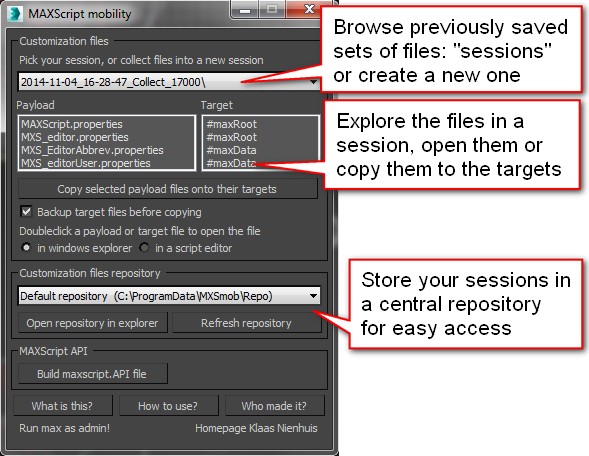
 

Maxscript properties consist of four files:

  • global options

  • user options

  • abbreviations

  • maxscript options

They’re spread out in two locations for each 3ds Max install you might have. This script provides easy access.

WARRANTY: This script copies and pastes files. Please make sure you have a backup. Although I've written and tested this script with the greatest care, I can't guarantee files end up where they're supposed to go.


More by Klaas Nienhuis

View all contributions