ScriptSpot

Script

Modifier Modifier Zorb

By Jordan Walsh · 2007-08-14

Version
2.9.03
Version requirement
Written for 3ds max 2009 + . A max 8 version is available now.
Other software required
for less than 2009 AVG extentions may be needed
Date updated
2020-12-09
Votes
282
Description

v 2.9.03, Added property dialog filters. Save Property window position and size, Changed "coorinates" prop to "coords" to fixes Vray HDRI map

v 2.9.02: Added Octane and extra Final Render Lights to On/Off and Multiply Right click Menu

v 2.9.01: Added Multiply option to ALL modify properties window. Can now multiply existing values by a chosen value

v 2.8.03 Fixed Save preset bug (for plugins like ky_trails)

v 2.8.02 Fixed ini file bug stopping wondow for opening a 2nd time

v 2.8.00 Added Exclude text field for filtering by name. Editing Refrence targets Tab now working!!! This means you can mass edit FumeFX object settings such as speed multipliers and other FumeFX and TP properties that were previously impossible to edit!

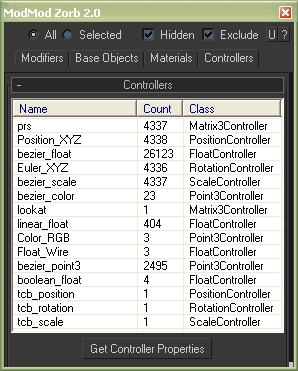
Edit ALL modifiers, ALL objects, ALL Materials, All Controllers, ALL Shadow types and ALL atmospherics/Render Effects. Work in max from a "Class-centric" way rather than a per object way. Edit thousands of object's parameters, randomize thousands of seeds, enable thousands of modifiers and more with a few clicks!

General Features (applies to all modifiers, controllers, materails, shadows, atmos and render effects):

MASS EDIT: Mass edit one property on all nodes at once, You can specify an absolute value, a relative value, apply an absolute value to modify, or multiply a value

MASS RANDOMIZE: Randomize one property on all nodes at once

SELECT/DELETE BY CLASS: Select all objects with a meshsmooth, or all spheres or all objects with a path constraint etc

FULL INSTANCE/REFRENCE TOOLS: Make all objects/modifiers of a class or selection instances. Make Base object refrences. replace base objects with another obj (eg make all selected boxes an instance of a vrax proxie.) Available for Modifiers and Base objects only ATM.

LOAD/SAVE PRESETS: Load and save presets in xml format for modifiers, objects, etc.

Specific Features (Can be done to All or selected):

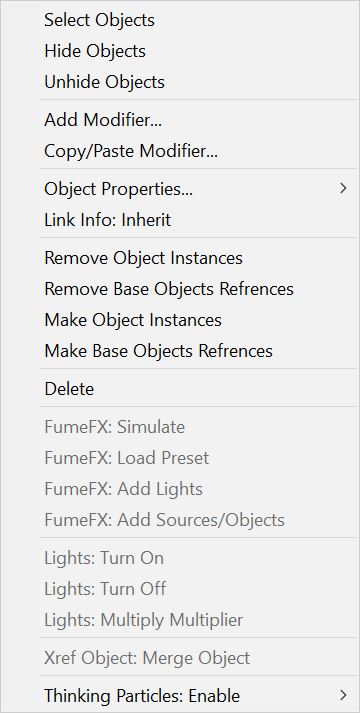
Modifiers: Enable, Disable, Enable in viewport, Disable in viewport.

PointCache Modifiers: Set ranges, Set path, Flush path, Reload, Record.

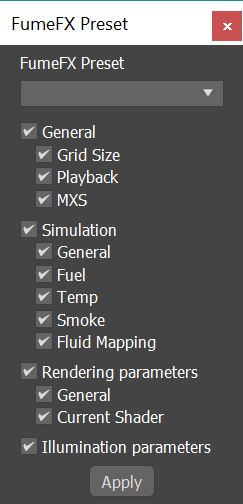
FumeFX: Simulate, Load settings

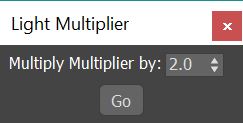
Lights: Turn all, selected, selected classes on or off. Multiply all light vlaues.

Xref Object: Merge object

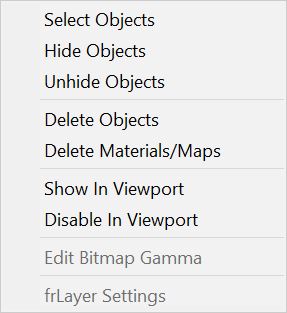
Materials: Show/Hide In Viewport:  Shows the material in the viewport. Doesnt work with texture maps yet.

Bitmap Gamma: Mass edit the bitmap load gamma settings. Choose auto or an overide value. Max 2014+

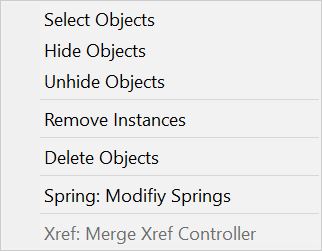
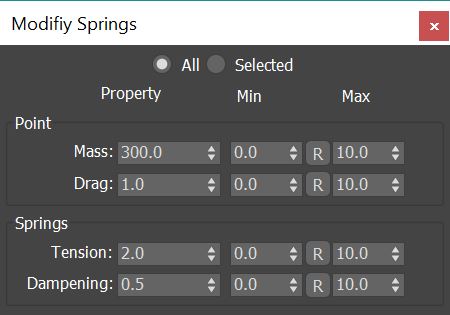
Spring Controller: Modifyspring controller settings (Needs its own section as springs are controlled differently with maxscript).

Merge Xref Controller:  Merges All/Selected controllers
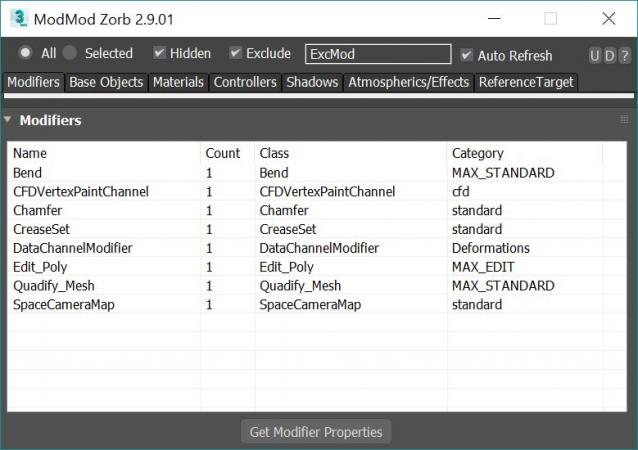
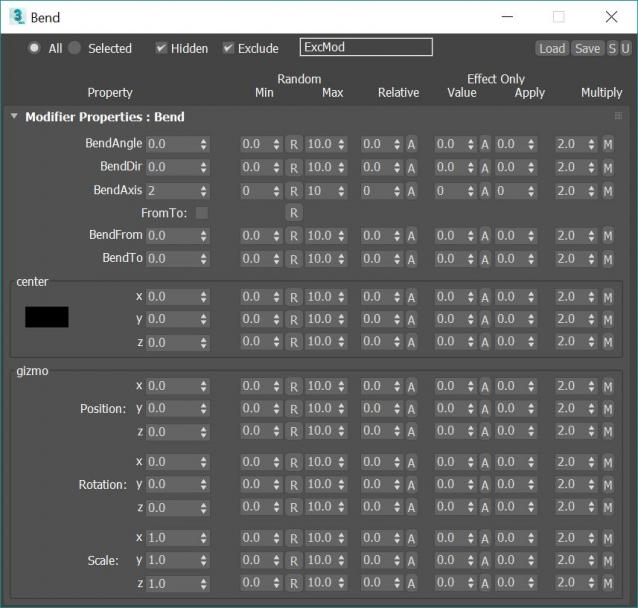
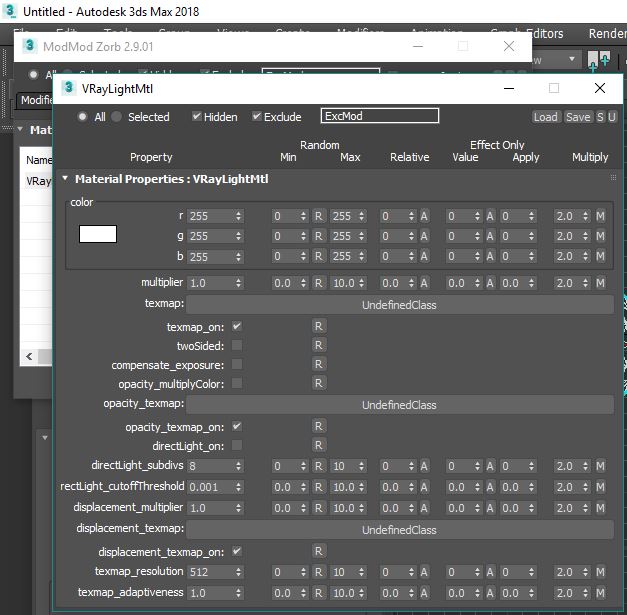
Example of a property window:
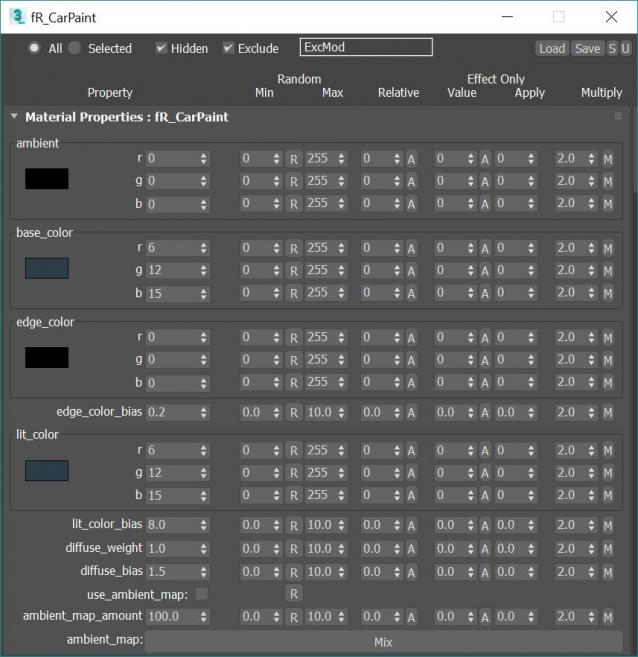
 

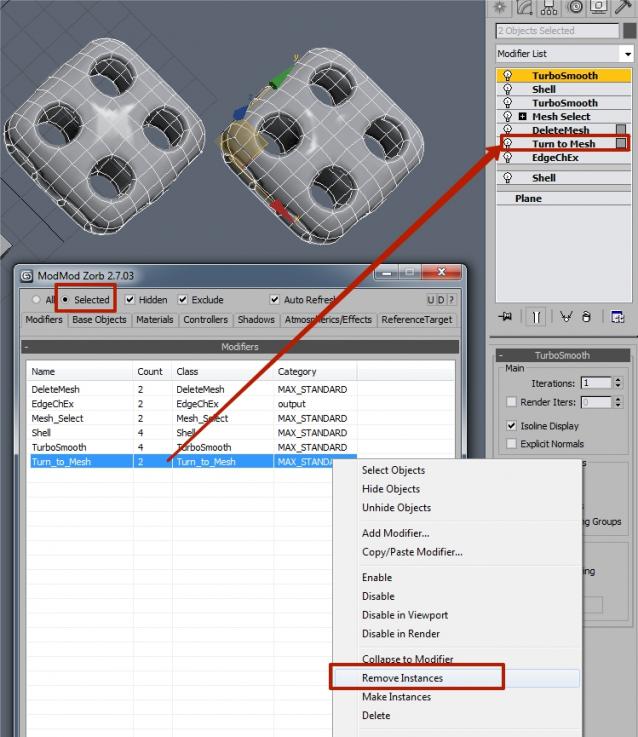
RightClick Menu for Modifiers:
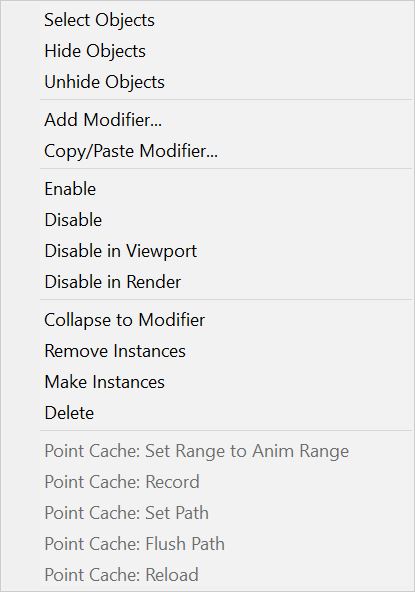
 

RightClick Menu for Base Objects:
 

RightClick Menu for Materials:
 

RightClick Menu for Controllers:
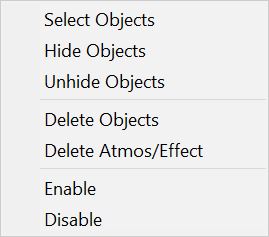
RightClick Menu for Atmospherics:
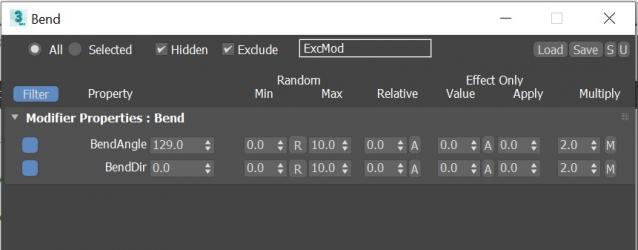
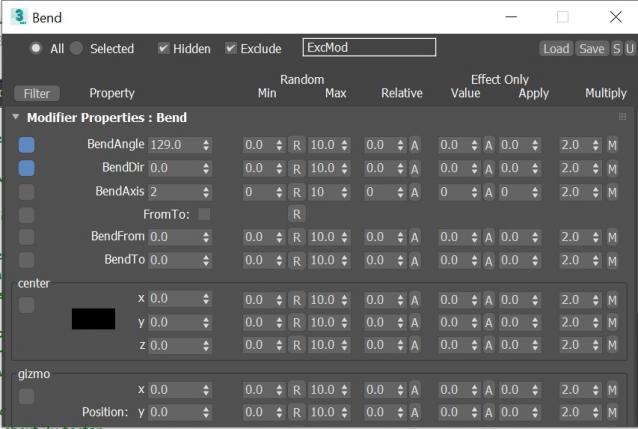
Dialog Filtering:

Filter ON:
Filter Off:
FumeFX Load Settings Dialog:
 

Light Multiplier Dialog:
 

Spring Controller Dialog:
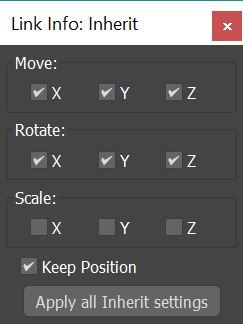
Link Info: Inherit window:
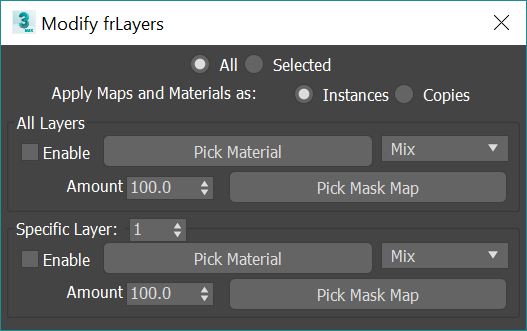
 fR_Layer Settings window:
 

Additional Info

Download the 2013 version for 3dsMax 2013 and above. Extract to 3Dsmax Dir. Tool is located in the "Zorb Tools" category
Attachments

Tags: Objects, Tools, zorb, edit, modifiers, materials

Comments (258)

Very slow on large scenes

rachka · 2024-02-03

Yes. Very slow on large scenes. Especially "materials".

Script closes immediately - 2023

HalukOzkul · 2023-07-06

I tried installing or directly running several versions of the script, but every time the script window opens and closes immediately, and the script listener just says "Bye!"

This happens on 3dsMax 2023. Any ideas how to fix this?

Jordan Walsh · 2021-04-13

Are you downloading the right version.. it should make a UI_In folder, not a UI folder. you need the 2013+ version. Again.. not totally sure if max2022 still uses the UI_In folder.
What is the default dir structure?

Installation on max 2024

tropish · 2023-07-29

Hi, can't install atm in max 2024. Unzipped v2.9.03_-_2013 in max dir but nothing shows in customize user interface. Yes there is a UI_In folder as well as a Macroscript and Script ones. Any help appreciated

Installation on max 2024

tropish · 2023-07-29

Hi, can't install atm in max 2024. Unzipped v2.9.03_-_2013 in max dir but nothing shows in customize user interface. Yes there is a UI_In folder as well as a Macroscript and Script ones. Any help appreciated

titane357 · 2021-04-06

Hi, how do you install Zorb in max 2022 ? There is no UI folder... ???

Jordan Walsh · 2021-04-06

Hi, to install you should download the 2013+ zip version and extract to the install dir.. eg: C:\Program Files\Autodesk\3ds Max 2018\
Sorry, have not tested in 2022, but id the UI_In dir exists in 2022, then should all be fine.

titane357 · 2021-04-08

Hi,
When installing in max 2022, it create a UI folder with Icons and Macroscripts inside, but max 2022 don't show Zorb in customize interface... :-(

VrayBitmap > RGB color space

Soboleony · 2021-01-15

Please add VrayBitmap > RGB color space: Default; sRGB primaries; ACEScg primaries; Raw

VrayBitmap > RGB color space

Soboleony · 2021-01-15

Please add VrayBitmap > RGB color space: Default; sRGB primaries; ACEScg primaries; Raw

Wonderfulll!

tahir1983 · 2020-12-08

Thanks for update! I d like get know has this tool ability to determine missed dll plugins and remove them (plugins such Baketotexture from 2021 max that often bore our brains ) ... and if no ...is it possible add this feature ? thanks in advance!

titane357 · 2020-12-05

Thanks for this great tool !
I had a dream... A feature to filter all settings to keep more used ones.
( because sometimes there is a lot )
We could add to favorite some parametters.
Thanks

Attachments

Jordan Walsh · 2020-12-08

Ive added the filters in v2.9.03. The only thing is that you have to close and open the property window dialog for it to update. So not perfect, but works and is saved between sessions.

titane357 · 2020-12-08

Waowwww !!! Thank you soooo much !! You're so fast ! :-) and nice UI :-)
Hope you can find a workaround for open-close.

VRayHDRI

afelicio02 · 2020-07-17

Hi,
I can't collect VRayHDRI's properties. I get a MAXScript Rollout Handler Exception.

"--Unknown property: "Coordinates" in Map #0:VrayHDRI"

Anyone else with the same problem?

Thanks,

Jordan Walsh · 2020-12-08

The "coordinates" bug for Vray HDRI Map is fixed in v2.9.03

StormBrig · 2020-01-22

Oldie but a goldie
thank you for this wonderful tool.

Window Disappears

Stenrik · 2020-01-20

Edit: Window was offscreen after I reconfigured my monitors.

David_Lacerda · 2019-10-16

Hi,

When editing Unwrap_UVW modifiers you can't change the uv channel, can you?
Thanks for this great tool!!

Jordan Walsh · 2019-10-18

No, dosnet look like you can. I could have a look at a special case for unwrap_UVW modifier though..

Jordan Walsh · 2019-10-30

So Ive had a look at the unwrapUVW and a lot of the values (like map channel) arent actually parameters on the modifier, but part of the interface functions.
In this case I wont be supporting them.
Sorry!

David_Lacerda · 2019-11-08

I figured out a way around it.
Thank you for your attention.

Error, crash

dmitrybelonosov · 2019-07-05

I'm sorry, the problem is solved!

tahir1983 · 2019-06-05

is there any chanse for corona renderer support?

Jordan Walsh · 2019-06-05

As Modifier Zorb works with Max objects in a generalised manner it should work for most things with out the need for formal "support". (Although this is not always the case!!)

What parts of Corona plugins aren't working with Modifier Zorb?

Randomize not working?

Stenrik · 2019-01-10

It's worth noting that all modifiers need to be unique with respect to each other before using any of the randomize functions. The script won't do that part.

Great tool, BTW. Very useful!

Jordan Walsh · 2019-01-11

Yes you are correct, instance and references will remain even when randomise is used.
There is tools to instance/deinstace objects and modifiers for your need too.

Is there any other way Randomise isn't working for you?

Thank you

JCR2011 · 2018-10-24

very much!

octane render materials support?

robobear510 · 2018-07-18

tried with octane materials, doesn't seem to work, collecting data, and than blank result.. ?

Jordan Walsh · 2018-07-18

Seems fine to me. You do need the materials assigned to objects in the scene, not just existing in the material editor.

Thank you Jordan !

igamaximus · 2018-07-19

Thank you so much for your 2.9.02 update Jordan, it works perfectly on fR-IES lights now !

Update current list on keyboard shortcut

igamaximus · 2018-08-15

Jordan, could you please, add possibility to update current list with defined keyboard shortcut in customized user interface?
That update button at the top is very tiny, and with "automatic update", we still need to click several times between tabs, to get list really updated. Keyboard shortcut to update list would be perfect.

Thank you so much...

Jordan Walsh · 2018-08-15

Yeah, sure, ill add some shortcuts!

Perfect with hotkeys

igamaximus · 2018-08-20

Thank you in advance for implementing hotkeys Jordan, looking forward!

UI problem

henning · 2018-05-17

UI just installed this nice script again after years not using it.
In max 2018 I get a very problematic UI issue, please see the attached screenshot.
Does anyone know what's going on?

Attachments

Jordan Walsh · 2018-05-17

That looks bad! Ok, will check it out in max2018...
Does it look ok in Max 2017?

henning · 2018-05-17

in 2017 it's ok!

Jordan Walsh · 2018-05-18

Damn! ok.. let me have a look!

Jordan Walsh · 2018-06-05

Seems ok on my side. Are you doing anything to scale the ui in max? My install is not altered...

henning · 2018-06-15

yes, I did have the windows 10 scaling set to 115%. Now at 100% your UI looks fine again! It's probably not easy to account for this so for now I'm going to keep it at 100%

Fantastic update Jordan !

igamaximus · 2018-02-22

Thank you so SO much for your fantastic work on this magnificent Tool !

swatchmate · 2018-01-03

After upgrade to last service pack for 3dsmax 2018 I cant use Zorb anymore, it just opens and close directly and says Bye in maxscript. I had this problem on a other pc a couple of years ago, is there any solution for it?

Jordan Walsh · 2018-01-03

Have you tried deleting this file and restating max?

C:\Users\[USER]\AppData\Local\Autodesk\3dsMax\2018 - 64bit\ENU\en-US\plugcfg\ModModZorb_Setup.ini

swatchmate · 2018-01-04

Works like a charm, thanks. Apparently a chinese letter had been added in that file even tough im only using european language.

The most useful max script ever!

Strob · 2017-11-17

Thank you so much Jordan for this script. This the most useful for 3ds max. Without it max is nothing!!! I use it since years and will stop use it only once I finally master Houdini! I always discover more and more useful stuff that your script can do like helping to batch point cache animated mesh.

One suggestion: in the point cache modifier we can't select the option of 1 file by frame or a single file. Could be useful to add it.

thanks a lot!

Jordan Walsh · 2017-11-17

Haha, Thanks Strob!!

Yeah, Houdini is the way to go :D
I dont use max theses days but happy to update Modifier Zorb with your suggestions.

Jordan Walsh · 2017-12-29

Hey Strob,
Sorry for the delay! I had a look at the point cache modifier in Max 2017 and the last entry called "fileCount" is the one you are looking for. Set to 0 for "One File" and to 1 for "One File Per Frame"

Jordan Walsh · 2017-08-06

Yes, you can go to the Controllers Tab, select the position noise in the list and hit Get Properties. In the list you should be able to find the seed property, hit the 'R' button to the right to randomise the value.

I havent got max 2018 installed so have not tested it. I will try to do this soon

Zorb works in Max 2018 to randomize seeds but not perfect

huertaaj · 2017-08-06

It works! I figured it out and I can't believe that I can randomize the seeds for so many objects so easily!

But...there is a problem with the the script when I try to modify the POSITION_XYZ controller.

1) Create a box, make two copies as instances

2) Run the Zorb script and double click on the Controllers/Position XYZ
3) Hit the "R" for either the Y or Z position. Each box is now randomized in the Y or Z position relative to its original position. Hitting the "R" re-randomizes the position of each box relative to the original position.

4) Here is where the problem occurs...Hit the "R" for the X position and all three boxes move to the same place, overlapping each other, instead of moving relative to their original positions.

Any ideas how to solve this?

Jordan Walsh · 2017-08-07

Well if you think about it, the script is working perfectly in the above description. You have just offset your boxes in the x position, so it seems like you are doing relative moves but infact you are not. It's only when you randomise the X again that you remove the x move you have applied to one of the boxes.

I have been meaning to have the random number applied in a few different ways, like add/mult etc but that would require a massive re write that I cant commit to right now.

I would say add a list controller and add a second bezier float to hold the offset you want to maintain. Then use zorb to randomise the Position_XYZ. Dosent seem to touch the non default bezier float on the list controller

Can Zorb do what I need within Max 2018?

huertaaj · 2017-08-06

I'm currently running Max 2018.

I have made a layer of about 500 molecules squeezed against each other in a plane, representing a biological membrane. I start by making a single molecule, and then I apply a Position List + Noise Position and also a Rotation List + Noise Rotation to that molecule. With the appropriate noise parameters, the molecule slightly vibrates and rotates slightly, giving the impression of random thermal motion. Then I make a bunch of copies of that molecule in a plane (about 500 copies). The copies all vibrate and rotate identical to the original molecule from which they were copied.

So, what I need to do is to change the "seed" for both the Noise Position and the Noise Rotation for each of the 500 molecules so that each one vibrates and rotates differently.

How can I accomplish this more easily than doing it manually for each of the 500 molecules? Is Zorb something that can do this and will it work in Max 2018?

Thanks,
huertaaj

3dsmax 2018

skaven · 2017-07-07

I have some issues with the script in 3dsmax 2018, fe: deleting a modifier deletes other modifiers too. will we have an update or you dont really have the time for this little gem anymore? :)

Jordan Walsh · 2017-07-07

Yeah, I have pretty limited time for this these days, but if its a simple fix I'll give it a go! Can you describe the exact setup that causes this?

skaven · 2017-07-07

so I have a few dozen objects with a chamfer modifier on the top of the modifier stack. I wanted to get rid of all of these and when I used the delete funcion in the script it deleted some shell modifiers too. those where below the chamfer. the stack was like this (from top to bottom): chamfer - shell - meshsmooth - editable poly object.
I didnt check all the objects, maybe there were other problems too, idk. but when I make a testscene with only one object it works...
max18 + win7

---
update: the objects were instanced and I can reproduce the problem easily in an other scene. just made a box, converted it to poly, deleted the top polygon, dropped a meshsmooth on it with 5 iteration (yep, a simple bowl), put a shell on it and chamfered the edges with the modifier. made like 10 instances, used the script and this time it deleted all the modifiers. :)

---

also, in max18 the edit button appearence funcion doesent working due to its incredibly complex behavior (or maybe its just shit...), that means when I put the script to a toolbar I cant edit its appearence and now here I am with an invisible button because the icons are not working with the new UI either and I cant even change its name to have something on the button... :)

Bancai · 2017-04-25

Great tool Jordan Walsh! I added the MultiRes modifier to a bunch of objects only to realize 2 days later that adding MultiRes modifier tripled my file size and I've forgot to which objects I added the modifier but then I found your script and your script saved me.

Jordan Walsh · 2017-05-24

Cheers! Good to hear it helped!

Installing problem

kimikkyeong · 2017-04-08

Hello Jordan~
I Downloaded the 2013 version for 3dsMax 2013 and above.
And Extracted to 3Dsmax Dir.
But there is no the "Zorb Tools" in my max category.
what can I do ? (max2016,s4,ext1,vray3.40)

Jordan Walsh · 2017-04-11

can you confirm you have the following files?
C:\Program Files\Autodesk\3ds Max 2017\MacroScripts\Zorb-Modifier Modifier 2.mcr
C:\Program Files\Autodesk\3ds Max 2017\scripts\Zorb\Zorb-Modifier Modifier 2.mse

Obviously in your max install dir.

Add Modifiers Broken under Max 2017

Streetwise · 2017-04-03

Hello, I select an object and select "add modifier", choose a modifier (Uvwmap for instance), hit "Add Modifier" and nothing. Modifier not added. If I add a modifier manually to the first part, I can't get copy/paste to even work to apply the modifier to the other selected parts.

Version 2.8.02
Max 2017 SP3

Jordan Walsh · 2017-04-05

Using 2.8.03 adding modifier and copying modifiers works fine.

The workflow can be a bit confusing though as the tool works in a "Class-centric" way, not on individual objects.
If you want to add a uvw modifier to all objects that have a meshsmooth, simply go to the Modifiers Tab and right click on "Meshsmooth" in the Modifiers list and choose "Add Modifier".
The selected object in the Max viewport only effects the filtering you can do. All the functions are run on the Modifers/Base Objects etc in the Modifier Zorb window.

IsolateByMaterial

3DcubIC · 2017-03-30

No funciona para la versión de max 2017

Win 10 installation

thanulee · 2016-06-03

Hello and thanks for the awesome script,
I cannot install it though in win10. I extract the files in max root directory but then i do not see it inside the program. Could u guide me plz? thanks a lot

Jordan Walsh · 2016-06-16

It should come up in the Zorb category.

Check your UI/macroscript directory to see if the files are in there.

Ayuda

3DcubIC · 2016-05-16

Es un Script muy muy bueno, y ahorra mucho tiempo, alguien me puede mandar más información en español????

Gracias y un saludo.

Thank you!!!

Carol Rein · 2016-03-12

Wow!! It now works perfect with Ky_trail!
This is one of the most useful tools for max!
Thanks a lot for your support!

Jordan Walsh · 2016-03-21

No problems! I'm glad you find it useful!!

Loft objects support

igamaximus · 2016-01-25

Jordan, can you please provide Loft objects support with your amazing tool? Currently, there are no visible parameters of this objects type.
Thank you very much.

Jordan Walsh · 2016-01-26

Sure, let me have a look at it...

Jordan Walsh · 2016-01-26

Hey igamaximus,
I had a look at the lofts and unfortunately none of the parameters are exposed to maxscript.
This happens with a lot of old stuff in max as maxscript is still a just a plugin (for max 1 or 2 I think), its not native.

You will have to ask autodesk to expose the parameters in maxscript and then they will work in Modifier Zorb.
Sorry!!

Thank you Jordan

igamaximus · 2016-01-27

Thank you very much for checking and informing me Jordan, that makes sense!
I will ask AD for sure, when i get some time...

All the best!

Ky_Trail issues

Carol Rein · 2016-01-13

The runtime error doesn´t happen with other Ky plugins (like milkyway) neither with any other plugin or modifier.
Just only with Ky_trail

Ky_Trail issues

Carol Rein · 2016-01-13

I have problems trying to save the Ky_trail settings, the plugin works ok getting the atmospherics properties of Ky_trail, but as soon as I press save, it returns an error:
--Runtime error: Error opening bitmap:
Did anyone have this problem?

Jordan Walsh · 2016-01-14

Thanks for the bug report Carol, Ill have a look. Should be an easy fix

Carol Rein · 2016-02-01

Thanks Jordan!! This is a truly amazing and useful tool! So I´ll be near to hear about your updates!

Jordan Walsh · 2016-02-02

Thanks Carol, Please post any bug reports or feature requests here and I'll do may best to sort them out.

edit active material slot

amir3dsmax · 2015-12-26

how can I edit active material slot properties ?

Jordan Walsh · 2015-12-28

You would have to select the objects that have the materials assigned then use the "selected" mode in mod zorb.

Max 2015 issue with v2.8.01

nexocomun · 2015-12-06

Hi Jordan,

I think I have the same problem as Rijkaard: v2.8.01 the first time works well, the rest is not working.

Deleting the ModModZorb_Setup.ini works again .... only once :( .

I use 3DS latest version 2015.

Tested with v2.7.06 always seems to work well. I enclose the two .ini, one for each version. Thanks for the great work done !!!!

Attachments

Max 2014 Issue

raijard · 2015-11-29

Hi Jordan,
Is there any known bug related to 2.8.01 version in 3DS Max 2014?
I'm looking forward to trying your script but I'm afraid it gets blocked after one time use.
It doesn't matter whether I run it from the toolbar button .mcr or by dropping it directly into 3DS Max viewport (.mse). The first time it works fine, but after that, in case I try to open it again, it doesn't react at all.
Then I can restart 3DS Max, or reboot... nothing makes it work again but recovering the system (Win 8.1). Just in that case, it will run again, but just one time.
Kind of weird. I don't use to get any problems with scripts on my system and never had an issue like this before.
Would it be possible to try an old version of the plugin, like 2.7.06?
Is there any possibility to download it so that I can try it out?

Any help would be welcome.

Hey Raijard,Sounds like

Jordan Walsh · 2015-11-30

Hey Raijard,
Sounds like there could be something funny happening with the settings file it creates, although I have never seen this type of thing happen.
The file is called ModModZorb_Setup.ini and gets created in you plugcfg directory
(run getdir #plugcfg in maxscript to get the directory name, should be: "C:\Users\\AppData\Local\Autodesk\3dsMax\ - 64bit\ENU\en-US\plugcfg")
Try Deleting this file and running ModModZorb again.
If this fixes it, could you send me the ini file to have a look at what is breaking it?

I have enabled 2.7.06 for download if you would like to try that too.
Cheers,
Jordan

2.7.06 did the job

raijard · 2015-12-11

Hello Jordan,
Sorry for the late answer.
Thank you very much for uploading old version 2.7.06 again. I have to say it works like charm.
Unfortunately I have an important submission so I wont risk the system trying to run version 2.8.01 again. As I mentioned, the only way to make it work again was restoring the system, which I'd rather not doing by now.
However, I would be happy to send you the .ini file later on if it can be of any help.
Congratulations in any case, this script is an amazing piece of work.

Jordan Walsh · 2015-12-11

Thanks raijard,
nexocomun has sent me the ini files below and it doesnt seem to be the issue. I will try to have a look this weeekend but have been very busy.
Im sure its some small and stupid bug...

You dont need to do a system restore to get 2.8.01 working, like I said below:

The file is called ModModZorb_Setup.ini and gets created in you plugcfg directory
(run getdir #plugcfg in maxscript to get the directory name, should be: "C:\Users\\AppData\Local\Autodesk\3dsMax\ - 64bit\ENU\en-US\plugcfg")
Try Deleting this file and running ModModZorb again.

Otherwise just keep using 2.7 until I release a fix.

Random modification on instances

yellow · 2015-11-18

Hi Jordan,

I was looking for this for a while, strange I did overlook it somehow :/
Thanks for this great script!

I was looking for something similar a while ago but didn't get far: something being considered kind of a modifier put on top of an instances modifier stack to control the values below; actually what your script does - while keeping the instance modification capability alive. I'm not sure IF it is POSSIBLE AT ALL, but that would be amazing..!

So eg. change size of a box but each instance has a random noise seed?
Or vray lights still being instances of one base light but having different light intensities?

Niko (with fingers crossed)

Jordan Walsh · 2015-11-23

Interesting...
I like the workflow idea here but I think that might be a bit hard and also going against the 3dsmax way. If you have an instance of a light or a modifier it exists once in memory and is pointed to by many base objects. The parameters are all children of the one instance and therefore exist once. If you want a light with different multiplier, you need another copy of the light instance and therefore break the whole instance workflow.
Im sure there is a way to fake this and have the modifier manage all or a group of selected modifiers, but it would be a totaly different beast.

I dont use max in production any more, so maybe there is a way...
A program like houdini is much better at dealing with this type of thing (and my production software these days) and has tools setup to do it!

Waveform controller properties

mindmedicine · 2015-11-10

When trying to modify the parameters for a waveform controller on ie the x-rotation
of an object, none of the properties show up.

Thanks for this great script. Just started using it, but I can already see it will be very helpfull!

Tim

Jordan Walsh · 2015-11-14

Hey Tim,
Ive just had a look at your issue. Looks like there isnt any maxscript access to the waveform controller, so unfortunately my hands are tied :(
You would have to ask Autodesk to fix this up, then Modifier Zorb should pick it up automatically.
Cheers,
Jordan

cecofuli · 2015-07-15

Unfortunately, I have an error, also with the last version of your script =(

Jordan Walsh · 2015-07-16

Hi cecofuli,
Is it the same error? I would need some more detail to be able to fix it, perhaps it is easier if you send me a cutdown scene file to test with?
Cheers

Bug!

cecofuli · 2015-06-23

Hello, Mayne because the new verion of Corona (v1.1.1) But, now, I have an error with CoronaNormal and, also, we need the supoprt for the new CoronaBitmap. Thanks.

Attachments

Jordan Walsh · 2015-07-04

I have tried with Corona v1.1.1 and all seems fine (My test version would be a bit new though!). I found a bug on the falloff map that is fixed in 2.8.01. Give that a try and let me know if there are any other errors.
Thanks for the error report and attachment :)

if i have 12 objects - renaming is no good

kirillall · 2015-05-03

I already read about this feature - its not gonna work if i need to tweak "noise X" and "noise Y" modifiers separately on 12 objects without renaming them, cause its take lot of time to rename them one by one, then change noiseX, then rename back and so on......timewaste....
From this situation, also is very handy will be a mass modifier renaming feature...
What do you think about this features in ModifierZorb and how many pain to add them? Thank you.

Jordan Walsh · 2015-05-05

I think the features that you are requesting will be a bit painful to add as I don't have heaps of time to work on it at the moment.
What I can add is the ability to modify the Exclude Modifier search string from "ExcMod" to what ever you want. Would that help?
Also the best mass modifier renaming tool would be to do a simple maxscript loop. A tool wouldnt give you the flexibility learning a bit of maxscript would give you.

split 2 same modifiers

kirillall · 2015-04-29

Hello Jordan. Current zorb take 2 same modifiers in stack (also with different names) and control them as one. Can you please add ability to split same modifiers in stack and control them as different. (split by name, split by stack order) - this feature will be very useful. Thank you.

Jordan Walsh · 2015-05-01

You can currently exclude modifiers by name with the exclude checkbox. Press the "?" for more information. I hope that helps

Gamma

3dwannab · 2015-03-26

Hi, Is there any way to add option/access the gamma through maxscript of the loaded map in the load bitmap dialog. I looked on forums and they say it's not possible.

I Like your script but

3dwannab · 2015-03-26

I see, that option is not in the demo and I don't really have a use for the rest for the features. Thanks. I can do a bit of Scripting (I think :) ) so I might give it a try if this script can't do it :)

Jordan Walsh · 2015-03-27

Ill have a look into adding gamma controls too.
Wont be for a week or two though as I'm travelling at the moment.

Jordan Walsh · 2015-04-08

Thanks Pixamoon, Looks pretty simple, I'll get it going in the next day or two!

Option for bitmaptexture

3dwannab · 2015-03-17

Hi, Could it be possible to add the type of filtering in the bitmaptex map.

3 options, Pyramidal, summed area + none.

Thank you.

EDIT: Found it under filtering.. Sudda gone to specsavers!!

no undo?

kirillall · 2015-02-11

Hello Jordan.Thanks for great script!! Is it possible to add undo for any changes? Its so extremely necessary function.

Jordan Walsh · 2015-03-16

Hi, Will try to have a look at this soon! Shouldn't be too much trouble to add.

Jordan Walsh · 2014-10-05

Can you give me the exact details on what you were changing when it happened?

Jordan Walsh · 2014-11-04

Ok, fixed now. Sorry for the delay... planning a wedding kind of takes precedence ;)
Please let me know if this works.
All the best!!

Vraylight error

paolo242 · 2014-11-25

When I try to edit just one vraylight at the same time with modifier zorb, it gives an error "--Unable to convert: undefined to type float."
Max2011 and vray 2.40.04
New file
1 vraylight
Open ModMod Zorb 2.7.05
Base object
Click twice on vraylight
And get the error...
With standard light everything is ok
With vrayambientlight is ok

Jordan Walsh · 2015-01-03

Give 2.7.06 a go. Working on 3ds MAx 2015 and vray 2.50

Frost and Zorb

Strob · 2014-09-30

Hi,
When I try to edit many frost objects at the same time with modifier zorb, it gives an error "--Unable to convert: undefined to type float." Any idea why?

Jordan Walsh · 2014-10-01

Some times Max plugins do things in weird ways. I'll have to have a look at it with frost and the other thinkbox plungins.

It gives a error...

3dbybrunolopes · 2014-04-15

It gives an error when I try to delete a map "normalmap" from a selection...

sweep

jsrocha · 2014-04-11

Hi Jordan, how´s going?
is it possible to add the option to change sweep interpolation steps in the script? http://prntscr.com/3901r5
thanks man,

Jsrocha

Hi there! loving this script, had a quick question about modifie

alteredgene · 2014-02-11

Love the script, just shared it with the whole studio.
thank you very much for such a work flow enhancer ; )

had a question from before though.

when i try to copy a modifier from selected object, to other objects.

1. select object
2. run ZORB, go to modifiers
3. right click on a modifier i want to "copy" select copy/paste modifiers
4. from the listView, select the modifier i want to "copy"
5. select the objects i want to copy that modifier to
6. press [paste], but nothing happens.

i am getting few other interesting behaviours, and just wanted to know if it is something i am doing wrong? or script not behaving like intended?

would be awsome if you can share a tip to get it working.

my goal is copy an instance from a selected object
paste it to (as a instance) to multiple selected object.

again thanks for an amazing script! looking forward to your replies ; )

Jordan Walsh · 2014-02-23

Hi alteredgene,
Sorry about the late reply!
Yeah, the workflow is a little unintuitive as you kinda have to think backwards about the process as Zorb works as a class filter to process objects.

To use the Copy/Paste Modifier... tool:
1: Open Zorb and select the class (Object or Modifiers) that you want to PASTE the modifier to.
2: Right click, select "Copy/Paste Modifier..." (Probably should be called "Copy/Paste Modifier From...")
3: Select the modifier from the dialogue.

That should pastes the selected modifier from step 3 on to the objects that match the modifier/object selection in the main dialogue of Zorb.

Hi Jordan, thanks for your detailed response!

alteredgene · 2014-06-23

sorry about the late reply to your reply, think emails from script spot is being filtered by my email machine thing ; )

i actually tried your explained method as well, but had no luck.

however, what i realised (and now that i realise it, i can see how ZORB works lot better, and how much i love it!)

1. i actually thought i had to be on [modifers] tab to copy/paste modifiers.

however, i had to be on [base objects] tab to copy/paste modifiers, since i wanted to copy and paste to the base object, which actually makes perfect sense now that i figure it out.

thought i leave this comment incase others have similar questions as mine ; )

again! awesome script which i use alot of ; )

thanks so much for making my life easier!

Jordan Walsh · 2014-08-18

Im glad it could be of some use! Thanks for giving it a go

Cheers!

Jonathan de Blok · 2014-01-10

This script totally saved my 4ss today! :)

I can't find the "specular level" rocker in the materials tab

boumay · 2013-12-28

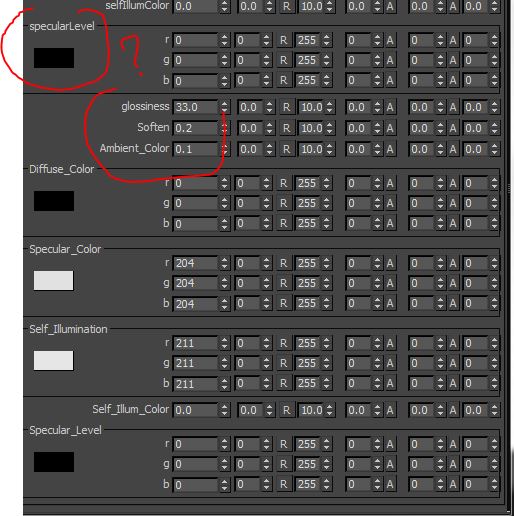
Where can I tweak the specular level? I can see the glossiness, opcaity, etc rockers, but no specular, only rgb values or color.
Do I miss something?

Attachments

Jordan Walsh · 2013-12-31

I think you just need to change the specular_level rgb. Sometimes the values are stored a bit weirdly in Max.

thank you very much and couple requests

harumscarum · 2013-12-05

essential script! especially like it feature to reference base object - is it possible to isolate this action as separate macroscript so in will possible to hotkey it? one more request is make selected modifier(s) unique, but keep objects and other modifiers instance (reference)

One of the best

igamaximus · 2013-12-05

scripts ever!!!! Thank you so much for your huge work mate.

vidivini500 · 2013-11-19

Hi, some test with noise mat and doesn't work random values in
Offset
Tiling
Angle
It would be useful to make random variations with various maps

materials

dub73 · 2013-09-06

extremely slow when changing mass material settings. I have around 100 materials for instance. 3ds max 2012

Jordan Walsh · 2013-09-06

Hi, Unfortunatly maxscript is very slow to process objects in this way, I have done all i can to make it fast (it was 3x slower in earlier verions!!!)

cecofuli · 2013-06-28

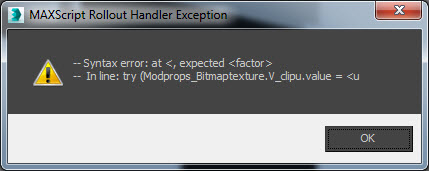
Hi Jordan, I installed, v2.7.04_-_2013.zip, but I have a script error when I click Bitmaptexture in the "Material" tab. CoronaMtl is ok.

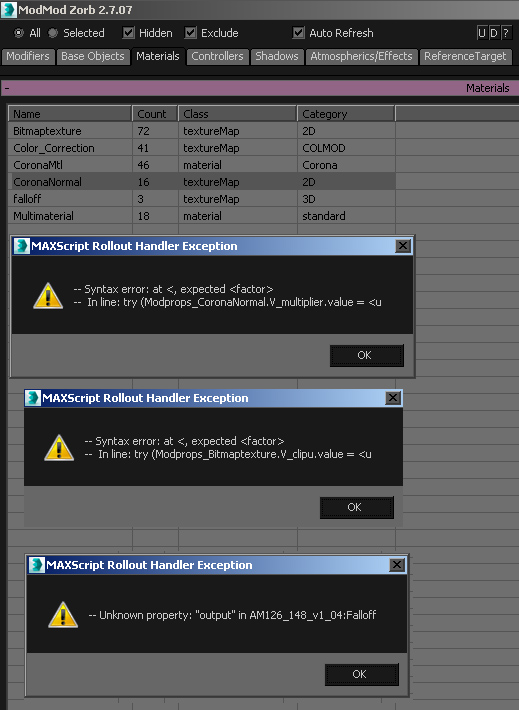
>> MAXScript Rollout Handler Exception:
-- Syntax error: at <, expected
-- In line: try (Modprops_Bitmaptexture.V_clipu.value =

Jordan Walsh · 2013-07-03

Could you confirm that when you run the script it says 2.7.04 and if it is could you send me a test scene that fails so I can check it out?
Thanks

I can confirm the same problem. Using Corona V1.00.02 + Max 2015

3dwannab · 2015-03-17

If you want a test scene I can upload one. Seems to be scene specific.

Jordan Walsh · 2015-03-18

Sorry 3dwannab, what is the issue you are having?
I haven't got Corona installed but can get a 45 day trial it seems. Could you post a link to the file and exactly what parameter you are looking for/ are adjusting.

If the error is "--Unable to convert: undefined to type float."
or something similar it means the object you are trying to access has some parameters on it that are duplicated or broken (happens a lot with plugns!!)
Usually I have to sift through the parameters and explicitly ignore the offending ones.

3dwannab · 2015-03-18

Don't be sorry, thanks for this wonderful script. :)

See attached screenshot of the problem.

Steps to achieve this:
- Open your script
- Go to materials tab
- Click on bitmaptexure
- Error pops ups/

The parameter I'm wanting to change is the filter off on all bitmaps.

Attachments

Jordan Walsh · 2015-04-13

Hey 3dwannab,
I was unable to reproduce your error. Could you make sure you are on the latest version of Modifier Zorb and if you still get the error could you send me a file and I'll have a look.
Thanks!

3dwannab · 2015-04-15

I've found out that this could be related to missing maps. Not 100% certain though!

Jordan Walsh · 2015-04-17

Ok, well let me know if it isnt. In the meantime I have added support for editing the bitmap gamma values.

Unsupported Corona renderer =(

cecofuli · 2013-06-19

Unfortunately, it doest work with Corona Renderer Material (free 3ds max plugin). For example, if I want to change the "blur" amount in the bitmap texture, I've an error. Is it possible to fix it? Thanks!

Jordan Walsh · 2013-06-24

Corona Renderer support
Should work now.

Random retiming?

madail · 2013-06-18

Hi there. Congrats go without saying - this is probably one of the top 5 scripts ever for max, getting to use it fully goes beyond imagination!

However, i do believe that it cannot do what i need, and it could be a nice addition. Please tell me if i'm wrong.

I know its possible to grab multiple objects and randomize it's animation (regular pos/rot/scale and even modifiers) by using the min/max randomize buttons. However, this will affect all keyframes at once. Is there any way of doing this to only selected keyframes (randomize just the start for instance), or even a speed randomizer? There are quite a few timing randomize/offset scripts, but some lack the ability to animate modifiers, and your's is so much powerfull that if it had some way to do this it would be jaw breaking!

Hopefully there's some way already!

Jordan Walsh · 2013-06-19

Have you tried turning on animate when you apply a change?
I'm not going to add any key support as its not really in the scope of this script, but one thing I could maybe add is to keyframe the change at a random time and you could specify the time range to be randomized within. Would that help at all?

What do you mean by speed randomizer?

Feature Requests

lightcube · 2013-05-19

I'd like to now if you could add one more category for property editing: Custom Attributes. So if you add a custom attribute to 20 objects, you can edit that attrib across the objects.

Also, I'd like there to be a checkbox that, when on, lets you edit all the shared properties across all selected objects. For example, both a Box() and Pyramid() have a property called .height ... it would be nice if you could edit across classes where the property and property-type match (including custom attributes mentioned above).

Maybe these are already possible... but I could not figure it out in the UI or from the available docs.

Jordan Walsh · 2013-05-19

I think both of your requests fall under the same umbrella as it would mean editing multiple objects/modifiers at the same time rather than editing via object/modifier/etc class and this script does.
I think you would want something similar to the Maya parameter spreadsheet (which I have thought about making but havent had the time)

lightcube · 2013-05-20

Not familiar with the Maya feature .... but it's something I'd like to see. I'd build such a feature for myself if necessary... but I'm hoping you'll just add it into this tool or an offshoot as it seems to similar in practice.

Nice tool, btw.

mark pigott · 2013-05-15

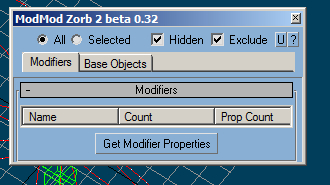
Will the Zorb2 beta 0.32 work in 3ds Max 6?

Jordan Walsh · 2013-05-15

Im not sure, 0.32 works without dotNet (only supported in max 9) but relies on ActiveX controls, Im not sure if they are supported by older versions.
I dont have a max that old to try it on either... so just give it a go i guess!

mark pigott · 2013-09-11

this is all you get in 3ds max 6. pretty impressive, huh.
please see screengbrab

Attachments

Jordan Walsh · 2013-09-12

Max 6! Thats 10 years old! Sorry, i cant support versions that old!
Nice color scheme though ;)

yeppers its old

mark pigott · 2013-09-12

Just wanted to show you what you get in 3ds max 6, that's all.

I have three analog syths that are almost 30 years old, and they are classics!

2x JX-3P's
1x Jx-8p

nice tool

dub73 · 2013-04-22

great tool for max, but a bit slow when changing 100 materials

No Category entry

ShiroEd · 2013-04-15

Howdy,

I've just installed this on 2013 but I'm not seeing 'Zorb Tools' in the Category list in the Customize User Interface dialogue.
I've double checked that all the files are in the correct locations.

Thanks for the help.

Jordan Walsh · 2013-04-16

The Macroscript / Icon directories have changed a bit. Ive uploaded a version that should work ok for 2013. Let me know if there are any problems.

permanent error on complex scenes

harumscarum · 2013-03-03

similar issue from time to time on script's run - it appears ant the very botto from the left not minimized but smallest window size possible. cool tool, but very annoying to restore and resize it every time
i hope it could be fixed

Jordan Walsh · 2013-03-03

thanks for the kind words kurt_hectic!

harumscarum: I have never had the issue you mention. There is a file that stores the size and position of the window here: \plugcfg\ModModZorb_Setup.ini (should be in your max dir)
Is should look something like this:
[UI]
ChkHidden=true
ChkExc=true
ChkSel=1
ModMod2_Size_X=564
ModMod2_Size_Y=469
ModMod2_Pos_X=1466.0
ModMod2_Pos_Y=493.0

You can delete it and It will load up at the default size. Sometimes, perhaps between updates it can get corrupted and not save the settings properly.

same annoying thing

Royal Ghost · 2013-03-04

Jordan, I also have this bug. It easily reproduce:
1. Open zorb
2. Minimize
3. Close using "X" window's button
4. Open again zorb
Window size not restored and window tries to open in minimized window's position.

Jordan Walsh · 2013-03-04

Thanks Ghost! That's fixed now in v2.7.03

Royal Ghost · 2013-03-04

Cool! Thank you! :)

THX!!!

kurt_hectic · 2013-02-28

I logged in just to type : thank you!
That script is awesome, it should be a core, standard module inside 3ds max.

Thank you :)

viktory · 2013-02-22

It seems that it works now. You are very fast, many thanks!

Great but don't work with Maxwell materials

viktory · 2013-02-18

If click on MaxwellBSDF, MaxwellLayer, Maxwell_Bitmap it shows the following error:

--Syntax error: at (, expected name

-- In line try (Modpros_MaxwellBsdf.V_BsdfEnabled.checked=
meditMAterials[1].material1.(n

Jordan Walsh · 2013-02-18

hi viktory...
Ahhh maxwell... I haven't ever had maxwell installed so I haven't had a chance to test it... maybe Ill try to get a demo or something and have a look.

Max 2013 Upgrade

troyharder · 2013-01-13

Hello, I have been forced due to a mass software upgrade in my company to go to max 2013. Are there any plans to update this super time saver plugin to max 2013 any time soon? :)
Let me know, i'd be very sad to know that we can't make use of this wonderful tool anymore!
Sunny days to you all!
D.

Jordan Walsh · 2013-01-14

Hi Demetrio,
I have uploaded 2.7.01 that has a few UI fixes to make it work a bit smoother on first run in 2013... I think everything else should work ok, but let me know if there are any specific issues in 2013.

troyharder · 2013-01-15

Sweet, I'll try it now!
Thanks a lot! :)

runtime error

appius · 2012-12-02

hi, i've a runtime error:
can't open: [path Zorb-Modifier Modifier 2.mse

what's happening?

Jordan Walsh · 2012-12-02

Yes, sorry, i put the file in the wrong directory in the I will update the zip.
To fix move Zorb-Modifier Modifier 2.mse from
3dsmaxDir\Scripts\
to
3dsmaxDir\Scripts\Zorb\

Sorry about that!

appius · 2012-12-06

thanks. ;)

Donation

maxor1986 · 2012-11-12

I just donated you some money. Thanks for this great tool!

-Robert

Jordan Walsh · 2012-11-12

Thanks for your contribution Robert!
Im glad you find it useful.

One of the best

igamaximus · 2012-11-25

realword scripts here in my opinion. I will donate soon also, Jordan's valuable work deserves more than that.
Igor

dub73 · 2012-10-08

great script and it works with 2012 :) unbelievable that 3ds does not have a attribute spreed sheet editor like Maya. In 2013 it is supposed to be fixed and implemented? perhaps

UI problem

jsrocha · 2012-09-11

Hi Jordan, how's going?
i´m having problems with the script UI, part of the tabs (i don´t know if this is a tab) is hidden, please check the attached image.
Cheers,

Jsrocha

Attachments

Jordan Walsh · 2012-09-11

I think that is because it has saved you window placement and size in a ini file and the latest version needs to be a bit wider. Try grabbing the window and making it wider or deleting your plugcfg\ModModZorb_Setup.ini file and re-running

jsrocha · 2012-09-12

Hi Jordan,
i removed the ini file from plugcfg folder and it doesn´t work, and when i resize the window the tab doesn´t change, it keeps hidden.
anyway, this is not a major bug, i can live with that ;)
Thanks,

Jsrocha

toolbar

mxdsa · 2012-09-06

How can I add it to my custom toolbar?

It's an awesome script; thanks!

Jordan Walsh · 2012-09-07

Simply go to the "Toolbars" tab in "Customize User Interface" window, Select the
"Zorb" category and drag the "Modifier Modifier Zorb 2" item to the toolbar of your choice.

mxdsa · 2012-09-07

Thanks! I didn't realize there was a macroscript in "UI" directory; I had been running the script in "Scripts"

Dimension checker

kirillall · 2012-07-27

Sad about Custom Param. It would be very powerful.
What do you think about ability to choose 2 or 3 dimensions for random generator, to generate 1 random values for XY, XZ etc...

Custom Attribute

kirillall · 2012-07-19

Hi. Great script. Is any chance to control custom attributes? Cause now zorb can`t see anything custom made parametr at attribute holder.

Jordan Walsh · 2012-07-24

Thanks Kirillall.
Unfortunately Custom Attributes are handled by max quite differently so are outside the scope of this script.

br0t · 2012-05-27

I tried to use this to mass change material parameters. tested it on some standard materials that are inside a multi/sub. tried to change their selfIllumAmount. Script crashes "cant convert true to float"... :(

Jordan Walsh · 2012-05-28

if your standard materials have different modes set then it will break (eg, blinn, metal, phong, etc.). There is currently no workaround for this as the modes give materials different parameters.

roamn · 2012-03-14

Is it better then NeilBlevins parametr changer?

Jordan Walsh · 2012-03-19

Ive had a bit of a go with Neils parameter Changer... I find it slightly clunky to use as you have to select a lot of options before you can change something. ModModZorb also is a much broader suit of tools offering select/delete by type, instancing tools and heaps more.

@maxor1986 : Thanks for your kind words! Im glad its helping you out!

maxor1986 · 2012-03-14

MOST AWSOME SCRIPT! Ever... Superfast... Brilliant features. There goes no day I don't use it in production. Thanks so much!

fajar · 2012-03-01

First i'll say , thanks jordan ....yours is great script. But  I got this weird UI


 Max 9, win 7-x64

Maybe the dot net setting in dialog need more adjusted.


Thanks


Fajar 


Thank you Jordan.

igamaximus · 2012-03-01

Jordan, your support and Zorb script are truly amazing. fR Layer works fantastic now, as the rest of the features (tested on Max 2010 and Max 2012 x64).

I will recommend this beautiful, real world script to everyone!

Regards

Jordan Walsh · 2012-03-01

Fajar: Just expand the window out, next time you open it the size will be remembered... or you can delete the \plugcfg\ModModZorb_Setup.ini file, This stores your size/location info.

save presets

jsrocha · 2011-11-17

Hi Jordan, this is a great script, thanks a lot. I have a suggestion, i start to use the "save" option, but i notice that it does not save the random values, wich is the option that i use most. Is that possible to make the script save the random values too?
thanks,

Jsrocha

Jordan Walsh · 2011-11-17

Hi Jsrocha,
Thanks for your comments.
The Save Presets are saving the values of the properties on the object/modifier etc, while the max and min values are UI elements so they are not really part of the presets. I'll have a look at what I can do though.

jsrocha · 2011-11-18

Ok man, thanks ;)

Barbiturat · 2011-09-09

Thanks! Great script!

Strob · 2011-05-16

I tested it with max 2012 and seems to work ok.

I have a problem that was also in max 2011 though: when I try to offset a parent using zorb controller, the child is also offseted in relation to the parent which result in the child losing the relative position it should keep with his parent...

Jordan Walsh · 2011-05-17

Thanks for testing that in 2012 Strob. I havent even got it installed yet!
Could you give me a step by step explanation of what you are trying to do with the controllers and modmod zorb?

Strob · 2011-04-26

Good idea about the mode dialog!

By the way, do you know if this version is 2012 compatible?

Local position randomizing

Strob · 2011-01-30

Is there a way to randomize the position of an array of object in relation to their local positions?

Jordan Walsh · 2011-01-31

Hmm, so a a relative randomise function? so you can specify an upper and lower limit and it will + or - a the random amount to the current value.
I will add this to the wish list!
The Properties rollout is going to get huge!
Would people prefer that all the options are listed at once (as they currently are) or a drop down to pick a modification mode and the controls for that mode will only be shown (You could of course change modes easily within the dialog)?

Happy Birthday :)

glmig · 2010-12-22

Happy Birthday, and thanks for all of your scripts :)

Real world script

igamaximus · 2010-12-23

Jordan, thank you for your sctipt, it is real lifesaver on massive scenes that need massive change.
One wish and respective reason: It would be amazingly useful if you could create function to inrease or decrease some parameter of desired material, percentualy respective to each material's current value. For example if you have bunch of materials with slightly higher reflection glossiness value in tight deadline with limited render time, it would be great if you could say "i want for each of glossy materials (selected or in the scene) to be 10% less blurry comparing to its current value". Is it possible?

Thanks a lot!

Jordan Walsh · 2010-12-24

Thanks for the Birthday wishes!

igamaximus: I guess what you are talking about is a multiplier for values. I have had a few people ask this so I might add it in soon. I have a light value multiplier in the right click menu, so I guess it would act the same as that but be another column in the Get Properties window.

Thank you Jordan

igamaximus · 2010-12-30

Looking forward to your valuable work. Just one more thing if you could add mate, it woud be absolutely stunning: often in my work with loads of materials, there is some sensitive parameter that defines render time pretty much (for example, biger value means faster render time). Please see if you could add function to define minimum (maximum) allowed value for specified parameter. This way, any numeric value that is below defined minimum will get that specified minimum value. For example, some materials have reflection glossiness values, let's say 0.4, 0.3, 0.2 and 0.8....and we define minimum value of 0.6 - this way, 1st, 2nd and 3rd value would be 0.6 because they're below defined minimum, and 4th value will still be 0.8 because is larger than specified minimum.

Thanks Jordan this is huge!!!!
Happy new year everybody.

Strob · 2010-12-10

The most usefulmaxscript ever! Should really be included in max.

Jordan Walsh · 2010-12-15

Thanks for the positive comments guys!
I would love to know how you guys find this script the most useful and what types of things you do most with it. Hopefully it will help me develop those areas more.

My favourite things to do are randomising noise seeds (of course!!), merging in xRef objects/controllers (Properly!!) and adjusting the glossiness subdivision on tonnes of vray materials at once.

sedus69 · 2010-11-04

Great script !

double Bend modifiers

tomastnt · 2010-10-17

Hi Jordan
Owesome script, I am just using for creating plants and etc, but I have one problem and one idea. :)
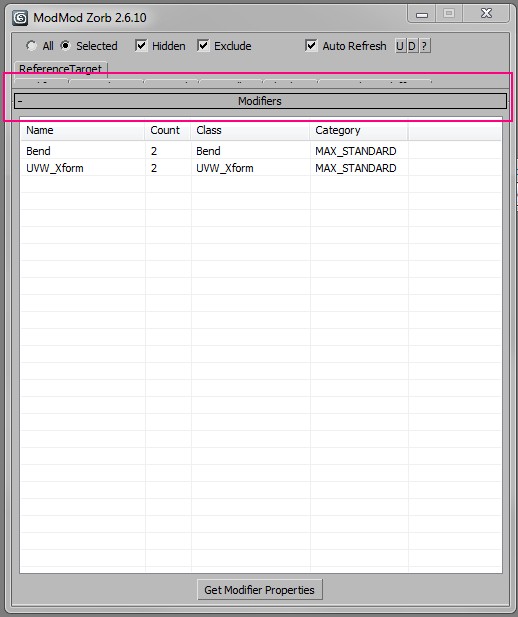
When I added two bend modifiers on my object your script could see and known just only one of those two modifiers. I would like to work with both. Is it possible?

ANd I have small idea. I have created fluffy tuft of grass by bend modifier. First step to create that tuft of grass was aply bend modifier with bend from 80-100 randomly. Then I have just selected stalks in the midle of tuft and applied value of the bend RELATIVELY. By this way i have created a tuft of grass prety quickly. But...then I wanted to copy my tuft of grass a and change the bend of every stalk slightly. But there is no way to do that. I have just wanted to create a second grass but a bit different. I can just + or - relatively the value od bend or add bend between 80 - 100 and start again the process of bending grass to the middle of tuft. That is a bit annoying.
1) So, it would be perfect, if there would be an option to change the angle of bend slightly on every randomly bended objects.
2) and how about setup some value "from - to" by the space position of the objects? For example: You need to create a tuft of grass. Stalks have to have diferent bend angle from 0 to 90 = from corner to middle of tuft.

BTW. Just now it saved me so much time!!!

Jordan Walsh · 2010-10-17

Thanks for your comments!
The script would have a hard time finding the right modifier unless I added a custom include/exclude string that you could set which would relate to having named the modifier with this string. I will look into this.
In reply to point 1 you should be able to do this by setting the 'Relative' spinner in the Properties Rollout then hitting 'A'.
I will try to add point 2 to the next version. Should not be too hard to add.

Jordan Walsh · 2010-09-16

Just a quick note on the new "Copy/Paste Modifier" Function.
As there is no access to the Max Copy Modifier clipboard the work flow can seem a bit reversed.

To copy a bend modifier from a cylinder to 50 teapots:

-Select the 50 teapots
-Run ModModZorb and choose "selected" and go to the "Base Object" tab
-Select the teapot in the list (you can select multiple items here) and right click and select "Copy/Paste Modifier..."
-From here you will be presented with a list of objects, expand the cylinder object and select the bend. This chooses which modifier to paste.
-Check whether you would like this modifier to be an instance of the original and press "Paste Modifiers to Objects"
-All your teapots will now have the bend modifier on the top of their stack

mahreeooce · 2010-09-04

I can't believe that the first time i came across this script, not only did I not pay much attention to it, but I actually thought it was a pretty useless script. But not so long ago I used it to help me with a very complex scene and all I can say is that this script is golden! By far one of the most useful max scripts I've used in a long time. I almost feel ashamed I didn't realize it's value at first.

Thank you for the effort and time you've spent making our work easier!

mhdmhd · 2010-07-24

Being able to delet maps or textures on all the scene would be a very nice feature, like deleting raytrace maps or dirt maps and better deleting missing maps, also may be renaming maps like the renaming tool.

JaredSmith · 2010-06-23

Thanks for making the ui resizable, that's very much appreciated :D

Jordan Walsh · 2010-06-23

No problems... Sorry about the delay in getting an update out, I have been a bit busy!

fajar · 2010-06-22

Defitnely the usefull script I ever use....

thank Jordan.W.

NicolasC · 2010-06-21

Simply a must-have !! thanks a lot for your efforts, Jordan :)

JaredSmith · 2010-04-02

I was wondering if it would be possible to change the script so that the display dialogue is not an auto fixed size. I find it really difficult to see all the entries after the script has initialized as the window is always slightly smaller the the list of entries.

noel_d3 · 2010-02-09

This script is probably one of the most powerful I know for 3ds max. There are still some functions that are not possible to edit when selecting multiple objects and the Zorb could do instead of 3ds max.

°The Inherits links (in Hierarchy > Link Info)

°The Rendering Controls of objects properties if one object selected is not renderable

°Exclude/Include list from multiple lights

°It's different but there is also the fact that you can not paste a modifier in the stack of multiple objects selected

°Finally I also suggest that by default if some objects are selected, Zorb goes into "selection" mode and if nothing is selected in "all" mode. Indeed for very heavy scenes that takes time to list all modifier of all objects, while in general if there is a selection when I run Zorbmodifier we just want modify selected objects.

Best Regards and thanks for your exellent work.

Leon

leon3d.com

Jordan Walsh · 2010-02-09

Thanks for the comments Leon, I have most of these implemented for the next release, which should be soon. I am just a bit busy at work to get the last bits finished.
I have been asked about the paste modifier question before but I think the working methodology doesn't suit modmod Zorb. I might make that a separate script, unless you have a good idea of how zorb would handle it.

MATSCRPTART · 2009-09-07

This is a great Script so my apologies in advanced if I am missing something But This seems to have trouble when using with objects with a morpher modifier.

Here is the error I get.

>> MAXScript Rollout Handler Exception: -- Unknown property: "_1__Sphere02___Target_Available" in Morpher:Morpher <<

it seems to happen on this line of your script

PropValue = (getproperty foundmod (getpropnames foundmod)[pcount])

From what I see it should work with the above code but anyway it looks like something that would be easy enough to fix.

By the way this error is given Only when a morpher modifier has targets set. It opens fine if there are no targets.

Thanks.

Jordan Walsh · 2009-09-07

ahh, yes, this is an old bug I thought i'd fixed. It will always crash with morph modifiers. Ill have to exclude some properties. Thanks

MATSCRPTART · 2009-09-07

Thanks a lot for taking a look. Actually I don't want to make any promises since I am pretty busy right now with a few projects but I was thinking of doing my own quick edit of your script so that it works with morpher. I was thinking maybe having a checkbox that says whether to use method specifically to access morph channels and then access it with a function specifically for accessing morph channels rather than the default method of your script. Or rather than the checkbox even just search for the class of the modifier rather than the checkbox.

I know this it is possible to dynamically build a rollout floater that will be able to set the channels of a morpher modifier since I have already done a rough script that does it. I attached it below If you want to check it out. It will open a floater that has all 100 channels of a morpher with spinners that allow you to change the value. It is in it's really rough stages right now and must be optimized and all features finished but it does work. for example I realized it is not necessary and really best not to dynamically build the rollout in an execute string If I am going to be doing it just for morpher since I can use labels and set them to the names of the morph channel by setting the labels text. Or I could even use edittext since this will allow the functionality for user to rename targets. This will also make it easier to update the rollout. The Pick Target Functionality is not yet finished.

The method I use to access the morpher modifier channel values is

MrphTargetObj.modifiers["Morpher"][slot_index].value

or to set the value

WM3_MC_SetValue MorpherMod Slot_index NewValue

Like I said I can't be sure right now but if I happen to be able to modify your script to use morpher maybe you could let me know if you would be adverse to me just posting it in a comment attachment for your review then you could see whether you would want to use it or not. However If it looks like it is going to be a little to time consuming to modify your script I may decide to just go with finishing My Morpher Interface instead and If you wanted you could always just take my code and add it to your script though it already is pretty big.

Thanks.

Attachments

Jordan Walsh · 2009-08-12

jeff- yeah, unfortunately not all parameters are set as worldUnit type so its hard to determine what to use!!! you can do classof (getparameter #height $) to see if its a worldunit, integer or float, but i have no idea how time values are set, like in pflow operators etc.

 fajar- its all for fun, but i mainly coded it to use for my own workflow, I couldnt think of working without it now!! I have been a bit lazy with the undo stuff, some parts have it and some dont.. ill have to do an audit and make sure its all undoa-ble!!

fajar · 2009-08-11

Maybe will be good if it have undo command in it (couse when I modify one modier and I press CTRL+Z it's doesnt undo the apllied properties) like when U rotate the modifier gizmo using this script.

Thank!

fajar · 2009-08-11

Wow Jordan, this is very big script I ever met (300kb), do you so it for fun and pleasure!!? This script is very good I love to use it !
thank

> I used to use a recursive

Jeff Lim · 2009-07-01

> I used to use a recursive subanim routine to gather mats and controllers (scarily similar to yours!!!) but my new method is quicker and more accurite in most cases.

cool! I scanned your script and found that you're using getClassInstances (SUPERCLASS.classes) to collect the classes. I never knew about the .classes property! Thanks, learned something new from your script!

Looking forward to your updates! 😆

Jordan Walsh · 2009-07-01

I didnt find the .classes thing for ages. I was kind of wanting a getSUPERClassinstance function, and .classes gave it to me. Its still slower than I would like though :(

Jordan Walsh · 2009-08-11

Updated to v2.5.6: Added Loading and Saving of all modifiers, objects, materials
etc properties. Added an update button for the properties dialog

Also world units should show up properly now.. i think!! I also added an auto update functino thats seems to work some of the time, but you have to be editing the first node that the script find. (There is a button to select it if you want too!)

XML loading and saving adds the ability to manage presets for everything now!! Doest supportevery type of property, eg some material settings may not get saved. Let me know if you find anything you need s0looking at and I can fix it

Jeff Lim · 2009-08-11

coool! thanks for the updates!
I took it for a quick spin, and noticed that the world units are not displaying on the spinners. (e.g. base object box - length, width, height)
I can't think of a way to detect whether a parameter is displayed in world units in the UI or not. (same goes for time related parameters..) :(
The update button definitely comes in handy. thanks!

JohnnyRandom · 2009-07-01

Absolutely Badass script Jordan! It kinda freaked me out when I clicked on Base Objects and the list populated with all my particle flow operators :)

Totally agree with Jeff, a refresh button would be nice ;)

Jordan Walsh · 2009-07-01

Cheers Johnny! Ill work on all that stuff pretty soon!

Yeah, the first time i ran it with pflow stuff in there I was supprised and happy too!!!!

Jeff Lim · 2009-06-30

hi jordan! awesome script, very handy indeed! 🙂

I just have a couple of sugguestions:

  • A refresh/update button for the property window.
  • A button to set/display spinners to type:#worldUnits.
  • A "T" checkbutton for time related values. Usefull for spinners that are displayed as time. (on an NTSC setting, a value of "1" in the max UI would display "160"on a maxscript spinner --- divide 160 by ticksPerFrame to get "1".)
  • Your property checkboxes are looking clean with the ":" (colon), but the spinners seems to be missing this presentability.
  • Just in case you're open to testing this out, you could try the recursive function I'm using for my old material/map floater script, I attached the broken down version of the function, it will basically just print all the material/map names in the scene.
Attachments

Thanks Jefferson,  Great

Jordan Walsh · 2009-06-30

Thanks Jefferson,

 Great suggestions, I should realy mapworld unit types and time type properly. I only have integer and floats setup properly.

I used to use a recursive subanim routine to gather mats and controllers (scarily similar to yours!!!) but my new method is quicker and more accurite in most cases.

Thanks again for the suggestions... keep em coming!

pokoy · 2009-06-24

great script, very useful!

jonahhawk · 2009-03-26

I use a ton of scripts. I install everything and anything that looks remotely useful.


This is far and away one of the best; such a lifesaver and so versitile.


Thank you.

Cheers jonahhawk, glad its

Jordan Walsh · 2009-03-27

Cheers jonahhawk, glad its helpful!

As always suggestions and bug reports are welcome!

fajar · 2009-03-23

a little suggest for .mcr file!!

macroScript ModModZorb2
Category: "Zorb Tools"
toolTip:"Modifier Modifier Zorb 2"
Icon:#("Zorb",5)
(
on execute do(
filein ((getDir #UI) + "\\MacroScripts\\Zorb-Modifier Modifier 2.ms")
)

)

hey z-orb check this out with yours!

thank man!!

Jordan Walsh · 2009-03-23

Hey Fajar, how is that different to what I already have?

Wont make any difference if you have installed it properly


gasmasocet · 2009-03-12

Hi, just a suggestion, VIEWPORT UPDATE DISABE/ENABLE very important when you work with HUGE amount of objects

hey gasmasocet, thanks for

Jordan Walsh · 2009-03-12

hey gasmasocet, thanks for using my script, hope it is useful!

I have viewport update disabled when performing edits but still get the mod pannel flashing. Havent had time to debug it. I may also have missed it for some right click functions. Are you having trouble with a specific function/action?

noel_d3 · 2008-11-20

Realy thank you very much for the "Relative" and "Effect Value" addition
:-)

Best Regards

Léon 3D

Jordan Walsh · 2008-11-21

No problems! im always interested to hear feedback/wishlists! In the next version I will make the material/controllers work by selection too

facemao3 · 2008-11-13

good thx

noel_d3 · 2008-10-01

Thank you,

I thought primarily of the values for example of Tiling of various textures which are not in intance in materials in multi/sub-object.

I would like that Tiling in V with 3 as value becomes to 8 but that those which are a value of 1 remain to 1.
I cannot select them separately because they are applied to the same object.

Rather than “3=8” we could have “3” becomes “8”

Best Regards

Léon

noel_d3 · 2008-09-30

Thx, In fact it's really usefull for change materials values.

Jordan Walsh · 2008-09-30

Cheers Noel_d3! Just be careful because it cant deal with standardmaterials when you mix blin with o/n/b with metal etc because the standard material drop down changes the amount/ names of the "standard" materials properties and it will crash. With materials that are "hard coded" (vray, mental ray) it will work fine!!

noel_d3 · 2008-09-29

thx

noel_d3 · 2008-09-29

Probably the script which I use most often.

A function misses:
Sometimes I want to change a precise value, for example I want that all the turbosmooth which are to 1 become 2 but that those which are to 3 remainder with 3.
One could imagine to be able to write "1=2" for this function which would be really usefull.

Best regards.

Léon

leon3d
akamaStudio

Jordan Walsh · 2008-09-30

That is an interesting one noel_d3. I'll have a look into it. For now you might have to use the selection filter when changing values.

titane357 · 2008-08-23

Very nice plug in, Thanks !!!! :-)
works on max 2009.

jonahhawk · 2008-05-14

Silly me. I clicked on the controller tab without a selection and now it is working on displaying ALL controllers in my scene.... will it crash....

3 minutes... it seems to have stopped... nope started again...

paused/frozen

4 minutes.... viola!

It would be nice to have a cancel button for just such foolhardy mistakes!


Otherwise awesome tool. Seems to work great with VRay materials so far. This is the only tool of its kind that I know of. Great work.

Attachments

Jordan Walsh · 2008-05-20

HaHA! Thats a lot of controllers! Yeah, the controller and material code is pretty slow. I should be able to halve it. But other than that its still pretty experimental!

Glad you are liking it! Most of the stuff hasnt been tested very much as it is such a general script and I only am really concentrating on the things I usually use it for, so if it breaks for some reason that you need it for dont hesitate to let me know and ill try to fix it ;)

alexus · 2008-03-25

Hi Jordan! Very cool script, but it don't work in x64 version, can you edit for?

Jordan Walsh · 2008-03-26

Hi Alexus, Thanks for the comment!

Have you downloaded the right version? There is a max8 ActiveX version that i recently coded as a request and there is a full DotNet version that works fine with max 9 x64. Infact Im using it right now for max 9 x64 on XP64. and it was originally coded for DotNet.

Make sure you get this file: ModifierModifierZorb_v2_B_0.32.rar

Let me know if you still have issues, or have any suggestions :D


Jordan

Try my script,can do same

mantis3d · 2007-10-05

Try my script,😎can do same thing and more!

 muti-object modify tool

Jordan Walsh · 2007-10-08

Yours is a good script, but that functionality is just one part of my script.

Thanks for the spam anyway

pixelarts · 2007-09-25

Thanks a lot for the max 8 version!

Of course i cant wait for you to implement the presets functionality, but i was thinking of a couple of other additions which i feel would make this an even more amazing tool than what it already is...

1.could we have sliders to change parameter values instead of the deault max implementation?

2.for modifier gizmos - could we be allowed to access one in the viewport to change it, and have it change echoed in local space across all similar modifiers?

Jonathan de Blok · 2007-09-21

Nice!

I just had a idea.. wouldnt it be great if was a visual flow chart for modifiers where you can tie everything together.

Like nodeJoe, shaderFX or particleFlow, it could work like this:

All the variables are nodes which can be a constant (default) or wired to an expression, other modifier variables, joystick input devices etc..

Basically you can wire everything together (like the wire-parameters dialog, but wayyyy fancier)

I know there's a free flowchard dev kit for max: http://www.scriptspot.com/3ds-max/plugins/helium

just a thought :)

Jordan Walsh · 2007-09-24

jcdeblok: There is a program that does that, its called Maya!!  The hypergraph (or whatever its called) shows all conections of all scene node .(Its a bit head hurty though)


A max 8 version should be easy to do, I just have to do a non dotNET version

Jonathan de Blok · 2007-09-24

I just realized it's already in Max too.. it's called schematic view. I always thought it was just for displaying the scene hierachy but after digging around in it I found a way to display all node variables too. With a right-click->wire you can wire them together.. been working with max for over 6 years and I keep running into new things :)

pixelarts · 2007-09-24

that sound cool!
i didnt know we could wire together parameters of different modifiers across same and multiple objects?

I mean..using the schematic view..i always thought it was mainly for people who use it for creating complex rigs to see their layout and do selections etc..

pixelarts · 2007-09-21

hi,

i know i am pushing for too much, but would it be possible to see a max 8 compatible version?

thanks

oops

Jordan Walsh · 2016-05-17

relied to an old comment... ignore this ;)

Jordan Walsh · 2007-09-21

Sure, good idea, I should be able to put that in when I get some scripting time

pixelarts · 2007-09-21

Hi Jordan!

Thanks a lot! , cant wait to use it!!

pixelarts · 2007-09-17

it would be great if we could save a modifier's settings as a preset.