The Outliner 2.0 is a fast and easy to use scene management tool. It has a wide range of features, including selecting, hiding, freezing, linking and grouping objects in the "Hierarchy Mode". In the "Layer Mode" you can organize your scene by dragging&dropping objects from one layer to the other. What's more, the Outliner offers support for nested layers, to manage scenes more efficiently. The interface is nimble enough to keep it open constantly.
Script
Outliner
By PJanssen · 2010-04-10
- Version
- 2.1.5
- Version requirement
- 3ds Max 2010
- Other software required
- .NET 3.5 Framework
- Date updated
- 2012-09-13
- Votes
- 757
- External download
- External download
Tags: Material, link, select, hierarchy, freeze, hide, layer, scene, xref, filter, sort, group, drag&drop, Scene Management
Description
Additional Info
Compared to the previous version (1.6.1), there are many improvements. Most notable among them are: hugely increased performance, improved stability, nested layer support and many small tweaks to improve the ease of use. For a list of all changes, click here
Videos
Comments (533)
Its out ! Outliner2-SF is out !
 spacefrog · 2026-05-09
Outliner2-SF - the revived 3ds Max Scene Manager is ready !
Please head over to its own dedicated post
Would love a new Outliner!
mjblosser · 2026-05-08
A new version 2 would be great, I got hooked on Outliner since 2011!
How's the interest in a working Outliner2 version ?
spacefrog · 2026-04-30
Hi guys !
Please help me understand the level of interest in an updated Outliner 2 version ! That means an Outliner 2 version that works with 3ds Max 2027 etc.
It also would remove the custom nested-layers implementation of the current version and would rely purely on the 3ds Max layer hierarchy functionality.
FYI:
Current version relies on Custom Attributes attached to the scene, which comes with some risks and of course makes scene incompatbile with 3ds Max installs without Outliner installed...
So please give me some feedback about how many still would like to use Outliner over Scene Explorer :)
Thanks !
You also can comment/discuss here:
https://www.frogsinspace.at/?p=8889
See the attached video about the current state of my update/revamp work
Attachments
- outliner_2_sf__-_3ds_max_2027_compatible.mov — outliner_2_sf__-_3ds_max_2027_compatible.mov740 KB
locb · 2026-05-01
2025 please!
spacefrog · 2026-05-01
thats part of the plan :)
Highly interest! I still use
FlameEye6 · 2026-05-07
Highly interested! I still use it to this day, had to modify it so it would let me use it on newer versions.
DOWNLOAD LINK
Bare · 2024-05-19
error upon startup in max 2023
compuhms · 2024-05-22
System.TypeLoadException: Method 'get_ObjectName' in type 'PJanssen.Outliner.Actions.OpenOutliner' from assembly 'Outliner.Core, Version=3.0.25.13101, Culture=neutral, PublicKeyToken=null' does not have an implementation.
 SMFoged · 2022-08-05
What's the latest news on updates for Outliner?
 JokerMartini · 2022-08-05
its' end of life i believe the dev stopped developing it all together
 MAXTools · 2022-08-06
It looks like the developer is completely brainwashed (judging by the main picture in the script description). So I don't think you should expect any updates from him.
It's living on
SMFoged · 2024-04-22
I have a working copy for 2025.
Only thing that does not work is hotkeys...
Can you please share it?
mirmidonets · 2024-05-26
The one posted below is not working
System.TypeLoadException: Method 'get_ObjectName' in type 'PJanssen.Outliner.Actions.OpenOutliner' from assembly 'Outliner.Core, Version=3.0.25.13101, Culture=neutral, PublicKeyToken=null' does not have an implementation.
This may not be news, but it works in Max 22.
 StarTone · 2021-06-29
There is an error message during installation, but just make a button on the Toolbar.
close it up
Alexandr Glazachev · 2021-03-25
I would wait. But here's the idea: It still starts after you close the error window. If you could add a command immediately closing, an error message. Something like "Alt + F4". But Alt + F4 can, under certain conditions, close the max, although on the other hand he asks about preservation, well, there are possible re-mixing of course, you will need to be careful.
I'm not a programmer, so maybe I'm writing nonsense, I'm sorry if something goes wrong.
Failed to load shortcuts
Alexandr Glazachev · 2021-03-24
Who would have even suggested.
Is it possible to solve this, and what is the matter.
spacefrog · 2021-03-25
The "shortcut exception at startup is because outliner scans the keyboard shortcut file and tries to interpret it. Since the format of that file has changed completely with the new shortcut manager, Outliner fails to do this and throws an exception..
This code is/was there to have 3ds Max shortcuts getting passed through to the 3ds Max window, while the Outpost window is active ( and receives the keyboard input)
I have a local source modification here that removes this feature ( and the exception ), with the side effect, that keyboard shortcuts are not getting passed throguh to 3ds Max while the outpost window is active
I thought i gonna fix this, but did'nt find time to do so ... i dont know WHEN i'll find time to do so either...
So what you want me to do ? post the semi-fixed build or are you patient enough for a complete fix ?
pixela · 2021-09-06
Let's do both?
We can use the semi-fix till the complete fix.
I have been using already just ignoring the error message.
But would be great if max shortcuts can pass through.
Now I need to click the viewport after using the outliner.
Thanks a lot.
pixela · 2021-09-06
Let's do both?
We can use the semi-fix till the complete fix.
I have been using already just ignoring the error message.
But would be great if max shortcuts can pass through.
Now I need to click the viewport after using the outliner.
Thanks a lot.
pixela · 2021-09-06
Let's do both?
We can use the semi-fix till the complete fix.
I have been using already just ignoring the error message.
But would be great if max shortcuts can pass through.
Now I need to click the viewport after using the outliner.
Thanks a lot.
pixela · 2021-09-06
Let's do both?
We can use the semi-fix till the complete fix.
I have been using already just ignoring the error message.
But would be great if max shortcuts can pass through.
Now I need to click the viewport after using the outliner.
Thanks a lot.
fix it plz
chinaman · 2021-03-23
The same problem
in 2021 max
since max 2020 SP3
abadone · 2021-01-05
since max 2020 with services pack 3 with the new hotkey editor the outliner bug... :/

Alexandr Glazachev · 2021-03-11
The same problem
in Listener:
** Outliner exception **
-- Runtime error: .NET runtime exception: was not expected.
re-upload of outliner_2_1_6_SF and outliner_2_1_5
 tosyk · 2020-09-19
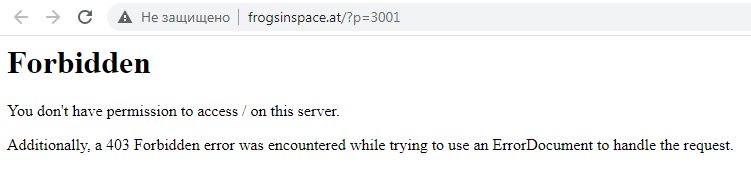
for those who can't access the link http://www.frogsinspace.at/?p=3001 because of "no permission" window I'm attaching these 2 latest builds of Outliner here. I test it with 3ds max 2019x64 without issues.
p.s.: all thanks to Josef 'spacefrog' Wienerroither for the update.
Attachments
- no_perm.jpg — no_perm.jpg20 KB
- outliner_2_1_6_sf.zip — outliner_2_1_6_sf.zip217 KB
- outliner_2_1_5.zip — outliner_2_1_5.zip216 KB
spacefrog · 2020-09-20
never heard of this issue - Is this "no permission" message still showing for people trying the mentioned link ?
tosyk · 2020-09-23
seems like it's country depends. a year ago in russia the millions of ip addresses of amazon were banned. some of them were unbanned later. maybe this is the case.
g2m.agent · 2020-08-26
Windows 10 x64
3ds Max 2013 x64
v2.1.5 works fine. thanks!
* 3.0 alpha install error:
Runtime Error (at 17:391): Out of Range.
any news ?
sebastian___ · 2019-12-14
Does it work well in 3ds max 2020 ?
Compatibility fix for 2020?
FlameEye6 · 2019-07-28
Hello! Any chance of another compatibility update for 2020? Everything appears to be working perfectly except for this error on startup (and another error about not being able to auto-assign the hotkey but you can still do that manually).
This script is just too essential!

fix error on startup
ahmadsy · 2019-09-30
Hi. Did you find out?
tosoyn · 2020-01-27
I found the workaround to prevent this window to appear. You need to find ui.ms in C:\Users\%username%\AppData\Local\Autodesk\3dsMax\2020 - 64bit\ENU\scripts\outliner
and comment out this string "outliner.loadkbdxFile();"
tosoyn · 2020-01-27
I found the workaround to prevent this window to appear. You need to find ui.ms in C:\Users\%username%\AppData\Local\Autodesk\3dsMax\2020 - 64bit\ENU\scripts\outliner
and comment out this string "outliner.loadkbdxFile();"
fix 2020
tosoyn · 2020-01-27
I found the workaround to prevent this window to appear. You need to find ui.ms in C:\Users\%username%\AppData\Local\Autodesk\3dsMax\2020 - 64bit\ENU\scripts\outliner
and comment out this string "outliner.loadkbdxFile();"
fix 2020
 cloobok · 2020-01-28
Where it is?
Can you describe what needs to be done more specifically?
You need to open the notepad,
wizard66691 · 2020-02-16
You need to edit ui.ms file, find and delete this string "outliner.loadkbdxFile();"
vangogvincent · 2020-06-10
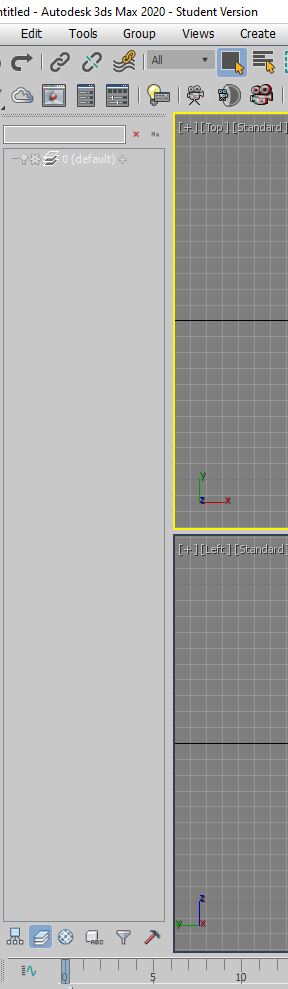
Copy all outliner from Max 2016 or 2017 or 2018 c:\Users\***\AppData\Local\Autodesk\3dsMax\2018 - 64bit\ENU\scripts\
to max 2020 c:\Users\***\AppData\Local\Autodesk\3dsMax\2020 - 64bit\ENU\scripts\
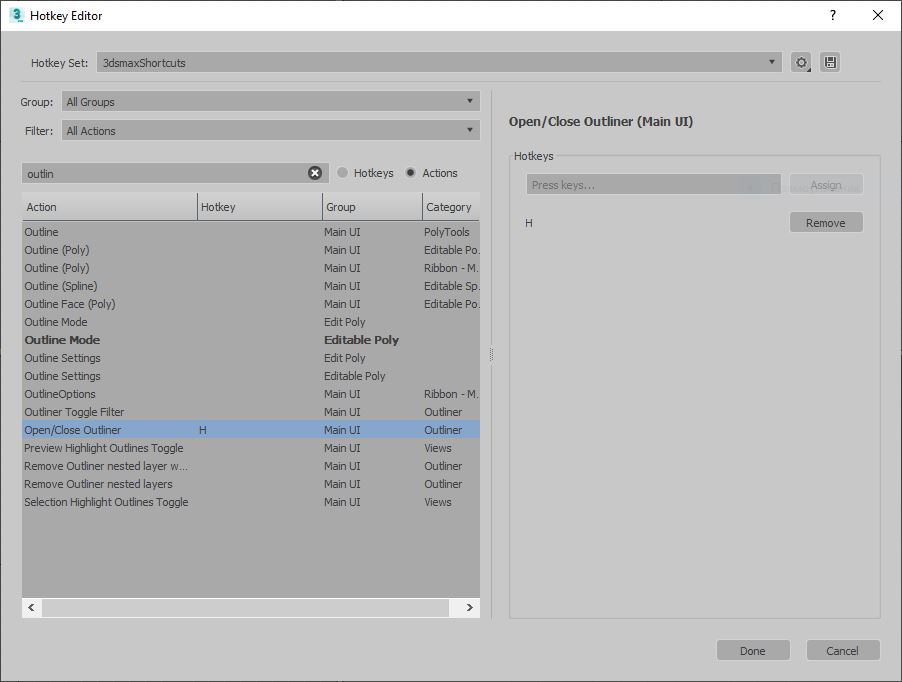
Enter Hotkey, find Outliner and assign "H" or any key
Or copy from zip archive (attach) - outliner_folder_scripts.zip
Attachments
- outliner1.jpg — outliner1.jpg60 KB
- outliner2.jpg — outliner2.jpg42 KB
- outliner_folder_scripts.zip — outliner_folder_scripts.zip209 KB
 asymptote · 2017-06-12
pjanssen stopped devving this years ago, latest version is now in the hands of the green warty one:
http://www.frogsinspace.at/?p=3001
Sadly only compatibility fixes for now. :/
 antonov3d · 2017-05-23
your beta completely broke my 3ds max it wont launch, thanks. Do not install beta guys.
It's not a Beta, but an Alpha version
JezUK · 2017-06-10
it is an Alpha version, so definitely not worth the risk if stability is important to you.
How to change text color in Outliner for Max2017?
Monaco Felice · 2016-12-23
Please tell me, how I can change the text color of selected objects?
At this point in 3dsMax 2017 color the selected and unselected elements almost blended. I would like to make the text more color contrast.
asymptote · 2016-12-24
@ Monaco :
Look in your ENU folder for a file called "outliner_user_colors.ini", you can change the selection colours there.
answer for asymptote
Monaco Felice · 2016-12-24
Very grateful!
...but the correct path to the file ENU\scripts\outliner\colorSchemes.ini
asymptote · 2016-12-24
ah, of course, "outliner_user_colors.ini" is the sample template file.:)
all is good.
Outliner Very Slow
thewool · 2016-08-25
Hi there. This is a great script, but it is very slow. Using v2.1.6 in max2014.
I have a large file, and everytime I select an object or deselect it, there is a delay of about 5 seconds. This happens only when outliner is open.
I think this is because it highlights the objects layer every time I select an object.
This makes it un-useable.
It would be great to have the option to disable this feature and for it to behave like max's default layer manager.
Max 2017 SP2
SMFoged · 2016-07-25
Version 2.1.5 breaks after I install max 2017 SP2.
Hope there is a fix
Fix for Outliner 2.1.5 with Max 2017SP1+ is in the works
spacefrog · 2016-08-05
Im currently working on a fix. Seems the problem is related to Max2017+ breaking byRef storage in arrays, which Outliner uses a lot for filtering stuff etc .will take some days and i'll post the results ...
Update: okay fix is complete, will still take some time to pack it up. Maybe i'll look into some other quirks i remember getting from time to time while using outliner...
freemanpro · 2016-08-05
any link for fix archive script ?
Spacefrog is on the Case!
asymptote · 2016-08-07
Outstanding!
...reminds me of the caddy fix back in the day ;)
Outliner 2.1.6 SF (Max 2017 compatible fix ) released
spacefrog · 2016-08-09
Just released the fixed package with Outliner 2.1.6 which runs on Max2017+ without crashing.
Head over here for the download http://www.frogsinspace.at/?p=3001
Note: it's still compatible with Max 2013 and later of course
the-trooper · 2016-08-17
Thank you very much on 2017 version. It's still better then new max layer manager.
sbk · 2016-12-03
3ds max 2016 crash in 1 second after load the scene.
redraw
jusdepoubelle · 2016-03-08
Hi guys,
When the outliner is in hierarchy mode and I do some parenting in the scene, some bugs appears like doubles. The only way to make it right again is to switch to layer mode and back to hierarchy. Is there a way to force the redraw?
Anyway, thanks a lot for this script, it's insanely helpful.
3.0 install issue
 harumscarum · 2016-02-28
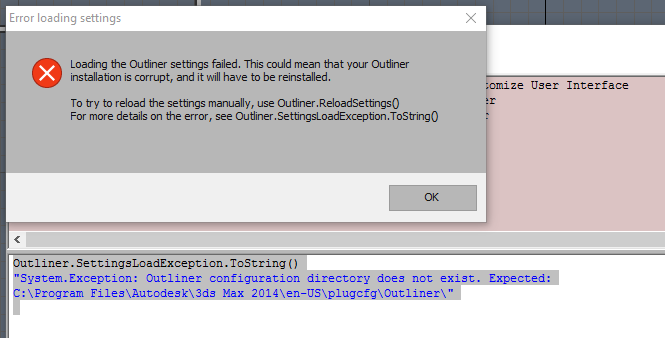
tried both Regular and Full versions from github but it only installing 3 dll files and Outliner folder is missing
could anyone please share full installed Outliner3 config for 3dsmax 2014*64?
thanks!
Attachments
- e5fac-clip-21kb.png — e5fac-clip-21kb.png21 KB
System.MissingMethodException
 Univerpix Studio · 2015-06-02
I got the following error in 3ds Max 2015
System.MissingMethodException: Method not found: 'Autodesk.Max.IILayer Autodesk.Max.IILayerManager.GetLayer(System.String ByRef)'.
at Outliner.LayerTools.AutoInheritProperties.LayerCallbacks.Added(ITab`1 nodes)
at Autodesk.Max.Wrappers.ManagedWrapperINodeEventCallback.Added(ManagedWrapperINodeEventCallback* , Tab* nodes)
Lantrancy · 2015-01-11
crash when loading 3dsmax 2014 after install 3.0.25 full.
and .Net error when load outliner 3.0 regular
any help?
how to install Outliner 3
harumscarum · 2014-12-07
there are no any mcr files in scripts folder
only 3 dlls and some xmls installed
install Outliner 3
 artursamenezes · 2014-12-18
GITHUB (a few dificult to find):
https://github.com/Pjanssen/Outliner-3.0/tree/master/build/Installers
There are:
- Latest_Full.exe
- Latest_Regular.exe
- Outliner_3.0.25_Full.exe
- Outliner_3.0.25_Regular.exe
OK? 🙂
...
asymptote · 2014-11-04
@designingpatrick
Sounds like you have remnants of Outliner 3 kicking around, search your Max root and enu folders for "outliner", I think there are 3 .dlls placed there by the installation.
Sadly Outliner is no longer being developed (unless someone takes over the Alpha.)
I was getting dot.net errors too with 3 in 2015, so dropped back to 2.1.5, slower than 3 on large scenes but much better than the scene explorer they stuck onto Max.
Dot Net error when opening outliner
 designingpatrick · 2014-11-02
I'm getting this error:
"--Unkown property: "open" in dotNetObject: Outliner.OutlinerGUP"
when I press H to open the outliner.
I'm not sure what happened, it's been installed for at least a year now and just stopped working the other day.
I tried removing it a few times, deleting the C:\Users\xxx\AppData\Local\Autodesk\3dsMax\2014 folder, uninstalling
results in an error 'Removing Hotkeys failed'
Any ideas here?
I tried the command outliner.open(), but that's just not working.
-- Error occurred in execute(); filename: C:\Users\patrick\AppData\Local\Autodesk\3dsMax\2014 - 64bit\ENU\usermacros\Outliner-toggleOutliner.mcr; position: 731; line: 32
-- Frame:
-- outlinerInst: dotNetObject:Outliner.OutlinerGUP
-- called in anonymous codeblock
-- Frame:
-- outliner_get_instance: outliner_get_instance()
>> MAXScript MacroScript Error Exception:
-- Unknown property: "open" in dotNetObject:Outliner.OutlinerGUP <<
** Outliner installer exception **
removeHotkeys
-- Unknown property: "FromXml" in undefined
outliner.open()
-- Unknown property: "open" in undefined
PJanssen · 2014-11-02
Did you install Outliner 3.0 beta by any chance? You can't have both installed next to each other unfortunately.
designingpatrick · 2014-11-02
Thanks for the swift reply.
I may have attempted to install Outliner 3.0 in my troubleshooting the other day, although I cannot be sure that it is currently installed. How can I check?
Is Outliner 3.0 recommended? Still in Alpha? I just tried to install 3.0, to see, and it doesn't appear to be working either.
Maybe I should remove all traces of Outliner and try again?
designingpatrick · 2014-11-04
How can I completely remove all of the Outliner files?
Max is now having issue launching, and I'm afraid that it's because of the Outliner.
By the way, the outliner is such a powerful and useful tool, it's killing me to not have it working.
designingpatrick · 2014-11-04
-- Runtime error: dotNet runtime exception: Invalid directory on URL. <<
Is outliner gone? Do this...
Psychodelic · 2014-09-30
delete the 20xx 64-bit or 32-bit folder in this directory: C:\Users\xxx\AppData\Local\Autodesk\3dsMax
Then uninstall outliner, and reinstall it.
Outliner gone ... FIXED
 Spatz · 2014-09-29
hey, for everybody who has the problem the outliner disappeared
try to change the workspace to "alternative layout" (the menu in the quick access toolbar) and then change it back to your or default layout ... this fixed the issue for me ...
hope it helps you too...
Outliner disappears on max 2014 64 when docked
tigerija · 2014-09-08
I need help!
Outliner is gone. I docked it. Next time i started max it was gone.
When I turn it on I just get slight movement on right side of my screen where Outliner was docked. Can't access it.
I was not able to find outrliner under: \ENU\scripts/outliner_prefs.ini"
No outliner_prefs.ini inside scripts.
My folders and files are not hidden.
I found this:
C:\Users\User_Name\AppData\Local\Autodesk\3dsMax\2014 - 64bit\ENU\en-US\plugcfg
Any help? I need it! Can't live without it! :D
.
 miauu · 2014-09-08
Why you not reinstall it?
tigerija · 2014-09-08
I tried that...
Try it through maxscript
PJanssen · 2014-09-09
Try setting the width through maxscript:
outliner.close()
outliner.prefs.setValue #Window #width 500
outliner.open()
I hope that helps!
Outliner is gone
mrcgnerd · 2014-09-17
I'm having the same problem, outliner is gone...
tried to reinstall it but no efect.
Your max script is giving me arror, by pointing to this line:
outliner.close()
And after reinstall outliner_prefs.ini is gone, macroscripts and some other files in ENU folder.
max 2014 / outliner_3.0.24_alpha
Please help.
Outliner crash reporter
 er.cchadw.ck@gmail.com · 2014-07-25
Somehow I crashed the docked Outliner. Running 3ds Max 2012 64bit, in OpenGL mode. Outliner was docked left, and I was scrolling downwards.
I tried submitting my crash details via the Outliner error reporter, but it failed to submit, showing this error:
---------------------------
Failed to send
---------------------------
Failed to send error report.
The remote name could not be resolved: 'script.threesixty.nl'
---------------------------
OK
---------------------------
Edit... here is a screenshot of the dotnet crash:
https://www.dropbox.com/s/8ug4fnl88ud92fa/2014-07-25_104026.png

3ds max 2012 outliner window disapears and won't come back
alteredgene · 2014-06-03
Hi PJanssen! thanks heaps for an amazing script.
really enjoying using it!
been having an issue though.
i have installed it fine, no error
running it fine, no error when resetting, or opening files.
but yesterday, i tried moving the outliner window slightly and the window just disapeared. and when i try re-opening it, something seems to be working, but the window will never pop up.
i have tried re-installing, no luck
i have uninstalled, and re-installed, the window will appear properly, but when i am working and tried moving the outliner window again, it disapeared, and won't come back.
i have tried resetting all my dialogue positions, no luck (its as if the whole window does not exist).
was hoping if you/or anybody can shed some light on this issue.
again, thanks so much for all your work! its an amazing script!
PJanssen · 2014-06-03
I suspect that the dialog position that has been stored in the preferences is somewhere outside your monitor's resolution for some reason.
You can "reset" this by editing the preferences ini. You can find the location of this file by entering the following maxscript command in the maxscript listener:
(GetDir #userScripts) + "/outliner_prefs.ini"
In the ini file, there will be a [Window] section, with posx, posy, width, height and dockflag properties. You can safely remove all of them to reset the window preferences.
I hope that helps!
Thanks, think dialog position was the culprit, however
alteredgene · 2014-06-15
yep, i suspected that might be the case, as script didn't error out, i just couldn't see the dialog.
i have followed your instruction, removed the [window] parameters to "reset".
however, when i run the dialog, it will keep defaulting to
posx=2554.0
posy=-32653.0
width=250
height=400
dockFlag=cui_floatable
and the posy just makes it out of my windows.
i am currently using 3 monitor setup, 2 vertical, one horizontal. not the usual layout, so perhaps its causing the weird behaviour.
do you have a function that it automatically positions itself when its launched? when i remove it, it just seems to default there.
i have tried not delting the parameter, but putting soemthing like 100, 100
but it will keep change to above numbers, and the dialog is not visible.
thanks for your help so far ; )
hope there is a fix for this issue ; )
Outliner 3
mastrein · 2014-06-24
Hi Pier! I installed version 3 using Max 2014. I docked the window to the left and it worked fine. But when I close max and start again the menu wont show. Is there some way to reset the plugin? I'll just stay away from docking. Uninstalling and installing does not work.
berdinatilli · 2014-01-17
http://forums.cgsociety.org/showthread.php?f=6&s=f06c4a1c8733b50c294b319…
really?
after some indecision from autodesk they dare to reject piers offer...
oh man, that is why i hate autodesk.
Project dead?
dreamco · 2013-12-03
Is this project dead or something?
i hope not!
möbius · 2013-12-03
According to his latest posts on CG-Talk Pier is currently checking for some crowdfunding possibilities to continue the project.
http://forums.cgsociety.org/showthread.php?p=7642203&highlight=outliner#…
I hope it's not dead, the progress of Version 3.0 looks awesome so far.
It looks like the problem
 MarkD · 2013-10-18
After spending a few days trying to get along without Outliner I decided I really needed to get it back up and running. I re-installed it (it didn't say install, it said re-install) but it kept popping up the error. So I went to uninstall it and complained about not being able to remove "hotkey preferences". The uninstaller bar didn't finish and I had to close the window. I shut down our overactive virus scanner and tried uninstalling again, success! Then I was able to install (instead of re-install) and its working fine now.
The only weird thing is that the files that where throwing errors, now open fine but have missing layers. They where empty layers and that normally happens when I merge files but these files where not merged but old 2012 files I was opening in 2014.
MarkD · 2013-10-14
Careful with 3dsmax2014 and SP3. This caused outliner to encounter problems while updating nested layers and then crashes max. SP2 and lower work just fine with outliner but something Autodesk did in SP3 breaks outliner.
.
miauu · 2013-10-14
How to reproduce this?
I tested with 3 nested layers(layer01-layer02-layer03), but max still works.
Max2014+Win8 x64
Update Check Error
 kumodot · 2013-09-05
Trying on Max 2014, click Update Check -> ERROR ->
Error retreiving update information : The remote name could not be resolved :'script.threesixty.nl'
PJanssen · 2013-09-07
That's "correct", the update service is no longer working unfortunately. But there haven't been any updates in the run-up towards 3.0 anyway..
3.0
dub73 · 2013-09-13
looking forward to 3.0 :)
HarryPotter · 2013-09-15
Is there a timeframe or estimation as to when 3.0 will surface ?
Thanks in advance!
Installation instructions?
vindalsace · 2013-08-21
I installed it, but how do I find it in the customize user interface panel, so I can hotkey it? What's it called and where does the installed script live in the 3ds Max directory after you install it? I'm using Max 2011.
miauu · 2013-08-22
Customize - Customize User Interface - Outliner category.
Outliner files are placed in(for max2014):
This is hidden folder, you have to make hidden folders visible.
C:\Users\YOUR_USER_NAME\AppData\Local\Autodesk\3dsMax\2014 - 64bit\ENU\scripts\outliner
Windows 7 pro x64 - 3dsMax 2013 ** Outliner exception **
Yanez · 2013-07-16
Hallo, i also got the
"** Outliner exception **
-- Runtime error: dotNet runtime exception: Data at the root level is invalid. Line 1, position 1."
Is there any fix. Have read rhight that i have to edit a file? TKS
miauu · 2013-07-02
Yep. Windows 8 Pro, Max 2014 SP1 64bit and the Outliner starts docked.
:)
2014 SP1 fixed this.
SMFoged · 2013-07-01
The max 2014 SP1 just came out and they fixed this error.
I reverted the "fix" mentioned earlier and outliner now works as it should, and it can even dock and everything...
Stephen
TwoPikachus · 2013-05-18
SMFoged, you are so incredibly awesome! Thanks for the tip here, I've been waiting forever to get outliner working in 2014. The loss of docking is a pain, but nested layers is worth it. Big ups to RickD too for figuring out the issue!
As far as I can tell, this is a Windows 8 & Max 2014 exclusive issue. There doesn't seem to be any problem on 2014 with older versions of Windows, nor is there any problem with Max 2013 on Windows 8. I'm no Maxscript genius either, so I have no idea what the problem is.
3ds Max 2014 crashes
TwoPikachus · 2013-04-20
On my laptop Outliner crashes 3ds max 2014. Windows 8 64-bit, Intel integrated graphics 4000, 6 gb ram. Outliner works fine in 3ds Max 2013.
Weirdly enough, it runs fine on my desktop with Windows 7 64-bit, AMD Radeon 5770, 16 gb ram.
I really want to move on to 2014, but I can't live without layer nesting. My laptop is holding me back! Help!
JustViktor · 2013-04-29
Have exact similar problem! Outliner crashed on Max 2014 startup (windows 8).
Look forward to fix) Realy like this plugin!
PJanssen · 2013-04-29
Please report the issue to Autodesk.
rone · 2013-04-18
Wow that's cool
thanks
lopatka · 2013-04-17
3dsmax 2014 crashes when you run outliner.
feeling that they are trying to run two copies of the...
windows 8 64 bit, 3dsmax 64 bit /
asymptote · 2013-04-08
After a reboot icons display ok now when docked.
asymptote · 2013-04-08
Yup funky things happen when docked, I just tweaked the height in the .ini
width=203
height=900
non docked the icons display ok
I can cope with that for now :) thx

Crash on 2014 win8
SMFoged · 2013-04-29
asymptote.
Do you have any tips on getting outliner to work in 2014?
Seems like it is crashing for lots of people.
What are your UI settings, etc.
Thanks.
Stephen
FIX (workaround)
SMFoged · 2013-05-06
I found similarities in this named selection set bug http://area.autodesk.com/forum/autodesk-3ds-max/autodesk-3ds-max--3ds-ma…
RickD has a temporary solution to fix that bug.
This solution works also with Outliner:
Edit the file
"C:\Users\Stephen\AppData\Local\Autodesk\3dsMax\2014 - 64bit\ENU\scripts\outliner\ui.ms"
Comment out the following lines (with two minuses(--)) Like this:
--cui.RegisterDialogBar outliner_main \
--minSize:[mainMinWidth, mainMinHeight] \
--maxSize:[-1,10000] \
--style:#(#cui_dock_vert, #cui_floatable, #cui_handles);
This problem seems to be only on Windows8... Right? And the temp fix breaks outliners docking.
Disclaimer: I know just about nothing about max scripting, but this fix works for me.
Stephen
Thanx SMFoged, it works for me!
JustViktor · 2013-05-23
SMFoged, thanx, it works for me!
But can't dock outliner window, it floats)
PJanssen · 2013-04-08
-double post-
asymptote · 2013-04-08
In Max 2014 when docked the icons disappear, I know Max 2014 hasn't been officially released yet, but I got the leaked trial from AD forums. Can you suggest a fix for this ? thanks

PJanssen · 2013-04-08
Well, it seems that they once again managed to mess up the docking... That seems to have become a recurring tradition for each release.
Not sure if I can do anything about it at this point..
Donate link is broken
repa2 · 2013-04-01
Hi there,
I want to add nice "extra" toolbar ;) but link goes to error page. Is it temporary bug or it unable anymore?
Outliner
Igor Bondar · 2013-04-01
Wait until 3ds max 2015 will be released :). It can be released natively.
( it assumption of course but all look like this)
PJanssen · 2013-04-01
Really? That's interesting... =)
Igor Bondar · 2013-04-01
Pier, so it's not true and 3.0 plugin under development independently ?
PJanssen · 2013-04-01
I'm currently the only one working on the new plugin version, yes.
PJanssen · 2013-04-01
Yeah the website has been down for a while now. There's a temporary download location at http://outliner.pjanssen.nl, but the site itself is down.
TwoPikachus · 2013-04-01
Any chance of getting a Max 2014 update? When I press the "h" key, Max crashes and gives the regular old "sorry for the inconvenience" crash message. I'm using 2.1.5.
PJanssen · 2013-04-01
Let Autodesk know about this issue too. Apparently they created some regression issues.
I don't think I'll have much time to do something about it soon I'm afraid.
closing the outliner
 3dhippie · 2013-03-22
The outliner is really great. Love it.
There's only one bug that annoys me. I am using 3ds max 2011 and opening the outliner is really fast. But when closing it 3ds Max becomes unresponsive for a while (maybe 30 seconds). Do you have a solution to that problem?
No materials in outliners "material mode" window.
Twiggygirl · 2013-02-14
In 2009 max there is only "unassigned" material with objects w\o mat (groups, lights, cams). If assign any mat to any obj - it becomes to be seen with list of relative objects. But if I change mode and then turn it back - there is only one "unassigned" material again.
hiding group contents in layer mode
wingman · 2013-02-02
It says on the mouseover that when "hiding group contents" is active it still moves all contents when moving a group to another layer.
I'm having a problem with it not doing so.
edit: btw: i'm on max 2010, working on a scene made in 2013 but saved as 2010, and continuing work there.
jinj · 2013-01-31
hi, i have to report 1 situation with outliner.
i run 3ds max 2013 64bit as administrator.
is this behavior expected? :
when i select a layer in outliner, i can't delete the contained selected objects. if, while selected by outliner i open layer window, and right click-> select, contained objects can't be delete. i have to un-select first, select them again in viewport or from layer window and then they can be delete.
Remove Nested Layers Command Not Working
leejk · 2013-01-31
Hi,
I am using the latest version with 2013 and have noticed that the remove nested layers toolbar command is not working. When I click it, it closes outliner and prints "Waiting for user input..." in the dialog. I am just trying to remove the nested layers in the current scene. Any ideas?
thx
Remove Nested Layers Command Not Working
PJanssen · 2013-01-31
Stupid question perhaps, but did you actually press the "Remove Nested Layers" button?
Sorting "Add Selection To" list of layers
 Royal Ghost · 2013-01-22
PJanssen, why Outliner (2.1.4) doesn't respect "SortMode" when display list of layers in "Add Selection To", is it bug?
If this not a bug, can you add this feature?
Sorting "Add Selection To" list of layers
PJanssen · 2013-01-22
Do you mean that the list of layers in the context menu should also be sorted on hidden state, if the tree sorter is set to sort by visibility?
Or does it not sort the layers alphabetically?
Royal Ghost · 2013-01-22
I mean does it not sort the layers alphabetically when sort mode is on.
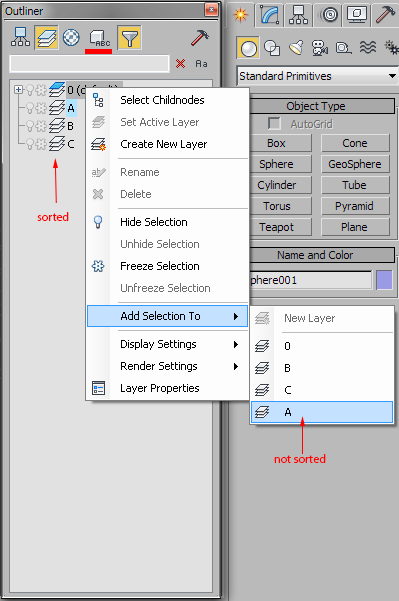
PJanssen · 2013-01-22
Ok, I would indeed consider that as a bug =) Following the sorting in the tree exactly would perhaps be a bit too fancy, but it should at least sort alphabetically.
I don't think it will be fixed in 2.x, but it's on the list for 3.0. Thanks for reporting it!
andylt1 · 2013-01-18
As a Maya user moving to Max this is a godsend.
Thanks for making this. One thing i LOVE is the ctrl expand (shift expand in Maya).. i used that sooooo much in Maya.
If I had one thing i missed it would be drag re-parenting inside the tool, though i can live without that.
Seriously, really, really great tool.
Drag&drop parenting
PJanssen · 2013-01-18
Unless I misunderstand what you mean, drag&drop parenting is fully supported. By default it uses the middle mouse-button (quite nice when using a wacom), but you can adjust this in the options if you want.
Thank you!
Mambo4 · 2013-01-17
PJanssen, Thank you for making this!
Coming from Maya to max, this is a godsend.
one bit of functionality that would be nice in 3.0:
As CTRL Click on the parent's [+] icon expands the whole hierarchy,
It would be cool if CTRL-Click on the freeze or hide icon effected all children too.
But really, beautiful job. Can;t live without it now.
PJanssen · 2013-01-17
Interesting idea!
Currently Ctrl-clicking on a node icon only modifies that particular node, instead of all nodes in the selection. So it would either have to be alt-click for the entire hierarchy, or the other function would have to move.
Outliner OpenGL BUG
tigre_g5 · 2013-01-14
Hi, Pier Janssen, can you release the Outliner 2.1.5 for 3ds max 2011 and 2012, because the Outliner 2.1.4.1 had an awful memory leak bug when we are working in openGL.
Please, I´ve assumed this is easy to fix, because the Outliner 2.1.5 for 3ds max 2013 in openGL all is working OK.
I´m working in openGL in 3ds max 2011 with animation, because it is at least four times faster than Nitrous or DirectX in shaded mode. (near 50fps with openGL vs12fps with Nitrous in animation)
Thanks.
hiden merged objects
appius · 2012-12-31
I've noticed that on some scene I've to shut down outliner otherwise the object I merged into my scene aren't visible at all.
some features wanted
appius · 2012-12-22
i didn't fing how to hide / unhide all layer. does it exist?
it would be also nice to be able to alt clic on a layer to hide all layers except one, such as in photoshop.
PJanssen · 2012-12-22
There currently isn't a "hide/unhide all layers" feature. But it should be very easy to add (for end-users) in version 3.0.
I like the idea of alt-clicking to hide everything else, I'll add that.
PJanssen · 2012-12-17
These issues won't be fixed for 2.1 unfortunately. The Outliner is far from dead though. I'm currently working hard on a brand new version.
antonov3d · 2012-12-17
Please fix it, those bugs driving me nuts.
sometimes i can't tell in which layer the object is, i just don't highlight any layer, and i'm stuck.
This bug with groups not able to assign themselves properly to other layer is killing me.
I can't believe the best max plugin ever is dead.
antonov3d · 2012-11-14
Hi again PJanssen,
i get a bug -
when i add a GROUP to a NESTED layer by PLUS sign, and then HIDE it it WON'T hide.
But if i add it by DRAG n drop, it will work OK.
It's not a big deal, but it annoys a lot, i have to drag it out of the layer, then drag it back.
Thanks!
mikemike37 · 2012-11-08
your hard work is much appreciated :)
Waooh
 Gspoutnik · 2012-10-18
Fantastic the best update for max and is not Autodesk
3 Mouse Button suggestion
tigre_g5 · 2012-10-01
Thinking about how improve the awesome outliner 2.0 or 3.0, I suggest a idea, make third mouse button panning for outliner, It's the natural manner we've working in 3ds max for years.
Thank you Mr Pier Janssen.
2013 error message at startup
 Daniel Wichterich · 2012-09-25
At first I want to say thank you for this fantastic script! I have a problem with the 2013 version. While installing it says it couldn't modify the keyboard shortcuts. And everytime i start it up it says it couldn't load keyboard shortcuts. Lstener says: "** Outliner exception **
-- Runtime error: dotNet runtime exception: Data at the root level is invalid. Line 1, position 1."
it does work though...
PJanssen · 2012-09-25
This sounds like a familiar issue with the kbdx file encoding.
There are two things you can do/check:
1) Make sure the file is in a writeable location (e.g. user folder)
2) Replace the first line in the file with:
Outliner 2.1.4.1
caogaiyu · 2012-09-14
cool man, the 2.1.4.1 really solve the problem in PU9 and 10 thanks
Outliner 2.1.4.1
PJanssen · 2012-09-13
I've pushed an update to the Outliner for 3ds Max 2012, which fixes the issues introduced by Product Update 9 and 10. To get the new version (2.1.4.1), use the "check now" update button in the options dialog.
Problem with update object
cheos888 · 2012-11-30
Hi I install the program and its right, but I have a problem, every time I create an object, dont update on the tree, I have to close outliner, and open again to apear on the tree. Its the first time Im using, the version install its the last one, for 3dmax 2012, and look really helpful and useful the scrips, but still this problem. Some help thanks??
PJanssen · 2012-09-12
I sent a new version (2.1.4.1) to you and some others for testing a few days ago. Did you receive it?
edit: this was directed at psx.
Alright! Let the test begin!!!
psx · 2012-09-12
Hi Pier. Sorry, Havn't checked my mail a few days, but instead every hour I came back here to check the news, and here we go.
Alright!
3ds max 2012 SP2 PU10 (Win7x64)
2 test machines.
Outliner stopped working once I installed PU10.
Now installing your update (2.1.4.1)
- New scene : works ( whoa )
- Reset scene : works stable ( Oh my God )
- Heavily manipulating with scene : works solid stable ( AAAAAAAA! I dont beleive )
- Opening huge scene : rockin stable ( Yeeaaaah!! It woooooorks! )
Tested on both machines. And this is it. You did it!
Man, this was the fastest hotfix in history of software development.
I thought it will take a month, or half a year.
Thank you! Now I can work again. Thank you again for this Great tool!
PJanssen · 2012-09-12
Thanks for testing this; it's good to hear that it seems to be working.
I can't take all the credits for myself though, Larry Minton from Autodesk did the debugging work and provided the idea for the fix. It was expected that PU10 would have fixed the issues, so I would not have had to push an update myself. Now that it turned out that it did not, it was an easy task for me to step in and apply the fix on my side.
Maybe 3ds max problem, but..
psx · 2012-09-09
Hi. First The Outliner is the great tool, and I use it in production for managing complex scenes with hundred millions of triangles. And it does well. I'm really happy about this tool.
But now one problem appeared. When I reset or open some scene The Outliner crashes with maxscript message
--unknown property: FillTree is undefined
in function Refresh() in core script
So I open it again and it works.
And in some scenes I cannot open it, it crashes instanly.
I reinstalled everything.
Other PC's do not have this problem, so it maybe the max's problem.
What do you think about this.
Maybe some suggestions.
Thanks!
PJanssen · 2012-09-09
this looks like it's a very common issue introduced by 3ds Max 2012 PU9:
http://script.threesixty.nl/outliner/index.php/blog/2012/08/3ds-max-2012…
Try installing PU10, and see if that fixes it. If not, send in the crash report and put something like "PU10" in the details field.
PU10 problem confirmed
psx · 2012-09-12
Just installed PU10 on fresh 2012 SP2.(Outliner worked perfectly on SP2)
And immediately Outliner began to crash everytime I reset, open, merge, create new object. Does not open for big scenes also.
This is a second machine with same PU10 problem.
Well. I cant do anything but wait for Outliner hotfix or some workaround.
Spline Problem!!!
wireframecreations · 2012-08-14
I am working in 2013 and I am having trouble merging splines into a scene. They are in the Outliner, but are invisible. I made sure they were not hidden. I did a test and placed a material modifier on a spline and then merged it into my scene and it showed up. I collapsed it to an editable spline and merged it and it doesn't show up. Script doesn't like lines/splines. This is an awesome script, outside of this problem. Thanks!
color coding
demoan666 · 2012-08-10
hi
does a color coding on layer basis already exists within?
if not would be a cool feature to add...and optionally the objects within layer may show corresponding wire color
thanks
d
PJanssen · 2012-08-11
Color tagging is something I'm working on for the Outliner 3.0. At this moment I've got a part of it implemented, see this blog post:
http://script.threesixty.nl/outliner/index.php/blog/2012/04/new-layer-mo…
More is to come though!
Outliner not refreshing
deadrighthand · 2012-08-04
Hi,
first of, I have to say, Great script, I use it in every aspect of my work ... but ... my problem is that since I switched to max2012 the outliner window dosen't refresh anymore ... everytime I create a new object I have to close/reopen outliner to display it ... any ideas?? I am running on a very up to date machine with a GTX680 on win7 64.
thanks for the help and amasing script
PJanssen · 2012-08-11
Which Outliner version are you running? Also, does it occur when using Direct3D or OpenGL instead of Nitrous?
 n.i.f. · 2012-07-04
excellent script!!!
colours
dub73 · 2012-06-20
Hi, it would be great if we could assign layers different colours in the outliner, like in Maya. Not only the wireframe in the viewport but in the outlienr as well. That would be much more clearly when working with lots of layers.
PJanssen · 2012-06-20
This will actually be one of the new features in version 3.0:
http://script.threesixty.nl/outliner/index.php/blog/2012/04/new-layer-mo…
dub73 · 2012-06-21
"like"
JokerMartini · 2012-06-06
When shall we be expecting the newest build?
PJanssen · 2012-06-08
That might take some time yet. I've been busy with other things lately...
 jos · 2012-05-27
congrats, love this plugin! any change to add see-through icons?
PJanssen · 2012-05-28
What would these see-through icons indicate? Or what should one achieve with it?
jos · 2012-05-28
you have before each object an icon for freezing and hiding. It would be nice if you add an icon to display the object in see-trough (alt-x)
PJanssen · 2012-05-28
Aah I see what you mean now! For some reason I was wondering why you'd want semi-transparent icons...
That should be a fairly straightforward one to add to the plugin version; so I've added it to the list:
http://script.threesixty.nl/outliner/index.php/3.0-features-list
jos · 2012-05-28
sorry for the bad description! Keep up the good work
jinj · 2012-05-23
hi, i installed it on max 2013... so far no bug to report.
the only annoying thing is, also in max 2012, that when the command panel is set to auto-hide... once the panel show, it open under the outliner so it's hidden. the same behavior it has sometimes with other max windows like the material editor. it's like the outliner has a function set like "always on top"
sure if needed i can set the outliner at the left... or the command panel on the left...
PJanssen · 2012-05-23
This sounds like a 3dsMax problem, rather than an Outliner problem. You should report it to Autodesk and ask them to fix it.
3dsMax 2013 support
PJanssen · 2012-05-20
I have ported the Outliner 2.1 to 3dsMax 2013:
http://script.threesixty.nl/outliner/index.php/download
Note that version 2.1.5 is only for compatibility with 3dsMax 2013 and above, and contains no new features.
jinj · 2012-05-09
hi there, the script works fine in max 2013 too. i'm on 64bit.
it's not possible to install it running the installer.
i just copied the folder from enu 2012 to enu 2013...
on startup i got 1 errors. but it works ;)
hope to help
edited sorry i added an not outliner related error
---------------------------
---------------------------
Failed to load shortcuts
---------------------------
An error occured while trying to load keyboard shortcuts.
See the maxscript listener (F11) for details.
Contact me through http://outliner.threesixty.nl if the problem persists.
---------------------------
OK
---------------------------
vbn · 2012-05-06
Nice script. Looking forward to Outliner for Max 2013.
jinj · 2012-05-01
yes i was referring to it... but as i said it's just me.
i was thinking about running scripts on a certain layer or nested layer... also the new scriptorganiser can load and imports files.
anyway.. as i told ... it's just an idea of me and nothing more...
jinj · 2012-04-24
i think it's really impossible to live without....
btw... from my point of view would be nice to have the script-organize merged in your....
it's just a idea of me....
PJanssen · 2012-04-24
I assume you're referring to Haavard's tool? I don't really see how that is related to the Outliner though, so maybe you could clarify a bit?
still aweseom
dub73 · 2012-04-19
I am using it now since a few weeks, and as a former Maya user I have no clue how one can work with Max without an Outliner :P great work !!!
Necro · 2012-04-18
2013 ?
PJanssen · 2012-04-18
3dsMax 2013 and the Outliner 3.0:
http://script.threesixty.nl/outliner/index.php/blog/2012/03/3dsmax-2013-…
Script Problem in 2.1.4?
leejk · 2012-04-12
Hello,
I have noticed that with one of my maxscripts that I use to loop thru a selection of objects and process them, that the script will skip a few nodes with Outliner open. If I use the native Scene Explorer to select the objects and then run the script, it does not skip any. So is there any particular things I should be doing in my script to make it Outliner friendly?
thx
PJanssen · 2012-04-12
Maybe you could send me the script (or the relevant part of it) through email, so I can have a look at it. The Outliner shouldn't interfere with the selection or scripts using the selection, unless of course you actually do something with the Outliner. So maybe something is going wrong.
Btw. did you fix the 3dconnexion issue?
idea
 mad · 2012-04-11
you have layer mode, material mode and hierarchy mode, so what about external references mode? for managing xrefs,maps and proxies? i know this is a hole new program but it will ber very very intresting :) default max asset track is piece of shit :) i know there is many script that can do this but it would be better if you do it :)
PJanssen · 2012-04-12
Interesting idea! It does indeed sound like it could be a big undertaking, but it might be useful. Could you maybe write down some requirements and how you'd imagine it should work in relation to the Outliner? I guess you can either do that here or maybe on cgtalk or polycount if that makes the discussion easier.
3.0
dub73 · 2012-04-08
currently I am trying to rename several materials (+prefix etc)? how about that feature? or is it already working somehow? i have the feeling there is so much missing in Max :/
PJanssen · 2012-04-08
This sounds like a good addition/extension for the "advanced rename" tool. Thanks!
3.0 Features and ideas
PJanssen · 2012-04-05
I've put up a list of new features and ideas for the Outliner 3.0:
http://script.threesixty.nl/outliner/index.php/3.0-features-list
If you have thoughts on how to improve the Outliner, or an idea for a new feature, let me know!
Doesn't update on Nitrous
alienretro · 2012-04-01
Sorry, duplicate
Doesn't update on Nitrous
alienretro · 2012-04-01
Hello, I'm using 3ds max 2012 with the latest version of Outliner on a 64-bit Windows 7 machine. When I create new objects, the outliner does not refresh. I have to close and open, so I can see the new objects.
As someone already pointed out, switching to Direct3D seems to fix the problem.
PJanssen · 2012-04-01
Do please let Autodesk know about this!
too hard
bronius · 2012-03-23
Thanx for reply. I'm not able to write even simple script :( I will ask for it my friends programmers..
Is it possible to add function to extend "Create New Layer"?
bronius · 2012-03-23
I want to add 80 new layers with same name and with count (for example: NewLayer_001, NewLayer_002,...NewLayer_080). Now I must 80 times click RMB, type or paste layer name, change numbers. Is it possible to add function to extend "Create New Layer" command?
PJanssen · 2012-03-23
I think you should write a little script for this particular task. It sounds like a too exceptional and specific case for the Outliner.
mad · 2012-03-21
great work on plugin version but i have a serious question :) will be plugin compatible with old max layer manager and can be the scene opened without outliner plugin?
PJanssen · 2012-03-21
Yes :)
mad · 2012-03-21
oh my! goooooooood
Just Brilliant!
janhlange · 2012-03-20
I know you get a lot of requests and things, but I just want to thank you for this absolutely brilliant piece of work. I installed it after seeing an Autodesk (as in made by Autodesk) tutorial vid on Facebook where the guy recommended your script. My vote is that Autodesk kill their slow as molasses third party control scene explorer, and replace it with outliner altogether (making the developer rich) and increment the major version, which will probably be the most useful thing in years. I absolutely rely on this now for scene navigation. Please keep this current.
PJanssen · 2012-03-20
Thanks!
I think you'll be happy to know that I'm working hard on a new version. It will be a lot faster (a solid 5-6 times compared to 2.1) and will have nice new features too.
Keep an eye on the frontpage of the website for updates on the development: http://script.threesixty.nl/outliner/
nitro viewport
dub73 · 2012-03-19
Hello, when I use Nitro (2012, w7 x64)) the Outliner does not update when I create new objects. New objects only appear when I close and re-open the Outliner.
When I switch do Direct3D it is working fine.
since I am switching from Maya to Max your Outliner is great !!
Update in nitrous
PJanssen · 2012-03-20
That's strange. I cannot test it myself (poor old laptop), but it works fine for a mate of mine. And I can't really think of a reason why this should happen...
You could try taking this up with Autodesk, and see if they might have some ideas. (Tell them you talked to me already, otherwise they'll probably send you straight back) If you find out more specifics around this issue, let me know!
bug report
mad · 2012-03-02
there is a little one :)
when you delete active layer it switch it to layer 0 but in outliner is not highlightet as active
PJanssen · 2012-03-20
Noted. Thanks for letting me know.
annoying question :)
mad · 2012-03-01
when will be released plugin version of outliner? approximately...
PJanssen · 2012-03-01
I really can't say at this moment. But keep an eye on the website and the CGTalk thread:
http://forums.cgsociety.org/showthread.php?f=6&t=871399&page=20&pp=20
Object propegation
intheflesh · 2012-02-29
Hey,
Thanks for the great script.
There seems to be an issue with objects not being added to Outliner on creation (not sure if this has been brought up before).
I have Outliner docked to the left hand side of Max, and set to start up with Max.
The problem is, for newly created items to show up in the Outliner, I have to press H to close it, then H again to open it. This defeats the purpose of having it open on start up.
Is there any way to make the items update in Outliner as they're created?
Cheers.
PJanssen · 2012-02-29
This is also in reply to the previous comment about the Outliner apparently not updating:
I haven't been able to replicate this specific issue (i.e. it not updating from the get go), but I have found some situations when it does consistently happen for me.
https://github.com/Pjanssen/Outliner/issues/52
A little while back I've literally spent a day and a half chasing this issue. It has been a very elusive bug somewhere in the treeview sorting and drawing/updating. So although I have been able to narrow the problem down, I have been unable to fix it within a reasonable amount of time.
As part of the plugin rewrite I'm also rewriting the treeview implementation, and hopefully this will make this particular issue a thing of the past. Meanwhile, sorry for the inconveniance.
issue
mad · 2012-02-29
when i open/import/merge outliner being blank (no layer visible) i must reopen it... is there any solution for this?
im looking forvard to plugin version :)
Poll
PJanssen · 2012-02-21
It looks like there was a bug in the poll module, which I think I have fixed now.
So if you tried to vote and it didn't work, please give it another try. Also, if you haven't voted yet, please do so here:
http://script.threesixty.nl/outliner/index.php/polls/pricing
PJanssen · 2012-02-28
I've put up a new blog post with the conclusions from the pricing poll: http://script.threesixty.nl/outliner/index.php/blog/2012/02/pricing-poll…
Poll
PJanssen · 2012-02-21
I've put up a little poll on the website regarding price ranges for a potential new version of the Outliner. It would be a complete rewrite of the script to become a plugin. This brings a lot of benefits, mainly in terms of performance. But of course it does take a lot of time and effort to do, so I'm considering asking a small price for a 3.0 version.
To give me an idea of the kind of price that you would think reasonable, please answer the poll:
http://script.threesixty.nl/outliner/index.php/polls/pricing
why?
mad · 2012-02-20
why is this great script sooooooooo slow? :( im really unhappy about this
PJanssen · 2012-02-21
Because it is a script, not a plugin. I've already optimized a great deal, and the performance now is just something you'll have to live with I'm afraid.
GooD · 2012-02-16
Windows 7 x64 + Max 2012 - drag and drop function for hierarchy mode doesnt work... when i drag one object ontop another nothing happens:( What could be wrong?
PJanssen · 2012-02-21
For anyone else who has this problem: check the "drag&drop mousebutton" setting in the Options dialog to make sure it is set to the button you've expected it to be.
layer wireframe mode is not working
demoan666 · 2012-02-15
is it only me/ missing something?
i am running the latest version of outliner max 2012 with nitrous viewport.
thanks for any clues.
D.
PJanssen · 2012-02-21
It seems that this is a nitrous bug; the other display modes don't seem to work either for layers. There's not much I can do about that. You should let Autodesk know about it, and hopefully they'll fix it.
huschi · 2012-02-01
Hi,
first of all thanks to your fantastic script.
Would it be possible that you integrate a possibilitie to change its properties in case its docked? I would prefer if it would be a bit smaller? Or did I loose sight of something and it is already integrated?
Cheers,
-Olly
PJanssen · 2012-02-01
Unfortunately this is not possible in 3dsmax. The only way to resize a docked window is to undock, resize, then redock.
leejk · 2012-01-30
Ok, it could have been that outliner had not been initialized when i tried it.
Looks like your site is down at the moment, as the download link is unavailable.
PJanssen · 2012-01-30
Yeah, there was a massive traffic spike, so I had to take it down for the moment:
http://forums.cgsociety.org/showpost.php?p=7230632&postcount=378
PJanssen · 2012-01-31
I've put up the latest build on GitHub, as a temporary download location:
https://github.com/downloads/Pjanssen/Outliner/outliner_2_1_3.mzp
leejk · 2012-01-31
Thanks! Hope your site wasn't hacked or something.
Small feature request: would like to have a white background in Outliner vs. the light grey. I think it would make the contents "pop" more and be easier to read. Of course, not everyone would like that, so I guess the bg color would need to be customizable. This could be in a simple preference file though.
PJanssen · 2012-01-31
I actually added a "user color schemes" file in the latest update, v2.1.3. See this post on CGTalk for details:
http://forums.cgsociety.org/showpost.php?p=7229440&postcount=371
Maxscript Error When Removing Outliner Layers
leejk · 2012-01-30
Hi,
When I open a scene that has outliner's layers in a version of 3ds max that does not have outliner installed, I get a Maxscript message that tells me to run outlinerNestedLayersCA.removeFromScene() to clear out Outliner's data. However, when I re-open the scene in the version of 3ds max that does have Outliner installed, I get a maxscript error saying "Unknown property: "removeFromScene" in undefined". So is there a way to remove Outliner's data in the version of 3ds max that has Outliner installed? I need to clear out all non native layer information.
thx
PJanssen · 2012-01-30
1. It is really not necessary to remove the nested layers data unless you have a good reason to do so. The message you're seeing is merely to inform you that it is possible should they cause any problems.
2. You don't need the Outliner to run the removeFromScene function. The removeFromScene function is defined as part of the nested layers data, so it is saved with every scene using them.
3. I'd have to look into why outlinerNestedLayersCA is undefined when you have the Outliner installed, but my guess is that it should work after you've started (and then closed) the Outliner once in the current session. You actually shouldn't get that little message in the listener either if you have the Outliner installed..
leejk · 2012-01-31
I am a little suspicious that the outliner layer info could be causing an issue in my master xref scene. When that scene is loaded, the xref'd scene that contains outliner layer info does not display as loaded in the 3ds max layer manager. The layers are shown in the layer manager, but do not show any objects belonging to them. Only after I open the xref manager dialog and do a manual refresh do they display properly. Since I am using scene states to control layer display, this is a problem because when the layers are in this state they do not turn on/off the objects in the scene. Could be a 3ds max bug, but I am trying to rule out outliner. Therefore, I verified this morning that when outliner is open, you cannot run this command: outlinerNestedLayersCA.removeFromScene() in 2012.
thx
spacefrog · 2012-02-01
I remember such a layer refresh bug when using xrefs existed in previous Max versions, even prior Outliner even existed. Possibly this bug has returned again ?
leejk · 2012-02-01
It could have, I am just trying to rule out all possibilities. It seems outliner adds callbacks to the scenes as well. Is there a way to completely "scrub" the scene of outliner data?
thx
PJanssen · 2012-02-01
I guess the easiest way is to:
1. Uninstall the outliner (you can keep the preferences)
2. Restart 3dsmax
3. Open the scene in question and run outlinerNestedLayersCA.removeFromScene()
4. Save the scene and restart 3dsmax.
Max freezes when I open Outliner for max file with 80k+ objects
Vipera · 2012-01-18
Max freezes when I open Outliner for max file with 80k objects (75k objects and 10k helpers).
Max2010 64bit.
Outliner 2.1.2
Nested Layers Not Always Showing
leejk · 2012-01-12
Hi,
Nested layers work OK in a scene, but when that scene is used as an xref scene in a master scene, the nested layers do not work. The layers display in the master scene, but not as nested. This used to work.
thx
PJanssen · 2012-01-12
This is -sadly- expected behavior. It is a result of having to work around the bug in the merge code of 3dsmax that made the previous nested layers implementation very prone to crashing max.
That's Unfortunate
leejk · 2012-01-12
I have noticed that outliner has crashed a few times today when I was nesting layers. I can't send in the report because here at work your domain is blocked by our security rules. Is there a manual way to send it in?
PJanssen · 2012-01-12
That's some very strict security rules then, hehe. What you can do is locate the generated files by clicking the links in the report before sending it. They're probably in the 3dsmax temp userdir. Then send them to me by email. If you don't have my address, just drop me a quick mail through the website and I'll reply to that:
http://script.threesixty.nl/outliner/index.php/contact
v 2.1.2 didn't work in Max2012
Vipera · 2012-01-11
I have reinstalled v2.1.1 and then installed v2.1.2 again. This time v2.1.2 works fine. I don't know what was wrong first time I updated to v2.1.2.
Delete Keys
3dimensions · 2012-01-11
It's still not possible to delete keyframes from an animated object that has been selected via the outliner.
Please fix that
PJanssen · 2012-01-11
I am aware of this, and if I knew how to fix it I would. But so far I haven't found out what's causing the issue.
Keep an eye on this for the status of the issue: https://github.com/Pjanssen/Outliner/issues/3
 W DIGITAL · 2012-01-11
wow that is weird!
i noticed that when you select in viewport outliner does not highlight whats selected, is there maybe a different selection going on? if the viewport selection would activate the outliner selection maybe it could go the other way as well, and if we select outline that it would make a selection in the outliner but in viewport and then let us delete keyframes on that objecT?
berdinatilli · 2012-01-11
selection is working fine here, both ways.
using
outliner v2.1.2
3dsmax 2012 SP2 x64
windows 7 SP1 x64
I cannot start version 2.1.2 - many errors in script
Vipera · 2012-01-10
I cannot start version 2.1.2 in Max2012. It generates many sript errors. Version 2.1.2 works fine under Max2010 though.
PJanssen · 2012-01-10
If the crash report dialog pops up, please send that in. Otherwise, could you please copy the full error message(s) from the maxscript listener (F11) and send them to me? http://script.threesixty.nl/outliner/index.php/contact
W DIGITAL · 2012-01-10
great script! thank you, very useful!
i noticed that i cant change the default layer, so new objects get into that, and i have to open the old layer manager to change that,
will this be implemented or am i not seeing it?
thanks
PJanssen · 2012-01-10
To change the active layer either click the layer's icon (by default), or right-click and choose "Set Active Layer" in the context-menu.
pit3ds · 2012-01-09
established 11 objects and wanted to make their subsidiaries (connect) on stage, but after 8 object link does not work. Link tried method of the Outliner.
mad · 2012-01-09
THIS IS BEST! be sure that autodesk will buy you! like a polyboost and fu*k up all you good work... dont let them to do it please!
Hide/Unhide children
 Wilbert · 2012-01-02
Is it possible to let outliner automatically hide or unhide children of objects ?
Please without expanding the complete tree in outliner (or make it an option)
thank you very much for 2.1!
harumscarum · 2011-12-30
but when toolbar at the top filter and sort options is out of screen
Attachments
- filter.png — filter.png7.5 KB

PJanssen · 2011-12-30
Ah nice find, I should have tried that of course!
I've created an issue for this at github: https://github.com/Pjanssen/Outliner/issues/44 It should be easy to fix in a future update.
PJanssen · 2011-12-31
This issue is now fixed in v2.1.1. Thanks again for reporting it!
Version 2.1
PJanssen · 2011-12-30
I've released version 2.1.
Two important notes:
-The minimum 3dsmax version requirement has been increased to 2010.
-The introduction of a new nested layer system means that scenes using nested layers will NOT be backwards compatible with older versions!
bug found in version 2.1
sgv3dmax · 2011-12-30
I updated to version 2.1 and while trying to attach 2 meshes, outliner crashes. I reverted to the old version since this is unstable.
PJanssen · 2011-12-30
I got your crash reports and I'll look in to the issue. Thanks for reporting!
berdinatilli · 2011-12-30
i tried here attaching 2 mesh objects and also 2 poly objects, fine here, no crash.
pjanssen, thx a lot for this update...
PJanssen · 2011-12-31
The issue is fixed in v2.1.1
berdinatilli · 2011-12-28
PJanssen,
can you release a beta 4 :)
PJanssen · 2011-12-28
Actually v2.1 is really close! This week for sure.
thank you!
harumscarum · 2011-12-27
here is one mostly max's related issue, but ountliner could easily fix it.
- on heavy scenes hide/unhide and select operations are not visible in viewport until its manual update (pan or zoom). is it possible to add redraw command after hide/unhide/select operations?
PS one more interface option would be great - ability to disable horizontal scroll bar so list will be always aligned by left edge
interface issue
harumscarum · 2011-12-26
it works fine when both toolbars at the bottom, but please see attached image what happens if both toolbars at the top
Attachments
- toolbars.gif — toolbars.gif4.2 KB

PJanssen · 2011-12-26
This will be fixed in 2.1:
https://github.com/Pjanssen/Outliner/issues/39
2 bugs found
harumscarum · 2011-12-26
1. when hide layer by clicking on its icon - everything is fine - all the object's icons are dimmed. but when click on layer's icon again to unhide - only one object in layer is indicating as visible
2. when click to unhide layer - object list (plus in rectangle) displays only after Outliner restart
both issues ONLY when hidden objects are disabled in filter
illustration screenshot is attached
Attachments
- outliner.gif — outliner.gif22 KB

PJanssen · 2011-12-26
Thanks for reporting this, I will look in to it!
PJanssen · 2011-12-28
https://github.com/Pjanssen/Outliner/issues/43
I've found the cause of the defect, it will be fixed in v2.1. And actually the "middle" image is already an incorrect state. The objects should not be shown in the tree at all.
Please fix these 2 bugs !!
vbn · 2011-11-19
1st bug - I have made a layer and in a few minutes I looked back at Outliner and the layer wasn't there anymore! I went to Max'es default layer manager and sure enough it was there. Please see the attached screenshot. Any ideas? I'm using the latest official version - 2.0.97 on Max 2009.
2nd bug - (2.1 BETA 2 & 3 related) - Error message when Outliner is closed
Attachments
- missing_layer.jpg — missing_layer.jpg107 KB

PJanssen · 2011-11-19
1. It's very difficult to say what went wrong with the layer disappearing without knowing what happened in max before that. Is it still gone when you close & reopen the Outliner?
2. You're going to have to at least give me the error message for me to be able to look into it.
vbn · 2011-11-21
Ok, I'll install the Beta again and send you the info asap.
berdinatilli · 2011-11-16
using now v2.1 beta3, nice work man.
now a little new problem, if you have the main ui buttons and the search bar set on top, they get over each other.
PJanssen · 2011-11-16
Noted. Will be fixed in 2.1 beta4 or 2.1, whichever comes first.
Thanks!
Feature Request
leejk · 2011-11-02
For people who work with imported CAD data, optimizing the hierarchy is key for performance. I think a useful tool would be so that when you right click on a top level dummy or mesh node, you would have the option to collapse all of it's children into a single mesh object. The new mesh object would retain the selected node's name and place in the hierarchy. I think this would be a very productive addition to this already great script!
EDIT: After thinking about it some more, perhaps the better solution would be for the allowance of assigning custom commands to run from Outliner's right click menu. Then a custom MaxScript command could be assigned to the context menu.
PJanssen · 2011-11-05
That sounds like an interesting little tool to add to the workflow tools set.
Adding custom items to the contextmenu is not a trivial thing to implement in the current architecture. I'll have a think about it though. It could be somewhat related to this perhaps: http://script.threesixty.nl/outliner/index.php/blog/2011/03/context-menu
PJanssen · 2011-11-05
Ok, I spent some time to implement this and made a macroscript that does the trick. It will be part of the next workflow tools release that will coincide with the Outliner 2.1.
It should be tested a bit more thoroughly though, so if you (leejk) want to help with that, drop me a line.
Another bug
vbn · 2011-11-01
I stubled upon another bug. One of my top level layers keeps expanding when I make an operation on another layer be it move objects to it or drop another layer in it. I restarted Max and when I loaded the scene a message popped up saying:
--No "getPropNames" function for undefined
I clicked "OK" on this dialog and tried to start the script again another message popped up saying:
-- Unknown property :"expandedNodeHandles" in dotNetControl:tree:(null)
By the way, I am using the latest Beta version (Outliner 2.1 beta3)
EDIT: Ha! I uninstalled the beta and installed back the official release and the problems went away! So it seems it's something to with the beta versions.
PJanssen · 2011-11-05
I will look into that. Thanks for letting me know!
version 2.1 beta3
PJanssen · 2011-10-30
For those following the beta updates: I've uploaded a new beta version: 2.1 beta3.
It contains many small fixes and enhancements. For more info, see: http://script.threesixty.nl/outliner/index.php/changelog
some issue here!
 mustafa mamdouh · 2011-10-27
I have issue with outline link to the scene:
sometimes layers are shown as empty in outline even if they have objects inside,to fix it i close and reopen outline.
sometime with object mode also.
Is that normal?
thanks
vbn · 2011-10-28
I have this problem too.
PJanssen · 2011-10-28
I guess it's not normal, but you'll have to be a bit more specific on what the exact problem is. Even better would be if you have clear steps which reproduce the issue.
BUG!
vbn · 2011-10-27
I am trying to add a group to a new empty layer but when I hide this layer some objects stay visible!
PJanssen · 2011-10-28
A few questions:
-Which mode does this occur in? I assume layer mode?
-Are you moving both the group and the contents to a new layer?
-Do you have "hide group contents in layer mode" turned on or off?
The expected behavior is as follows:
With "hide group contents in layer mode" off, moving a group node only moves the group head. The visibility of the group head does not affect the visibility of the group contents. This is standard max behavior.
With "hide group contents in layer mode" on, moving a group node moves both the group head and the contents to the new layer. As a result, the visibility setting of the new layer will affect all objects in the group.
vbn · 2011-10-31
"A few questions: -Which mode
A few questions:
-Which mode does this occur in? I assume layer mode?
-Are you moving both the group and the contents to a new layer?
-Do you have "hide group contents in layer mode" turned on or off?
The expected behavior is as follows:
With "hide group contents in layer mode" off, moving a group node only moves the group head. The visibility of the group head does not affect the visibility of the group contents. This is standard max behavior.
With "hide group contents in layer mode" on, moving a group node moves both the group head and the contents to the new layer. As a result, the visibility setting of the new layer will affect all objects in the group."
With me it's the opposite - With "hide group contents in layer mode" on, when I move a group to a new layer the layer which I moved the group from seems empty but it isn't. The layer which I moved the groups to shows the groups I just moved but when I hide them (or the whole layer) nothing happens. It seems like only the group heads have been moved which is not what I expect. When I move grouped objects between layers I expect them to contain the objects residing in the groups. I think that's the logical it should function.
Next version
dreamco · 2011-10-23
I hope the next version won't take that long ;)
Cheers
Material Mode Broken?
dreamco · 2011-10-23
Is the material mode broken? I only see the unassigned node.
Yeah - i got the same problem
spacefrog · 2011-10-23
@dreamco :
Yeah - i got the same problem after (auto-)updating to the latest release...
looks like a bug to me...
PJanssen · 2011-10-23
Oops! There's a typo in the code causing that...
It will be fixed in 2.0.98. Thanks for reporting.
vbn · 2011-10-22
Thanks, I think that answers my question. :)
PJanssen · 2011-10-22
It might still be worth writing to Autodesk about the strange way the layout happens though!
I for one would be very happy if they'd give the docking system a bit of an overhaul.
Docking issues
vbn · 2011-10-22
I think I have some docking issues. When I dock Outliner to the left, where I already have one docked toolbar, it doesn't dock in full height:

I have to undock my left toolbar, dock Outliner and then dock back my left toolbar to the right of Outliner:

However, when I close and open Max, Outliner's height gets broken again:
Is this normal? I'm using Outliner v.2.0.97 and Max 2009 SP1 on Win7 x64.
PJanssen · 2011-10-22
I believe this is not something outliner-specific. So I think you should contact Autodesk about it.
The fact that the Outliner appears 'after' the toolbar after restarting is because it is handled as a script, which is evaluated after the toolbars are opened.
Fantastic but small buts
huschi · 2011-10-18
Super .
As an old MaYA vereran its fantastic.
But whats with drag and drop and slowly doubleclick to rename?
Maybe in the next version?
keep going on
PJanssen · 2011-10-18
Could you be a bit more specific?
Layer Mode mouse pointer flashing
jabba52 · 2011-10-18
Hi there,
The Layer mode now seems to be working a bit in the background to check something. The mouse pointer is flashing it's clock symbol every two seconds.
Thanks
PJanssen · 2011-10-18
I'm surprised that it causes flashing, since it isn't doing all that much. Either way, it is a periodic check of the layer names. Because of 3dsmax limitations, the Outliner cannot catch layer name changes made outside the Outliner, for example by scripts or the standard layer manager.
I was thinking of taking it out, since it is a bit of an ugly workaround, and the gain is small. Maybe I'll get rid of it in the next update.
jabba52 · 2011-10-18
...or perhaps the option to not check? :) I checked CPU usage for it and it's super tiny, but for some people like myself, your Outliner has caused me to abandon the Max layer manager entirely, so I'm a user not at risk of outside name changes.
thanks!
Outliner 2.097
 trixian · 2011-10-17
Just updated, and saw that the outliner window can't be resized to the height i need, as if there is a max height restriction or something, resulting in it not filling the height of the UI when I dock it. The previous version did not have this problem and docked perfectly, though I understand this was was broken for a lot of other users. I am running Max Design 2012 on xp64 on a Dell 30 inch screen by the way. I'm guessing this is a W7-XP UI issue.
PJanssen · 2011-10-17
So it doesn't automatically go to full height when you dock it? That is precisely the thing that should be fixed in this release.... Or do you mean that it does resize, but just that it can't be sized enough?
The max size is now set to 1200, which may be a bit too limiting, coming to think of it. It might as well be set to 100K; the point was that setting it to -1 was breaking the resizing when docking.
PJanssen · 2011-10-17
I've adjusted the current version a bit so the max height is much larger. Could you try downloading and installing it over your current installation and see if that resolves the issue?
http://script.threesixty.nl/outliner/index.php/download
Size
trixian · 2011-10-18
Yup, that fixed it. Thanks.
To clarify what I meant:
Using outliner as a floating window, would not let me adjust its height as far as I would like (height of the maximized viewport). It just stoppet at some value (as you later mentioned). This resulted in it being the same height when docked, with lots of wasted gray space at the bottom. Since no one else has had this problem, am I the only one using a 30 inch screen? (2560x1600 pixels)
PJanssen · 2011-10-18
You're the first one to have reported it at least. And before 2.0.97 there was no limit on the height, but that caused resizing issues when docking too.
Anyway, good that it is resolved now!
Godjo · 2011-10-16
Thanks! But the Download URL doesn't works.
Besides thanks for your script, it helps me a lot.
It would be great if we could choose colors to highlight layers.
PJanssen · 2011-10-16
Next time I should remember to upload the actual build as well, hehe. Thanks for letting me know, it's fixed now.
As for layer coloring, someone else suggested this too, I will have a think about it.
Update 2.0.97
PJanssen · 2011-10-16
I have updated the Outliner to version 2.0.97, fixing many different issues, including the docking problems. Use the update function in the Outliner's options dialog to get it, or alternatively download it from the website.
berdinatilli · 2011-10-14
well, i tried to recreate the issue from scratch in a simplified scene, but without success due to the nested layers merge crash.
anyway, for some reason in the project i was working in (that is unfortunately under a NDA), max did not crash all the times at merging nested layers, it merged the objects in scene but they did not show up anywhere in outliner, not even after a save and reopen. quite weird.
from what i observed during my last project, is that the nested layer merge issue can actually lead to three different scenarios:
1) max crash. (almost all times, i had to workaround it)
2) max merge without indexing it somehow in outliner.
3) it merges successfully. (i had some of those, i do not know why)
sorry i can not be much of a help due to the NDA :(
regards,
berdi
PJanssen · 2011-10-14
I am aware of issues with merging/xrefing nested layers, and I am currently investing a lot of time trying to resolve it.
Please also see this report http://code.google.com/p/outliner/issues/detail?id=25 and this thread http://forums.cgsociety.org/showthread.php?f=98&t=1011678&page=1&pp=20
berdinatilli · 2011-10-13
PJanssen, glad to see you back on with outliner :)
unfortunately i noticed lately some bugs in layer mode:
1) activate display as box per layer do not work.
2) if you detach an element it appears immediately in the active layer, but if you close outliner and open it again its actually in the same layer as the source object.
based on the need to close and reopen outliner in some situations just to refresh, i miss a refresh button.
i found other bugs too, but they kind of weird, i have to take the time to test them in simpler conditions...
i keep in touch,
and thanks in advance.
PJanssen · 2011-10-13
1) Are you sure the objects on the layer have their display settings set to "by layer"? The boxmode setting in 3dsmax does not override the objects setting unless this is explicitly set on the object.
2) I'll look into that, issue report created: http://code.google.com/p/outliner/issues/detail?id=27 Could you verify that these steps are indeed correct?
If you find other bugs as you say, do let me know.
berdinatilli · 2011-10-13
1) indeed, if i set the object to obey the by layer display settings, it works.
i presumed that it was supposed to work like an general layer override..., perhaps this is an improvement to consider...
2) precisely that report.
i checking your bug report page..., the weird issue i encountered is not reported, later i will try to prepare some sample files for reproducing the issue...
regards,
berdi
PJanssen · 2011-10-13
1) Yes I have something like this planned. It's a bit more tricky than it seems at first glance though. For example newly created objects should also be adjusted. But I have some ideas on this, yes.
More issue reports are welcome, they are a great help to improve the quality of the tool! And indeed, a clear reproduction case helps even more.
Hide all layers at once?
vbn · 2011-10-13
Is there a way to hide all layers at once? You can do this with the built-in layer manager in Max but can't find a way to do it in Outliner.
PJanssen · 2011-10-13
Yeah there's no functionality to do that in the Outliner. I guess I could add that to the 'workflow tools'.
Error downloading
milllaz · 2011-10-10
I'm using Win7 64bit and 3ds max design 2012, i can't install outliner, i keep getting the same error as well (i saw a comment of someone having the same problem and solved it by changing the ".zip" ext.):
"copying new files failed. This could be caused by high security settings. Please see the Maxscript Listener for details."
the file was downloaded as outline_install.ms
I'm not sure if the problem is from max 2012. i don't think so. Any other suggestions? help...its kind of urgent
In Maxscript Listener:
Outliner installer exception:
copyScriptFiles
-- Runtime error: dotNet runtime exception: Could not find a part of the path 'C:\Users\3DS Max\AppData\Local\Autodesk\3dsMaxDesign\2012 - 32bit\enu\temp\outliner\script\'.
'C:\Users\3DS Max\AppData\Local\Autodesk\3dsMaxDesign\2012 - 32bit\enu\temp\outliner\script\'.
Thank you!!
PJanssen · 2011-10-10
Alright, please take a look at these two pages:
http://script.threesixty.nl/outliner/index.php/installation
http://script.threesixty.nl/outliner/index.php/known-issues
pekili · 2011-10-09
state sets(stupid name) only records changes in scene(like maya overide),but cant be used for asigning alt material/propreties to all objects on single layer.
PJanssen · 2011-10-09
Aha ok, I had thought you could use it as a renderpass manager in a way. I will have a think about the alternative material idea.
dreamco · 2011-10-09
Its been a long time since you posted something on your development blog. Please give as something to dream on...hehe. Any status on the v3 release?
Cheers
PJanssen · 2011-10-09
Hehe, it's been a long time indeed... I will put something up there soon though. Not specifically about 3.0 though, since I have been focussing on getting a lot of things in the current version fixed lately.
pekili · 2011-10-09
You got altenate material button(with matte/shadow material for example) which you can switch on/off,in off state objects have their usual materials and in on state all objects on layer are asigned with alternate material.Usefull for setting up render passes.peace
PJanssen · 2011-10-09
Ah I see what you mean now. That does sound useful indeed.
I haven't really looked in to the new (?) state sets feature of 3dsmax yet, but perhaps this is something that could be easily done in there?
pekili · 2011-10-09
Is it posible to implement alternate propreties/material switch on per layer basis(ala Onion)?
PJanssen · 2011-10-09
Could you explain this a bit further? I am not too familiar with the Onion, so I'm not sure what you mean here exactly.
vbn · 2011-09-25
PJanssen, I'm using Windows 7 x64. May be that's where the problem lies. I've read the workaround so I can undock it if I change the ini file but it is a bit tedious since I have to restart the application. The point is, we should be able to undock it from Max by grabbing a handle that any undockable UI element in Max has (like the Ribbon or the Main toolbar for example).
Another problem I found - the background behind the active element stops abruptly at the right half making the last character almost unreadable. Please look at the screenshots I've attached to see what I mean. In the second image I'm showing my suggestion.
Despite of these minor issues which I'm sure you'll get dealt with I think that the tool has a great potential! I'm already using it in my workflow. :)
Attachments
- outliner_probl.jpg — Problem101 KB
- outliner_probl_fix.jpg — Proposed solution113 KB


PJanssen · 2011-09-26
It is tedious indeed. A quicker way of doing it would be by running this line of maxscript in the maxscript listener (F11):
cui.floatdialogbar outliner_main
I am looking into the issue now and have been able to reproduce it in 3dsmax 2012 on windows 7. And I have also done a little test where a dialog did seem to be undockable, so there is a little bit of hope :)
PJanssen · 2011-09-27
I've fixed the two issues with docking in max2012/win7.
http://code.google.com/p/outliner/issues/detail?id=1&can=1
http://code.google.com/p/outliner/issues/detail?id=2&can=1
But it'd be nice if some people could test and verify this. So please contact me through the Outliner website http://script.threesixty.nl/outliner/index.php/contact and I'll send you a test version.
PJanssen · 2011-10-01
Something I just realised about your second problem (selection backgrounds): it would seem like you have visual styles disabled in windows, correct? I just noticed the rather odd looking plus/minus buttons. It looks like they were expected to be a pixels or two larger (oddly drawn + and - itself, done by 'me', are out of place too). Perhaps that's causing the displaced selection backgrounds too..
vbn · 2011-09-25
Please see this screenshot showing the problem with the undockable window in Max 2012:
http://imageshack.us/photo/my-images/195/outliner.jpg/

PJanssen · 2011-09-25
Which operating system are you using? I have tried it on my windows xp installation in 3dsmax 2012 and the undocking seems to work sort of fine. That is, it will undock fine but after a few times it crashes max altogether...
Resizing the docked window
vbn · 2011-09-25
Great tool! Looks like a dream come true - ability to nest layers.
A minor suggestion - it'll be great if one can control the size of the docked window. Any chance of implementing this? And it also seems that once docked it can't be undocked. Am I doing something wrong? I'm using Max 2012 x64 with both SPs and hotfixes intalled. Thanks!!!
PJanssen · 2011-09-25
There are many issues with docked windows in max 2011 and 2012. I am aware of them (although I can't reproduce the undocking issue myself) and will try to find a way to work around them. However, I believe this to be a generic issue in maxscript rather than the Outliner specifically. So it will be hard to find a solution I'm afraid.
Meanwhile, have a look at this section of the website: http://script.threesixty.nl/outliner/index.php/known-issues
mwaif · 2011-09-25
vbn,
I can't undock from the interface either. There's a way though. Open outliner_prefs.ini (it's located in AppData\Local\Autodesk\3dsMax\2012 - 64bit\enu\scripts folder) and find the line starting with dockFlag. Change that line to: dockFlag=cui_floatable and save outliner_prefs.ini
You're right about that once it's docked you can't resize it. There's a workaround for this too. Resize outliner window before docking it will keep that setting. Also outliner_prefs.ini keeps window size information, you can change it from there.
Curve Editor
3dimensions · 2011-08-30
I'm not able to delete keyframes in trackview if i select an animated object via the outliner.
PJanssen · 2011-09-25
That's a curious bug! I will look into it, thanks for reporting.
PICK problem
kumodot · 2011-08-23
Hi. This script is a must, but i am terrified with my friend's issue (Alan Camilo). He lost its project usint this script and nested layer. Any fix to that issue ? It is an issue ?
Anyway i am testing the script and it's incredible, but now i have a problem too. Everytime i use any PICK button and press "H" to pick my object and click on the target object in OUTLINER it's not working. :( The "PICK" behavior ok using the native scene explorer.
PJanssen · 2011-09-25
I really wish I could implement this! I had looked into it a while ago, but could not find anything that could support it. I can give it another go though.
Outliner ruined my life
alancamilo · 2011-07-29
All the max files I used outliner are crashing when merging any object. Uninstalling the script dosn't solve the problem, not even merging everything in a new file. I can't get support.
PJanssen · 2011-09-25
Apparently there's an issue with the nested layers and merging them. I will look into that issue and fix it. In the meantime, here's a little tool to remove the nested layer data (not the layers themselves) from a scene or a batch of scenes: http://code.google.com/p/outliner/source/browse/trunk/maxscript/macroscr…
This will be included in the coming update as well.
Crash Problem when merging objects
alancamilo · 2011-07-15
I've organized some layers inside other layers, and now whatever object I try to merge, max crashes. If I delete those layers, they come back again. I'm running max 2012. If I use max 2011 with the same file, it works fine, but if I open the file again in max 2012 the crashes continues. #weird
how to undock outliner
_exuser · 2011-06-29
Outliner 2.0.96, 3DSMax Design 2012, Windows 7 x64
How to undock it?
PJanssen · 2011-07-02
There seems to be some issue with 2012.... docking got even worse it seems.
Check out http://script.threesixty.nl/outliner/index.php/known-issues for a workaround.
_exuser · 2011-07-12
It helps, but If I dock it again .ini file changes to previous state. My way to fix it is to uninstall and install again outliner and keep away from both sides. :)
jinj · 2011-06-24
jinj wrote
"well i found out that max 2012 + nitrous driver + outliner on startup can make the objects in viewport invisible. while all is ok when one start manually the outliner.
isn't a big thing... but it's good to know.
btw i have a nvidia graphic card.... just to pinpoint that isn't related to such a limitations."
the 2012 sp1 fixed this problem ;)
the bug was due nitrous driver.
PJanssen · 2011-07-02
Good to know. Thanks for telling me!
Installation
Iridium · 2011-06-13
Thanks a lot, PJanssen.
I've installed Outliner. The problem was with downloading installer via Opera. Opera automatically rename it to *.zip, then i extract archive and try to install it by running outliner_install.ms in 3ds max.
Sorry to bother you
Problems with installation
Iridium · 2011-06-13
hi PJanssen,
I'm using Win7 x86 and 3ds max design 2012, i can't install outliner, keep getting the same error
"Copying new files failed. This could be caused by high security settings. Please see the Maxscript Listener for details."
In Maxscript Listener:
Outliner installer exception:
copyScriptFiles
-- Runtime error: dotNet runtime exception: Could not find a part of the path 'C:\Users\3DS Max\AppData\Local\Autodesk\3dsMaxDesign\2012 - 32bit\enu\temp\outliner\script\'.
'C:\Users\3DS Max\AppData\Local\Autodesk\3dsMaxDesign\2012 - 32bit\enu\temp\outliner\script\'.
UAC is disabled, user account has admin rights. Files isn't creating in my appdata folder.
Help please.
PJanssen · 2011-06-13
Take a look at the "known issues" page on the website for a workaround: http://script.threesixty.nl/outliner/index.php/known-issues
If you can, could you try installing it on another 3dsmax version with Windows7? I would like to know whether the problem is windows7 or 3dsmax 2012 specific.
berdinatilli · 2011-06-09
pjanssen,
i realized the potential of outliner not long ago, and finally, recently i implemented it in my workflow, man, it made my life easier...
only fair to make a donation, that i actually did recently.
looking forward to see outliners evolution... :)
btw. i think i found a bug, in one occasion i accidentally moved the default layer into another, after that i could not move it back..., i just reproduced the problem, create other layer, then select the default, and press the plus icon of the other one...
PJanssen · 2011-06-10
Thanks!
Someone on polycount mentioned the default layer bug too. I will fix that.
hi PJanssen,no filter is
jinj · 2011-06-05
hi PJanssen,
no filter is activated.... it happens only if outliner start on max2012 startup and nitrous driver are used. if i start outliner manually after maxstartup all is fine.
i also need to close the outliner while loading or merging a scene in the current max window... because it's like to have it on startup.
nitrous has a lot of problem... for example one is how nurbs are dispalyed.... the node aren't visible.. only meshed is possible.
i'm not saying that the outliner is buggy but there is a conflict inbetween.
 hjernej · 2011-06-04
This is way cool. I might just get hooked on it...
And excellent 'customer' support! Thanks.
GeorgeR · 2011-05-25
Well at least there's a solution, so thanks :) This scene was most definitely started a while ago pre-2.08.
jinj · 2011-05-31
hi.
i have a problem and hope in a bit help.
i'm using nested layer :) and i can't get why from time to time some nested layers disappears... but also the layers in them aren't listed!
is there a way to backup the layers and the nested layer info for a scene?
hi,sorry to bother you, i
jinj · 2011-06-01
hi,
sorry to bother you, i have a new bug to report and i found out that is related to the outliner.
see this post for example images:
http://www.the-area.com/forum/autodesk-3ds-max/autodesk-3ds-max--3ds-max…
well i found out that max 2012 + nitrous driver + outliner on startup can make the objects in viewport invisible. while all is ok when one start manually the outliner.
isn't a big thing... but it's good to know.
btw i have a nvidia graphic card.... just to pinpoint that isn't related to such a limitations.
PS: nitrous drivers has some issue mostly displaying related like nurbs etc.
PJanssen · 2011-06-01
To make sure: could it be that the "filter affects viewport" is on and all objects are filtered out? Other than that, the Outliner doesn't do anything with object visibility unless you explicitly tell it to do so (i.e. click the "hide" button).
"Add outliner check..." doesn't save.
GeorgeR · 2011-05-25
"Add Outliner check to scene where using nested layers" doesn't seem to remove the check when you turn it off. I'm still getting the message when I submit it to backburner. Using 2.0.96.
Other than that, I haven't used the default Max selection window/layer manager for a year!
PJanssen · 2011-05-25
You're right about the fact that it doesn't remove it from the current scene (or any others that it was added to). You can use the macroscript "Remove Outliner nested layer warning" to clean scenes.
As for the warning showing up with backburner, that shouldn't happen. At least not when the scene was created with a recent version (2.0.8 and later). There was a bug in earlier versions, and the only way to get rid of that in a scene is by using the above-mentioned macroscript.
I have to admit that implementing this feature was a bit of a mistake. The idea itself wasn't so bad, but it has caused quite a few annoyances and problems.
hi,thank you very much for
jinj · 2011-05-15
EDITED:
lol i find it... i was looking for nested layers ;)
hi,
thank you very much for sharing this usefull script.
well i have a request:
could it be possible to add the ability to create-group and visualize grouped layers?
PJanssen · 2011-05-15
They're nice aren't they? ;-)
jinj · 2011-05-16
nested layer is awesome.
simplify a lot of works...
i think that your script will aquired from autodesk.. to replace the crappy layer manager.
:)
Bug working with Xref
fabriceb · 2011-04-27
This is how to recreate the error.
please create a scene with 3 teapots. put tp1 on layer1 tp2 on layer 2 and layer 2 inside layer1. tp3 stays on layer0
create xref with tp1 and 2 and you get a cyclic redundancy error. if not, just change somethign in the xref'd scene and reload in the master file and then the error applies.
Generraly, when I merge files in my scene. the scene becomes unstable. and some layers don't show up until I restart max and reload the scene. not sure if this is related.
Many thanks for an otherwise fantastic tool!
Fabrice
bug merging objects
fabriceb · 2011-04-27
I have recreated the merge bug in my current file. (please see screenshot) I have just merged "object094" which shows up in max's layer "Resi". That layer (resi) was created in outliner in another file and was nested within Layer "0.Rev09"
Now for some reason in this file. the layer "resi" is absent from outliner altogether. and object094 is nowhere to be seen in layer mode. is does show in "list" mode.
This happens most of th etime I merge objects. Typically i have to select my newly merged objects and create a new layer in outliner so that the object shows up in there.
berdinatilli · 2011-04-21
thank you PJanssen
verticalslicer · 2011-04-21
I've noticed that if you have a layer hidden, you cannot unhide specific items within that layer using the lightbulb icons. There are workarounds, of course, but this feels like a limitation that shouldn't be there.
PJanssen · 2011-04-21
Yes, this is inherent in the way max layers work. An object is hidden if its layer is hidden OR if it is hidden itself. So if you'd want to unhide an object that has been hidden by its layer, you'd have to unhide the layer. I suppose this could be done automatically (or with a popup, but that might be annoying), but that could mean that you will unhide more objects than you intend to. Another approach could be that when unhiding an object that is hidden by its layer, it'd unhide the layer and hide all objects that were not selected. But that doesn't sound ideal either.
What do you think?
Random layer re-assignment
chrismmurray · 2011-04-20
I've noticed in 2012 that the "right click" layer assignment method is randomly re-assigning objects in layers to other layers. Its not doing it to objects on Layer 0. Its also no showing the "+" indicators on the layers. There are 600+ objects in the scene. I never saw this in 2011.
Here is a jing screen grab of the layer manager compared to Outliner.
PJanssen · 2011-04-20
That's very curious. Could you describe a step-by-step way to reproduce the assignment issue?
As for the Outliner not showing the + expand buttons, are you sure the filters aren't hiding the objects on the layers?
issue resolved, kinda...
chrismmurray · 2011-04-20
My filter button was on. So the missing "+" was totally user error. One I turned off the filter they returned. Everything also starting acting normally as well. (layer assignments). I will try to recreate and record what I was experiencing with filters ON. Perhaps they are related. It may take me a bit (tomorrow) as I'm near the end of my day here....
flicker
berdinatilli · 2011-04-20
indeed, if you move the outliner main window, it flickers strangely moving borders and in the same time the full window stay where it was until mouse button is released on new location.
it feels also very slow and hard at moving the window (its not smooth like any other window).
and every time open/close outliner, it moves the window a little down & right, have to reposition the window all the time.
everything else, that actually is what matters, seams great.
thx a lot for your hard work, cant wait to see newer versions, especially v3.
PJanssen · 2011-04-20
Yeah the window 'jumping' is a very annoying thing. It is a bug in maxscript which I thought I had compensated for. But perhaps if it happens again, they fixed it and the Outliner is now overcompensating so to say.
I will see if I can do something about the window dragging.
vklein · 2011-04-19
A wish:
It would be very cool to be able to dock the filter configure menu (the icon-set) to the Outliner's main UI, so you don't need to open it every time you make changes. Perhaps under the search bar.
Nevertheless a WONDERFUL script, superior in almost every aspect to max's own crappy new selector.
Flicker
verticalslicer · 2011-04-17
Anyone know why Outliner doesn't show contents while dragging? It just shows a flickering outline of the window. Is this a redraw bug? I'm using Max 2011 x64 in Windows 7.
PJanssen · 2011-04-19
Is this when dragging one or more nodes in the Outliner, or when dragging the entire window?
New website!
PJanssen · 2011-04-11
The Outliner 2.0 had its 1 year anniversary yesterday! A good moment for an overhaul of the website:
http://script.threesixty.nl/outliner/
In the "development blog" section I'll occasionally write about the progress of the development of the Outliner.
filter bug report
harumscarum · 2011-04-04
thank you for Outliner!
here is bug i found: CameraTagret and LightTarget comes with Helpers Icon and in Geometry category, so dont affected by filter
screenshot attached
Attachments
- filter_bug.png — filter_bug.png0 B

PJanssen · 2011-04-04
Thanks for reminding me about that. That they have a helper icon is correct, the target object is a helper after all.
But that it is filtered as geometry is strange! I should look into that.
PJanssen · 2011-04-10
I looked into this issue, and it turns out that the Target object is actually a Geometry object! Rather surprising, but there we have the reason for its apparently strange filter behavior. I will make a workaround for that somewhere in the Outliner, so that it will be filtered with the Helpers.
Update 2.0.96
PJanssen · 2011-04-03
I have updated the Outliner to version 2.0.96, fixing a frequently occurring crash when deleting nodes through the context menu. Use the update function in the Outliner's options dialog to get it, or alternatively download it from the website.
nested default layer
 santex · 2011-03-28
hello. this script is great, thank you a lot. i am using it all the time, i have actualy replaced old layer manager with outliner and i sometimes accidentaly place '0 (default)' layer inside another layer. is it possible to revert this, i cannot 'unnest' it. (sorry for my english :)
thanks again !
Attachments
- nested_default_layer.jpg — nested_default_layer.jpg15 KB

PJanssen · 2011-03-28
How did you get it there in the first place? You should not be able to drag the default layer...
santex · 2011-03-28
i have selected '0 (default)' layer and then i have used small plus icon next to '0 - help' layer. i wanted to move all objects from default layer into 0 - help.
PJanssen · 2011-03-28
Hmm that's a bug then.
There's no easy way of removing the default layer from its parent layer. You could do it through maxscript (with the outliner closed) by entering this in the maxscript listener (F11):
(LayerManager.getLayerFromName "0").layerAsRefTarg.outliner_parentLayer=undefined
That should do the trick.
santex · 2011-03-28
thank you very much! it worked.
i dont now. Maybe, i use
 moonlight · 2011-03-17
i dont now. Maybe, i can use hierarchy mod in groups
moonlight · 2011-03-17
sory my english little bit. ofcourse i understand you but writing...
I want copy layers and sublayers with theirs objects.
examble:
select layer > left click > copy layer and than paste layer
PJanssen · 2011-03-18
Aha I see what you mean now. I suppose that could be an addition to the workflow tools.
Currently I'm working on a rather big overhaul of the 2.0x code in preparation for a new release though, so that is taking up all my time...
thank you
moonlight · 2011-03-16
very nice work.1 billion thank you.
i need very much "nested layer clone tool" for my project.
My idea; this is very important for complicate scenes.
PJanssen · 2011-03-16
Hmm I'm not sure I understand what you mean by "nested layer clone tool". Could you explain that a bit?
Processor issue on huge Scene... And XRef Request...
UbiGuy · 2011-03-13
Hi!
Thank You for you amazing tool!!! I curently testing Outliner at job with some heavy scene from previous projects to see if it could be a good addition to our toolset. I discover few issue or annoying things... Except those problems your tool his very sharp...
1 : With huge scenes (many thounsand of individuals objects), Ouliner become VERY slow! Only renaming objects become painful. I dont know if you can do something for that, but it could be great to get some speed. But I can understand Maxscipt is not fast as C++....
2 : Outliner seem loading XRef objects even if the filter mode remove the Xref objects from diplay. We always use xref scenes in production (to avoid bad manipulations and simplify rendering iteration...) Is it's possible to add an option in Outliner PREFERENCES to remove xref scenes and xref objects completly? This option will certainly solve for us the first issue in some scenes. I hope 3DSMax script allow that!!!
3 : Using Thinking Particles 4 and outliner somethime lead to crash 3DSMax. I can't find a way to reproduce it but it's clear something bad going on between them... It's random.
Thank you again for your tool!
PJanssen · 2011-03-15
Thanks for your comment.
1. As I've said in a previous comment, performance optimization is definitely a #1 priority for me, and has been for a long time. I've done a lot to get the most out of maxscript, but there simply are limitations, as you say. When you say "VERY slow", I would like to know how slow that is exactly. If you could make a video capture or something like that, this would be great.
2. I will look into that, thanks for reporting.
3. Are you sure this is due to the Outliner? Do you see objects in the Outliner that should not be there?
more suggestions
harumscarum · 2011-03-09
hi again, the more i use Outliner the more i exited! I would be happy if my suggestions will be useful.
1. auto-collapse non selected layers
2. show only selected objects within expanded layers
PJanssen · 2011-03-15
Interesting suggestions, I will consider them for a future version!
Postitive Comment.
 paranoidx · 2011-03-09
H bro,
Great work, I am using this for every work. and yes I got your Workflow Tools also.
Here some cmt on those things hope that you find it useful :
1. Mostly on not actually a big scene but Outliner make my work slow because of its loading progress (i can see blank screen or my max turn to freeze on Win 7 for a while)
2. Workflow Tool got a lot of great tools inside, but why dont you add them into a panel, now they are all separated and got much time to call them out from CUSTOMIZE menu. I am lazy so right now I did not call all :D
3. Material Explorer really slow and crash frequently
4. Filter option cause crash sometime and it quite slow or getting some delay.
Hope these are not my fault when using MAX, then it should help you alot onf upgrading your GREATEST EVER script, I am really tired to work with default layer inside MAX, but have to agree that DEFAULT in MAX greatly fast and no crashes.
I am using 3DSMAX DESIGN 2010 64bit on Win7 OS with a Dual Core XEON spec/6gb Ram
PJanssen · 2011-03-15
Thanks for your comments
1. What is "not actually a big scene" for you? 100 objects, 1000, 10.000? The initial loading process can not be sped up, and does not depend much on the scene size. While you see the little "Initializing Outliner" it is loading the script itself, not the scene.
2. Thanks. The reason for this is that it is actually quite tricky to make a toolbar through scripting, and secondly because there are many tools in there, not all which everyone will want to use. And since it is not that much work to put them exactly where you like, I decided to do it this way.
3. How many materials are you using when it becomes slow? And when it crashes, do you get a crash report dialog, or does max crash completely. If there is a crash report, then do please send it in; otherwise I'd like to hear some more details about when it crashes, if you can tell.
4. See 1 and 3.
Do know that performance optimization is definitely a #1 priority for me, and has been for a long time. I've done a lot to get the most out of maxscript, but there simply are limitations. If you want to know more about specific optimizations; I post some stuff on CGTalk now and again in this thread: http://forums.cgsociety.org/showthread.php?f=6&t=871399
Issue on huge scene
paranoidx · 2011-03-17
Hi bro,
Here are some info, hope can help you.
1. My mostly crashed sample scene : 3,997,073 Polyfaces (proxy + arch stuffs). Other smaller scene still crash where I encounter so familiar.
2. Now I do understand, your hard work really appreciated.
3. My project is visualize a twin tower next to a beach where there are boundary city around which generate from Greeble. About crash report, sometime 3dsmax crash before Outliner crash, sometime there is dialog. If I de-active Outliner at startup, work around w/o it, work flow return in normal speed, reasonable, not too fast but not too slow.
Anyway, mostly of huge scene I have to de-active my hobby at work on Outliner to work on default layer mangement in 3DS Max
Hope it help.
PJanssen · 2011-03-17
For the Outliner, the number of polygons doesn't really matter. It's the amount of objects and materials that largely determines the speed. So in your sample scene, how many individual objects does it have (more or less) ?
paranoidx · 2011-03-18
Hi bro,
Here is summary info from file :
Objects : 21835
Shapes : 36
Lights : 872
Camera : 12
Helpers : 167
Total : 22922
Hope it help you in development.
Best regards,
PJanssen · 2011-03-18
Oh that is a pretty huge scene indeed. There's little I can do for this case specifically, other than saying that I'm doing everything I can to improve performance, but there simply are limitations.
With some luck, Autodesk will make their C# and Python wrapper of the SDK public in one of the coming max versions, perhaps 2013. That will definitely give me more options to boost performance. But that's a rather long term development.
suggestion
harumscarum · 2011-03-08
please add an option in preferences to hide (docked) Outliner in ExpertMode
thanks
PJanssen · 2011-03-08
The "Workflow Tools" contains a tool that does this (and a little more).
Check out http://script.threesixty.nl/outliner/?page=donate
bug found
harumscarum · 2011-03-08
great script! thank you
but let me post bug report here - camera and helpers targets are shown as geometry.
Attachments
- buuug.png — buuug.png10 KB

PJanssen · 2011-03-08
Thanks for reporting this, I'll look into it!
Request: Cut and paste objects into hierachy
 charzamm · 2011-02-17
I was wondering if I could put a request in. Sometimes we deal with a thousand objects in a scene. We were wondering if there is a way to select an object and sort of cut and paste it into a new hierarchy node. Sometimes it takes a few minutes of dragging to find the proper node we need to place it under. Being able to do a sort of copy paste objects would be awesome! Just a wish list item. : ) Thanks!
Link to last selected
PJanssen · 2011-03-16
Sorry for the late reply.
In the workflow tools, there is a tool "link to last selected". This is parenting "maya style" if you like. Maybe this does what you are looking for?
http://script.threesixty.nl/outliner/?page=donate
alek3tt · 2011-02-15
Hahaha, so simple, I can't believe I haven't figured it out myself :)
Thank you
PJanssen · 2011-02-15
Hehe you're welcome.
This works the same for object hierarchies and material assignments by the way.
alek3tt · 2011-02-15
Hi,
Thanks for this great script :)
I have a problem. I don't know how to move layer back to root from nested layer. I can drag it, but I can only move it to some other layer and not to root. I can delete top layer and then all the nested layer within will go to the root, so it is how it should be, but after reloading the scene, top layer that I have deleted is back containing all nested layers - like it couldn't save layers to root again.
Do you know how to solve this?
Thanks
PJanssen · 2011-02-15
You can unlink a layer from its parent by dragging it into empty space (within the outliner's treeview). If you drag it to the right of any node's text, a different cursor should appear (an empty box instead of the +), indicating that the selection will be unlinked when you drop it there.
I hope that helps.
I'll look into the issue of deleting a toplayer not being saved.
Outliner-esque Render Pass Manager
smashley · 2011-01-27
Any plans to make a render pass manager that works in Outliner? I'd be GLAD to pay for that!!!!
PJanssen · 2011-01-27
I have thought about going in that direction at some point, yes. There are a quite a few render pass managers out there already though of course. Are there any specific features or 'workflows' that you'd like to see which aren't available in currently available tools?
And which high-level features would you expect it to implement?
Problems with outliner
ikblue · 2011-01-26
Hi, some people in my work team have been using the outliner on our current project and it caused some big troubles in the production.
Our troubles started when my mate started using nested layers. 3ds max began to freeze more often than usually, generally these freezes lead to a crash of the application. Some viewport issues started to appear too (I really don't see how it could be related to layers, but since I have cleared nested layers the problems disappeared). Big problems when saving files : very often 3ds max crashes.
We are using 3ds max 2010 and we have quite heavy scenes filled with containers.
Hope this is usefull.
PJanssen · 2011-01-26
First question is of course: are you sure this is due to the Outliner?
RE:First question is of course:
ikblue · 2011-01-27
My problems have stopped since I moved my objects to simple layers instead of layers inside layers, so it looks like a proof to me.
PJanssen · 2011-01-27
Ok. The viewport issues you mentioned, could you describe them?
As for the instability: can you trace it to specific actions other than saving the scene?
If you have a particular scene that demonstrates the issues, could you perhaps share it with me, so I can look into it?
Heavy scene cause Outliner crashes or Outliner does app crashes
paranoidx · 2011-01-28
Hi bro,
I got same problem with him I think. After the whole week have to re-open and work again a lot cause to OUTLIER could not load or to slow when loading, this could lead me to 2 options : OUTLINER crashes - send report or my APP could not responding and crash.
My spec is Win7 64, 3DSMAX Design 2010 64.
I am working on Arch Viz field
http://farm6.static.flickr.com/5177/5394643853_ca2f56a658_b.jpg here is a link to my screen shot after I reset my work before XREF, Proxy : OUTLINER should crash if I push city neighbor, park, road, road detail, vehicle, this building stands in front of a beach and open sea with detail on people, trees, stuff, ect..

Hope this help,
my email : phamduongvu(at]gmail.com (contact me if you need any further reply to update your GREAT SCRIPT)
Thanks for your time and your work is great !
Render Farm Issues
smashley · 2011-01-25
When using the Outliner script with Deadline, we get pop-up errors. When we disable the nested layer warning in the options, we still get errors. We end up having to run the "remove nested layer warning" script you provide. Is there a better/easier way to not get these errors. I dont want the whole team to have to remember to run that utility script. Thanks for a great script btw!
PJanssen · 2011-01-25
Could it be that these were old scenes causing the messageboxes? After running the "remove nested layer warning" and saving the scene, the messageboxes should never come back.
I'm thinking of getting rid of the entire 'feature' for the next major version actually. It's still doing more harm than good it'd seem...
Render Farm Issues
smashley · 2011-01-25
Yah, I'd get rid of it. Less hassles. thnx again for a great tool!
PJanssen · 2011-01-23
I've updated the Outliner to version 2.0.95. This is still a release for max 2008 and above. Most notable changes are fixes to the search field and an added "clear search field" button in the main UI.
As always, the easiest way to update is through the Outliner (Options->General->Check Now). For those running 2.0.94, you'll now get to see the new update dialog, I hope you'll like it!
could not update to 2.09
paranoidx · 2011-01-24
After pressed *Check Now* button, it told me about new version and asked me for install -> OK . Nothing happened.
Restart MAX it still there, 2.08. (sure that my internet on working)
Hope that it is not a bug or 2.08 got no Update Online feature (?!)
Thank for your script, your work is excellent.
PJanssen · 2011-01-24
That is strange. I've tried it here (updating from 2.0.8, using 3dsmax 2010), and it works just fine. What should happen is that a download dialog pops up, showing the download progress. After that, the regular outliner installer should appear automatically.
You can manually install the latest version though, by downloading it manually and following the "upgrading" instructions on the website: http://script.threesixty.nl/outliner/?page=download
Feature
malucow · 2011-01-18
Superbeb script, one of the most useful so far, I just wish that the search bar could find parts of the object's name, like searching for "rig" would include mesh_rig in the results.
Sorry for my poor english.
PJanssen · 2011-01-18
Use the asterisk sign (*) to search for any occurrence in the object's name. So *rig would include mesh_rig.
Additionally, when pressing return after searching, all matching nodes will be selected.
malucow · 2011-01-19
Nice tip!!!! Thx for the fast reply and this awesome script, keep up the good work.
Version 2.0.94
PJanssen · 2011-01-17
I've uploaded a new update: 2.0.94:
* Added location and hide option for search bar.
* Improved update functionality.
* When uninstalling manually, the preferences file can be preserved. (Automatic uninstallation as part of an update always preserves preferences).
This will be the last version that supports 3dsmax 2008. More about that later.
Thx for rush replay
minks · 2011-01-13
i have admin rights, and when i drop installer into max error window poops up saying "copying new files failed. this could be caused by high security settings. please see the maxscript listener for details"
and in maxscript listener i get this lines
Outliner installer exception:
copyScriptFiles
-- Runtime error: dotNet runtime exception: Could not find a part of the path 'C:\Users\minks\AppData\Local\Autodesk\3dsMax\2011 - 64bit\enu\temp\outliner\script'.
that "sript" folder isnt in my appdata folder
tried creating it myself, didn't work
thx again
PJanssen · 2011-01-13
Strange, apparently extracting the script files from the mzp is failing. I can send you a new version of the installer which does the extraction in a slightly different way. You could try and see if that works for you. I'll just need your mail address so I can send it :)
thx a milion
minks · 2011-01-13
here is my email milenko_20@hotmail.com
thx again, i really got used to it
changing a workflow is a pain :)
PJanssen · 2011-01-17
Did you receive my email with the new installer? And if so, did it work?
installation problem
minks · 2011-01-13
thx, i have used this amazing script for a while now, but after switching to Win7 x64 and 3d studio 2011, i cant install it, keep getting the same error
Runtime error: dotNet runtime exception: Could not find a part of the path 'C:\Users\minks\AppData\Local\Autodesk\3dsMax\2011 - 64bit\enu\temp\outliner\script'.
UAC is disabled
help would be appreciated :)
PJanssen · 2011-01-13
That is odd. Are you sure you have administrator rights when trying to install it? Also, after you've dropped the mzp into 3dsmax, can you find that folder, or does it really not exist?
Out of curiosity, did you get an 'ugly' maxscript exception, or a message from the installer itself?
PJanssen · 2011-01-06
Uploaded a little update: 2.0.93, which fixes a crash that seemed to occur quite frequently when opening some scenes.
mwaif · 2010-12-31
Thanks for this awesome script.
PJanssen · 2010-12-06
I've uploaded another minor update: version 2.0.92
This update fixes a .NET exception that occurs when opening a scene while the Outliner is opened.
PJanssen · 2010-12-03
I've uploaded an update to the Outliner (2.0.91), fixing a rendering issue where some nodes become invisible and scrolling makes a mess of the tree.
super
 lalamax3d · 2010-11-30
i never thought, it will be so much helpful and so much decent tool..amazing, keep rocking,
PJanssen · 2010-11-29
I've released an update for the Outliner, version 2.0.9. This update fixes a lot of issues, and adds a couple of small improvements.
A full list of changes can be found here: http://script.threesixty.nl/outliner/get_latest.php?file=changelog
To update, just run the Outliner in 3dsmax, and if it doesn't prompt you to update when starting, go into the options menu and click "Check now". Alternatively, you can download it directly here: http://script.threesixty.nl/outliner/get_latest.php?file=outliner
max 2001 problem
j_forrester · 2010-11-13
cant seem to get this working in max 2011? not sure if it's compatable or not?
3d max 2009 problems
 omid3098 · 2010-10-31
Hi.
I think there are some bugs in 3d max 2009.
while I'm in layer mode, create layer will create two layers and also I can not remove any layer..
I use latest version 2.0.8
ps. 2.0.7 works fine
PJanssen · 2010-10-31
Both these issues will be fixed in the oncoming update, 2.0.9.
Thanks for reporting it though!
Thank you, now it works.
paranoidx · 2010-10-28
Sorry for late response. I have it works right here already. Perfect.
Thank you for your support.
2010 support
paranoidx · 2010-10-04
Hi there,
Your work is awesome.
I 'd like to ask that : is there a version of this script for 3ds max 2010 release yet ?
I could not start it on 2k10 due to script error keeping inform about could not find missed data in a location inside "temp" folder.
Thank you,
PJanssen · 2010-10-04
2010 is supported in the current version.
When in the installation process does this happen? If it happens after the installation, did you restart 3dsmax before using it?
Confused About Node Hide Button
leejk · 2010-10-01
The node hide button looks like a little light bulb, correct? To me that implies that when the light bulb is "on", the object is "on" and visible. However, the behavior is the opposite. Is that meant to be a joke?
thx
PJanssen · 2010-10-01
You're not the first to mention this. I think we can argue both behaviors are sensible. The current behavior follows max' default behavior in the layer manager. In the next update, I'll include an option to flip the behavior for those who prefer it the other way round.
dreamco · 2010-10-01
The "delete layer" function is broken. Using max default for now.
PJanssen · 2010-10-01
I will look into it, thanks for reporting :-)
simons · 2010-10-02
yes, delete function is not working over here too.
regards
ALZHEM · 2010-09-28
Brilliant. You are the man :D
ALZHEM · 2010-09-26
Mmm... what about an "Expand all" and "Colapse all" (or selected)? After I selected a couple of things quite nested in my scene is very hard to see things here as the tree is huge. Having this on the right click options would be enough I guess. Also an "auto expand/colapse" could be a cool feature. If you select something that is in a deep level of a tree, it could do what it already does, and when you unselected it, colapses it back.
Oh! And another potential bug. When you open the "object properties" and close it, it opens it again... weird.
Thanks :)
PJanssen · 2010-09-26
You're right about the Object Properties! I wonder how I ever missed that! I guess I need a QA team, hehe. Thanks again for reporting.
I'll get back to you about the feature requests.
PJanssen · 2010-09-27
I've fixed the "object properties" dialog opening twice issue. It turned out that it wasn't just this, but that in some (fairly common) circumstances, all actions done from the context-menu were performed twice! With many actions you would not have noticed it, but it would have had some performance impacts I'm sure. So it's good to have this fixed now, thanks again for reporting it.
The middle-mouse double-click crash has been fixed too. Both fixes will be included in the next update.
ALZHEM · 2010-09-26
A pleasure. Thank YOU!
ALZHEM · 2010-09-26
Hi again. I've found a bug... I think. Double middle click on an object makes MAX crash.
About suggestions, thumbnails of the materials for the Material tab would be great, but I guess that'd make the script much slower...
Thanks!
PJanssen · 2010-09-26
Good find! I'll fix it. Thanks for reporting.
ALZHEM · 2010-09-26
This is just a post to say your tool is truly AMAZING. I know is great to get sometimes a bit of flattering, so here I go :)
I've used 3ds for the past 17 years. Then I changed to a new studio and now I use XSI and a bit of Maya. What I found is:
1.- Max is not as bad as all the XSI and Maya users use to say (is pretty awesome in fact)
2.- Something actually cool in these other programs are the Explorer (XSI) and the Outliner (Maya). When at home I went back to MAX I really missed this :(
Now I've found your script and I can say I'm a new MAX user. This is AWESOME!!! Very well done :D And the Materials tab is amazing. I'm specialized on shaders and lighting and this simplifies a lot the way of seeing the materials that I have in the scene.
THANKS A LOT!!!!! :D
PJanssen · 2010-09-26
Thanks, it's great to hear that people find this useful!
If you have suggestions for additional features of the material mode, or the Outliner in general, let me know!
s_a_b_o_t_e_u_r · 2010-09-17
In mode(Layer Mode) groups look not correctly
PJanssen · 2010-09-17
If you mean that group contents aren't shown below their group head node, then that's by design. Imagine a scenario where the group contents are on a different layer than their group head, this would be confusing in the layer mode if you were expecting a group hierarchy.
You can turn this on though, there's a setting for it in the options dialog.
Dariusz · 2010-09-16
Hi
Ok simple issue. I jsut drag the outline to second screen. Now its gone. how do I get it back? ^^
PJanssen · 2010-09-16
Oops! I used to have a little macroscript included with the previous versions (< 2.0) that would reset the preferences, but I don't think it's still in there.
You can do it manually though:
-Close max.
-Search for this file on your computer: outliner_prefs.ini
-Make a backup of it, just in case something goes wrong.
-Open it, and edit the values posx, posy, width, height so that the window is positioned on the screen.
-Save the file.
-Start max.
I hope this helps. If you keep having problems like this when moving the Outliner (to a second monitor), let me know.
Dariusz · 2010-09-16
Hey
I could not find the file, so I've just reinstalled it.. so far it works..
Amazing script so far!
Little req if possible..
CTRL+Z to undo some moves..
And maybe shortcut to do multiple renaming using Rename tool that max provide? thanx
asymptote · 2010-09-14
This is great, I now actually feel in control of my scenes. I'll never touch that frustrating Layer Manager again :) far too limiting. You've changed the way I use Max , brilliant script.
PJanssen · 2010-09-13
I've updated the Outliner to version 2.0.8.
This update includes a fix for the backburner/netrender issues with scenes containing nested layers.
You can get the update by using the "Check now" button in the options dialog, or alternatively, download it directly.
PJanssen · 2010-09-18
Something I forgot to mention about the last release, 2.0.8, is that I've also included a little tool to clean up the layer warnings in pre-2.0.8 scenes.
You'll find it under Customize -> Customize User Interface -> [Category] Outliner.
It can either clean up the currently opened scene, or do a batch clean up on a specific folder and its subfolders.
simons · 2010-09-12
hi,
this is a great script i've been using for months now.
the only thing which bothers me a lot is that if open and using the 3dconnexion space navigator it is so slow while navigating. is it possible to fix this issue?
thanks and regards
PJanssen · 2010-09-15
I haven't had time to look at the 3dconnexion space navigator issue yet, sorry. I'll do my best to find some time to find out what's going on and see if I can fix it.
simons · 2010-09-15
thanks for your reply, but with the new version the problem is gone.
maybe there has been a problem when installing version 2.0.7. or did you change anything in the new version according speed?
thanks and regards
PJanssen · 2010-09-16
Oh that's curious! I don't think I did anything that would have caused that.
Anyway, good that it is working properly now though!
jinj · 2010-08-19
hey,
what about my request?
http://www.scriptspot.com/3ds-max/scripts/outliner#comment-7918
thank you for the good work!
PJanssen · 2010-08-19
Aha yes, I see what you mean by it, but I don't think it's supported by 3dsmax...
trixian · 2010-08-17
I really like outliner, though for scenes with over 3k objects\nodes, it does get a bit sluggish, but the reason I'm posting is that with the newest version (2.0.7) breaks net rendering.
If you have a scene file with nested layers, it will cough up a modal dialogue on the net render slaves telling you to install outliner since the file has nested layers. You then need to click OK to let the file continue to load.
I can't imagine a good reason to have this behavior on net render machines.
 grabjacket · 2010-08-19
Trixian,
we've had the same issues with the dialog popping up and breaking the rendering process. We're rendering through deadline. I've adjusted one of the files "nestedlayers.ms" to avoid the popup. I've converted the popup to a message in the listener. Max-files which already have the popup (created by a callback) need to be "repaired" with a script which removes this callback.
Here's the calback in that scriptfile I've adjusted
/*
Disable the messagebox, put the message in the listener instead
(dotNetClass \"MessageBox\").Show \"This scene contains nested layer data created by the Outliner Scene Management tool.\nThe Outliner can be downloaded from www.scriptspot.com.\n\nThis will not interfere with regular layer or layer manager behavior.\" \"Outliner nested layer data found\" (dotnetclass \"MessageBoxButtons\").OK (dotnetclass \"MessageBoxIcon\").Information;
format "This scene contains nested layer data created by the Outliner Scene Management tool.\nThe Outliner can be downloaded from www.scriptspot.com.\n\nThis will not interfere with regular layer or layer manager behavior.\" \"Outliner nested layer data found\n"
*/
function addFileOpenCallback =
(
local callbackStr = ("
local outliner_prefs_file = (GetDir #userScripts) + \"/outliner_prefs.ini\";
if (not (doesFileExist outliner_prefs_file)) do (
local containsNestedLayers = false;
for def in custAttributes.getSceneDefs() while (not containsNestedLayers) do
if (def.name == #outlinerNestedLayerData) do containsNestedLayers = true;
if (containsNestedLayers) do (
format \"This scene contains nested layer data created by the Outliner Scene Management tool.\nThe Outliner can be downloaded from www.scriptspot.com.\n\nThis will not interfere with regular layer or layer manager behavior.\" \"Outliner nested layer data found\n\";
callbacks.removeScripts #filePostOpen id:#outliner_nestedlayers;
)
)
")
callbacks.addScript #filePostOpen callbackStr id:#outliner_nestedlayers persistent:true;
),
PJanssen · 2010-08-19
I'll provide a proper fix for this issue soon, possibly today.
I should have used the GetQuietMode() method to check for net rendering.... I'll also provide a script that can fix the issue in old scenes.
daimyo · 2010-08-07
THIS IS AMAZING!!! Makes life alot easier bringing some of the maya functionality. Good job mate! Thanks a thousand times!
jinj · 2010-08-15
this is the best solution for a missing feature in max!
my compliment the outliner work fantastic also the beta material improvement!
any chance to have the option also to integrate it in the "geometry panel"... the geometry panel is most of the time empty! with a lot of space!
thank you for the script!
 Pewi · 2010-07-15
--> duke2
I haven't used nested layers yet. So I haven't encountered the bug you refer to. I think the script i so excellent that I don't need nesting (yet).
GeorgeR · 2010-07-02
Has no one else gotten the merge issue? This is a real showstopper. It kills the ability to use Xref's, containers, etc.
PJanssen · 2010-07-02
I haven't had time to look at it yet, but I will try to reproduce and fix it.
fajar · 2010-06-22
is it posible to make it compatible with max 9 (x64), coz I really need it bad, I dont had any super layer manager for this max version ?
thank.
GeorgeR · 2010-06-18
Welp, after about 3 hours i've tracked down a bug to do with nested layers.
1. New scene, create a layer called "Parent" and another called "Child", attach Child to Parent.
2. Save scene as "TestA.max".
3. Ensure Child is the active layer, and add a teapot. Save this scene as "TestB.max".
4. Reload TestA, then attempt to merge TestB.
5. Boom! Doesn't occur with non-nested layers, and doesn't crash if you deleted Child in the TestA before merging.
toriacht · 2010-06-15
great script and would love to use it but when I net render through backburner it generates a dialogue box saying something about nested layers information from the outliner script. This causes the render to hang , which sucks.Anyway round this?
PJanssen · 2010-06-15
Certainly. You can disable this "feature" in the options dialog, under "Layer Mode".
To remove the warning from a scene, open it with a 3dsmax installation that doesn't have the Outliner, and resave the scene.
I'm still looking for an easier way around this issue...
Royal Ghost · 2010-06-11
bug: select object/s, object properties, then close object properties -> after closing properties window re-opens
YevhenK · 2010-06-13
In the next build I'd like to have an option: when I dock the window in 3dsmax, may it expand to the full height? because now I have to undock it, change the height and then dock again. maybe it can be done automatic?
PJanssen · 2010-06-15
This is a 3dsmax 2011 bug, nothing I can do about it as far as I know...
PJanssen · 2010-06-15
@Royal Ghost: Thanks for reporting this. I'll look into it.
wannabeartist · 2010-06-09
Very good tool!
In the next version, I would love to see collapse/expand all button for layers!
intrinsia · 2010-05-27
This is a really great script; thank you so much! I have been looking for a stable ans reliable replacement for TheOnion and this has pretty much everything I need. :)
Is there any way to integrate alternate materials for layers? For example if I had a layer that I wanted to use as a holdout; is it possible to define an alternate override material that could be applied to said layer? This would be a great addition to an already great tool!
Thanks again!
joel
PJanssen · 2010-05-26
@MarkD:
In the Options dialog, there is an option to disable the nested layers warning. You'll find it in the "Layer Mode" section. This will not remove the warning from existing scenes though. Maybe I should add a macroscript to the tool to do this.
There isn't an automatic/batch installer, the only way to start the installation is through the UI which is created after either dragging it into max, or by running it through 'maxscript -> run script' in the main menu. With some creative maxscripting you should be able to make a batch installer from the existing installer script though.
MarkD · 2010-05-25
Is there a way to bypass the nested folders error message that pops up when opening the file on a computer that doesn't have Outliner installed? Or is there a way to install outliner without dragging it into the viewport or having max running at all?
The problem I'm running into is that we do a lot of network rendering and the nodes only have rendering capabilities. Launching max to install outliner isn't an option on render nodes. That error message hangs the server nodes and keeps them from rendering. Clearing the error causes the job to hang and the node needs to be restarted.
leejk · 2010-05-19
I just upgraded to latest version, and now the little light bulbs are grayed out when an object is visible, and on when the object is hidden. It looks like to me the behavior is inverted. Is that correct?
 IN_human · 2010-05-05
This second version is even more reliable and much more stable.
It's now in my "must have" list of scripts.
Thank you.
lopatka · 2010-05-05
Great plugin! Is that right now I really need! Very convenient!
I would like to invite to invert places to hide and show icons layer (object). And then in my opinion as it looks illogical. When the layer (object) is hidden icon is supposed to be gray inactive. Actually like the other icons. Personally I have a vivid icon is confusing and it seems that the layer is enabled (visible).
But anyway thanks for the great work done!
leejk · 2010-05-04
That's what I was wondering. It appears that is the way 3dconnexion works; it constantly creates and deletes the camera with each movement you make on the device.
rgds
leejk · 2010-05-03
Also as a feature request, could an option be added to automatically toggle the display state of child objects? So when a parent object's display is toggled off, it would be very helpful to have an option setting to turn on, so that the child object's display state is turned off.
thanks
PJanssen · 2010-05-03
Something like alt-clicking the hide button (or node icon) propagating the values down to the childnodes, that could work quite easily I think.
leejk · 2010-05-03
Hello,
It looks like there is a bug with using Outliner in combination with a spaceball like device. I am using Space Navigator by 3dconnexion, and I think the problem is that when using a device like this, it temporarily creates a camera in the scene to use to move you around. When it does this the camera momentarily shows up in the scene hierarchy, which is what appears to be giving a problem. The problem is that navigation in the viewport is not possible as long as Outliner is open. The viewport fps is less is like 1fps. The problem goes away when Outliner is closed. The problem exists too when using the built in Scene Explorer, although not near as bad. I don't know that there is anything the 3dconnexion people can do, but I would think one possible solution is to somehow filter this temporary camera out of the scene hierarchy to begin with. Any thoughts on that?
thx
PJanssen · 2010-05-03
Does this camera have a special name? Or even better if you can somehow figure it out: does it have a special class?
simons · 2010-05-04
leejk,
this has absolutely nothing to do with outliner.
open the 3dsmax layer and take a look at it. it also creates a 3dxstudio connection camera when using the 3d navigator.
i don't see where the problem is anyway, because it vanishes automatically when you don't use 3d navigator.
regards
PJanssen · 2010-05-04
Well I can imagine a scenario where it could cause a slowdown with the Outliner, or any other tool which responds to scene changes opened. If they'd create and delete a new camera for each operation update, say 60 times per second, it could result in lot of events to handle for the Outliner. Still, this would be a terrible design by 3dxstudio if it was indeed the way it works...
And there's little the Outliner can do about it either.
PJanssen · 2010-05-02
I've uploaded version 2.0.7, fixing a number of bugs and adding one new feature. As usual, get the update using the "Check now" button in the Options dialog, or download it directly.
For a list of changes, click here.
simons · 2010-04-30
thank you for your hard and excellent work.
PJanssen · 2010-04-29
I've uploaded update 2.0.5. You can get it by using the "Check now" button in the options dialog, or alternatively, download it directly. If you update through the Outliner, it'll show that the latest version is 3.0, this is wrong and is merely to solve an issue with the updates.
For a list of changes, click here.
PJanssen · 2010-04-29
I've uploaded 2.0.6, fixing a pretty serious issue when using the "convert object to" functionality after having had the Outliner open.
antonov3d · 2010-04-29
This...is... amazing..
Attachments
- who-is-awesome.jpg — who-is-awesome.jpg32 KB

fajar · 2010-04-25
Im giving this script 8.9/10 point..... athough I dont use it very much, but after giving it a try, I just know that this tool should be used in the future 3dsMax (Selection in 3dsMax now suck (UI more than function), layer manager more over, no improvement after critized many years).
a little suggest from the noob like me : in Layer manager section, it would be amazing if I can do drag and drop thing ; ex : I had box in layer 1 and want to move it to layer 2, theres no need to for me to use "add selection to....layer xx" function, just select an object and drop it to another layer, I hope you understand my image is.
and many thank for the great script you've made.
PJanssen · 2010-04-25
Drag&Drop between layers is definitely supported, and should work just fine.
fajar · 2010-04-26
Thank, cant wait for this feature
PJanssen · 2010-04-26
It's in there already! Has been since 1.something. ;-)
antonov3d · 2010-04-22
Hi, thanx for this amazing script!
You know all it benefits better than anyone.
I have a little wish list -
1. ability to make a layer active by double click
2. buttons before layer names for Hide/freeze toggle.
3. drag&drop for right mouse button.
As useful idea see attachment.
Also, has anyone really been far even as decided to use even go want to do look more like?
Attachments
- Bezimeni-2_kopiya.jpg — Bezimeni-2_kopiya.jpg117 KB

PJanssen · 2010-04-23
1) That would interfere with the behavior for all other nodes (rename or expand).
2) Noted.
3) There's a bit of a problem with this. The context menu will have to go to another button if you want to use right-mb dropdrop, which might become rather confusing...
 Martin Breidt · 2010-04-21
Thanks, excellent script - great tool for users, great coding example for scripters.
leejk · 2010-04-20
Hi,
Very nice script. In my opinion you've done a better job of a scene explorer tool than what ships with 3ds Max. Here are a few suggestions:
1) - When docking Outliner to the left of the UI, there is no way to resize it to fill the whole height of the viewport, nor is there a way to adjust it's width. You have to undock it, resize it, then re-dock it.
2) - Using it with 2011, I have a scene loaded with about 6000 objects. Performance of Outliner is pretty good except for switching between the objects and layers tabs; there is about a 2 second delay when switching.
3) - Be nice to have Containers support added to the right click menus.
4) - What about the ability to have custom right click menus, kinda like 3ds Max's quad menus?
Again, nicely done!
PJanssen · 2010-04-21
1) The height is a bug in max2011, the width is a maxscript limitation. Unfortunate, but there's nothing I can do about it.
2) Still not terrible I'd say. Probably just filling the treeview (purely .NET code) takes up most of the time.
3) What kind of functionality related to containers would you want to see?
4) That is not a trifling thing to implement. Not impossible, but not easy either. It'd require an interface to edit them, a way of saving and loading them, etcetera.
PJanssen · 2010-04-19
I've updated the Outliner to version 2.0.4. If you have the Outliner installed already, use the "Check now" button in the Options dialog to download and install the latest version.
For a list of changes, see the changelog.
simons · 2010-04-16
no problems at all with windows 7 64bit and 3dsmax 2010 over here.
installs fine and works excellent.
titane357 · 2010-04-16
hello xam,
I had same error message on seven.
Minimize your security and it should work well.
PJanssen · 2010-04-16
Man is windows7 really that restrictive? I thought I would've countered the security issue by putting all script files in the user dirs...
xam · 2010-04-18
Thanks, I will try.
xam · 2010-04-16
Thanks for the amazing script. I've tried to install into my 3ds Max Design 2011 (latest version) 64-bit in Windows 7 Ultimate but the following message came out:
"Copy New Files Failed
Please see the MaxScript Listener (F11) for details"
and in the Listener:
======================================
Welcome to MAXScript.
Outliner installer exception:
copyScriptFiles
-- Runtime error: dotNet runtime exception: Could not find a part of the path 'C:\Users\Joshua\AppData\Local\Autodesk\3dsMaxDesign\2011 - 64bit\enu\temp\outliner\script'.
Outliner installer exception:
clearTempDir
-- Runtime error: dotNet runtime exception: Could not find a part of the path 'C:\Users\Joshua\AppData\Local\Autodesk\3dsMaxDesign\2011 - 64bit\enu\temp\outliner'.
======================================
Please help.
PJanssen · 2010-04-16
That is very odd.. Could you check if those directories indeed don't exist after you've dropped the .mzp into 3dsmax? (and before clicking install).
And if it doesn't exist, maybe you could run a search on your harddrive for 'outliner' to see where the file do end up being copied to.
ps. it might be easier to discuss this problem over email. You can contact me through my website: www.threesixty.nl thanks.
abyjoe · 2010-04-15
Hi...
great script... since max 2008 I have hated the new Selection tool from max and I wrote my own which could do everything in a better way. single clicks and all that but yours is so much better and quicker to handle 1000's of objects... so well done
One problem I have is that in hierarchy mode it lists everything based on the filter and not by the objects visible in the viewport or isolated objects which is what it should do... only list objects you are working with... Is there a change you could fix that feature because it doesn't even grey out the hidden stuff so there is always a big list in hierarchy mode.
cheers
abhi
PJanssen · 2010-04-18
I think some confusion exists here because the filter doesn't take an objects layer hidden state into account (up to now). This will be fixed in the oncoming update (2.0.4).
When this is fixed, all you have to do to see "just the objects in the viewport", is activate the filter and set it to not show hidden objects.
titane357 · 2010-04-14
Very nice !
I notice two things :
- I'd rather have all buttons at the top of the window : when it is expended, the buttons are on the botton of the screen....
- When the window is docked, when you close and the re open the window, it appear floating 1 second, then dock. That is not make very solid (just feeling)
Thanks a lot to share !!! :-)))
PJanssen · 2010-04-14
Thanks.
- A matter of preference I guess. I'll think about making this optional. (it will be a bit of a low-prio thing to be honest though)
- Yes that is true, there is a bit of flashing when you open it docked. This has nothing to do with stability or being solid though, it's simply the way max handles dialogs. A dialog has to be undocked before it can be closed, and has to be opened before it can be docked.
PJanssen · 2010-04-15
@titane357: in the next update, there'll be an option to put the main UI buttons at the top. Just added it, it was quite easy.
PJanssen · 2010-04-13
I've updated the installer so it no longer requires administrator rights to install the Outliner. Uninstalling any version prior to 2.0.3 will still require admin rights, this is just to get rid of files in the old "protected" location.
Anyone who has already got 2.0.x installed can skip this update.
dreamco · 2010-04-14
What do i need to do to uninstall it? Thanks.
PJanssen · 2010-04-14
Don't you like it? :-)
To uninstall, download the .mzp package, run it (either by dragging it into 3dsmax, or going to MaxScript -> Run Script), and choose "uninstall".
If you want to install a new version over an old one, you don't have to manually uninstall first.
dreamco · 2010-04-16
I don't like it. I LOVE IT. But i was wondering if i had to uninstall 1.6 first and then install the new one. Anyway thank you ;)
simons · 2010-04-12
thank you so much. startup crash is gone.
though i had problems with the update function. maybe my firewall. will chedk it out.
thanks and regards
PJanssen · 2010-04-11
I've uploaded version 2.0.1, which addresses the following issues:
* Fixed open at startup crash
* Fixed installer issue when having to install across different volumes.
* Fixed crash when dragging node onto container.
* Fixed crash when somehow trying to add an empty selection to a new group.
You can download the new version by going into the options panel and clicking "Check now" if you already have the Outliner 2.0 installed, or by downloading the installer manually.
Two of these bugs were reported using the automatic Error Report form, and I must say that I'm really happy to see that working quite effectively.
simons · 2010-04-11
definately the most awaited script.
thanks for your hard work. script runs perfectly except one thing.
i am on windows 7 home 64-bit with 3dsmax 2011 64-bit.
when option "open at 3dsmax startup" is enabled i am getting the error message:
-- unknown property: "open" in undefined
C:\Program Files\Autodesk\3ds Max 2011\stdplugs\stdscripts\outliner\outliner_open_on_startup.ms
i have correctly uninstalled previous outliner 1.6.1
could you tell me what to change in the script to get it to work?
thanks and keep up your good work
p.s. here is the mentioned script
(
function outliner_get_instance =
(
if outliner == undefined do
fileIn ((getDir #Scripts) + "/outliner/init.ms");
outliner;
)
local prefsFile = ((GetDir #userScripts) + "/outliner_prefs.ini");
local open = getINISetting prefsfile "General" "openAtStartup";
if (open != "") then
try ( open = open as BooleanClass; ) catch ( open = false; )
else
open = false;
if (open) do
(
local outlinerInst = outliner_get_instance();
outlinerInst.open();
)
)
PJanssen · 2010-04-11
Thanks for reporting this. I've been able to replicate the issue and will fix it asap.
Royal Ghost · 2010-04-11
Can't install :(
Installer exception: copyScriptFiles -- Runtime error: dotNet runtime exception: Source and destination path must have identical roots. Move will not work across volumes.
how to fix it? (max2010x32,max2011x32 same errors)
PJanssen · 2010-04-11
Thank you for reporting this. I've sent you a message through Scriptspot with a link to a new installer which will hopefully fix this issue. Please take a look at it and let me know if it works.
simons · 2010-04-11
thanks for your reply.
i am sorry, but maybe i am dumb. no need to reply ;-)
i can't find your answer. where is it?
could you mail it to c0p0u@web.de
a thousand thanks
PJanssen · 2010-04-11
This was in reply to another issue. :-)
The "open at 3dsmax startup" issue has been fixed too, I'll put that online tonight.
installer
malcolmwilkie9 · 2011-05-12
Did you manage to install ive had the same message trying to install
PJanssen · 2011-05-12
Are you sure this was the error? If so, which version are you trying to install?
 MarTroYx · 2010-04-10
Sweet, I like it :-)
DarkNemos · 2010-04-10
The best tool ever! Must have!