ScriptSpot

Script

Quad Chamfer Modifier

By Marius Silaghi · 2012-05-12

Version requirement
3ds Max 9 - 2025
Date updated
2024-05-09
Votes
32
Download
Download
Description

The Quad Chamfer modifier produces all quad chamfers, unlike the normal 3ds Max chamfer which produces a lot of triangles and ngons. Get it from https://mariussilaghi.com/products/quad-chamfer-modifier
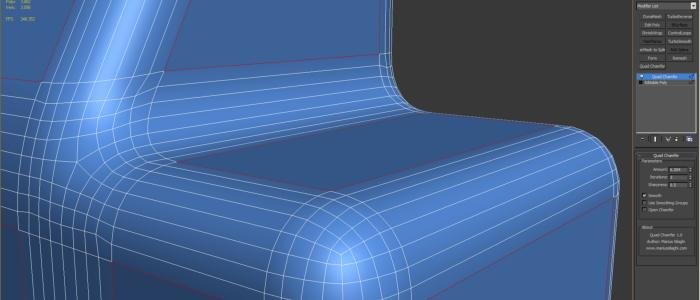


It is the succesor of the Quad Chamfer maxscript, improving on by:
Speed. Being a native c++ plugin now it allows you to modify chamfers in real time.
Control. You can determine the look of your chamfers by controling their sharpness/roundness.
Robustness. A robust new algorithm allows you to chamfer any edge combinations without unpredictable results.
Flexibility. You don’t have to commit to any chamfer, you can always change them later.
Workflow. With the new “Use Smoothing Groups” option you can chamfer the sharp edge between smoothing groups. This allows you to go under the Quad Chamfer modifier and make changes to the topology without destroying your chamfers.

Videos
Comments (46)

simcloud · 2024-05-14

Thanks for the update for max2025! I continue to use your plugin!

Marius Silaghi · 2014-05-23

Quad Chamfer Modifier for 3ds Max 2015 released

>>>

Vadim Sadykov · 2014-04-27

someone already do this script for max 2015!
Marius was lost and no one knows when this script is updated.

good but

ttus · 2014-04-18

Script You're good quality, but the price is high.
But, There is not gonna to get from illegal place in the least.

Please prepare a license for hobby users and students.

script waits purchase

Vadim Sadykov · 2014-04-08

questions do not need to, just do the script, it's just for this topic

yeap

Vadim Sadykov · 2014-04-08

Yes I wizard of Oz and links leaked to the network.

JokerMartini · 2014-04-08

I do not believe the 2015 max has been released yet. How were you able to post images of it in action?

.

miauu · 2014-04-08

Maybe 2 weeks ago it was possible to download the trail version of 3dsMax 2015 from the Autodesk site. Meybe he have it from there.

berdinatilli · 2014-04-09

actually, its available again, just quickly tested the download link at autodesk...

hope marius recompile everything, even QC, because maxes has a glitch :(

luxxeon · 2014-04-09

What exactly is the glitch? Hopefully people are sending in the bug reports.

berdinatilli · 2014-04-09

judge for yourself

*from official trial

Attachments

Click Link

Vadim Sadykov · 2014-04-07

I have a script

Now I do not sit in max2014

this script is a high demand

Vadim Sadykov · 2014-04-07

everyone wants to see the work of facets of maya in max. any reputable developer appreciates the time.

.

miauu · 2014-04-07

I suppose that you have Quad Chamfer for max2014. What is the resul of using it in the same scene as you showed above?

luxxeon · 2014-04-07

What happens if you just extrude that edge cut with "0" height? Should look more like the Maya bevel.

3ds Max 2015

Vadim Sadykov · 2014-04-07

Hey. Modifier does not work in 3ds Max 2015.
I'm waiting for updates :)

.

miauu · 2014-04-07

All SDK plugins have to be recompiled to works with max2015.
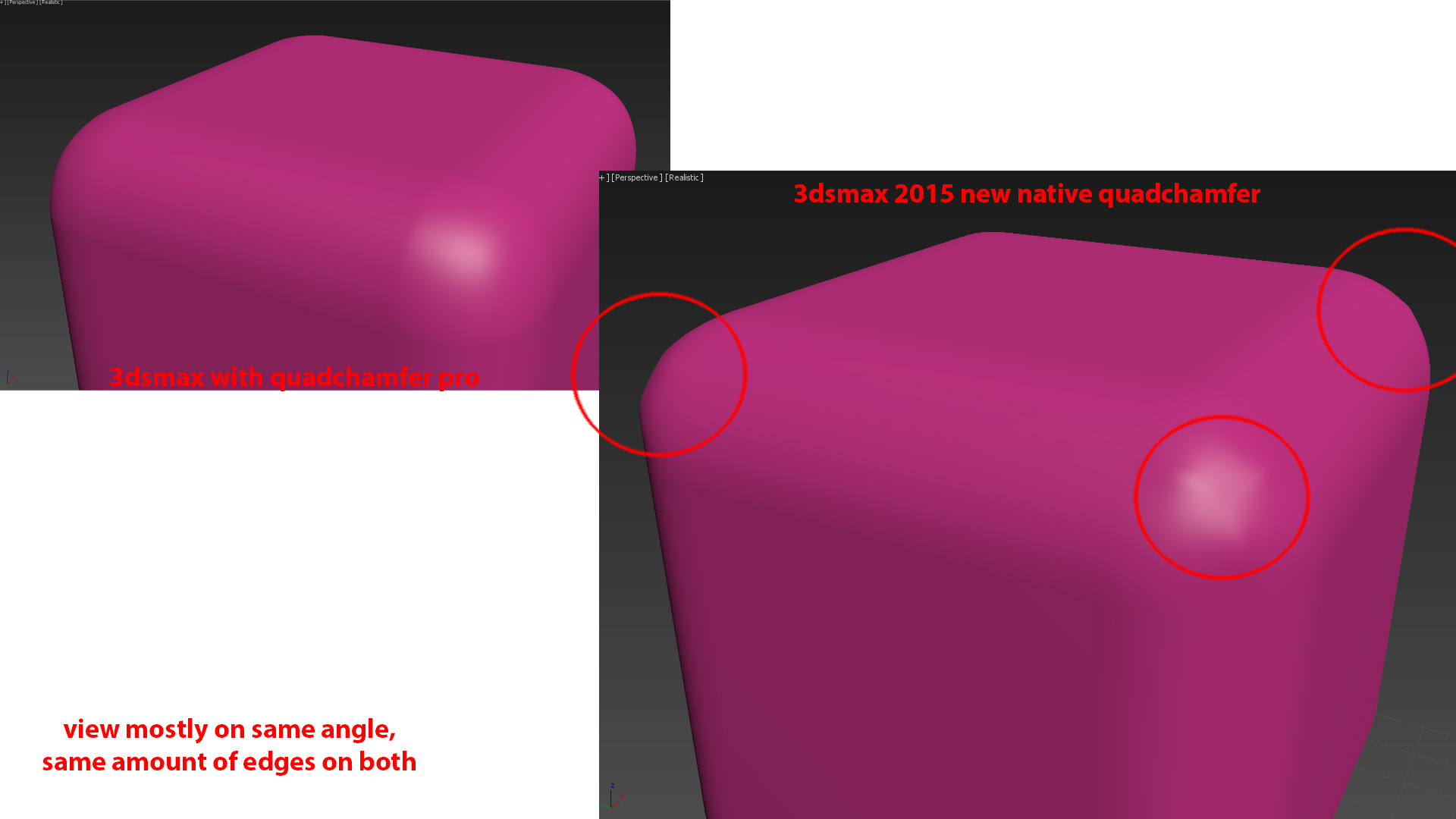
Since Max2015 have Quad Chamfer modifier, can you tell us what are the advantages of this modifier vs built-in in max2015?

miguel1900 · 2013-07-17

Hi!

It seems really interesting, but I have a little question; I have tried some other "similar" plugins to smooth edges, but they don't work with a linked AutoCAD 3D objects, nor with imported ones, I don't know why.
As it seems to be common, I would ask you if Quad Chamfer can work with those 3D objects and how, before purchasing.

Thank you!

2014 support

Marius Silaghi · 2013-05-03

2013 plugins work by default in 2014. Just use the files from 2013.

Quad Chamfer 1.16 update

Marius Silaghi · 2012-12-21

1.16
- Fixed a lot of bugs and crashes

Marius Silaghi · 2012-10-04

@cecofuli Before collapsing the quad chamfer modifier add an Edit Mesh modifier on top and then collapse it. Or if it is already collapsed try adding the edit mesh and collapse it again.

cecofuli · 2012-10-01

BUG: Hi Marius, often I've this bug. For example, with UNDO, the in mesh the round corner disappear.

Attachments

small bug

stealthx · 2012-07-12

There is probably a bug with "Push 2" function. Look at the attachment.

Attachments

fajar · 2012-07-11

damn its very good plug.....youre very creative man.I wonder if autodesk will buy your plug and implemented it in their product.

btw its very good plug and time saver

Quad Chamfer mod Trial

Marius Silaghi · 2012-07-11

I made a 7 days trial version available. Get it from here http://www.mariussilaghi.com/qchamfermod.htm

stealthx right now it is not possible what you are asking, maybe I will find a way to add it in a future release

Really great plugin!!

stealthx · 2012-07-10

Could I ask if there is some reason, why "Iterations = 4" add 15 new edges? I can't add for example 2 edges but only 1, 3, 7, 15 ... new edges. This is problem for low-poly models. Would it be possible to have TWO Iterations = TWO new edges?

Marius Silaghi · 2012-07-02

Changes for v1.13.
- The UI has been redesigned.
- Added ability to save and load presets.
- Added ability to use Round Shading at iteration 0 to make the chamfer look round without adding extra geometry.
- Added a new Face Selection chamfering type.
- The Material Id can be set a zero now so that the new faces inherit the Material ID of the old faces.
- Fixed a bug when chamfering large n-gons with holes in them.
- Fixed a bug that occurred when the cut tool was used on edges that were being chamfered by their edge weights.

http://www.youtube.com/watch?v=jMgd7RrWgww

Quad Chamfer modifier 1.10 released

Marius Silaghi · 2012-05-29

Changes for v1.10 are:
- Adds a "Push 2", a "Pinch" and a "Slide" option for controlling the the edges created by the inset function
- Improves the results of "Quad Intersections" and "Quad Ends" options
- Adds option to select the smoothing group of the faces created by the chamfer
http://www.youtube.com/watch?v=qiFOX2B08aM

Quad Chamfer modifier 1.09 released

Marius Silaghi · 2012-05-27

Changes for v1.09 are:
- Adds ability to inset the polygons created by the chamfer allowing for stylistic effects in combination with the push option
http://www.youtube.com/watch?v=FAsfq2CbVrs

Quad Chamfer modifier 1.08 released

Marius Silaghi · 2012-05-26

Changes for v1.08 are:
- Adds ability to push outwards or inwards the edges of the chamfer at iteration 1 or higher
- Fixes some Chamfering by Edge Weights bugs
http://www.youtube.com/watch?v=_ivz38h_BOY

Quad Chamfer modifier 1.06 released

Marius Silaghi · 2012-05-25

Changes for v1.06 are:
- Adds ability to select between Min, Average and Max interpolation in Chamfer by Edge Weights mode
- Fixes some bugs in Chamfer by Edge Weights mode
http://www.youtube.com/watch?v=_ivz38h_BOY

:o

The Mind Forest · 2012-06-01

Looks cool.

Quad Chamfer modifier 1.05 released

Marius Silaghi · 2012-05-22

1.05 - Adds a Quad Ends option to remove n-gons and the end of some chamfered edges
- Adds ability to assign a material id to the faces created by the chamfer
- Adds a Invert Open chamfer option to keep only the faces created by the chamfer
http://www.youtube.com/watch?v=KBoujqQI0oM

titane357 · 2012-05-22

soooo coool

shopkeeper · 2012-05-21

Great modifier but screw Autodesk for not including basic functionality like this as default in a 3 grand piece of crap software like 3dsmax.

Quad Chamfer modifier 1.04 released

Marius Silaghi · 2012-05-21

1.04 - Improves the Chamfer by Edge Weights option by allowing variable chamfers
- Fixes a crash when open chamfering with turbosmooth on top

barigazy · 2012-05-21

This update worth a million bucks:)

Quad Chamfer modifier 1.03 released

Marius Silaghi · 2012-05-19

1.03 - Adds a Chamfer by Edge Weights option

Quad Chamfer modifier 1.02 released

Marius Silaghi · 2012-05-19

1.02 - Adds a Quad Intersection option to remove n-gons and triangles at intersecting edges

Quad Chamfer modifier 1.01 released

Marius Silaghi · 2012-05-15

1.01 - Fixes a crash when chamfering around triangles or n-gons

barigazy · 2012-05-12

Very good script modifier and let's say most useful tool for industrial and architectural design.
Standard champher operations only works well when you want to destroy sharp edges like this:)
http://www.scriptspot.com/3ds-max/scripts/deformed-edges
Cheers man! Nice works +1