•••••••••••••••••••••••••••••••••••••••••••••••••••••••••••••••••••••••••••••••• VERSION 1.1

With this tool user can deform selected edges of Editable Poly objects.
This will give your model a more natural look with raw edges.
For example: wooden or concrete pillars or walls, pieces of clay or ice, rude metal etc.
Script
Deformed Edges
 By barigazy · Credited author: Branko Živković · 2012-05-03
- Version
- 1.1
- Version requirement
- 2010+
- Date updated
- 2012-05-03
- Votes
- 20
Downloads
- bga_deformededges_v1.1.ms — bga_deformededges_v1.1.ms17 KB
Tags: modelling editable poly edges
Description
Additional Info
Follow these five step:
1. Select your model (the conditions are: model must be converted
as Editable Poly object with none modifiers assigned).
2. Manually select edges or you can use the button
*Select Contour Edges* which will select all edges
with the given minimum and maximum angle between
two faces who share same edge.
3. When the edges are selected press *Analize Topology*
button to recive some inportant pararametars for
precalculation process.
4. I suggest to use default settings for the first deformation
process by pressind *Defor Selected Edges* Button.
Then activate *Interactive mode* which will allow you to have
direct feedback of any changes on your model.
5. You can also use *Peview UNS* (use NURMS Subdivision)
with display iterations, or remove all changes on model
topology (*Revert Object Topology*).

N O T E: If your object has a large polygon count
(high poly model) then do not recommend that you
use *Interactive mode* or if you do choose to use this mode
in the previously described conditions then try to
increase or decrease spinner value only by one.
Take a look very nice presentation of this tool by Chandan Kumar on cg.tutsplus.com http://cg.tutsplus.com/tutorials/autodesk-3d-studio-max/quick-tip-how-to…
Installation:
Place the bga_DeformedEdges_v1.0.ms file into a
max script directory.
This script is written and tested on 3dsMax 2011 x64
and 3dsMax 2012 x64, but it may work in older version.
Credits:
Denis Trofimov (Denis T) for his great input
regarding optimization of code.
You can put a comment on CGTalk Forum where you can see also
making of *Deformed Edges* script. Follow this link:
http://forums.cgsociety.org/showthread.php?f=98&t=1048132
Recent tests with version 1.0

Version 1.1 New Features:
- now you can use BEVEL operation to create a stitches
NOTE: To disable bevel option just set *Bevel Height* value to ZERO.
- added Preview Checker Map options for cheking the model UV's.

Comments (32)
Test in 20184
 LAOMUSIC ARTS · 2026-02-10
Hi!
I just test it in Max 20184 Vray36, were it just chamfers the selected borders.
Hope this helps othjers!
LAO
Thank you for writing that one.
din · 2022-10-11
This script is just what I need for a specific object in a scene. Thank you!
Great script, toolbar shortcut?
fede4383 · 2018-07-17
Hi and thanks for this very usefull script
I was wondering how to add it on a toolbar button?
the 'select contour edges' is incredibly usefull, I'd like to use it sevral times while modeling
Thanks
Federico
Results are not that great and can be done in 3 simple steps!
brainsgonedead · 2016-11-09
I tried this script and it did not give good results and is a bit slow and has issues with undoing (history mode).
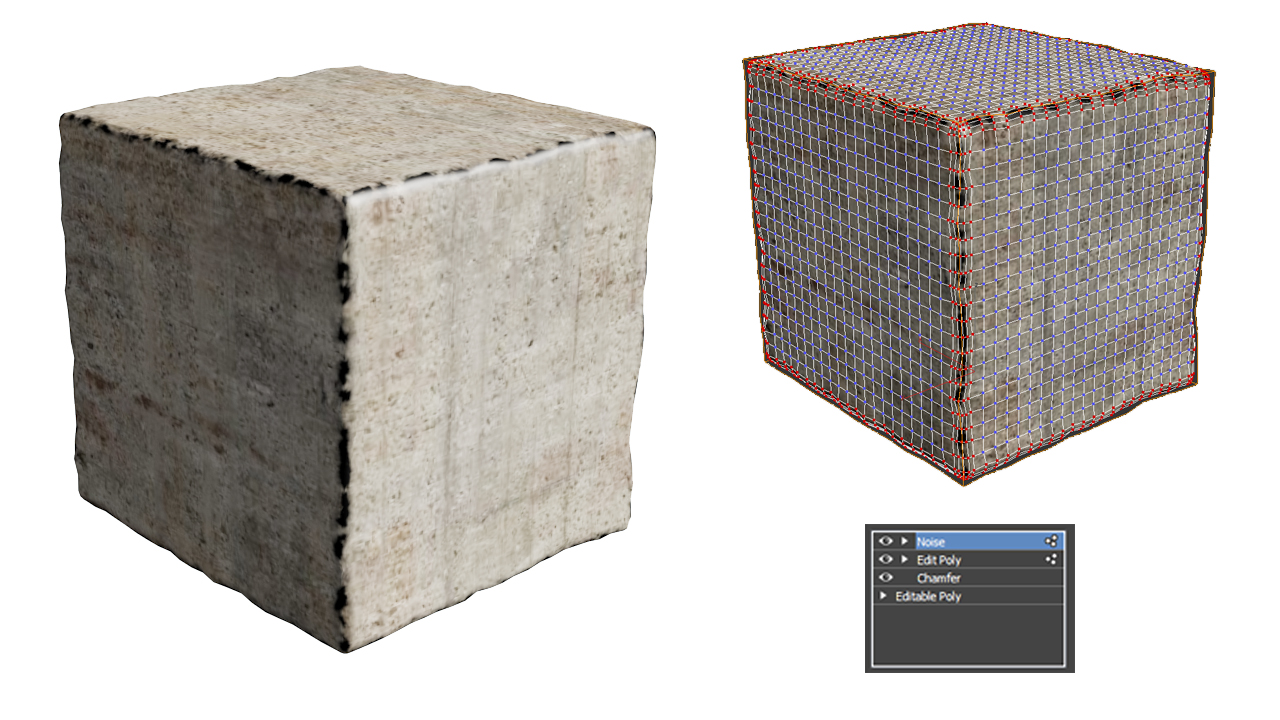
See my attachment, all you need to do is add a chamfer mod, add subdivision, select the edges of the chamfer around the object, then select the vertices (from edge mode) now add a noise mod. As shown in the attachment image...
Attachments
- untitled-1.jpg — untitled-1.jpg569 KB
Improvements
JakubCech · 2016-11-03
Hello there!
Great script.
I would love to ask you for improvements - these are my suggestions!
1. ma deform edges a modifier without the need to have object converted to edit poly (not destroying stack).
2. Make "bevel" function edges orientation aware - so when there is "bevel" being applied on an architectural column and lets say ceiling - its working on 90 and 270 degrees edges according to normals. So there is no need for 2 passes.
3. Make created corner quads! Actually this script is making corners look very wierd.
Let me know what you think and if I am missing something that is maybe already applied.
Thank you,
Jakub
Great !
Tommy_LedZep · 2015-09-29
Very useful script, thanks a lot !
Thank you!
 artrager · 2014-04-07
Works great! I will use this all the time, a much needed tool for stonework. Thanks!
I've only wanted this for forever . . .
 bathyscaph · 2014-03-20
. . . very clever tool. Thanks for sharing!
barigazy · 2014-03-21
I'm glad you like it :)
Cheers!
james88 · 2014-03-09
Great idea!
 lightcube · 2012-10-29
I'd love to see John's request for this to be converted to a modifier.
barigazy · 2012-10-30
When i have free time i try to make modifier version
rs3d · 2013-07-10
A modifier would be great!
barigazy · 2013-07-11
Yup. I agree with that, probably in the next update.
Cheers!
Ooo...
 The Mind Forest · 2012-05-22
This looks awesome, I can't wait to use it! Good work!
barigazy · 2012-05-23
The Mind Forest, thanks for the nice words.
 JokerMartini · 2012-05-22
Once this lives inside a modifier then max modeling will have everything it needs.
barigazy · 2012-05-22
Thanks for the suggestion, John
 Michele71 · 2012-05-15
Very nice :) Thanks
Thanks,Michele71
barigazy · 2012-05-19
Thanks,Michele71
 le1setreter · 2012-05-08
well done. working great. many thanks.
barigazy · 2012-05-08
Thanks le1setreter
Any suggestion for upgrade?
I prepare big update for the next version.
Suggestions
 trixian · 2012-05-15
First off, nice script.
My suggestion would be for controllable noise size in addition to the amount you have now. On longer \ larger objects, the noise on the vertices looks uniform and unnatural. Maybe even use a noise map so one can control it from the mat editor.
barigazy · 2012-05-15
Thanks, trixian.
For longer \ larger objects you must manually adjust edges length
(cut edges or move verts) and the script will do the rest.
The main idea of the script is not to use modifier or maps.
All this extra stuff will slow down the execution of main function, an block interactive mode. I planing to add other things like deformation of inner edges, if nothing else is preventing me from working on this tool.
Great...
Garp · 2012-05-07
... and damn useful!
Thanks a lot for sharing :))
barigazy · 2012-05-08
Thanks Garp.
noalana1 · 2012-05-06
thank you so so much for this great script!
Thanks for the nice words,
barigazy · 2012-05-06
noalana1, thanks for the nice words.
barigazy · 2012-05-04
Thanks raistlin.
You have a very good work and ideas on your site,
especially character illustrations. Just keep it up!
Cheers!
 raistlin · 2012-05-04
Great Idea ! Thanks for the share !
Plus 1
JokerMartini · 2012-05-03
Great script, thank you again for sharing the goodness.
Hi John,Thanks for the
barigazy · 2012-05-03
Hi John,
Thanks for the compliment.
I'm glad that someone can serve this tool.
But this is only the first part of the script,
the second part will be better.Also I plan to add some cool stuff
for inner edges.
Cheers!