What is it: A collection of tools that helps any texture artist with UV and texture related tasks. The main philosophy is to shorten typical steps into simple context sensitive single clicks. You don't need administrative rights, just drag the MZP file into the viewport and let it install itself into your 3dsMax user folders.
Most scripts are developed by me, I asked some people however to share their scripts and let me include them.Note that the scripts are free to improve, change, use for your own, just include the credits should you repackage anything. I stored each tool into a self contagious *.ms file so it should be easy to explore and extend the scripts for your own needs.
Installation: Just drag the MZP file into the viewport and install it from there. All files will be stored in your local 3dsmax userfiles so you don't need any Administrative rights to install it.
This 3dsmax user folder is usually located under: C:\Documents and Settings\user\Local Settings\Application Data\Autodesk\3dsmax\2010 - 32bit\enu\
The installation will create a folder within the 'scripts' folder called 'TexTools' in which it will copy all the TexTools files that are needed. Four icon files will be copied into 'UI\usericons' for the macroscripts. Should the installation fail for some reason a prompt window will show up with a instruction on how to copy the files manually to get TexTools running.
Roadkill needs to be downloaded separately from:
http://www.pullin-shapes.co.uk/page8.htm
VideosComments (115)
Checker Broken on 2021
TTrazix · 2020-10-17
I confirm Chercker Map is officially broken on max 2021 until someone find a fix !
Checker Map Swap not working.
TTekinette · 2020-10-10
The Checker Map Swap button doesn't seem to work anymore with 3ds Max 2021. Not sure how to fix it. Used to work fine with Max 2018.
I like and hate this tool
JJustAnUnknownUser · 2020-06-14
This tool is great apart from one thing which almost ruins this tool completely for me. It's the split button. To press that button is a high probability as it's next to the iron button which I use all the time. If you press that fucking split button your UV is fucked without any undo. So you have to do everything again.. So much time wasted, cause of this poorly coded tool. The only thing you have to do is add either cancel action button or have an ability to remove certain buttons from the toolbar. And that's it.. god
.
Jjahman · 2020-06-26
So, you missed the button and the tool turns from great to poorly coded? Are you serious? It's a decade old free tool.
Does this script still work!
Rratatouille · 2019-10-06
Does this script still work in 2018 and 2020?
If not, then any good alternatives?
thanks.
Nneel3d · 2019-11-28
it works with 3ds max 2020
Pixel Unit Transform Floater disappeared
SScampbell · 2016-01-12
Been using your script for a while, love it. I did notice that the Pixel Unit Transform Floater has disappeared all of the sudden. Im not exactly sure why. Everything else still works perfect. only thing that has changed was a new monitor with bigger res, but didn't think that would really kill that.
I should note, that when i hit the edit UV button it shows for a second then disappears right away.
Thanks for any help and love your script man saved me many of hours
EDIT: after messing with it a little more it does look like an effect from resolution when i shrink the window and save current settings it shows back up.
Installation for versions older than 2011
PProfound semantics · 2015-08-20
Press F11 -> Open mzp file
Ssean00 · 2015-06-19
When using TexTools you will see a Toolbox inside the GUI of 3dsmax. Most functions only work if you are in the editUVW mode in 3dsmax.
I'm also getting a dot net runtime exception on the clipboard (image_renderto) when trying to bake a blockout map
asymptote · 2013-12-06
The chequered map is squished in the viewport when using 2:1 ratio textures, is there a way of preventing this ? I tried resizing the map but it still views as a 1:1 ratio in the viewports.
Awesome tool btw ;-)
Getting a flat normal
Mmastrein · 2013-07-28
Hi! I have some problems with the tool. When using max own render to texture feature I get a good normal map but when I use your tool for it, my renders comes out flat. Even though everything is setup correctly and in the same manner as when using max's own tool.
Getting a flat normal
Mmastrein · 2013-07-28
Sorry commented on the wrong tool!
Good
nhatkenhpvn · 2013-05-04
so great!
One issue
VvitalquaD · 2013-03-07
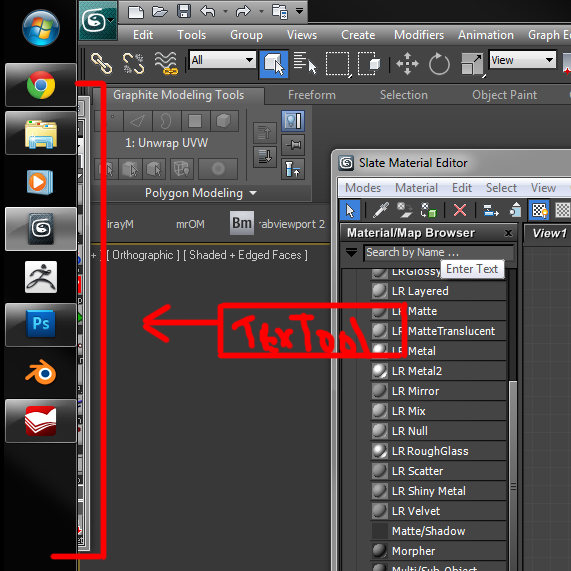
Great tool, though it has one issue. The panel appear on the left corner of a screen, outside 3ds max and I can't move it.
The issue is not with the program but on how you set Windows TaskBar, move it down and problem solved.
Consider that most people have Windows TaskBar on the bottom, not left.
Where is the soft-selction function?
Llordraidis · 2012-12-20
Awesome script! Love it. But are there any plans to integrate the default UV soft select tools? Currently I have to temporarily disable your script whenever I need to access them.
Thanks a bunch!
How change link to photoshop version
Gspoutnik · 2012-11-07
Hello & thanks for this great script that i use since many years.
one thing.
i have two photoshop versions and i would like to change the link in Textools for the newest version of photoshop.
Any solution for this?
Best regards
Gspoutnik
JokerMartini · 2012-07-18
such a useful tool. This has save me quite a fair bit of time. Thanks for the tool.
Sstewmarton · 2012-07-18
The only dissimilarity is in where the list of records originates. with this move toward, all you need is a list of records in a text file to course. we have manage a nice assortment fb status of that can you like and brains better.
Launching problem
Vvondecrolock · 2012-07-07
I just come back to max, first reflex.. TEXTOOLS :P A lot of improvement, seem's cool but after instaling ( files are in the proprer folder, auto instal worked great) the launch bouton in the main toolbar doesn't work : / I had no problem with older version and max 2009, but i currently use 2012 64bit now (fresh install).. Any idea? 2012 is not listed above in supported version, but i see it working properly with max 2012..
Hey there
AArtie · 2012-01-28
Great stuff for sure! I have a question here - after installing 4.10 version for a Max 2012 i can barely see uv seams and edge selections too. Could be a bug?
Error .. Error .. Error ..
Ssid0013 · 2011-12-28
hey, i downloaded the file many times .. but the rar file could be extracted as it says " The archieve is either unknown format or damaged " and as i run the direct .mzp extension file through run script option it says " Runtime error : Missing or invalid zip package file .. " .. Even the drag option is not working, i tried every possible option . please suggest what should i do ..
spline mapping --> 2 ideas to improve
Ppaulov · 2010-12-05
Hi. Here go a couple of suggestion to improve the existing spline mapping tool.
1) WHen I do aply a spline mapping to a curved road surface, the mapping time is amazingly reduced, but I always have to manually adjust the mapping cause the scale is not the correct one, even if "real-world Scale is active. The hot feature would be to adjust the road with uvwmap to the texture width and scale the lenght of the uvwmap acordingly to the size of the geometry. Doing it by hand is really frustating as has non of creative.
2)To me generating splines for the mapping is not too hard, but this means that I've to be selecting a spline for each road segment and do it one by one. It might be possible to batch map selected objets by "generatin" their mapping spline from their boundaries. I mean, as 3dmax has an option in the editmesh mode that allow to extract the boundary, it might be possible to extract it and take one of the longest segments as mapping spline and map a selection of objets at a time.
This last point might be impossible but with the first I would be more than happy.
bye!
Linh3D · 2010-12-05
so great!
Ffajar · 2010-07-12
dang it , why autodesk 3dsmax team dev doesnt include this awesome tool on new release?
GushingDizzy · 2010-07-09
Hi,
This new version seems to install ok, except that I get this error:
GushingDizzy · 2010-07-16
Ah, ok. It seems that the .mzp file that I download here from Scriptspot causes installation problems, but the one from your site doesn't
TTorchManTM · 2010-06-24
Hi, thanks for this great tool, i really like it, but sometimes i getting a strange behaviour in the UV Edit window, when Im moving with UV polys, the moved part moves away from cursor.
Here is short video for explanation: http://www.youtube.com/watch?v=PlvS8RHIM_I
Its something wrong with the TexTool, or am I doing something wrong?
Thanks for reply.
AAnkebut · 2010-06-15
Does this work @ 3ds max 2011 x64? Last time I tried it didnt (buttons has no functions)
Svennovich · 2010-06-12
hey, thanks for this cool script i start using it in my workflow.
Also learned A LOT from your maxscript!
It saved me tons of time & research. you are in my credits of my first released script ;)
hi,renderhjs
it's a great plugin.
but can the "split" tool be worked only on selected faces?
JokerMartini · 2010-05-31
Hey renderhjs I've revamped your Checkermap button that allows for multiple objects to be selected at one time and store each objects individual material as well as restore it after using the checkermap shader. I can send you the file via email.
renderhjs · 2010-05-13
updated to version 3.95
changes:
- fixed some Roadkill bugs, now it should link to any folder and work with max 2009 as well
- added a function that shifts overlapping shells except 1 shell to another UV 1:1 space and back with another click. Useful when you need to bake maps using the Render to Texture in max and you have stacked or overlapping UV's which usually would cause artifacts in the bake.
- modified the 'linear' tool in that way that a single edge automatically extends to a loop selection, a default left click aligns without any axis snapping and right click snaps to the U or V axis.
- improved Setup with Link resources and 'show userfolder'
Oothoap · 2010-05-22
The video demonstrating the teapot and roadkill shows selection of an edge then expanded in to a loop. Next it turns in to a seam. How do you turn a edge loop selection into a seam in the UV editor?
I tried the "edge to seams" button under the Unwrap stack out on the main rollout. That turns the loop into a seam but roadkill doesn't see it. The teapot is not cut on the seam. It's as if I didn't make a seam at all.
What step turns the loop into a seam?
thanks
renderhjs · 2010-05-09
updated to version 3.81
new features are:
- improved setup, initializes without hick ups and inits custom variables at the first launch after the setup.
- roadkill unwrapping with a single click from within just max. It cuts along existing uv edges and unwraps them using the ABF or LSCM method. Sadly either the 3dsMax exporter/importer or roadkill changes the vertex order which is why it attaches a poly copy as a new editable poly modifier. Roadkill needs to be downloaded separately but is freely available.
- Command to copy UV shell groups to smoothing groups (good for normal mapping stuff)
- If you uncheck "Override Edit Colors" it does not touch anymore the bitmap background in the UV editor - instead it looks cluttered like the good old max
@The Card
i had the same prob,if you click the install button a pop up should give you the directions to install manually. It tells you to go to the users appdata-then local settings. However, Win7 hides appdata by default so have to right clik in your user folder, then properties, then check the read only box to for the appdata folder to unhide.(working on MACw/bootcamp no prntscrn) This may be the noob approach but it worked for me. Hope this helps, Mad props to render!
Bowplane · 2010-04-05
@render
for some reason my max 2010 does not keep the editor tools when i shut down even if i run as admin, may it be attributed to me usuing the educational version? again, great work.
DDarkNemos · 2010-03-30
Dunno witch version i tried personally but that version did not have undo. Does this version have undo?
Zzwick · 2010-03-15
awesome script, must have. Now Max just needs the tech that the Zbrush guys made, called 'UV Master'...
Ok. I'm getting this: "Runtime error :Epoly face index out of range (1 or) 99:100 " when trying to get texel ratio. Everything else works fine now. Thanks,
- Fix for chinese windows users: error with ° character in the split by smoothing groups script.
- Installation comes with a temporary manual installation instruction should it fail to install the easy way.
- Max2008+ only: New Button in the Pixel Transform Floater 'snapPix' wich will snap the selection to pixels depending on the Texture size setup. Usefull when doing low poly/ pixel art. http://img188.imageshack.us/img188/225/snappixels01.gif
- Minor fix regarding the Transform Floater when starting it again. Someone at cryptic had a crash with it hope it is fixed with this.
- Fixed double undo for the Linear button (aligning edges or verts on a line). Undo was actually working but you had to press it twice in order to undo just once.
WWaxmodeler · 2010-02-19
this looks like a pretty cool script.
My question though is can you make it work with max version 8
Aaaeiria · 2010-02-19
hello
What offer to unwrap?
Toolbox or unwrella or lscmunwrap or else?
MMAlice0409 · 2010-02-17
I am using Max9 and having the same problem smer has.
The script looks cool though. UVing in Max9 is just so painful.
Rrempage · 2010-02-15
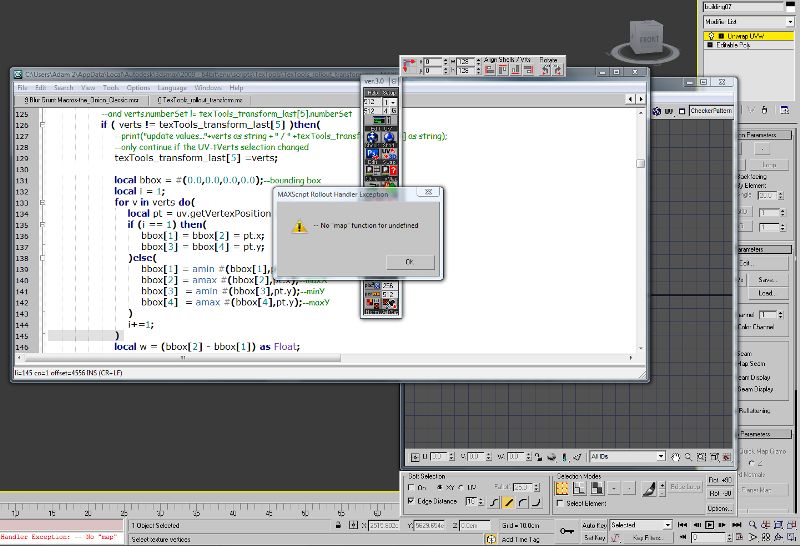
OK. I have this problem with old version popping up sorted. But still getting this MAX SCRIPT ROLLOUT HANDLER EXCEPTION "--No map function for undefined. "
Can you tell me renderhjs what is that all about?
Many thanks
TtheCardenas · 2010-02-13
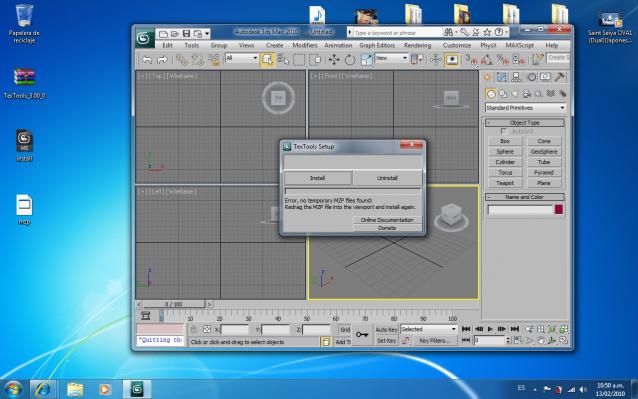
hi a cant
install helpme error:
error no temporary mzp files found redrag mzp files into the viewport and install again
somebody help pliz i have w7, 3d max 2010
😳
Michele71 · 2010-02-11
I love you Man! Very Thanks for the BIG Script....
noel_d3 · 2010-02-20
About improving XYZ to UV swap.
For the swap function between UVW XYZ, it would be welcome to have two editpoly modifier instead of one :
one for cutting the model and one for moving vertexs.
It helps to put a morpher modier between UVW and XYZ with disabling one of this two editpoly.
It's very useful with a skinwrap to paste objects on the model like a skin from UVW, as with scripts MLdecorate and SlideKnit.
EDIT : In fact you can simply add a morpher modifier to go back to the XYZ from UVW.
renderhjs · 2010-02-11
@othoap: redrag the MZP file in the viewport, within the setup there should a big notable 'Uninstall' button. It will swipe all the files created by the script itself, max and or windows including macroscript links, icon files and windows temporary files. There is a simplified log in that uninstall panel that should give you an idea what files and where are deleted.
@rempage: you seem to still have a very old version of textools perhaps in your scripts/startup folder? Remove it from there. For example on my copmuter that folder is located at:
C:\Program Files\Autodesk\3ds Max 2010\Scripts\Startup\
So if you find the old TexTools file simply delete it.
Alternativly and this is how newer version get sweeped simply redrag the MZP file (of the most recent version of TexTools) in the viewport and run the Uninstall process. It should detect all TexTools files.
Oothoap · 2010-02-11
renderhjs,
Thanks for the reply. I'm sure this is ME, not your wonderful app.
Been there tried that, did not work. I even looked behind the interface to see if the dialog box was hiding. I did look in C:\Program Files\Autodesk\3ds Max 2010\Scripts\Startup\ and the folder is empty, "weird huh". TexTools runs in max so where are the files?
Rrempage · 2010-02-11
Thanks. I missed that old TexTools file in sturtup scripts.
Thank you for great script.
Oothoap · 2010-02-10
please instructed on how to uninstall. I can't find any of the installed files in the win7 max2010 folders scema. Is there an install log from the mzp?
Rrempage · 2010-02-09
Hi. I have problem trying opening editor second time. It shows me this error : --No map function for undefined.
Also I can't get rid of TexTools 1.4- it starts with max even after installing TexTools 3.0. I use 3ds max 2009x64
Thanks.
Great script.
I can't find the ring and loop selection for linear align.
A great feature that I long dream would be to project a uv from an other mesh, like skinwrap for skin.
Best regards,
Léon
Ddutch · 2010-01-18
when using a uv channel other than one and using the checker button causes problems.
the uv texture channel is always on channel one.
Would be nice if it automatically set the texture channel to the channel you're currently working on.
Ccapcaverna · 2009-11-27
very good script
Aamuha005 · 2009-11-27
superb tool ! i like it
Graph · 2009-10-29
i've encountered an error in the alignment function fn_texTools_transform_align_selection
the polyOp crashed because it was operating on a mesh, you should maybe get the type of the node and set cases for Poly and mesh
appart from that verry nice toolSet
Ssmer · 2009-10-20
when i drag TexTools_2.91.mzp to max 9 or max 2010,
it always have an error.
what is i must to do?
Qq378719579 · 2009-11-21
me too.
renderhjs · 2009-10-09
smal bugfix with 2.91 (linear macroscript has been fixed)
added 2 new things in v2.8a new UV split method to split your UV based on the smoothing groups of the model: another tool to simplify the spline mapping (2009 only!!) there are some things of this release not yet done like the pixel input transform floater and some stuff of the peel mapping script which is why I would flag the release as rather experimental.
renderhjs · 2009-09-30
@Cathodeus: 1.) forcing defaults (openen UV-editor): eventually yes- though still if you open it the regular way in 3dsmax it should come with your stored default settings.
2.) linear line up script: yes thats possible, usually I take the right mouse button for alternative modes. I will change the code so that in the next release right mouse click will snap lets say in just 15° instead of left mouse click 90°.
@cecofuli: taken care of, will be fixed in next release, thx.
besides those things I have started experimenting with a new floater that will allow pixel unit wise transform type in for selections.
Ccecofuli · 2009-09-28
Hi,
if you open the script, without any mesh selected, and click the "WIRE" buttom, textools gives an error :)
CCathodeus · 2009-09-23
@RENDERHJIS
Hello man,
Congrat for your work. I'm using your plug in everyday now. Before uving was a nightmare but now i'm happy with it.
That's why i'd like to donate you money. Not a lot but you're making things easier for us, your script is evolving fast and without too much bug. The ui is really nice and user frinedly. If you put on your website a paypal donate system i'll be happy to encourage you.
Got new questions for you or wishlist :
-I'm now openings the uv editor only with your tools it's faster and force the autodesk options :-) but i'd like to have my own settings (like grid spacing, and grid colors). Can you provide to users the ability to setup those parameter into the setup options of your script ???
-I love your "make uvs linear button" but today i was making linear diagonal uvs but they were under the 20 degree threshold so the script maked it vertical :-)
Is it possible to have vertical and horrizontal linear uv with clicking the script button. And diagonal linear uvs with shift+cliking the script button. Sorry if it's not clear.I think that will be better than new buttons into the ui. The ui is perfect actually : Not to big. With a perfect button size.
-Is it possible to let stuck your script window with the UvEditor window. Like it when the user move the uveditor window textools will fallow the window.
-I think that two checker are enough the max version and the all colored numbered version (The green and bleue one is too much). When we must pass from shader to checker we must click 4 time. Saving one click will be really nice ^^.
Thanks a lot man.
Hope autodesk will buy and integrate you script into the next realase.
Sscumworks · 2009-09-22
KILLAR WORK Render!
Ffajar · 2009-09-22
everyday I follow this script development and everyday I got good surprise from this script too.....Good work and good speed of work!!
unfortunately I cant proper edit the documentation page with all the new bake types atm. because my apartment is already empty (moving). I covered that for the ones that are interested in my previous posts, I will update the whole documentation sometime later.
New added are:
baking types:
Element blocking
Smoothing Groups blocking
Material ID blocking
Ambient Occlusion
Light Tracter Advanced Lightning (clay render)
Cavity Map
Hard Eedges (smoothing group edges)
Transver UV layout
mirror tool: seöect either 1 edge or edge loop selection to average booth sides. Or select just 1 half of the shell as face selection to mirror it to the other side.
other changes are all about bugfixes like opening texture in Photoshop (only if file exists on disc) or some Texel pick and apply tweaks so that they work with float values instead of integers (more preciese).
And the peltmap can now be triggered also with just 1 edge selected as it will then edgeloop that edge selection cut it there and try to pelt- stretch the associated shell.
AAnkebut · 2009-09-13
very nice...i really cant wait anymore...especially the mirror function is really useful...please release it :D
renderhjs · 2009-09-13
well who knows ;) smal overview of the blockout map types:
AAnkebut · 2009-09-13
it would be very nice if you could release 2.5 as soon as you can...hope before moving to australia :)
renderhjs · 2009-09-13
as for next version, don't know. I am about to move to Australia within the next weeks so stuff is tight and I can't predict much.I do however try to offer some time whenever I can on this project.
Aside from smal fixes at the moment I am workingon a re-design for the baking maps interface as well as some additional maps you can bake:
the light Tracer results are similar to the ones used here:
All changes are about pick/set texel density tools:
geometry and mapping densities were treated as integer numbers o_0, as soon as this is "a bit inaccurate" now densities are treated as floating point numbers. Density values are saved within scene, so you don't need to pick them everytime you open your scene or restart script(uv_toolbox_2.23.ms)
Pick tool now working with any type of mapped geometry, not only epoly. It now calculates densities for selected faces only (if there is a face selection). It will not close UV editor window if one is open. (fn_20__texel_pipette.ms)
Set tool now working with any type of geometry with unwrap UVW modifier assigned. It will not close UV editor window if one is open. Right now it works only if one object is selected, unwrap UVW assigned and faces selected to assign new density on them. No multi-object processing and processing objects without modifiers. Sorry for that guys, but I don't really need such functions, so I didn't write them 😳 (fn_19__fixTexelDensity.ms)
All new functions are not tested right now, so do not install this modded scripts if you are not familiar with MAXscript, wait untill new release, hope renderhjs will include these features into next one.
@ IN_human:
I experimented with the .open as well but I noticed that all the text fields got reset. Haven't thought about re - initializing the GUI though. Will test yours and mix it most likely with a start TexTools mix in case it has not been initialized before at all.
IN_human · 2009-09-04
Here's another version of hide/show macro, this one will behave like checkbutton on a toolbar.
and thanks for changes you made since 1.70, will check them. Right now I'm trying to make pick/set texel ratio tools to work with selected faces, not just whole object. Will let you know if I will make something useful.
CCathodeus · 2009-09-03
Thanks a lot for that tool. Loving the align button, compr, rectify and normalize fonction.I'm not bored anymore by uving 3d objects. Thanks to you. It's cool to know that solutions are coming even if it's not from autodesk.
Maybe they will buy this tool I hope so.
But i did found a bug.
While pressing the check button twice get this script error because the bitmap path is no longer "/scripts" folder but "Script/Textools/" can you please correct this for the new version :
Thanks a lot for that tool loving the align button and compr.
- macro and icon for show & hide has been added
- color changes to the UV-unwrap editor should be passive, meaning that it stored former settings if you apply the regular way a UVWunwrap modifier.
- as for texel density, the script is not yet perfect. Will try to look into that sometime
apart from that,
many additions have been added since then, like blockout map rendering, cavity map, stitch, quick pelt mapping.
For a complete overview on whats included now check: http://renderhjs.net/textools/
IN_human · 2009-08-23
Just installed, nice toolset and really usefull.
But there's just a few things I don't really like:
-it replaced my color scheme in UVW editor 😠
-it closes UVW editor everytime I assign texel density to a selected shell
-no macro to show/hide UI. In fact I don't need this toolset in my startup at all as soon as I don't edit UVs 100% of my worktime. So I just want a hotkey to show up UI when I need it.
Of course I can fix these things for myself, but you may add this changes into next release too
renderhjs · 2009-06-24
hey thats very cool,- will check it out right away and of course replace it if its better.
Right now I am working on a new GUI prototype for future releases which is why this project is a little bit on pause release wise.
@ kpeel: if you want to develop local e.g just like in what your screenshot tells me extracting the scripts - you have to put the bitmap in a folder that maxscript reads as a local e.g the
[project_folder]/sceneassets/images/
if you then compile or run the script it should load proper. alternativly you can open that folder using:
(I added a rollout in the options panel of the script that holds a button for this folder as well)
@ Dannat121: yes and no, the majority of the scripts probably do not work with max 8 simply because some features are not yet accessible in maxscript. But some might actually work, I did not have the time so far to test it out on max 8.
@ dustinbrown: has been added to the hotlist on the documentation site and linked to your post:http://www.renderhjs.net/textools/
I want the symmetry stuff as well, as soon as I have some time I will wrap my brains about that one - see if I can come up with something.
A symmetry tool would be AMAZING. If you pelt map a human head and relax it, you can often loose symmetry in the UV layout for whatever reason. Having something that will whip things back into symmetry would be great. The old technique of UVing half the model then mirroring it doesn't work if you're bringing the model to and from a program that relies heavily on point order being maintained, like ZBrush. Being able to maintain symmetry within the UV interface would be HUGE!
DDannat121 · 2009-06-05
OK does anyone know if this works in max 8 because if it does or if anyone can get it to work for max 8. I would love to use this!
Thanks so much!
Kkpeel · 2009-06-01
Thanks for the script "uv_toolbox_1.60.zip". when I start max this is what I get. I went into photoshop and resaved "icons_renderhjs_uv_toolbox_xl.bmp" but I still get this. what am I doing wrong.
Thanks in advance
most of the commands are now split into seperate *.ms files each with its functions inside. This makes it easier for me to manage updates but also easier for you if you want to use a single script or modify it. the functions are loaded into the main script file, in this case: uv_toolbox_1.60.ms
renderhjs · 2009-04-29
yes I will add that in a near future release, it is not that easy though for me- I will try to find a soloution that will work for me. Meanwhile I changed to 1.40
changes:
minimize mode (double click on header logo, to shrink and expand the toolbar) this way it is taking less GUI space while still being present. It is a quick solution for the demand of having it able to run - which I will add at some time.
max 2010 GUI bugs workaround (max2010 displays some text buttons instead of image buttons). In other words it is now usable in max2010 as well.
setup rollout floater when you press the "setup" button
ability to stores settings in a local *.ini file, currently the following gets stored and recalled:
panel position
panel start minimized
background color view (UV editor and flat view)
last used texture size
last used padding size
start as minimize mode
debugging tools for maxscript development but also you to see where things are stored (macroscripts, *.ini files), but also inspect UV map channels. It can be accessed from the setup panel (lowest rollout there)
texel transformation now works also on UV sub-selections (transforms only affected UV shells of the face selection). The pipette does not yet work on sub selection of UV or obj face selections.
removed $.unwrap2.setFillMode 2; which forced the UV editor to render selections as solid fills and under some max9 installations under vertex mode weired display errors, see also this threadhttp://boards.polycount.net/showthread.php?t=62742
fixed pixel padding in the packing function (I devided integer through integer which in maxscript case could not be delivered in the desired float value)
optimized a little bit the explode UV selection to more usefull shells
fixed the open in PS for max9 as it used a method that was only available for max 2008 (some array stuff)
removed 1 button/ icon in the texel category as it was not yet useable
Ffajar · 2009-04-28
example of macroscript, from this case:
macroScript YOU FILL IT Toolbox Selected category: "YOU FILL IT" toolTip: "YOU FILL IT" buttonText:"YOU FILL IT"
(
global YOU FILL IT
ON execute DO
(
fileIn ((getdir #scripts)+"/YOU FILL IT/uv_toolbox_1.20.mzp")
)
)
*YOU FILL IT=variable
of course all variable depend on creator!!
BBonesJovi · 2009-04-22
Thanks For very good script!
I like to use your script, but there is one annoying thing - the only way to start it when
its closed is to run a script directly. Please make a button on a common toolbox that would start the script with a single click.
Fast release this function =)
macroScript Macro3
category:"DragAndDrop"
toolTip:""
(
fileIn "C:\Program Files (x86)\Autodesk\\3ds Max 9\\Scripts\\uv_toolbox_1.20.mzp"
)
updated to v 1.2new features
renderhjs · 2009-04-21
updated to v 1.2
new features include
reniewed icons
Texel (ratio of 3d mesh size and texture spaced on it) apply tool (works also on multiple objects)
Texel read tool (pipette)
renderhjs · 2009-04-16
updated to 1.10
changes:
opens associated textures of the selected objects in photoshop (photoshop must be installed)
crops the UVlayout to the minimal space including pixel padding space
swaps your UVlayout with your 3d world Object data, if you hit it again you get your 3d model back IMPORTANT: this merges your object to a single Poly or Mesh (depending on the direction [is detected automaticly])
renderhjs · 2009-04-14
updated to v 1.0
major changes are:
new GUI +23% bigger colored buttons while staying with the same tools size
channel support: if you assign a new channel number e.g 2 and hit 'open Editor' the script will automaticly open for you the UV channel you selected in the panel. Other functions that were changed for this: render UV, AO, Faces
new explode button: will basicly unwrap autoamticly all the selected faces (usefull when starting from scratch)
like before macro support is now included but yet limited to the most important functions- more will come in the next releases aside with saveable options.
smaler interface (less buttons, nudge stuff is gone for now, same as AO settings)
partly multiple objects Unwrap support for max2008/2009, including: open/close editor, render uv template and uv selected faces, smart extend selection
new function: 'smart extend selection' though only available atm. as macroscript. It extends you selection of either faces or edges to that extend that when in face mode: it selects the whole shell that belongs to the faces. When one or more edges are selected it tries to edge-loop extend the selection (well as good as max can do).
unfortunately autodesk did not a propper job when implementing the multi-UVWunwrap support as it fails at some functions at some random spots, more about that matter:
so from my point of view multiple UVW unwrap usage is not advised in most situations unsing this script - but dont worry it wont abort or puke errors in most cases- instead it often only processes the first object of that selection.
renderhjs · 2009-03-26
thank you Christopher, seems like it really got attention after you putting it on the front page. I've seen recently a few other people trying their hands on uv related maxscripts which is nice.
At the moment I am adding macroscript support so that single functions can be added to shortcuts or custom floaters.
There is also anew option menu comming along that will save certain settings and restore them each time you launch the script again (or restart max).
I got a stack selected shells script quite well running
it scales, rotates and moves the shells on top of each other. It only fails sometimes with to rotation symetrical shells like quads or circles, see here why:
some other minor functions let you select shells instantly and select edges in a loop depending on which mode you are into atm.
finally I made a smal website that provides a more complete overview of what which function does and what functions of the maxscript it uses (in case you want to modify it or or change it). Its not yet complete but hopefully it will be updated step by step:
clipboard mini icons on the render to clipboard buttons (might be now easier for some people to understand right away)
new button 'quick flatten' with the clothing ironer
makes from your current texture face selection a single UV-shell without the need of xtra seam marking and pelt mapping,- or stitch things together by hand. The secondary mode (right click instead of left click) opens the relax dialogue.
it took me literally a few clicks to unwrap those elements. Its esspecially usefull in combination with select element mode or slect by angle (default 20° in my 'UV editor' mode).
checker material swap recode with 2 additional custom checker maps:
if you left click on the button it will cycle though the checker maps and the default material (1 = max checker map, 2 = custom PNG texture A, 3 = custom PNG texture B). THe textures can be found in the *mzp file - just open it with winrar or 7zip and replace one of the 2 PNG images in it.
dsa
Ttrick · 2009-03-10
Marvellous ;)
Ccecofuli · 2009-03-09
Good script! I think that now you need to make some little videotutorial, for demostate how useful is your work 😉. Just a suggestion.
renderhjs · 2009-03-09
More then I could ever wish for ;) Looking forward to this. I'm currently learning MS myself so I can customize things myself. So many possibilities !!
I am about to simplify the function names that are used e.g:
fn_05__distribute_verts_on_line
fn_04__align_uv_verts
fn_03__bake_ao_2_clipboard
fn_02__bake_uv_2_clipboard
...
so they are easier for others to spot and use for their projects. Though atm. I am not really through with this- I need to think about macro script functionality as well so things might change within the next releases.
update 0.9
to this date known main issues/bugs:
ch# (uv channel) gets ignored,- everything is operated on channel 1
no map-able macro keys
no multiwrap support yet (sets selection[1] as UV-edit)
changes:
realtime easing simulatation with right click on 'align edge' or 'distribute vertices', left click or again right click to stop simulation. A regular left click will result in a absolute result
distribute verts on flow key
smart rotate selection to minimum vertical bounding box space
nudege up,down,left,right with parametric input
spin 180° of current selection
interface smal changes - a little bit more minimalistic
checker map swap. If a previous material (before the click on that button) was found it will be stored as previous map and reused on a second click. Materials are not stored per object- so if you leave it as a checkermap and hit the button on another object changes might be that the previous material track is lost of the previous one.
Ttrick · 2009-03-06
More then I could ever wish for ;) Looking forward to this. I'm currently learning MS myself so I can customize things myself. So many possibilities !!
renderhjs · 2009-02-28
update 8.7
changes:
statistics message box: displays various UV-related statstics and some ratings about how good or bad that particular value is (can be). If you dont have a uvw-unwrap modifier on your poly (requirement) it adds one temporarily and removes it afterwards. It messes abit with the selections I will fix that at some point.
The used UV-space is based on zOffTy idea by rendering the filled faces into a temporary bitmap and counting the white pixels and compare it with the black ones. So speed things up I only calculate this within a size of 32*32 pixels which means 1024 pixels to check (maxscript loops can be slow). This percentage value is rather a basic indicator for your uv-space usage not a super accurate science, so in other words the quality scale is between 0 and 1024.
Tiles shells are shells that overlap the borders of your base square. Overlapping faces are the faces that overlap other faces.
fixed--Unknown property: "unwrap6" in Unwrap_UVW:Unwrapu UVW for max9 users when hitting the align UV shell to edge
a screenshot of the added statistics box:
Ttrick · 2009-02-28
Great stuff !!!
Would it be a possible option when aligning vertices either horizontally or vertically also to make them equidistant ?
renderhjs · 2009-03-04
yes I had actually already worked on something like that,- but its not yet final which is why I have not yet posted it here, here are some animations showing it in action:
the first one aligns it to a straight line just like the align one but with equal spaces:
this second one preserves the angles of the edges which is like preserving the initial curve flow of a line flow:
I am also working on the following (alot of testing involved atm.):
- align uv shells based on 3d orientation (so a XY wall gets rotated XY in the UV). This should prevent faces to be 180° flipped like the flatten operation to often does and one often notices it in the end when painting on them.
- rotate shell to the most compact bounding box size - this means in other terms rotate long elements always horizontal (or vertical) and not like 45° or other non optimal rotations
transfer texture from channel A to channel B using RTT and no projection cage stuff which often ends up with bad results
align uv shells to each other based on 1 edge at the border of 1 shell. This is similar to what modo and uvLayout have. Its very powerfull when you need to stitch 2 shells together based on a edge of the 2 shells
uv-checker switch to switch back and forth using your previous material and a checker map. Someone else asked for a custom UV-map (with colors and fine grid as bitmap file) - might add that.
and lots of other idaes- maybe even some selection presets (select elements, select by angle+ignore backfacing, ...)
renderhjs · 2009-02-23
update 8.5:
changes:
changed the order of buttons, grouped items by using seperators (bitmap slice from the logo). pad means pixel padding that is used in some functions like: 'crop' and 'pack UV'
added propper undo support,
if you now hit align or any other UV modifying keys it will let you undo the operation with 1 3dsmax undo call- no need to hit it multiple times now.
reuses existing uv-unwrap modifer if its already on top, adds one if there is noone present
- [UV editor]- button closes the uv-editor panel (using a hack) if its already open, opens it again on the same position if you hit the button again- in other words it works as a switch.
flat shaded button switches between #flat and #smooth with showing edges. It does not yet read out the previous setting but its a next step
added crop button: what this does is that it crops all UV verts to the minimum UV space it needs and incorporates the pixel padding around it. It does not pack,rotate or move individual shells so your layout is not destroyed instead it scales the whole proportional so that it fits into the texture space plus the pixel padding on the borders.
interface screenshot:
renderhjs · 2009-02-22
the following parts have been updated:
changes/updates:
(1.) ask's the user in case mental Ray is not assigned as the renderer if the script should assign it and continue the script.
If mentalRay is already the scene renderer everything should work right away and nothing gets changed at all.
(2.) high and low presets (not yet tuned values,- some recomendations? - sets spread and falloff value for AO)
(3.) Assigns a checker map (greyish with 8*8 tiling) to the selected object with visibility inside set the viewport. This has nothing to do with the material instance editor (the 3dsmax material editor) as each object node in max can (has) have its own material.
(4.) set self illujmination viewmode in the active viewport. Its a bit hidden in the default 3dsmax interface but this button does not at all modify the material - instead it sets the viewport mode to 'flat' which basicly means no shading and 100 difuse view.
(5.) thx to tumberboy I fixed the auto-align button thingy my script can actually DETECT angle snap mode . If it is active it will temporarily disable it- align rotate again and enable back your angle snap toggle.
(6.) included the normalize UV-shells script from MoP
which normalizes all uv-shells without hardly changing their position. This often results into equal pixel space density over all shells, thx MoP for the great script.
I still havent tested it on 64bit max versions but I think this version now should work
renderhjs · 2009-02-21
could anyone confirm that the script works for 3ds max 2009 x64
I now highly assume that it was because those people who said it did not work for them did not assigned mentalRay as renderer before. I will add a detector in the script that warns the user if mentalRay was not assigned.
nuosyo · 2009-02-20
Hello, a question, not this for max9 64b?
brittnell · 2009-02-19
I just tested it in Max 2009 x64, and it seems to work as expected.
It even rendered out the AO pass to clipboard just fine.
Thanks for this, and I look forward to seeing what else you plan on adding.
Cheers,
Britt
Jjlsz · 2009-02-19
Hey people!
could anyone confirm that the script works for 3ds max 2009 x64
OOgneed · 2010-02-18
I'm confirm. This is works in MAX 2009x64.
I didn't use all function but what i use this is works
renderhjs · 2009-02-13
some users from polycount mentioned that the AO render script does not work under any 64bit version of 3dsmax. I am not yet sure if it is now fixed as I cant test it atm. on 64 bit.
The other render scripts (UV-wireframe & slected faces) however work without problems on 64 bit.
 By renderhjs · 2009-02-10


 Pixeldamage · 2015-04-15
 asymptote · 2013-12-06
 nhatkenhpvn · 2013-05-04
 Gspoutnik · 2012-11-07
 JokerMartini · 2012-07-18
 Linh3D · 2010-12-05
 GushingDizzy · 2010-07-09
 Svennovich · 2010-06-12
 Bowplane · 2010-04-05
 hi a cant
 Michele71 · 2010-02-11
 noel_d3 · 2010-02-20
 Graph · 2009-10-29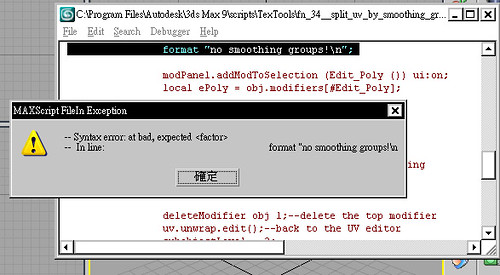
 another tool to simplify the spline mapping (2009 only!!)
  there are some things of this release not yet done like the pixel input transform floater and some stuff of the peel mapping script which is why I would flag the release as rather experimental.


 IN_human · 2009-09-07

 Vitus · 2009-06-24


 this way it is taking less GUI space while still being present. It is a quick solution for the demand of having it able to run - which I will add at some time.
 opens associated textures of the selected objects in photoshop (photoshop must be installed)
 crops the UVlayout to the minimal space including pixel padding space


 Admin · 2009-03-11


 nuosyo · 2009-02-20
 brittnell · 2009-02-19