ScriptSpot

Script

Visual Pivot Placer

By miauu · 2011-04-07

Version
1.5
Version requirement
tested in max 2009, should work in older versions too
Date updated
2011-09-28
Votes
38
Description

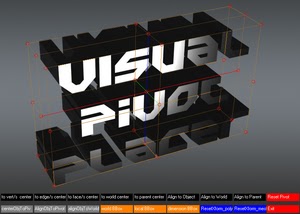
The image above says all. :)

Places the pivot of the selected object/s in one of the red colored circle.

For Editable Poly object/s you can place the pivot in the center of selected vert/s. edge/s, face/s.

Click with LMB on one of the red circle will tread all selected objects as one and the pivots of all objects will be in the same place.

Shift+LMB - every object in group or selection set  will be treated as a separate.

Version 1.1:

Now the tool will stay open until the "Exit" button is pressed or user click with RMB. This will allow you to select new object and change the pivot position without restarting the script. Watch the second video.

Version 1.2

some bugs are fixed

Version 1.3

fixed bugs:

 - select object when pressing the button

 - select hidden object

Version 1.4

   added:

- 3 types of pivot points cage - world BBox, local BBox(idea by @TitusLVR ) and dimension BBox.
- RexetXform and convert to Editable_Poly - idea by @tomastnt
- Shift+slecet another object will put the pivot of object to pivot of the selected objects

Version 1.5

added:

- RexetXform and convert to Editable_Poly - idea by @tomastnt


I don't know why the video is not showed. Click here to watch it.

Installation:

Drag and drop mzp file in 3ds max. Go to Customize - Customize user interface - "miauu" caegory and look for "Visual Pivot"

Videos
Attachments

Tags: Poly, object, place, pivot, visual, vert. edge. face

Comments (40)

dmitrybelonosov · 2017-05-10

Thank you very much! Great quick tool!

It will be better

popa_3d · 2013-07-12

thnaks for this script I just think it will be better if you create a standard UI interface for it or give the abilty to chose between the two...

I don't like a lot this one cause it get weird when you move the mouse or rotate the view, pan...

.

miauu · 2013-07-12

You are using max without Nitrous, right?

When I have time I will add standart UI.

popa_3d · 2013-07-12

yes I use 2009 so no nitrous in this version...

Idea - sub-object selection local pivit to object level pivot

TitusLVR · 2013-07-12

Hi !
Here is another idea its like funky tools pivot placer, but more useful
idea point in the picture:
http://i.imgur.com/YbRop6Z.jpg

Many thanx for your good job!

miauu · 2013-07-12

You want the pivot to be oriented just like the sub-object pivot no matter of the ref.coord.syste?. For example when you select a face and the ref.coord.sys is Local the pivot is placed at the center f the face and its Z axis match the normal direction of the face. You want the VPP to place the pivot just like in the example?

TitusLVR · 2013-07-15

Yes, point of idea in alingning pivot for whole object by face or N-selected faces, no matter of ref.coord.system., yes yes you understand me.

miauu · 2011-12-03

Yes. I tested on max2012 and mzp does not work for me too, but I can't fix it, because I don't have max2012 for now. But, I will write new version in the next weeks, which will support max2012 and will have new ui.
:)

mLichy · 2011-12-03

Hey,

Your latest MZP doesn't want to install for me in Max 2012.

For 1, I have to have a selection in the first place for it to start, and when i drop the .mzp, the tool starts, but doesnt install, and also stops working right away....

It looks great though!

miauu · 2011-10-22

I don't want to force people to buy my scripts that was free yesterdey. :) May be in the future I will post some other commersial scripts, but the scripts that is free now will stay free. But if you like my scripts you can go HERE and support me. :)

3dgopnik · 2011-10-22

You can not choose! Collect all!-)

miauu · 2011-10-22

Hi!
I do not know what scripts are good and which not. :)

3dgopnik · 2011-10-22

Good afternoon! Do you have lots of good scripts, it would be better and more comfortable if they were combined into one great script and a good spread for the money. The script is worth it!

miauu · 2011-09-27

f you select more then one object and then arrange a new pivot position by your script and keep a selection of objects, then the pivot point of selection isn't changed till your manually click to Affect pivot only. Which I think is little illogical. The script changed the pivot point of each of objects but don't changed the pivot point of selection which is wrong i would say?

@tomastnt, you report this for a second time, but I don't have this poblem. The pivot go to it new position without any problems, no need to manually click to Affect pivot only. I can't reproduce the problem wich mean that I can't try to fix it.

Wich max version you use?

Answers

tomastnt · 2011-09-27

Yes. I would like to collapse the stack with reset xform. I would prefer editable poly, but I would say a lots of people would prefer also editable mesh...

The second question I don't understand clearly. I have found out more information about it.
If you select more then one object and then arrange a new pivot position by your script and keep a selection of objects, then the pivot point of selection isn't changed till your manually click to Affect pivot only. Which I think is little illogical. The script changed the pivot point of each of objects but don't changed the pivot point of selection which is wrong i would say?

miauu · 2011-09-24

@TitusLVR, about your second request. You want the pivot to be as you show in the image, but the coordinate system to be "World","local" or else, but not "parent"?

Great script!

tomastnt · 2011-09-22

Hi Miauu.
Great script. I have offen used your scipt. I have found just two things which I am missing. The first one is Reset xform button. Would be great if you could choose to collapse or not modifier stack with reset xform.

The second one is ...when I select a group of object, then change the pivot point, pivot point isn't change. I have to go to Hierarchy and click to affect pivot only. If I will click, the pivot suddenly change to the right position. I think it is max bug.

Thanks Tomas

miauu · 2011-09-24

You want to colapse the stack with resetXform and convert the object to editable_poly or to editable_mesh?

miauu · 2011-09-22

Hi, TitusLVR!
The links not work. Can you upload the images on other server(imageshack.com).

miauu · 2011-09-22

I will add this in the next version. :)

Glad you like it!There are

miauu · 2011-09-15

Glad you like it!
There are at least 2 working pivot scripts - one from Bryan Cavett and one from @Funky Bunnies. May be the best of them is:
http://www.polycount.com/forum/showthread.php?t=83445&highlight=working+…
I thinkt that there is no need to do thing with two click when you can do it with one. If I add a working pivot to Visual Puvot script yoh first have to start Visual Pivot and then turn on the working pivot. With @Funky Bunnies script you have to do only one click(press a hotkey).

mwaif · 2011-09-15

This is one of my favorite scripts.
Are there plans of adding working pivot support?

tomastnt · 2011-09-05

Great script
Would be able to add a button for Reset Xform?
Thanks
Tomas

br0t · 2011-05-09

right now I have to do some accurate architecture stuff, and this script is damn useful :D I tested some others for fast picot placement, but this one is the fastest, great job.

miauu · 2011-05-09

Thanks. :)

@begon, Al bugs that you

miauu · 2011-05-03

@begon, All bugs that you pointed are fixed. :)

begon · 2011-05-04

Now, All works, Thanks!

begon · 2011-05-03

These buttons with the text sometimes do not work properly

It occurs, when under black buttons there is other object.
Click on LMB, selections jumps on other object.
It does not work, if other object hidden, the selections jumps on hidden object.

3ds max 2011

miauu · 2011-05-03

That's happen on version 1.1 and 1.2. The reason is - when you click with LMB the script try to find if there is object under the mouse cursor - this allow you to select diferent object while the script stays open.
Use version 1.0 to avoid this behavior. I will make changes as soon as possible and will post the new version. :)

br0t · 2011-04-18

great idea for a script! how did you do those buttons and in general how am I able to pick the red circles, is that interal 3ds max stuff you use or dotNet or do you draw this stuff into the viewport?

two things that dont work for me (2011 x64):
- drag&drop does not install the script as a macro, but will run it
- the buttons and the boundingbox interface sometimes just stay on screen and will not disappear

Cheers

miauu · 2011-04-18

How the script works - see this script - http://www.scriptspot.com/3ds-max/scripts/3d-ui-vertex-align-tool The buttons are gw.wrect(the lines of the cage are gw.wPolyline). You have to track the mouse position on the screen and if the mouse cursor is over a button and you click on it - the script execute command assigned to that button. Thats all. :)

 drag&drop does not install the script as a macro, but will run it

After restarting 3ds max still the script is not apear in the "miauu" category? You can try to install it manualy. Unzip the .mzp file. Go to maxroot/scripts and create directory "miauuScripts"(in case that you don't have that folder). Place the .mse file in that folder and run the macro file.

 the buttons and the boundingbox interface sometimes just stay on screen and will not disappear

New version is uploaded. If the problem is not solved tell me to try to fix it again. :)

wmiler · 2011-04-11

here did not work with objects in groups, I tested this and v11 did not work for grouped. But the rest is working very well.
Perhaps it might be my version of max 2009.
When I select the group and apply the visual script, appears to align the pivot points, but when I leave the visual script, pivot back to its old place.
But the script is wonderful, I'm using, thanks.

miauu · 2011-04-12

That is strange. I also work with max2009 and as you see on video, I don't have problems with groups. I will try to fiz that. :)

very good

wmiler · 2011-04-11

excellent script,
to be complete, lacking accept with grouped objects.
But it's very good.
thanks

miauu · 2011-04-11

The script works with grouped objects. Watch the last 33 seconds of video. :) If you mean something else, please be more specific. :)

fajar · 2011-04-07

it would be better if I can have exit button instead it dissapear by it self after one use/click.

miauu · 2011-04-08

I am working on something else right now, but i will add this to the script as soon as possibel. :)

Royal Ghost · 2011-04-07

Very cool! It seems useful for me. Thank you for sharing!