ScriptSpot

Forum topic · Scripts Wanted

VrayBmpFilter Relink path

By Chupakabrah · 2013-01-24

Description

Hi friends!

Faced with a big problem, maybe someone can help me?

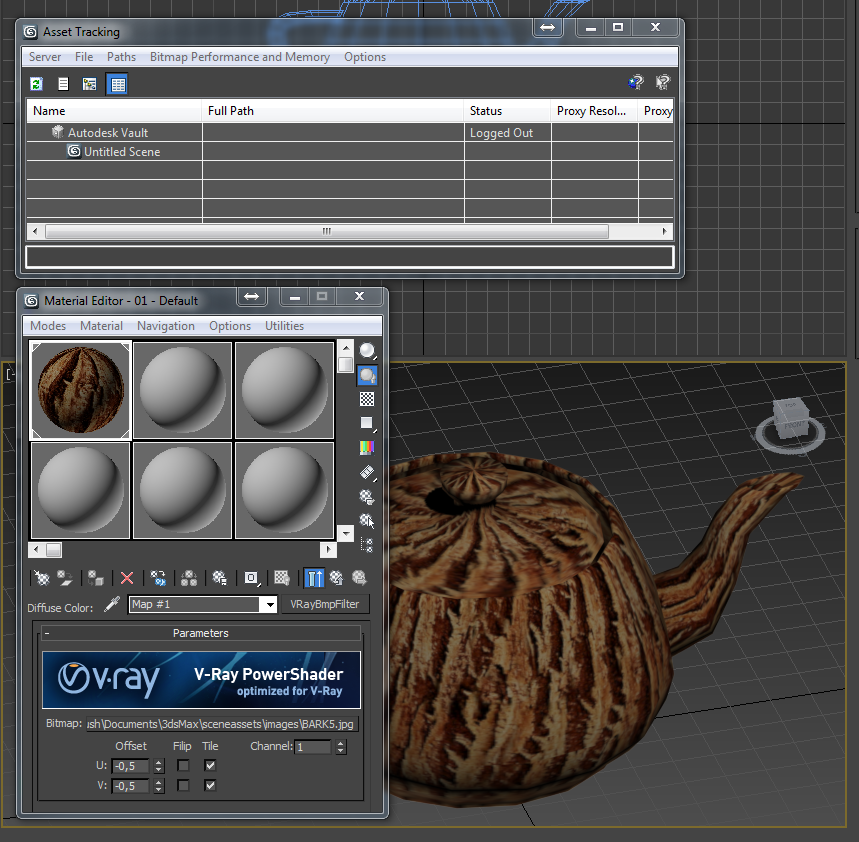
I have a lot of scenes in which many materials used VrayBmpFilter.

And now I need to change the bitmap path in these scenes. Do it by hand is almost impossible, Asset Tracking does not see the VrayBmpFilter, other scripts and programs also can not do relink path. In addition to creating a script for this purpose, i see no other solution. I'm in this unfortunately do not understand anything :((

Searched everywhere, really nobody faced a similar problem?
Or is there a simple solution, that I do not know?
Help please!

Attachments
Comments (13)

Chupakabrah · 2013-01-24

Спасибо конечно, но это как из ракетницы по воробьям :)
Если проблема решается 5 строчками кода, покупать за 75 долларов плагин...

Chupakabrah · 2013-01-24

Please, if you have some time and desire, can you write a simple interface to this script? Just enter the path and the button Relink? I am sure that it would be useful to many people. Thanks in advance!

barigazy · 2013-01-24

Yep.Asset Tracking does not recognize VRayBitmapFilter maps.
Try with this function. Just add new path.

fn relinkVRBFmaps newPath:@"C:\\Temp\\" =
(
local VRBFArr = getClassInstances VRayBmpFilter
if (cnt=VRBFArr.count) != 0 do
(
for m = 1 to cnt do
(
VRBFpathName = filenameFromPath VRBFArr[m].bitmapname
VRBFArr[m].bitmapname = newPath+VRBFpathName
)
)
)
relinkVRBFmaps()

Chupakabrah · 2013-01-24

Thank you barigazy!

But I get the error.
I copied the text of the script, replacing "C:\\Temp\\" to "D:\\Temp\\" and run this script.
In this case, nothing replaced. In Listner written:

-- Error occurred in m loop; filename: ; position: 213; line: 8
-- Frame:
-- m: 1
-- a: undefined
-- VRBFpathName: undefined
-- called in relinkVRBFmaps(); filename: ; position: 267; line: 10
-- Frame:
-- VRBFArr: #(Map #1:VRayBmpFilter)
-- newPath: "D:\\Temp\\"
-- cnt: 1
-- No ""get"" function for undefined

what am I doing wrong?

barigazy · 2013-01-24

Try again the code.

Chupakabrah · 2013-01-24

YES! It works! Thank you so much! You saved my life :)

My pleasure, man.But tell me

barigazy · 2013-01-24

My pleasure, man.
But tell me what is the advantage of this map (VRAYBMPFilter)over standard Bitmap map and VRayHDRI which also supports different files extensions?

Chupakabrah · 2013-01-24

in Vray help is written this:

"The VRayBmpFilter texture map is useful for displacement maps, created in external programs (like ZBrush) where exact placement of the map is very important. The VRayBmpFilter map produces a smooth map by interpolating the bitmap pixels, but without applying any additional blurring or smoothing. This is not possible with the default Bitmap texture of 3ds Max."

I did some tests for myself and come to this decision.
Because it does not apply additional filtering, texture rendered very clearly and without fuss.

barigazy · 2013-01-24

Good point. When I finish with my job i will finish the interface for your tool

zahid hasan · 2013-04-23

Thanks a lot. hope it would be helpful of other alien type of map in future.