3ds Max | Plugins

MXSPyCOM

1 vote

A modern version of MXSCOM, to allow for editing & execution of 3ds Max MaxScript and Python files from external code editors.

In 2005 Simon Feltman released the first MXSCOM, a small Visual Basic 6 application that took commands and sent them to Autodesk's
3ds Max's internal COM server. This allowed users to choose their own external code editor for editing MaxScript and to be able to
have their MaxScript code execute in 3ds Max by way of having the code editor utilize MXSCOM to send the file into 3ds Max and have it

XrayUnwrap 2.0 - Cowdfunding campaign help to founding

1 vote


Hello everybody, we launched a crowdfunding campaign to develop XrayUnwrap 2.0 for Autodesk Maya and 3ds Max. In the video we show the new features we would like to add to this great plugin! thanks for your support! Please visit our crowdfunding campaign here: https://www.indiegogo.com/projects/xrayunwrap2-0-quicker-auto-unwrapping...

UI toolkit

5 votes


UI Toolkit, is a serie of new 3dsmax scripted plugins, to quickly create modern & sci fi UI and motion graphics directly in 3dsmax.

With a lot of procedural parameters and ways to animate and link them together.

More tools to come, you can email us to suggest some new features/objects.

Features :

Helix Pro

-10 votes

Helix Pro (Plugin) 1.0
● Start/End radius
● Height/Radius bias control
● Number knots/side that make up helix
● Number of turns
● Height of helix
● Radius randomizing option
● Height randomizing between each revolution
● Animate-able controls
● Smooth/Linear spline interpolation
● Figure 8 option for making braids or ropes

Compatibility

prorender PRM for V-Ray Denoiser

0 votes

With the prorender PRM for V-Ray Denoiser tool you can easily accelerate and distribute denoising jobs on your renderfarm. As you can see it in the screen recording video the GUI gives you control of the most important parameters.

With the prorender PRM for V-Ray Denoiser tool it's very easy to submit denoising jobs on a renderfarm.
https://www.youtube.com/watch?v=UKsd3RGMfVQ

Scope of functions:
-accelerate and distribute V-Ray denoising jobs on a renderfarm
-easy GUI usage with drag'n'drop

RelaxBySG (Relax By Smoothing Group)

3 votes

Modifier to smooth meshes without destroying hard edges defined by smoothing groups.

RelaxBySG works on the same principle as the standard Relax modifier, but offers a greater degree of control.
Rather than relying on the modifier to find boundaries and corners and hoping for the best, you can use smoothing groups to define them yourself.


ImpressObjects

6 votes

ImpressObjects is a plugin for 3ds Max that allows two intersecting meshes to be pressed against one another so that their respective vertices do not overlap.

HOW TO USE:
1) Use the "Select Node A" and "Select Node B" pickbuttons to choose two overlapping meshes.
2) Press the "Create Target" button to create a target helper. This determines the directions in which intersecting vertices will be moved.
3) Adjust the target helper as desired.
4) Click "Impress".

FEATURES:
- Non-destructive to mesh topology

OverMorpher PoseSpace

2 votes


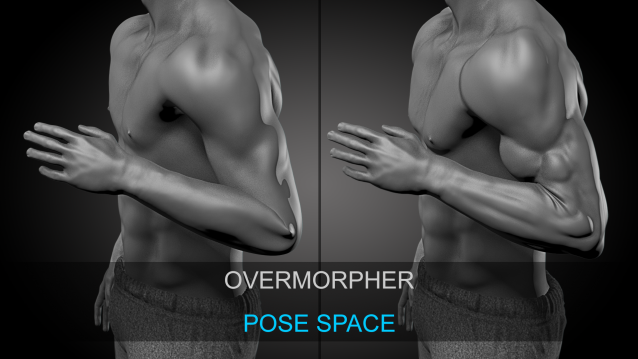
OverMorpher PoseSpace is a 3Dsmax plugin dedicated to Pose Space Deformation.

It is pretty similar to the SkinMorph, Corrective poses driven by your Rig.

Except the poses interpolation is more reliable.

The SkinMorph modifier drives the poses depending on the angle between 2 bones.

OverMorpher MeshSpace

1 vote

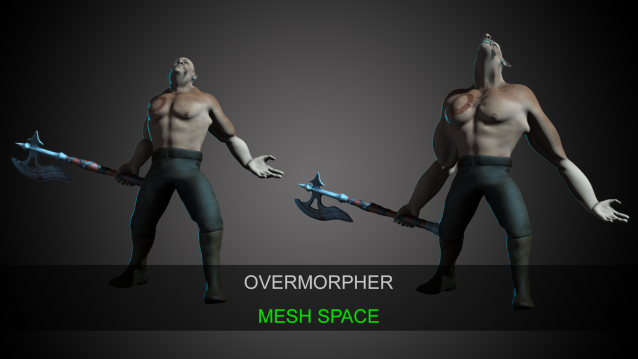
OverMorpher Mesh Space is the release of what I showed a few years ago: http://hocuspocus-studio.fr/tools/overmorpher/

That’s a new 3dsmax plugin. It works like a morpher, but on top of an animated mesh.

It can be placed over a skin modifier, or anything like a point cache or an alembic…etc

Varo + SocketMXS

-13 votes

Syndicate content