3ds Max | Tutorials

A few notes about code optimization

47 votes

The base idea of this topic is to say to all coders - always to research, because this is the only way to get rid of any myths. Each myth may hinder your future development and may leave a wrong impression in us for the MaxScript language at all.


Automated randomly generated number decals. Script + procedural material.

0 votes

This post details how I set up an automated decal numbering system. A random number is assigned to a dummy object that matches a name convention and any decal objects attached to that dummy assume the same ID. The ID can be used for material assignment purposes, in this case it is to drive a sprite sheet that renders that number to a material.

At a minimum the script should be a good jump point for automating parts of procedural artwork.

As used in this image:

BackBurner monitor undocumented cmd switches

67 votes

In case you run multiple backburner managers (e.g. on notebook at several places or using local manager and manager in office) it is good idea to have icons for automatic connecting monitor to the different manager hosts.

I've found two working command line parameters for monitor.exe:

monitor -a
monitor -mservername

First one turns "Auto connect" on. Second one sets manager hostname and connects to it. (Note: There is no space between -m and hostname or ip)

Be gamma correct!

41 votes

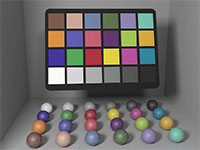
gamma corrected color checker

Gamma correction is one of those buzz words that are really easy in
terms of theory and math but confusing in how they are applied in
practice. As a consequence, it is largely ignored by many graphics
practicioners. This illustrated 10 page article is my attempt at
clarifying gamma correction in the context of 3D CGI by answering most
of the typical questions: "What is gamma? Why do we have it? When should I perform gamma correction? And what happens if I just ignore it?"

Bézier curves (Spanish with English commentary)

0 votes

In these videos, you will learn how to create a Bézier curve in MAXScript and ton know all it´s mathematical details.

Bokeh in 3dsmax with particle flow and maxscript

24 votes

Note from admin - I just ran across this great tutorial showing how to use maxscript and pflow to render fast, simulate dof based on camera focus.

...

This script will define particle’s scale and transparency depends on camera’s focus. Now you can animate the geometry or the camera and render the particles with scanline. Don’t forget to cache all the particles for viewport/render using the Cache operator.

This setup renders pretty fast as opposed to mental ray’s or vray’s honest dof. And we have fast bokeh effect with the ability to inceract with scene geometry.

Brick Wall Quick

4 votes

This is not a tutorial or script, just download the .max file.

Just trying out a brick wall with several scripts but sadly I have an old laptop so I thought why not try to make my own brick and then use the Clone Modifier (iToo) to clone it to two layers so that I could add more layers at a later date. It worked, I admit it's not brilliant but it might be useful to someone out there.

Made in 3D Max 2009

Added a Script made using Primitive Maker, it will be found under Wall and created a brick.

Calling Maxscript Functions from DotNet

29 votes

Calling Maxscript Functions from DotNet

I thought I’d draw attention to a few enhancements that Autodesk has made
with the new release in the hope that it will help you with your
scripts. The private/public methods in struct declaration in MXS was a
welcome addition, but I was hoping for a few extras in the dotnet area
too. The main one to note is -

CGWiki - MAXScript Info Page

18 votes

A detailed wiki entry on MAXScript. Includes development history, language overview, possible applications, etc. A good read even for those of us who have been around MAXScript for a while!

Syndicate content