Tagged 'Track'

Project Manager

597 votes

After a long stretch of development, Project Manager 4 is officially out — the biggest release in the product's history, and now with full 3ds Max 2027 support.
The headline is AI Asset Classification.
Your library gets sorted automatically — by object type, material, and style — no manual tagging.

Project Manager 4 — What's New Since v3

Changelog · 3ds Max 2016–2027

AI-Powered Asset Classification

  • Automatic categorisation of 3D models and textures by object type, material, form, and style — no manual tagging required
  • Runs entirely on your machine — no cloud, no subscription, your assets never leave your computer
  • GPU-accelerated background processing at low priority — won't interfere with rendering or active work
  • Reclassify specific folders or categories on demand — no need to reprocess the entire library
  • Scale across a team: multiple workstations share the same database and classify in parallel

Colour Tools

  • Find assets by colour — pick from a palette and instantly see matching models or textures
  • Perceptual colour similarity search — finds visually related assets, not just exact hex matches
  • Find Similar by Colour in the right-click menu for models and textures

Find Similar

  • Find similar by content — AI matches 3D models by style, shape, and visual look
  • Find similar by colour palette — matches assets to a reference image or mood board by dominant colour proportions

Smarter Search & Filtering

  • Multi-keyword search: "Chair, Glass" finds a file named Chair.max described as "glass"
  • Category filter correctly includes all subcategories — filtering Furniture also returns Furniture → Chairs → Dining
  • Combine category and material filters: find glass-and-metal tables, or wooden ones, in one click
  • Categorised / Uncategorised quick filters — see which assets still need attention

Gallery & 3D File Browsing

  • Three gallery tabs for .max files: Models, Materials, and External Links
  • Drag materials directly from the gallery into your open 3ds Max scene
  • 3D viewport preview for FBX, 3DS, OBJ, and other formats — inspect geometry before importing
  • Edit external links inline — fix or replace missing textures without opening the .max file
  • Zoom & Pan for images — inspect textures at full resolution inside Project Manager

Migration & Compatibility

  • v3 and v4 share the same database format — point v4 at your existing library and go; no rebuild required
  • Run v3 and v4 side by side on the same team; supported from 3ds Max 2016 through 2027

Performance & Other Fixes

  • Significantly improved overall performance — faster navigation, filtering, search, and file/folder operations
  • Live sync in shared database mode — changes by colleagues appear automatically without reloading
More about new features   Project Manager version 4
 

FilePathFinder Pro & Light versions

410 votes

Using the FilePathFinder you can be sure that you have complete control over external links into your scenes.

Asset tracking features include support for XREF files and easy linking with external files.

Using the FilePathFinder (and Batch Render&Relink), you can search for missing assets and relink external files.

In addition, files that are linked to selected objects are displayed in Interactive Mode, and bitmap textures can be toggled and placed within the Material Editor.

Also with this tool, you can easily make an archive a 3ds Max scene.

Note that FilePathFinder supports the highest number of asset types of any plug-in.
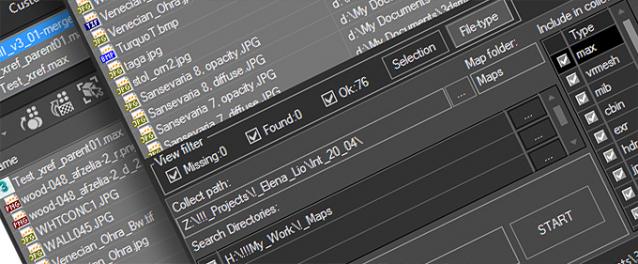
 

The Batch Render&Relink tool helps manage your asset files into the 3D model and material libraries in Batch Mode.

BR&R is capable of rendering thumbnails for 3D models, materials, and IES photometric files.

Batch Mode makes for an easy way to gather and compile many assets at once.


The new version of FilePathFinder is released with support to 3ds Max 2026

and many new features that improve managing scene assets

FilePathFinder Pro version 4.17.01

  • Adds support to 3Ds Max 2026
  • Play IFL, and animated GIFs directly in the list view
  • Play IFL and animated GIFs in the external Asset Viewer
  • Ability to change selected assets directly from the Asset Viewer using keyboard shortcuts
  • Adds an ability to include/exclude search directories by filename
  • More accurate material/texture placement in SME
  • Drops support to light theme
  • Fixes an issue with including/excluding search directories by filename
  • Fixes an issue with searching, relinking, collecting, and archiving the content of IFL files
  • Fixes an issue with relink assets in batch mode for Demo version [Batch Render&Relink]
  • Fixes an issue with renaming external scene links with status #Found
  • Fixes some issues with relink assets using exclude directories
  • Fixes a bug with relinking assets in huge scenes
  • Fixes a bug when using the tool together with Materials Manager and Models Manager
  • Some other optimizations, fixes and speed improvements

EffectsChannelSet

79 votes

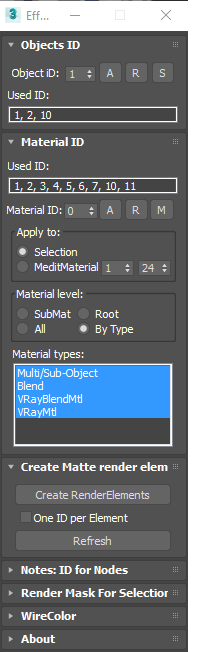
  • Management the Material ID and Objects ID.
  • Assigning a wirecolor for objects.
  • Automated creation MultiMatteElement for V-Ray renderer.
  • Automated creation MatteRenderElement for Mental Ray renderer.
  • Automate the creation of CMasking_Mask for Corona Renderer.


EffectsChannel 1.67.4

  • Some fixes and speed improvements

EffectsChannel v1.64

  • Fixes an issue with assigning ID to sub-materials in the version 1.62

EffectsChannel v1.62

  • This version speed-up opening on complex scenes. The time of opening on a very big scene decreased from 16 sec to 0.094sec.

EffectsChannel v1.60

  • Adds support to Corona Renderer: Automate creation of CMasking_Mask.

Show DotNet Properties

45 votes

Vray Quick-Render

1 vote

"Vray Quick-Render" the utility for creating fast preview test-renderings.
It help you make fast test-renderings for setup lights and tuning materials.
All changes for Vray will be applied only on render-time.
Your settings for Vray not will be change.

Set Selection filter

40 votes

Script for quick set the Selection Filter.
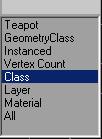
Allows you to create custom filters
for Classes (for example-Box),
for Superclasses (for example-Geometry),
by objects Layers,
Modifiers, Materials, Vertex count or Instanced objects.

v. 0.22
Adds ability to set filter by layers of selected objects.

v. 0.23
Adds ability to set filter by classes of selected objects.

VrayMultiStageRender ( VrayMultiCamRender )

43 votes

Utility for rendering animation and static scenes in 2 Stages from the animated camera.

At 1st Stage is calculated LightCache in Fly-through mode and

Irradiance Map in incremental add to current map mode for the entire scene,

while 2nd Stage is the final rendering.

This approach allows for all frames receive the same high-quality Irradiance map in less time.
For more information see topic Rendering a walk-through animation from Vray tutorial.

Main Features:

  • Rendering in two stages for to obtain better results in less time.
  • Support for network rendering (BackBurner, Vray Distribute Render, Duma)
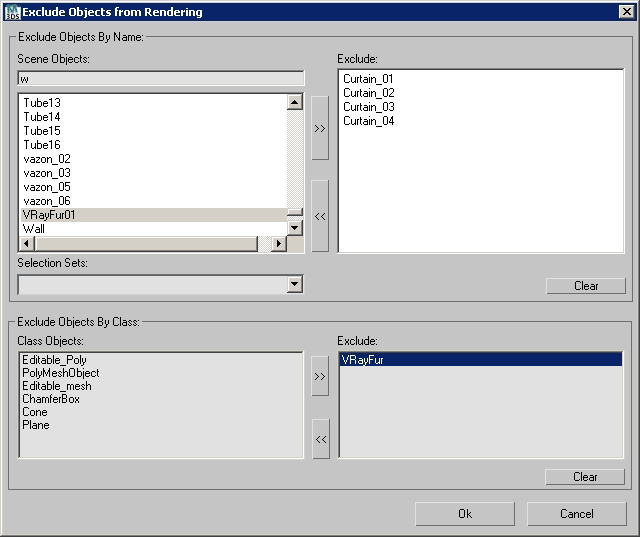
  • Ability to exclude from the Global Illumination rendering VrayFur, RPC, some lights and Displace.
  • Automatic creation of animated camera VrayCam.
  • Create subfolders for RenderOutput, RenderElements and irradiance map.
  • Automatized naming LightCache, Irradiance map, RenderOutput and RenderElements.

VrayMultiStageRender v2.0.75

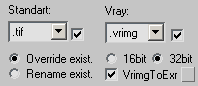
  • Adds ability to auto-convert on the fly Vrimg files to EXR after each frame rendering (supported with network and local rendering)
    It is possible to convert the files into one EXR file with all channels or Render Elements into the separate EXR files.

VrayMultiStageRender v2.0.70

  • Adds ability to exclude objects from rendering per Stage
    (Useful for Exclude from rendering Global Illumination VrayFur,Hair&Fur, Proxy and other Objects)


Clean Retimers

3 votes

A little scipt for removing retimers from scene, because they cause huuuuuuuuuge performance slowdown.

Scripts for VrayProxy

39 votes

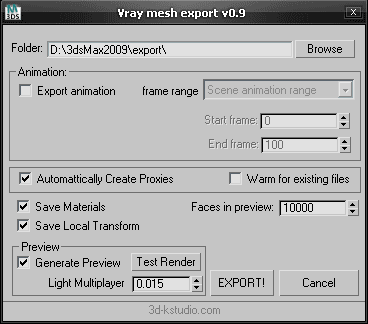
Export Mesh to VRayProxy with material.

Create VRayProxy with material.

Load VRayProxy Material.


Vray mesh Export v0.9

  • Adds "Test Render" function.
  • Adds "Light Multiplayer".
  • Adds capability for saving settings the utility.

Fixes issue with loading materials


Dashed lines generator - traffic dashed lines

2 votes