Batch Camera Render 2

Batch Camera Render maxscript version 2 - reworked and improved version of Batch Camera Render maxscript. The main imporvement is the ability to assign different settings to one camera, just as in standard 3ds max's Batch Render.
Take a note that it is still in beta stage!
Voted suggestion could be placed here - Google Moderator BatchCam2 Сategory
Current Version: 2.0.9
Release Date: 4 January 2013
Bugfix:
- Corrupted other script's custom attributes stored in a scene.
Release Date: 14 January 2012
Improvements:
- Preview button added- it renders only current frame without saving anything - no images, no vray maps,no elements. Note that if output file is specified in standard Render Setup script saves rendered image in preview mode.
Bugfixes
- Frame Range Type "Frames" didn't recognized - fixed
- Resolution changing in certain conditions caused error message - fixed
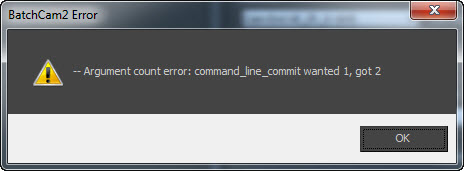
- Netrender with Command-Line-Commit didn't worked well - fixed
- Some of the Clear buttons didn't work as expected - fixed
Release Date: 21 November 2011
Bugfixes:
- startup error in 3ds max versions <2012
- render preset not found error fixed
- animation ranges detection now works as expected and camera target's animation is also considered
- clear settings in resolution and frame ranges
Improvements:
- Render method from the version 1.9.x (fewer problems with gamma expected but not confirmed)
- Vray section from the version 1.9.x
- Orthographic camera mode in Vray section - turns Physical camera into orho mode (and any other cameras)
- Nth Frame property can be set for each preset independently (useful for Vray Irmap calculation)
- Render Preset property is now saved not as just a name of preset but as a full file path to ensure scene consistency across the network, different projects and 3ds max versions.
- Render Element property is available, but only in 1.9.x render method. Render commit method can be choosed in Options rollout.
Small fixes:
- Frame ranges are now remembered as you choose different range types.
- Checked state of the render preset is also saving, so you don't have to recheck the presets when you're making many test renders.
Installation:
Run this script with Maxscript -> Run Script command from any folder on your hard drive, then go to the *'Customize User Interface' -> 'Toolbars'*, browse to category 'Sergo Pogosyan' and add 'Render scene cameras...' button to the toolbar or to the menu.
This page http://www.sergepogosyan.com/scripts/BatchCameraRender2/ will not be available for some time.
| Attachment | Size |
|---|---|
| batchcam2.0.9.ms | 174.78 KB |


Comments
Привет!Скажу по секрету, что
Привет!
Скажу по секрету, что версию 2.х я давно не обновлял, и скорее всего обновлять не буду. Работать над двумя версиями одновременно не получается, а версию 1.9 бросить тоже не получается. Пользуюсь этой версией везде, но только под 2012.
Попробую как нибудь в 2014, если будет нормально работать, то выложу новую 1.9 и ее и буду развивать.
Спасибо за предложения.
ps: Лучше наверное на английском тут писать, потому что народу тут много разного и тоже право имеют.
Google+
Привет) BatchCam1.9.x в 2014
Привет) BatchCam1.9.x в 2014 максе не пробовал. Раньше я пользовался только им в 2012 максе. Все работало отлично. Но перейдя на 2014 макс, сразу решил поставить и опробовать BatchCam2.0.9)
Кстати, есть несколько предложений:
1) возможность расширять внутреннее окно по вертикали, где находится список камер
2) возможность расширять все диалоговое окно по горизонтали
3) кнопка создания камеры (как стандартной, так и vray) во вьюпорте
4) возможность получать на выходе с одной камеры несколько форматов картинок, а не одну (например, *.png и *.jpg, т.е. за один проход 2 картинки)
5) добавить столбец с № и возможность перетаскивания камеры с одной строки вверх или вниз очереди (как в списке в uTorrent'е) или кнопка перемещения вверх/вниз
6) image aspect есть, а вот pixel aspect нету. было бы неплохо добавить pixel aspect
7) вместо %cameraname% сделать счетчик автоматический, а то при написании можно ошибиться
Много разных и частых ситуаций было, отсюда и возникли пожелания для улучшения уже отличного скрипта;)
Did you try "BatchCam1.9.x
Did you try "BatchCam1.9.x Style" without "Show Submit Dialog" option?
It was broken in 2013, I almost gave up with hope that my script will work with new 3ds max, but I didn't try it with 2014.
Google+
issue with Render Commit Method
When you choose "Command-Line-Commit" Render Commit Method and use different Scene States and render in DR mode => result is bad. Main computer is rendering good, other net computers are rendering only original scene state.
But with "BatchCam1.9.x Style" Render Commit Method all is perfect except canceling all of the Batch by one click)
P.S. using 3DS Max 2014 64-bit and vray 2.40.03
*.bat
Hi, is there an option to export everything into a *.bat file? OK, I can copy it from the TEMP folder, found it, but its a bit to intricate :)
thx
vray render elements
I can't seem to get the vray render elements to save to file. I know it worked for me as some point, I think on the original Batchcam script.
Thanks
Thanks for the fix, that was fast! :-)
Tim
www.timsportfolio.co.uk
Fixed and attached.
Thank you Tim!
Very severe bug, sorry if corrupted your scenes. Fixed and attached fixed version.
Sergo.
Google+
Rewriting other attributes stored on RootNode
Hi Sergo,
Very interesting tool. Great work :-)
I was linked to your plugin by a user experiencing problems with a tool I have written, and after investigating the issue it looks like your tool is overwriting (redefining) all custom attributes stored on the rootNode, including the ones I have stored for my tool. I had a look through the code and I think you need to add a few name checks before redefining the custom attributes to make sure other attribues not associated with your script are not redefined. I have attached a maxscript file that shows exactly what happens:
1. Run the top part of attached script to add a custom attribute with 5 paramaters
2. Open Batch Camera Render 2
3. Click 'Add'
4. Custom attributes made in step 1 have now been redefined, 5 paramaters deleted and replaced with batch camera paramaters.
Cheers
Tim
www.timsportfolio.co.uk
hi friend, it's time to change now..let 2000servers works for u.
here we can offer you free trail and 20usd bonus. and more important we are online 24hours upport both system and techical team.
support all the software that you used before such as 3ds Max Maya Softimage C4D and Blender,. so on.
contact me for more information thanks
Best Regards
Frodo
Market Manager (Free trial Render Service with 2000more servers www.foxrenderfarm.com )
Email : Frodo@foxrenderfarm.com Skype: foxrenderfarm.com Msn: foxrenderfarm.com@hotmail.com