ScriptSpot

Script

Batch Camera Render 2

By sergo · Credited author: Sergo Pogosyan · 2011-07-22

Version
2.0.9
Version requirement
3ds max 2008-2012. 32-bit and 64-bit.
Date updated
2013-01-04
Votes
10
Description

Batch Camera Render maxscript version 2 - reworked and improved version of Batch Camera Render maxscript. The main imporvement is the ability to assign different settings to one camera, just as in standard 3ds max's Batch Render.

Take a note that it is still in beta stage!

Voted suggestion could be placed here - Google Moderator BatchCam2 Сategory

Additional Info

Current Version: 2.0.9

Release Date: 4 January 2013

Bugfix:

  • Corrupted other script's custom attributes stored in a scene.
Release Date: 14 January 2012
 
Improvements:
  • Preview button added- it renders only current frame without saving anything - no images, no vray maps,no elements. Note that if output file is specified in standard Render Setup script saves rendered image in preview mode.
Bugfixes
  • Frame Range Type "Frames" didn't recognized - fixed
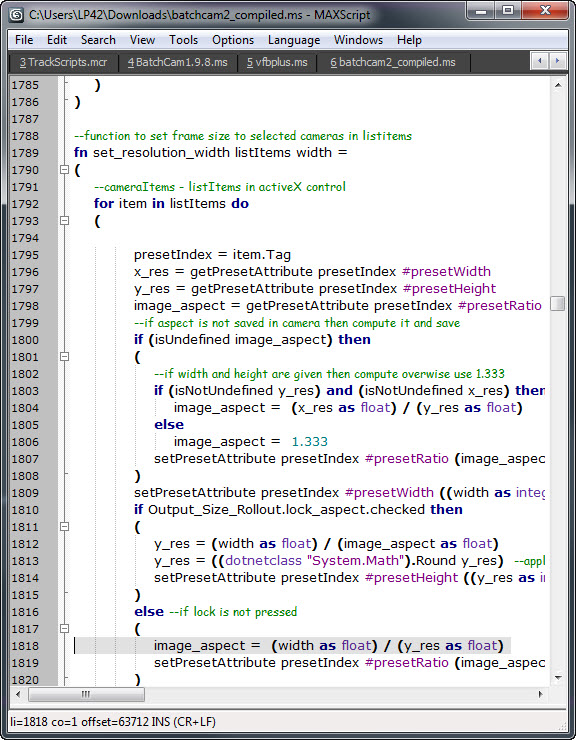
  • Resolution changing in certain conditions caused error message - fixed
  • Netrender with Command-Line-Commit didn't worked well - fixed
  • Some of the Clear buttons didn't work as expected - fixed

Release Date: 21 November 2011

Bugfixes:
  • startup error in 3ds max versions <2012
  • render preset not found error fixed
  • animation ranges detection now works as expected and camera target's animation is also considered
  • clear settings in resolution and frame ranges
Improvements:
  • Render method from the version 1.9.x (fewer problems with gamma expected but not confirmed)
  • Vray section from the version 1.9.x
  • Orthographic camera mode in Vray section - turns Physical camera into orho mode (and any other cameras)
  • Nth Frame property can be set for each preset independently (useful for Vray Irmap calculation)
  • Render Preset property is now saved not as just a name of preset but as a full file path to ensure scene consistency across the network, different projects and 3ds max versions.
  • Render Element property is available, but only in 1.9.x render method. Render commit method can be choosed in Options rollout.
Small fixes:
  • Frame ranges are now remembered as you choose different range types.
  • Checked state of the render preset is also saving, so you don't have to recheck the presets when you're making many test renders.


Installation:

Run this script with Maxscript -> Run Script command from any folder on your hard drive, then go to the *'Customize User Interface' -> 'Toolbars'*, browse to category 'Sergo Pogosyan' and add 'Render scene cameras...' button to the toolbar or to the menu.

This page http://www.sergepogosyan.com/scripts/BatchCameraRender2/ will not be available for some time. 

Attachments

Tags: Rendering, Rendering Manager, Batch Render, BatchCameraRender

Comments (100)

one click cancel

bernielomax99 · 2020-08-11

This is the most used script here at the office. But we loose alot of time canceling work.
We urgently need a one click CANCEL.
Can you assist?
Thanks!!

can not render

waiterayu79 · 2018-04-23

when i push the render button,it only save AS a new MAX file,but it doesn't start render,how can i solve the problem??THANKS

net render

Greenbean · 2018-03-27

Hi,

I'm wondering if I can somehow use split scan line activated without having to activate "show submit dialog"
So I can batch render multiple high res cams, with the full convenience of this fantastic script! :)

Kind regards

send all jobs as suspended

mitviz · 2016-05-27

IS there a way to do this?

pedro_s · 2014-05-07

Hi Sergo,

Me again.-I really tried to resolve these but with no success..

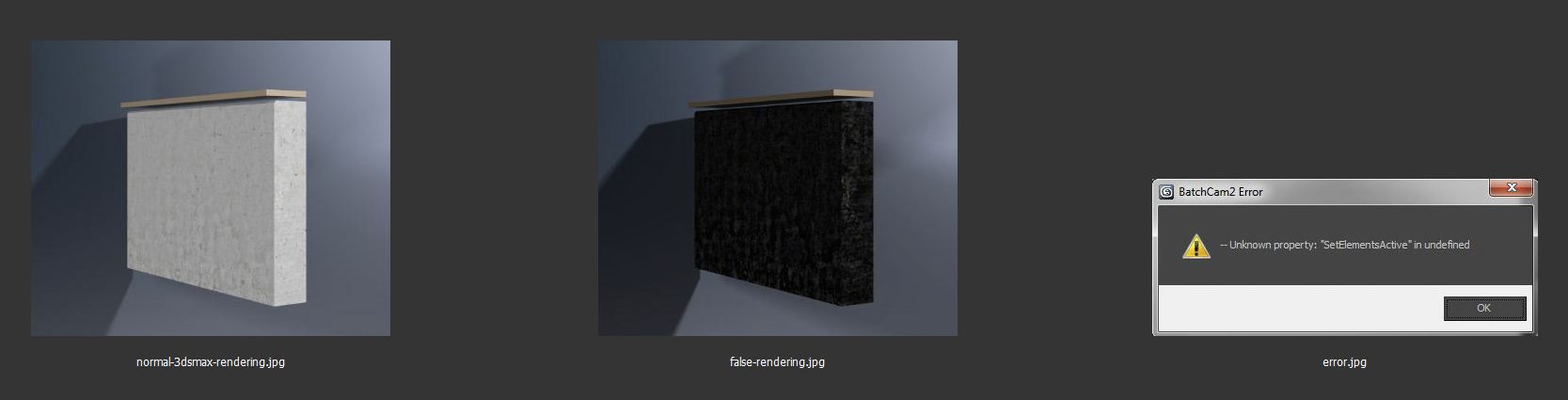
- When I do a render with bacthCam2, textures with bitmaps appear brighter than other materials.. (I tried a local rendering and trough batch render directly and work fine ..)
-The VFB work when I use preview but do not work through farm render
-Sometime and randomly .tif images save in 8bit and without alpha channel even when I check option for 16bit/alpha

Many many thanks! (and sorry for bad English)

Regards!

Pedro

Attachments

sergo · 2014-05-07

Hi again,

I don't support this version of script Pedro, I don't use it at all for my own work. The only thing is that this script renders through the command line rendering and this type of rendering may has its quirks, bugs and other lovely 3ds-max-y things.

My advice - stay away from 2.0 and stick with BatchCam 1.9.x. Or deal with it, it is open and free.

Great Script!

MH · 2014-01-14

Hey Sergo,

thank you for this amazing Script!!!
Unfortunately I can't use it because it does not work. :-(

I have a large scene with many VRay Cameras all across the scene. When I add them to the Batch Camera Render List and press "Render", the CMD window appears showing me something like this:


C:\Program Files\Autodesk\3ds Max Design 2014>"C:\Program Files\Autodesk\3ds Max
Design 2014\3dsmaxcmd.exe" "D:\...\BatchCam2SubmitScene_***27301.max" -outputName:"\\workstation\d\...\rendering\140114\test01\0_VRayPhysicalCamera01" -came
ra:"0_VRayPhysicalCamera01" -width:512 -height:342 -frames:1 -continueOnError
1>>"C:\Users\...\AppData\Local\Temp\BatchCam2Submit_***27301_Out.tmp"


C:\Program Files\Autodesk\3ds Max Design 2014>taskkill /F /FI "WINDOWTITLE eq BatchCam2SubmitScene_***27301.max*" 1>>"C:\Users\...\AppData\Local\Temp\B
atchCam2Submit_***27301_Out.tmp"

But the rendering itself does not start.

I tried the "Net-Render" option as well. But I get some error messages here as well:

2014/01/14 14:00:12 ERR Job '***273 0_VRayPhysicalCamera0101' (Autodesk 3ds Max 2014 (64-bit)) failed for workstation
2014/01/14 14:00:12 ERR Error message: 3dsmax adapter error : Autodesk 3dsMaxDesign 16.3 reported error: Render Error (Initializing Renderer)

Do you have an idea what I could try to fix it?

MH · 2014-01-14

Ok - found the solution: I forgot to attach the fileextention (.tif) to the "%cameraname%" Output parameter.

Everything works fine now. Thanks again for this extremely usefull script!!!

:-)

Problem

chakib · 2013-09-24

Hi man, i have a heavy scene that renders fine in vray, but once i configure it with Batch render like a always do, it gaves me now a weird msdos error with the file max name in it, didn't understand what is the problem, here is the dos error :

C:\Program Files\Autodesk\3ds Max 2013>"C:\Program Files\Autodesk\3ds Max 2013\3
dsmaxcmd.exe" "C:\Users\blabla\Desktop\G Project\Gold room\BatchCam2Submit
Scene_gold_area_optimized01.max" -outputName:"C:\Users\blabla\Desktop\G Pr
oject\Gold room\renders\test.tif" -camera:"VRayPhysicalCamera001" -width:2000 -h
eight:1125 -frames:0 -continueOnError 1>>"C:\Users\blabla\AppData\Local\Temp\
BatchCam2Submit_gold_area_optimized01_Out.tmp"

sergo · 2013-09-25

Send me the scene if you can, I need only cameras in it.

chakib · 2013-10-04

ok i'll send it soon

chakib · 2013-10-05

Here is the scene with only cameras

Attachments

Run as Administrator helps

sergo · 2013-10-10

Hi,
I've tried your scene and I also get the error on render start. I restarted 3dsmax with Run as Administrator and then it started to render. I have no idea what is the reason of not render under normal user, but it is what it is.
Hope that helps.

P.S. Other thing is that your scene uses newer Nvidia plugin (possibly installed with recent Raygun or something like that), and standard 3dsmax complaints about that too.

didn't help !

chakib · 2013-10-11

I've tried it as Administrator it gives me the same error :s
really weird...

maybe i've found why

chakib · 2013-10-11

In the Render Commit Options i've changed it from " Command-line-commit " to " Batchrender 1.9 x style ", and it renders now

sergo · 2013-10-14

I would say that's the best way how your problem could be solved.

psd manager

themaxxer · 2013-09-02

great script, but is it possible to add the possibility to save to *.psd files via psdmanager?

best regards
themaxxer

Thanks !!!

jumils · 2013-05-31

Wonderful tool thanks, save me precious minutes in the middle of the nights, sending renders to backburner.
Thanks again

JM

issue with Render Commit Method

riperbot · 2013-05-20

When you choose "Command-Line-Commit" Render Commit Method and use different Scene States and render in DR mode => result is bad. Main computer is rendering good, other net computers are rendering only original scene state.
But with "BatchCam1.9.x Style" Render Commit Method all is perfect except canceling all of the Batch by one click)

P.S. using 3DS Max 2014 64-bit and vray 2.40.03

sergo · 2013-05-20

Did you try "BatchCam1.9.x Style" without "Show Submit Dialog" option?
It was broken in 2013, I almost gave up with hope that my script will work with new 3ds max, but I didn't try it with 2014.

riperbot · 2013-05-21

Привет) BatchCam1.9.x в 2014 максе не пробовал. Раньше я пользовался только им в 2012 максе. Все работало отлично. Но перейдя на 2014 макс, сразу решил поставить и опробовать BatchCam2.0.9)

Кстати, есть несколько предложений:
1) возможность расширять внутреннее окно по вертикали, где находится список камер
2) возможность расширять все диалоговое окно по горизонтали
3) кнопка создания камеры (как стандартной, так и vray) во вьюпорте
4) возможность получать на выходе с одной камеры несколько форматов картинок, а не одну (например, *.png и *.jpg, т.е. за один проход 2 картинки)
5) добавить столбец с № и возможность перетаскивания камеры с одной строки вверх или вниз очереди (как в списке в uTorrent'е) или кнопка перемещения вверх/вниз
6) image aspect есть, а вот pixel aspect нету. было бы неплохо добавить pixel aspect
7) вместо %cameraname% сделать счетчик автоматический, а то при написании можно ошибиться

Много разных и частых ситуаций было, отсюда и возникли пожелания для улучшения уже отличного скрипта;)

Привет!Скажу по секрету, что

sergo · 2013-05-22

Привет!

Скажу по секрету, что версию 2.х я давно не обновлял, и скорее всего обновлять не буду. Работать над двумя версиями одновременно не получается, а версию 1.9 бросить тоже не получается. Пользуюсь этой версией везде, но только под 2012.
Попробую как нибудь в 2014, если будет нормально работать, то выложу новую 1.9 и ее и буду развивать.

Спасибо за предложения.

ps: Лучше наверное на английском тут писать, потому что народу тут много разного и тоже право имеют.

*.bat

dub73 · 2013-04-12

Hi, is there an option to export everything into a *.bat file? OK, I can copy it from the TEMP folder, found it, but its a bit to intricate :)

thx

vray render elements

gfa2 · 2013-01-28

I can't seem to get the vray render elements to save to file. I know it worked for me as some point, I think on the original Batchcam script.

Rewriting other attributes stored on RootNode

TimHawker · 2013-01-03

Hi Sergo,

Very interesting tool. Great work :-)

I was linked to your plugin by a user experiencing problems with a tool I have written, and after investigating the issue it looks like your tool is overwriting (redefining) all custom attributes stored on the rootNode, including the ones I have stored for my tool. I had a look through the code and I think you need to add a few name checks before redefining the custom attributes to make sure other attribues not associated with your script are not redefined. I have attached a maxscript file that shows exactly what happens:

1. Run the top part of attached script to add a custom attribute with 5 paramaters
2. Open Batch Camera Render 2
3. Click 'Add'
4. Custom attributes made in step 1 have now been redefined, 5 paramaters deleted and replaced with batch camera paramaters.

Cheers
Tim

Attachments

Fixed and attached.

sergo · 2013-01-04

Thank you Tim!

Very severe bug, sorry if corrupted your scenes. Fixed and attached fixed version.

Sergo.

TimHawker · 2013-01-04

Thanks for the fix, that was fast! :-)

Tim

3ds max 2013

sergo · 2012-09-18

I didn't know you're trying to make it work under max 2013. I couldn't manage to test it with recent update yet, but without that update both the scripts don't work as expected.

Try to install update 5 from AD support site.

Unsolved backburner problems

vklein · 2012-09-11

Hi, still getting non renderable backburner jobs with Command Line rendering.
They can't be assigned to any slaves nor somehow changed (change priority, frames or sth else). They won't render because there are no slaves assigned at start.
For me it seams to be some type of "locked renderjob" kind of problem.
They can only be deleted or (sometimes) suspended.

64-bit job to 32-bit servers

sergo · 2012-09-11

That happenning sometimes when you submit 64-bit job to 32-bit servers or otherwise. Could you check the settings in script's Options rollout?

Hi,I never changed job type

vklein · 2012-09-18

Hi,
I never changed job type to 32 bit in BatchRender2 settings, always using 64bin max with 64bit jobs and 64bit slaves. Just set 32 and back to 64 to force the script. Leads to nothing.
Submitting "command style" in 2013 64bit still leads to non changeable jobs assigned to no slaves.

IMPORTANT!!!!!
Checking "Show Submit Dialog" and sending jobs "BatchCam 1.9"-style leads to working renderable jobs!!! Only the renderdialog+connect+save times/clicks are highly annoying.

Using command-line + "Show Submit Dialog" freeze max or freeze the cmd window.

vklein · 2012-08-08

Oh by the way, by putting the render elements completely into the output EXR files (part of pipeline changes here that were long overdue) ended the RenderElements fuzz/chaos with Batchrender/3dsmax. Please fix the backburner issue mentioned in my last post.

vklein · 2012-08-08

Hi I have here a serious problem with Batchrender2 under 3dsmax 2013:
The Jobs sent to backburner don't get assigned to any renderslaves, manually assigning them don't do it either.
I was stuck in productions and want to post this for several weeks now, sorry for being so late.

Bad news

sergo · 2012-08-08

Unfortunately there is serious bug in 3ds max 2013 maxscript. I can't make work batchcam 1.9 with max 2013 so far due to this bug.
I didn't test batchcam2 with max2013, but you can try to use "command line" submit method. "Batchcam1.9 style" submit method is definitely unstable.
In my case max is crashing every time I submit the job.

sIBL light problem

dedandy · 2012-06-19

Hi some problem I found with render camera batch with sIBL light system a HDRI sunlight system from http://www.hdrlabs.com/sibl

The sIBL script work well on 3dsmax 2011 x64 and vray render system, but when I launch some camera or some frames on batch script (tested on 1.9.7 and 2.0.8) background is not aligned...
attached the differences from render by the standalone camera and from batch render...

Attachments

Some minor wishes

vklein · 2012-04-11

Hi,

could we get a bigger renderpresets dialog box?
Using the whole width of the window?
And a higher jobs-window?

We have here a lot of problems with Render Elements. They don't render using the right names, instead they take the names out of the 3dsmax render settings dialog (even if we erase the names there).

Keep up the good work, we are using your batchrenderer all the time.

sergo · 2012-04-23

Render elements' names is a real pain in the ###. AD changed something again, they don't overwriting when names are set by the user... Still struggling to find some workaround.

Jobs table's size will configurable in next version. Stay tuned ;)

stanley_asbeek · 2012-01-19

Hi Sergo,

I'm using a lot your script for the current project, and I came across some feature that is a little bit missing if I way comment :o)

I would be great if there was a way to name the passes.
Because when you have the same camera with different passes you can't really figure out with one is rendering in BB.
Of course for the moment I'm using the edit setting to see the render output but it would be great to have the name of the passe directly in the job name.

Another feature would be to have the ability to expand the view of the passes. For the moment, it's limited to 7 passes and then you have to scroll down.

If I can say also, I found a kind of bug.

If you are rendering with passes, it's working great as long as you don't have any output path in the render element. But the thing is that max/vray is creating automatically a render output path in the render element when you save out a image the "normal way". And that output path is overwriting the output path/name of the render elements of the passes in your script.

At the end, if you rendering 3 passes, the render elements of the passes will not have the correct name (of the cam) and will overwriting themselves.

I just have to be really careful now when I send out passes that I don't have any path in the render elements in max.

Hope it's not too much asked

Cheers
Stan

sergo · 2012-01-19

Thank you for thorough testing Stan!

1.Situation where "automatic paths overwrite scripted paths" looks like a bug.

2. >>At the end, if you rendering 3 passes, the render elements of the passes will not have the correct name (of the cam) and will overwriting themselves.

Could you send me a scene with passes set up, where they're overwriting one another?

I'll think about the rest of your post and write later.

stanley_asbeek · 2012-01-18

Great!
thanks very much,

I'm gonna try that when I have some time.

Cheers

Stan

"Frames Render" setup takes the frames from Max Render Setup

stanley_asbeek · 2012-01-17

Hi Sergo!

One again, I would like to thank you for all your work and support, it's absolutely great!

I wanted just to point out a bug that I have for some time now and that is not just a one time thing.

When you chose "render frames" in the script it is actually not taking the frames that you assign in the script but the one that are setted up in the Max Render Setup.

If I have only 1 cam with that type of configuration, I can bye pass the problem but if I have more than 1 cam with the "Frames Render" option, than I have to send it manually and change the frames for the pass in the Max Render Setup.

Hope this help you improve your script.

Thanks again for your help.

Stan

sergo · 2012-01-17

Hi Stan!

Try new version, I've just uploaded it to the site. This bug is fixed in this version.

sergo · 2012-01-12

Not yet. It's a bit different story. Though not that hard, I think.
There're some sort of tools to make multi-file render on the scriptspot, aren't there?

Multi files support?

roamn · 2012-01-12

Hi, thanks for this script. Are you planning please to add support for multi file batch rendering? I mean the ability to set a row of max files to be automaticaly processed?

themaxxer · 2012-01-07

thanks for reply and help. I have figured out and submitting jobs with "batchcam 1.9x" works.

another question. for saving all the IR and LC maps at once, does the syntax %cameraname% work too? if not I have placed a request. :) would be nice to have.

thanks for your effort and best regards
themaxxer

sergo · 2012-01-07

of course yes! And not only %cameraname%, here's full list of keywords:
%cameraname%
%scenestate%
%renderpreset%
%resolution%
%date%
%scenename%
%projectfolder% and %projectpath%
%scenefolder% and %scenepath%
%up% - to change preceding path one folder upward
%trynum% - counts how many times the render button was pressed

new bugfix version

sergo · 2012-01-07

Here's new bugfixed version in attachment.

Attachments

themaxxer · 2012-01-05

hm, how to tell the script gamma/LUT of 2.2 and input of 2.2? I get weird results in saved images... backburner job tells the input gamma is 0.000 what's wrong.

beside that, great script.

ps. I work in LWF so I have to change the input gamma.

best regards
themaxxer

Working now

chakib · 2012-01-03

Thanks the elements now are well saved in the right places for the right cameras with your new compiled version, very very good script thank you so much !!!!

sergo · 2012-01-03

Enjoy! And don't forget to press '+' sign to vote up! Thank you ;)

chakib · 2012-01-04

Done man ! you're a genius !

Thank you

chakib · 2012-01-03

but i have a question :

Using the 1.9 method for vray elements, i have two cameras :

I've chosen the twos with differents resolutions, but the problem is the elements that i have were only for one camera and not for the two cameras, so what's the problem ? how can i save the elements of each cameras using batchrender?

sergo · 2012-01-03

Make sure Enable Elements checkbox is checked for each camera. You can also put %cameraname% into Elements Folder field to have elements for each camera in separate folder.

stanley_asbeek · 2011-12-29

Ok right,

I just figured out that if I put the render commit method as batch cam 1.9.x I still have the "No file saved" error but I can send my files, and elements are workings!

thanks a lot, your are saving my WE, or may I say, my new year ;o)

This looks really great, do you want some input ideas on how to improve it ? New functionalists?
I was working with RPM before, but they don't have it here so I have to go with something else, and you script is really great :)

Thanks again for all of this.

Stan

sergo · 2011-12-29

Hi Stan,

Thank you for your research!

I confirm 0049 bug, it happens when lock aspect button is unchecked.
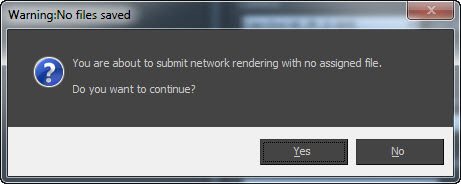
0050-0051 needs more testing, I'll make it later. But 0050 is not a bug - this window pops up when Save File checkbox is unchecked, let me know if it happens in other cases.
0051 is realy ugly thing, I have to make tests with netrender.

I'm open to new ideas and improvements, so go ahead, write your suggestions here or by the email.
Another way to submit ideas is my new repository hosting, so if you like developer tools you can submit a ticket on the http://dev.sergepogosyan.com/batchcam2/reportlist. You can login as anonymous or create an account.

sergo · 2012-01-02

Hi Stan,

here's new version in attachment. Try it and let me know how it works.

P.S. Happy New Year! :)

Attachments

Woaw

stanley_asbeek · 2011-12-29

Hi there, wow you are quick for answer, thanks so much

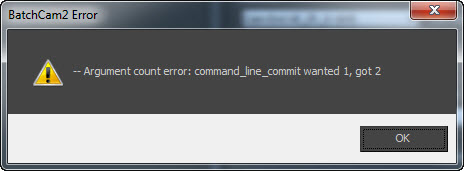
I'm trying your new script, which looks great, but I have a error when I try to send the render to the network. See attachment (image 50-51).

The first image (49) is another bug that I had with the previous version as well but nothing to problematic. It happens when you want to enter a rendering resolution, this popup when I type in the width and click in the height.

So I can't tell if the Elements are working because I can't send the render :o)

any ideas ?

Thanks so much for your time.

Stan

Attachments

Hi there,Great script, but I

stanley_asbeek · 2011-12-28

Hi there,
Great script, but I have a error.
Looks like there is a problem with the render elements, and it's critical for me unfortunately.

Hope you would be able to fix it.

See attachment.

Thanks

Stan

ps : max2012 64Bit, Win7 64Bit

Attachments

sergo · 2011-12-28

Hi!
Could you test attached version? I did some bugfixes and improvements but didn't upload it yet.

Attachments

new error found (when using 1.9.x method)

k2000 · 2011-12-01

Hi,
I just found new error message. (when using 1.9.x rendering method)
When you render the same scene with the same outputh file - Batch asks if you agree to replace the existing file xxxx.tif (or something).
When I press "Cancel" the render stops.
After that it's not possible to start render againg. There is always error. Scene/Max restart doesn't help. It puts something somewhere... (THIS IS REALLY WEIRD!!!)

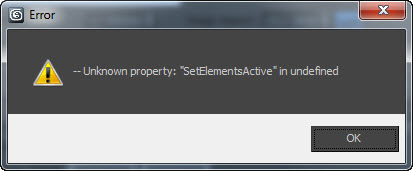
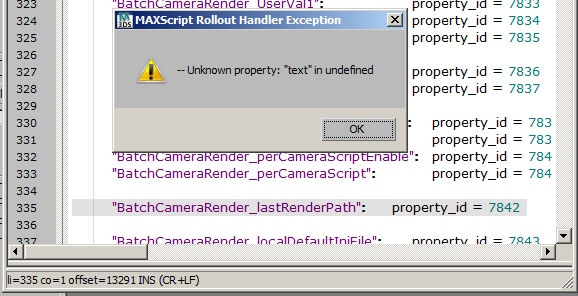
MAXScript Rollout Handler Exception: -- Unknown property: "SetElementsActive" in undefined
li=2128 co=1 offset=73320 INS
...
( elementMgr.SetElementsActive false)

Forced to switch back to the old good one 1.9.7 stable as always.... (unfortanately)

P.S. (didn't used to command line method so far, makes lots of max scene copies)

P.P.S. if you change resolution in 2.0.7.7 it writes it to max render settings - one more issue

sergo · 2011-12-01

Can not reproduce the error - When script asks to replace existing file (in fact it is 3dsmax who asks, not the script) dialog box contains no Cancel button but just Yes/No. If you answer No then script just stops processing.
I suppose there's some other thing that crushes the script. And this crush causes the other error - changing the render setup resolution.
Send me your scene, if it is possible.

Output size - CLEAR error

k2000 · 2011-11-21

Hi,
Found a bug with output size...
If you used these settings and set some picture dimensions through BatchCam you are not able to change resolution or clear the values. Error comes out - see the picture attached.

After restarting Batch all fields will be blank but HEIGHT will be still there. And it looks like there is no way to get rid of it - delete or clear again or restart will not work.

Thx

Attachments

sergo · 2011-11-21

Fixed

Don't saw 2.07 sorry

vklein · 2011-11-18

Thanks for the tip with gamma, is there some script workaround possible? Opening the 3dsmax filesave dialog and immediately closing it or something like this?
And for the "SetElementsError": I didn't saw the 2.07 i was using 2.06.

sergo · 2011-11-19

Gamma workaround for those who has gamma output set to 2.2:
1) set *any* output file in *standard Render Setup* window by pressing "Files..." button.
2) set any other file in any BatchCamera script.
3) render scene with script. You'll get images with gamma 2.2 (or whatever you set in output gamma preference).

I did many tests and this one works best. I don't know why max ignores gamma if output is set by the script. Max has many bugs as many of knows and dealing with them is worst part of maxscripting.

To prove that this is max's bug try to run this two commands in script listener:
rendOutputFilename = @"path/to/your/image.jpg"
rendSaveFile = true
Then press Render button in Render Setup dialog and look at the resulting image.
After that press Files button and pick the same image and render. See the difference.

Start error gone

vklein · 2011-11-17

nothing

sergo · 2011-11-17

Did you try latest 2.0.7 version? "SetElementActive" bug is fixed in this version.

Considering gamma, I made some test after I added 1.9.x rendering method and get strange results - gamma works ok in both methods if you set render file by the File button. But if you just typed in file name in new preset then gamma set to 1.0 again for both methods. It seems that max adds or sets some info before or after showing file picking dialog. If you set the file without dialog gamma setting is lost.

Problems

vklein · 2011-11-17

First: many, many thanks for implemented the features I asked for.
But: The old rendering method don't work. I got this error-combo-box:
---Unknown property: "SetElementsActive" in undefined.
3dsmax 2012 x64 here.

And I now have very strange gamma problems, even with EXRs (new rendering method). See the attachment. The problematic texture is a PNG (it seams to have some built-in gamma, can't set it's gamma).
Is there a safe uninstalling procedure, because now I have a strange max-script error every time I start BatchCameraRender and deleting the macroscript and reinstalling don't help.

Attachments

new feature to add

k2000 · 2011-11-16

Hi,
Is it possible to add moveup/movedown buttons to move cameras up and down?
Not a great feature but could be usefull sometimes.

Thx

sergo · 2011-11-16

Up/Down buttons feature is possible. Should check with single file numbering.

frames...

k2000 · 2011-11-16

One more thing I found.
2.0.6 adds 0000 to the output file name regardless if I selected frame range or not.
Just makes names longer when there is no need.

Thx.

3 cameras...

k2000 · 2011-11-16

posted some error issues vie email.

After pressing "render" comand line window gives some text and nothing more happens...
Other method doesn't work as well...
Was forced to roll back to 1.9.7

Thx

sergo · 2011-11-16

Thank you for testing, bug fixed, new version uploaded.

fajar · 2011-11-15

aspect ratio calculation always error in max 9,say somthing about "System.Math" dotnet...could you fix it sergey

thank you very much

sergo · 2011-11-16

3ds max 9?! Oh, it can be dotnet problems, but I can't even test under max9, I don't have one. Come on, fajar, it is realy time to change max version, to 2009 at least, please.

sergo · 2011-11-15

I've just finished with it. Will upload shortly.

Renderpresets

vklein · 2011-11-15

You wrote: "I encountered the same error recently and have a thought to store renderpresets as full file name instead of just a preset name.
But how this would assure that other user has access to this preset? By saving renderpreset to shared folder?"
Yes, by shared folders. If we can share the 3dsmax file we can share the presets. Our normal work-flow are shared project-folders on a server mapped to equal drive letters (example "P:" for projects) on everyones workstation (the drives are forced to everyone by active directory policies).
So sharing is easy, and another VERY important plus is that a filename would be unique and explicit without any misunderstands in everyones 3dsmax. Could you please implement this as soon as possible?

error

k2000 · 2011-11-11

>In the new scenes - sript works well !

But when I open an old scene (where other version were used 1.9.5-1.9.7) I always get an error...

So to work with old scenes I need to run version 1.9.7. Is there any way to fix it?

Thx

refresh

k2000 · 2011-11-11

Hi all,
Just upgraded to v2.0.225 (Max Desing 2010, Win7 64bit)
In previous versions when you run the script you instantly see the list of you cameras. And if no - you just click the "Refresh" button.
Now when I start the script - the list is blank. Pressing "Refresh" does nothing.
Is it supposed to be so?

I missed Copy/Paste buttons (liked it in v1.9.7) - very usefull feature to change "save path" etc.
Now to copy properties you need to delete old camera and duplicate a new clone.

Thx

sergo · 2011-11-11

The matter is that this version is not camera-centric, you have to create preset to render some view, not necessarily camera view. This is why the list is blank at first run. In next versions I'm planning to add some import feature to easily import old version presets and standard batch render presets too.

I use this script with some of my old scenes and I didn't have such problems. Could you send me your scene for testing? I need an empty scene with camera objects.

k2000 · 2011-11-14

The issue with the error is gone now.
After system restart everything is fine now.

Thx

Jobnames and job sorting posibility

vklein · 2011-11-03

Hi,
sorry for having so much wishes, but could you please, please implement these features:

A jobname or comment/note field would help distinguish jobs (especially those from the same Camera)

The possibility of sorting jobs up and down by 2 up/down buttons would also help.

Could you please make the job-list larger, so more jobs fit over one another.

Renderpreset from file ???

vklein · 2011-11-03

There are problems with loaded render presets in 3dsmax and your script.
It is possible that the shown list of presets contains unloaded presets, which leads to canceled job submissions.

Could you please implement a chose file dialog for the render presets? This would assure that you really have the specific preset, and would assure that another user opening the scene with his 3dsmax also has the specific preset.

Renderpresets for other users

sergo · 2011-11-03

I encountered the same error recently and have a thought to store renderpresets as full file name instead of just a preset name.
But how this would assure that other user has access to this preset? By saving renderpreset to shared folder?

Old render type?

vklein · 2011-10-28

Could we get the old render type from BR 1.9? To resolve my Gamma problem with non EXR files?

sergo · 2011-11-02

Yes, it will be available in next version. I will try to update it asap.

vklein · 2011-09-27

my gamma settings are input AND output 2.2. Exr seams to have their own gamma of 1.8. I just edited your script and inserted the needed gamma options( -gammaCorrection:1 -gammaValueIn:2.2 -gammaValueOut:2.2)into the "CommandString", but with no effect. So for me it seams to be an 3dsmaxcmd problem (it's a shame they still have such basic errors in 3dsmax version 14).

sergo · 2011-09-27

Thank you for testing. Agree with you, I've tested different switches and none of them worked. I just don't know what to do now, it seems as a big problem for whose who uses non-exr file formats.
May be prerender script helps somehow... have to make some tests.

Little Bug with RenderSettings

vklein · 2011-09-27

There seams to be an problem with the Vray rendersettings of the file if loaded over the 3dsmaxcmd which you are using for rendering now. Looks like my pics are missing the environment reflection map or something similar. And there could be an gamma issue too. 3dsmax 2012 x64 vray2 using here. I don't have now time to investigate, pics looks darker and some reflections are missing, thats all I can say for now. Rendered without the script works fine (backburner and local).

sergo · 2011-09-27

Could you provide your gamma settings? I'm using input=2.2, output=1.0 and I'm rendering to exr and have no problems at all.

It seems that there is some bug with gamma+3dsmaxcmd, you're not the first who mentions it.

Render without framebuffer

vklein · 2011-09-27

Could we get a option for disabling frame buffer over backburner please?

sergo · 2011-09-27

How about additional command line paramteres field?
There will be a field where you can enter "-showRFW:0" and render will proceed without frame buffer. I don't know if this option has an effect on backburner jobs... Will check and let you know.

titane357 · 2011-09-13

Great script ! save me lot of time : archviz render, lot of different cameras for just one shoot,...It would be great to have an option to save the file with the camera name in it ! Thanks for sharing. :-)

sergo · 2011-09-13

Thank you!

I don't understand about saving file, could you explain a bit further? Do you mean saving the rendering file under the camera name? You can use %cameraname%.jpg to do that.

titane357 · 2011-09-27

ok, that was just what i was looking for !!! thanks.

HELP !!! Network render doesn't work

vklein · 2011-09-02

Submitting jobs for network render doesn't work.
I can't submit to my server even by putting the exact IP or name in the field. I have to use another port (3800) perhaps here is the problem. The batchwindow opens with job calls, it looks like it would begin redering, but no job emerge in backburner. Local rendering looks good.
3dsmax 2012 with backburner 2008.1.1.
batchrender 1.9.xxx worked fine.

sergo · 2011-09-02

Didn't test under 2012 max. Could you provide some more information - error message or screenshot?

sergo · 2011-09-02

Ok, actually this version didn't handle port parameter, you were right. I fixed that and upload new version soon. BTW: In 3ds max 2012 close file command is broken so HOT FIX 1 or 2 is REQUIRED for this script!