Modifier Instancer

11
votes
Author Name: 
Arda Kutlu
Version: 
0.5
Date Updated: 
08/29/2008

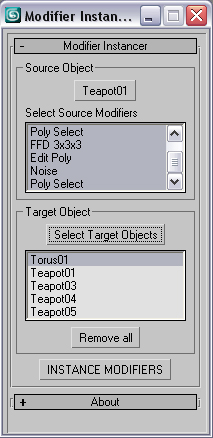
This simple scripts allows you to instance some or all modifiers of an object into large number of objects.

- just pick the source object

- select the modifiers that are going to be instanced. Press CTRL for multiple selection.

- select target objects

- Hit to the INSTANCE MODIFIERS

version history:

version 0.5

-Selected objects automatically will be added to the target list.

-------------------------

version 0.4

-when selecting target objects, the source object dont show up in the selection window anymore.

-When trying to instance invalid modifiers (ie, edit poly modifier on
point helpers) , it simply skips that modifier for that object instead
of throwing an error.

--------------------


--------------------

version 0.3

-first release

--------------------

Additional Info: 

Its a Macroscript. Drag and Drop or run the script.
Then assign into a menu, hotkey or quad menu through customize =>
customize user interface => Under the Category: Tik Works

Version Requirement: 
Written in 3ds Max 2008
Video URL: 
AttachmentSize
Tik_Modifier_Instancer_v0.3.ms3.07 KB
Tik Works-Modifier_instancer_v04.mcr3.27 KB
Tik Works-Modifier_instancer_v05.mcr3.45 KB

Comments

Comment viewing options

Select your preferred way to display the comments and click "Save settings" to activate your changes.
jsrocha's picture

Thanks man!! Jsrocha

Thanks man!!

Jsrocha

masquerade's picture

Thanks for the suggestion.

Thanks for the suggestion. Its a good idea.

 Done that and updated file. Enjoy.

titane357's picture

I second this !!! :-)

I second this !!! :-)

jsrocha's picture

I have a suggestion: if

I have a suggestion: if possible, let the selected objects be in the "select target objetcs" box already. Doing this, you don´t need to select the objects by name. I think it would be a great improvment to the script...
best regards,

Jsrocha

jsrocha's picture

very, very usefull! great

very, very usefull!
great Job!!

Jsrocha

Comment viewing options

Select your preferred way to display the comments and click "Save settings" to activate your changes.