
Movement controls visibility
Hi all,
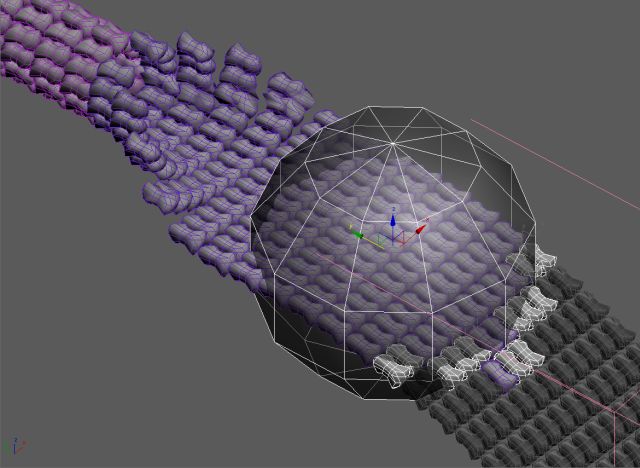
Is there a way to connect an object´s transform (M/R/S)to other object´s visibility and modifiers? In the attached image, a sphere moves (-Y axis)in an array of objects. 1- As it touches each object, they became visible (those in white). 2- Then, some rows behind, each row begins to fold into a ring (those in magenta). In 1-, the simple (and draft) way is to link the sphere movement to each object, by comparing their Y position (in natural language: if Y of sphere is greather than obj Y, then obj is visible). This is without checking surface intersections ofcourse, but never used script before and seems I cannot script even that simple rule.
In 2-, all the row has a parametric bend modifier that could be set in the same way (as the sphere passes), but for now is animated by hand. So, I thanks in advance those who are kind enough to spare some time and help me in this matters (and excuse my english).
Thanks,
| Attachment | Size |
|---|---|
| sceenshot1.jpg | 43.01 KB |
Comments
Awesome!
Thank you very much, Jos!
I`ll give it a try. Here is the file you requested. http://www.sendspace.com/file/rg953w
GD,CG artist
Hi Jos, I have some
Hi Jos,
I have some suggestions if you don't mind
When you use *Ctrl Object* pick button you can set filter fn
Also is better to add buttons, something like "Remove List Item" and
"Clear List" than use doubleclick, because some users don't read the code (script) to find out how to do that. :)
By the way, nice work.
bga
thanks
thanx for feedback. Yeah I hadn't much time, so this is far from finished. For the filter I had in mind you dont need a sphere, so you could also take a helper or something as control object. And yeah, thank for pointing that out, I had forgotten for the clear list button and remove list item. (I had to hurry, my break wasnt that long :p )
first version
So this is the first version (no error checking, and if the sphere passes it sets one keyframe). Check out if this is what you need. If you need additional features (fade in over a certain frames for example, just ask). For the addition of the bend modifier i'll make a version just for you, can you provide me with a max scene as example? it's difficult to know which angle I have to animate an over how much frames. So if you give me a max file and specific info I'll do the job for you.
Almost finished the script
Almost finished the script that will animate the visibility of the objects. I'll will post a first version tomorrow!