Tagged 'save'

Save button

6 votes

If you're tired of 3dsmax Auto-saving and freezing when you are working, this script is for you.

It's based on an idea of Vincent Lacour.

installation :

Put the file in the Scripts/startup folder of your 3dsmax installation.

Restart 3dsmax How it works :

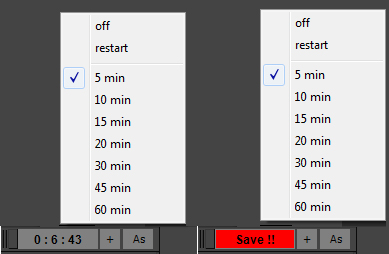
When you start 3dsmax you'll notice a new tool at the bottom left of your UI.

If you right clic on the biggest button, you'll see a few options :

CAT Pose Grabber

1 vote

A panel to support CAT rigs which allows temporary storage and retrieval of a single or muliple poses. Poses are not named and there is no management of them. The idea is that you simply want to grab a pose (or several) and use it immediately, without dealing with names or folder structures for fluid workflow. Poses saved are stored as files and are thererfore persistent unless overwritten using the script store functions.

Features include:
- Supports multiple CAT rigs in the same scene. You can even transfer poses from one rig to another.

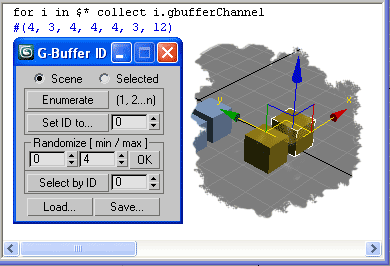
G-Buffer ID

22 votes

4 assistant operations for effects tasks which required G-Buffer ID's.
All of them works on selection or all scene objects and support Undo.
Plus Load/Save to log file to backup and restore your G-Buffer ID's settings.
Save also works on selected or all scene objects.
Only Load ops not support Undo.

miauu's Batch Save/Export OBJ/FBX/3DS/MAX as OBJ/FBX/3DS/MAX files

6 votes


Batch save or export selected .obj, .fbx, .3ds or .max files an .obj, .fbx, .3ds, .max files.

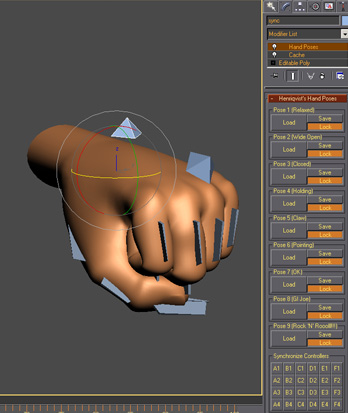
Henriqvist's Hand Poses

0 votes

Script developed to enhance the speed of animating hands. You can save a lot of poses and then load it anytime you want. OBS1: It only saves position and rotation, scale information is not stored. OBS2: You cannot use position or rotation list in the controllers, but you can use float list.

Face Pose Saver

1 vote

A 3ds Max script to save key positons of the face witch is controlled with sliders

Video link

GitHub link

ABOUT THE SCRIPT:
It's a tool for animators to save key face poses and speed up work. It's gets the position of the selected sliders and do a snapsot on the viewport and save as a button. First you have to set the "CHR" as the charachter name and set the path where the picurates begin saved.

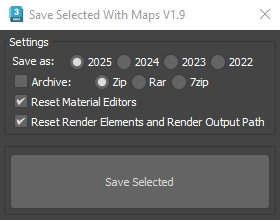
Save Selected With Maps

6 votes

It will collect/relink all selected objects bitmaps to the chosen folder, even if the bitmaps are just flagged "found" in the asset tracker, and it will save your selected objects to that same folder.

If path are missing or unsolved those maps will keep their missing or unsolved path, it will be easier to try to find them.

It is compatible with Vray bitmaps, Corona bitmaps and IES files in Standard, Photometric, Vray and Corona Lights.

Material Manager

1 vote

Material Manager gives users a one-click solution for saving out materials and also reapplying them. Users can choose to save the selected objects materials, or the entire scenes materials.

ViewsMan

23 votes

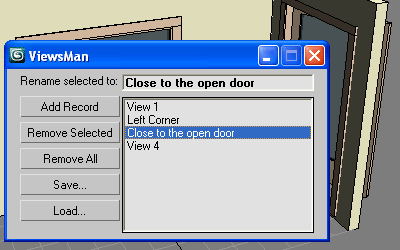
Save and restore unlimited views.
You can save views in one scene and load them in another scene.
Double click in the list to restore the saved view.

ViewsMan

The idea come from AutoCAD where you can save up to 5 views. Im not sure (never see) how exactly this feature works in AutoCAD, I just read about this in the ScriptSpot.com, and I hope this tool is useful anyway ;-)

View Manager

13 votes

Save and restore up to 5 views in the current scene.

I am working on a bit more usefull version but I have some issues to be resolved. The idea is like in AutoCAD - you save up to 5 views in the current scenes - for now you can't save or name them but I hope to resolve that. This helps in working in the viewport without the need to create cameras.

Syndicate content