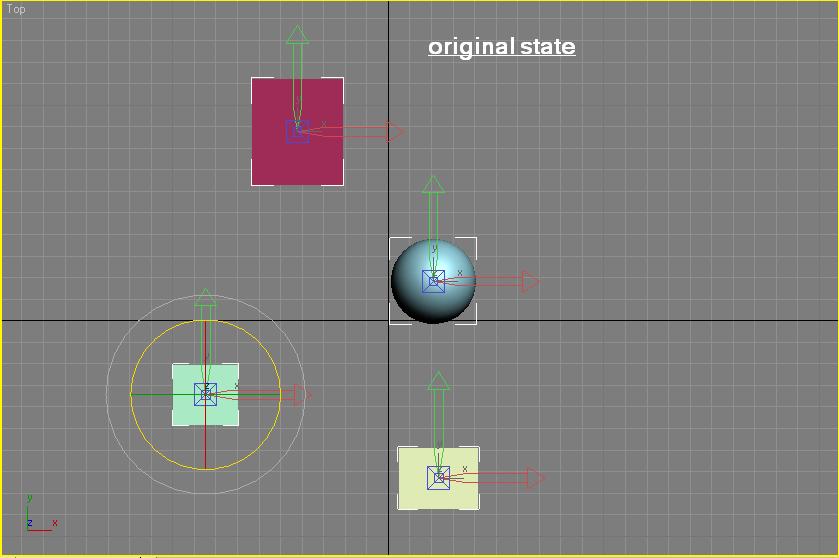
hello ... i was wondering if it is possible to make a bunch of ( 500 and more) objects pivots look at a node or something without affecting the original object .. u can look at the attachment the will give the idea ...
thanks in advance
Forum topic · Scripts Wanted
make objects pivot look at an object ...
 By 3D R.n.D · 2011-01-01
Description

Comments (14)
Here it is explained
 JokerMartini · 2011-01-21
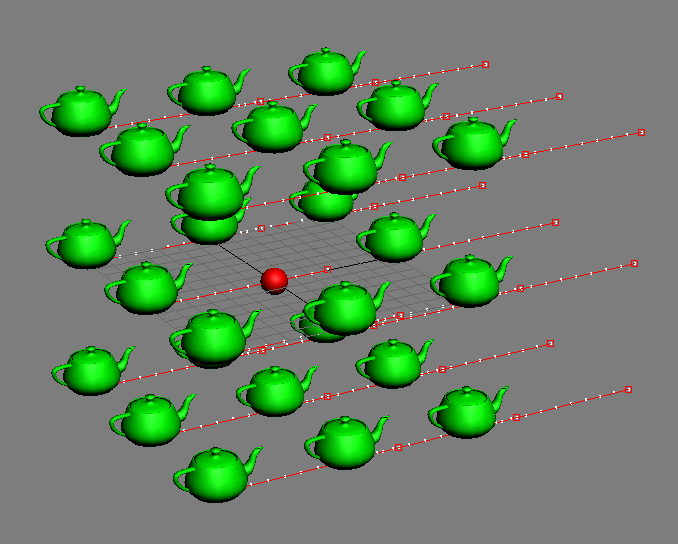
Scene Setup: All the teapots are animated going from left to right as seen in image one.
There is a Geosphere in the origin 0,0,0
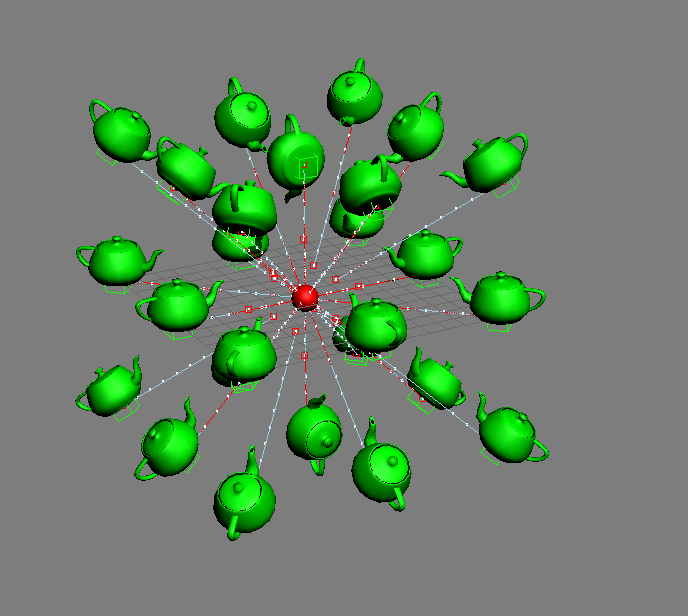
Run the script. The result makes all the animated teapots aligned towards the geosphere which is what we want. Results of image 2.
The problem is that when i delete the look-at constraints the teapots return back to there original states found in image 1.
I want to somehow figure out a way to keep that offset and rotation created by the lookatConstraint and but delete the look at constraints.
Now it's animated?
Garp · 2011-01-18
This is quite different from what we've been doing so far.
I can't open the file (still using old max 9). You'll have to describe the scene: what is animated (objects? target?), what is looking at what, how many targets?
From the script it seems that you link to a dummy and then give it a lookAt. If you want to animate either the dummy or the target, of course you don't delete the dummy!
(...!)
Garp · 2011-01-17
(
    local dum = dummy()
    local theTarget = $Geosphere01  -- the target
    local theLookAt = lookAt_constraint()
    theLookAt.appendTarget theTarget 100
    dum.rotation.controller = theLookAt
    for obj in selection do
    (
        dum.pos = obj.pos
        obj.transform = dum.transform
    )
    delete dum
)
I'm curious to see where this is going :)
Bug
JokerMartini · 2011-01-18
Alright this is where I'm going with it Garp.
I'm having an issue when I delete the Dummy with the Look At Constraint. Now do you know of any where I could get around that and somehow delete it which keeping its offset?
Directions:Open the max file and run the attached script but ONLY on the green wirecolored objects and the scrub the time line. You'll notice all the objects animate inward which is what I want.
If you do that same process but delete the dummy it doesnt react the same.
Thanks
John
Attachments
- objlookat.max — objlookat.max248 KB
- alignobjecttoobject-v2.ms — alignobjecttoobject-v2.ms363 B
(...)
Garp · 2011-01-17
(
    local dum = dummy()
    local theTarget = $Geosphere01  -- the target
    local theLookAt = lookAt_constraint()
    theLookAt.appendTarget theTarget 100
    dum.rotation.controller = theLookAt
    for obj in selection do
    (
        dum.pos = obj.pos
        local oldTM = obj.transform
        local newTM = dum.transform
        obj.transform = newTM
        obj.objectOffsetRot = oldTM * inverse newTM
    )
    delete dum
)
Nice
JokerMartini · 2011-01-17
Great stuff Garp.
Now this script seems to change the objects pivot to point at the targeted object which is great and what I asked for. Thanks a ton.
Now is there a way to not only change the objects pivot but rotation align it to point at the target objects pivot.
For example. You had a geosphere at 0,0,0 and then you created a handful of teapots.
You now want to rotate align the teapots so not only their pivots but also the spout on all of them are pointing towards to targeted object (geosphere)
JokerMartini · 2011-01-17
Is there a way to do this without using a controller?
Is there a way to run the script and it makes the objects pivots rotate to look at an object? It doesn't have to be a permanent thing like the look at controller. I'd like it to just rotate once to match.
Working version:
Garp · 2011-01-16
(
    local theTarget = $Geosphere01  -- the target
    local theLookAt = lookAt_constraint()
    theLookAt.appendTarget theTarget 100
    for obj in selection do
    (
        local oldTM = obj.transform
        obj.rotation.controller = theLookAt
        obj.objectOffsetRot = oldTM * inverse obj.transform
    )
)
JokerMartini · 2011-01-14
Hey guys did this one ever get figured out and working?
I was messing around with it today and it does not seem to be working properly?
Any final scripts or conclusion on this one?
3D R.n.D · 2011-01-02
u mean :
for o in $ do o.objectOffsetRot *= o.rotation
i tried that but the objects didnt get back to thier original state ...
Oh, I forgot that part.
Garp · 2011-01-02
Oh, I missed that part. Reselect the objects (including the first one) and type:
for o in selection o.objectOffsetRot *= o.rotation
If it's for an animation, you need to use a script controller.
3D R.n.D · 2011-01-02
ammm i tried it but its not what i want ... i dont need the objects to look at the sphere but i only want thier pivots to do so as in the picture 2 ... what can i do :(
3D R.n.D · 2011-01-02
i'll give it a shot ... thanx allot :D
Select one of the object and
Garp · 2011-01-02
Select one of the objects and give it a lookat contraint with the proper target, axis and such.
Type c = $.rotation.controller in the listener.
Select all the other objects and type for o in $ do o.rotation.controller = c
Et voilà.