Tagged 'plugin'

UI toolkit

5 votes


UI Toolkit, is a serie of new 3dsmax scripted plugins, to quickly create modern & sci fi UI and motion graphics directly in 3dsmax.

With a lot of procedural parameters and ways to animate and link them together.

More tools to come, you can email us to suggest some new features/objects.

Features :

Techline

-1 vote

The Techline plugin offers the ability to easily create a mechanical, linear line with varied notches, segments, gaps, thickness and more. Check it out and see what you can create!

3ds Max Compatibility:
– 2008 or later

msKonektus

3 votes

msKonektus v0.1 - plugin for 3ds max 2017-2026.

msKonektus allows you to create effects similar to those known from the Plexus plugin for After Effects.

msKonektus is fast and efficient, and provides many parameters to customize the final result. Works with geometry and particles (standard particles, Particle Flow, tyFlow).

INSTALLATION
Simply copy correct version msKonektus_20xx.dlo file into your 3ds max 20xx plugins folder.
You should find it under Geometry rollout -> msTools -> msKonektus.

Curlipse – 3Ds Max Shape Object

0 votes

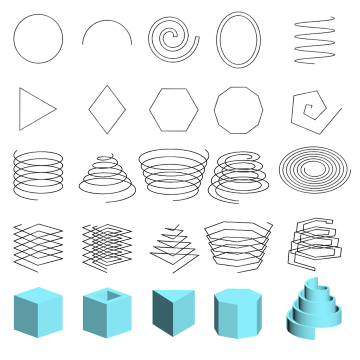
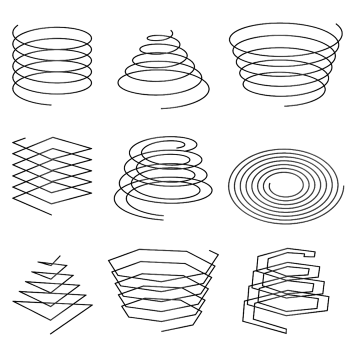
3Ds Max plugin for creating shape objects like open/closed flat or 3D elliptical or circular spline helixes.

Also, using Curlipse, you can create N-gon shapes with a lot of options.

Also, unlike the standard helix shape, Curlipse generates a valid curved shape with the ability to specify interpolation steps.

Curlipse is included in a pack with Fusion plugin

Dimension Shapes (3 plugins)

1 vote

Updated 2025/11/16

- Extended features, read more on JokerMartini.com

Dimension Shapes is a bundled 3dsMax plugin consisting of 3 plugins. These plugins give users the power to create 3d dimensional lines, similar to what's commonly seen in schematic drawings. Below are the three plugins that are included.

Angular Dimension