ScriptSpot

Forum topic · General Scripting

button for checking if effect is on or off

By themaxxer · 2018-09-17

Description

hi all coders

I have found this script to check if DR in Vray is on or off, and now I need this for checking another checkbox...
is it possible to check if psd manager is on or off, too? see: https://c2n.me/3WIDjWd.png
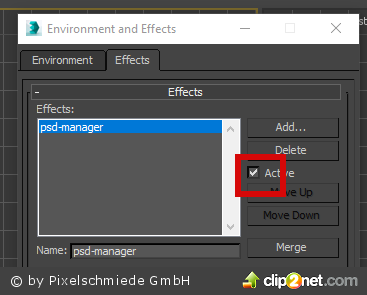
thanks for reply.

best regards
themaxxer

macroScript Leo_Distributed_render_On 
category:"Leo_DR" 
internalCategory:"Distributed_Render" 
tooltip:"Distributed_Render_ON" 
buttontext:"DR ON"
 
(
	on isChecked return (renderers.current.system_distributedRender)
	on execute do
	(
		renderers.current.system_distributedRender = not (renderers.current.system_distributedRender)
	)	
 
)
Comments (10)

themaxxer · 2018-09-17

it works!!!! man thank you very much!
you are my hero. :)

do you make custom script as job?
I have some ideas for my workflow and I search for a good coder...

best regards
themaxxer

.

jahman · 2018-09-17

Why not. You can find my contacts inside the script

`

pixamoon · 2018-09-17

Hi,

You can add

on isChecked do ...

similar as the prev script had it.


on isChecked do 	
(
	for i = 1 to numEffects do
	(
		local eff = getEffect i
		if matchpattern eff.name pattern:"*psd-manager*" do return (isActive eff)
	)
	
	false
)

Best regards,
Pixamoon

.

jahman · 2018-09-17

That's exactly what I did, but it doesn't help to update button state if user delete effect or disable it manually.
There seem no callback for effects, unfortunately. The only way I found is to use when subAnimStructure ... changes on the RenderEffects trackview track. But didn't experiment much.

`

pixamoon · 2018-09-17

Just quickly checked here in 2016 and it works (disable / delete effect) but only when I accept changes by closing "Environment and Effects" window or open/close other dialog.

I checked also function from isChecked manually and it works even without closing dialog. So it means isChecked is fired up only if something changes in max Dialogs

.

jahman · 2018-09-17

macroScript Leo_Distributed_render_On 
category:"Leo_DR" 
internalCategory:"Distributed_Render" 
tooltip:"Distributed_Render_ON" 
buttontext:"DR ON"
 
(
	on isChecked return (renderers.current.system_distributedRender)
	on execute do
	(
		renderers.current.system_distributedRender = not (renderers.current.system_distributedRender)

		for i=1 to numEffects do
		(
			eff = getEffect i
			if matchpattern eff.name pattern:"psd-manager" ignorecase:true do setActive eff (not (isActive eff))
 	
		)
	)	
 
)

themaxxer · 2018-09-17

thanks jahman

it seems not to work... and can you write it in a separate script?

best regards
themaxxer

.

jahman · 2018-09-17

Try these to toggle psd-manager effect.


for i=1 to numEffects do
(
	eff = getEffect i
	if matchpattern eff.name pattern:"*psd-manager*" ignorecase:true do setActive eff (not (isActive eff))
 
)

or


for i=1 to numEffects do
(
	eff = getEffect i
	if eff.name == "psd-manager" do setActive eff (not (isActive eff))
 
)

themaxxer · 2018-09-17

thanks jahman

the first one works, didn't tested the second one.
now is it possible to indicate if the button is pushed? like in the Leo DR script.

I would like to donate something if you want. time is money. :)

thanks
themaxxer

.

jahman · 2018-09-17

Not sure how to correctly update toolbar button state when user adds or removes an effect or enables/disables it manually. Seems like no easy solution exists or I couldn't find one.

Attachments