
dimension tool
Hello
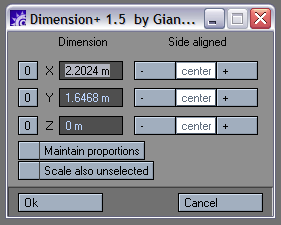
I look for a tool like dimension+, a lightwave plug in.
It is used to change dimension of a selection of vertex (edit poly object).
It would be great to have orientation option : not just world XYZ, but local, grid,...
Thanks.
| Attachment | Size |
|---|---|
| resize.png | 10.92 KB |
Comments
i was joking :-)))
i was joking :-)))
Ok, now inversion is gone :)
Ok, now inversion is gone :) You understand me wrong, your gif was very helpful for understanding the functionality of the lightwavescript :)
If you think this tool can
If you think this tool can be usefull for people, I think you can see if it is possible/doable to use not just world, but grid and gimbal space coordinate. (and if it can make coffee)
Sorry, I'm french, german
Sorry, I'm french, german should be a dramatic alternative for me :-)))
-/+ Invertion is simple : if I want to change for eg. Z size and I want that the top of the bbox don't move, I select "+Z".
If I want the bottom of the bbox to be fixed I choose "-Z".
For now your script does the opposite.
It is not fair to laugh at my poor gifs...
hello I tested 1005 and in
hello
I tested 1005 and in fact it works fine (as 1004)
but for me , "-" and "+" are always inverted...
In your script , calculation of "maintain dimension" and "scale also unselected" are done in the UI, in the LW script it is done afterwards.
So in you script you need to have 3 axes to be different to zero to have possibility to "scale also unselected", if not you obtain a flat object.
Thank you very much for your patience :-)))
Hello again :D (Are you from
Hello again :D
(Are you from germany? I'm from germany maybe we can talk german to get the miscommunication fixed ^^)
Yeah you want that its only possible to "scale also unsel." when all 3 values differ from zero? No problem.
Maybe you can make a nice gif again to show me your -/+ inverted problem.
"Scale also unsel." is done by simply backup the current vertselection, select all verts and after dimensionize restore vertselection. Is that the wrong way?
"Maintain proportion" ... how to do that afterwards? Please explain the functionality in Lightwave ... or make a gif :D
Uhm, I tested the "scale
Uhm, I tested the "scale also unselected" and the "side aligned". Both seem to work as expected. Maybe check again version 1.0.0-5 :)
yesss there is 2 problems
yesss
there is 2 problems :
- "-" and "+" are inverted
- "scale also unselected" don't work
(nice "refresh" button :-)))
it would be great that after running the script we keep subobject vertex mode.
Hope you don't regret to help...
Thanks for the nice gif :) I
Thanks for the nice gif :) I updated the script.
I'll try to explain me
I'll try to explain me better :-)
hope that can help....