Tagged 'General Scripting'

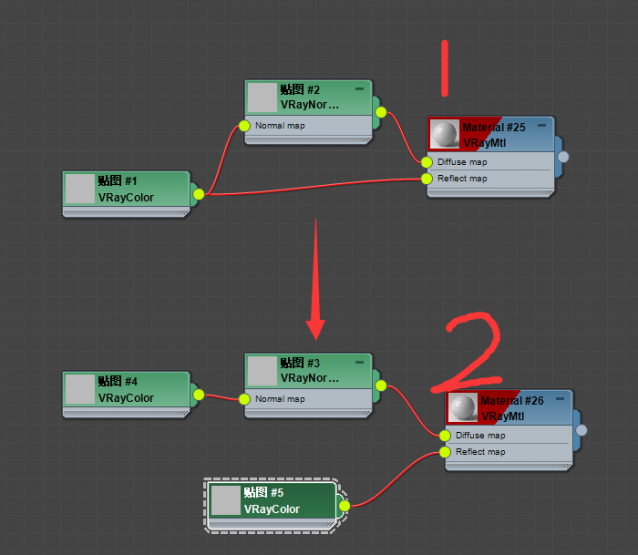
I want to turn all nodes like 1 into 2 in the scene

Can the following operations be achieved

This is my test maxscript

Select ONLY visible polygons (eg what camera can see)

I am after a script that will allow you to make a Selection when in Polygon sub-object mode, and it will ONLY select the visible polygons. There does not seem to be any function, or script, ever made for 3DSMax to do that.

Below is a script that can select ALL visible polygons only. I assume it could be edited to take a Selection as the range to select from?
It would also be good if it could select either forward facing polygons, or backward facing ones - maybe two scripts at worst?
And there would likely be numerous other sub-function selection modes that would be very useful too.

How to rename detached objects in a layer based on their ascending numbering order.

Please note, I am happy to pay someone to write this short script for me, so please let me know your fee to do this for me :)

Here's my request.

I have objects in a layer (I have many layers, 100) and some of those objects (let's call these the 'original' objects), are named - 006_145_15, 006_145_18, 006_145_25 etc.

Note that they are suffixed with _15, _18 or _25. Their prefixes (in my example, 006_145 is the same within its layer but will be a different sequence of numbers in other layers, but still in that similar 3 digit grouping pattern).

How can I apply Material IDs to the 2 end-cap sides (and base) of a sweep object and then detach those Ends ?

Please, can you guys help me on this - it's the final step needed for a script I need :)

I have many shape objects that I need to batch process via a script.

They are all very simple extrusions, which are just a 2-vertex straight line 200mm in length, and each object has a single Sweep Modifier (each object has a unique custom shape).

The base and the side-ends of every shape is flat (and if it helps, I can specify that the sides are at x=0 and x=200, and the base will always be the face that is at z=0).

This is what I need to do for each object is as follows;

How to select specific vertices on a spline (so I can manipulate them) ?

I've got a very simple shape that I want to write an automated script for.

I want to select the two lowest vertices (they will both be on the same height on the z-axis, say maybe 0), and I want to invert that selection so I have all the other vertices and move those up the z-axis a particular amount.

How can I find my two lowest vertices in my spline?

PS - I am a newbie in MaxScripting and am going through AutoDesk's MaxScript Essentials book, but I can't see it in there.

Many thanks.

Is it possible to use Maxscript to extract the Custom Section of a Sweep Modifier ?

I have a batch of sweep objects I want to go through so that I can process them in some way.

The first step I need to accomplish is to go through my set of selected objects (each object is just a shape with a Sweep Modifier).

I want this script to do the following;

For each selected object;

1) Set the current layer to the layer of the currently worked on Selected Object.

2) Store the name of that currently worked on Selected Object.

Is it possible to use Maxscript to extract the Custom Section of a Sweep Modifier ?

I have a batch of sweep objects I want to go through so that I can process them in some way.

The first step I need to accomplish is to go through my set of selected objects (each object is just a shape with a Sweep Modifier).

I want this script to do the following;

For each selected object;

1) Set the current layer to the layer of the currently worked on Selected Object.

2) Store the name of that currently worked on Selected Object.

Is it possible to use Maxscript to extract the Custom Section of a Sweep Modifier ?

I have a batch of sweep objects I want to go through so that I can process them in some way.

The first step I need to accomplish is to go through my set of selected objects (each object is just a shape with a Sweep Modifier).

I want this script to do the following;

For each selected object;

1) Set the current layer to the layer of the currently worked on Selected Object.

2) Store the name of that currently worked on Selected Object.

Is it possible to use Maxscript to extract the Custom Section of a Sweep Modifier ?

I have a batch of sweep objects I want to go through so that I can process them in some way.

The first step I need to accomplish is to go through my set of selected objects (each object is just a shape with a Sweep Modifier).

I want this script to do the following;

For each selected object;

1) Set the current layer to the layer of the currently worked on Selected Object.

2) Store the name of that currently worked on Selected Object.

Make a 4 vertices poly with 3 selected vertices

Hi

I want to make a new poly face with 4 vertices with 3 selected vertices.
( see pict )

SV = #()
SV = polyOp.getVertSelection $ as array
pt1 = polyOp.getVert $ SV[1]
pt2 = polyOp.getVert $ SV[2]
pt3 = polyOp.getVert $ SV[3]
DIST = pt3 - pt2   --- here
NP =  pt1 + DIST   --- and here
pt4 = polyop.createVert $ NP
append SV pt4
polyOp.createPolygon $ #( SV[1] , SV[2] , SV[3] , SV[4])
redrawViews()

It works in some situation, but as I'm a s### in maths, I don't know how to locate the 4th vertex in space...
If anybody could help. Thanks.

Syndicate content