Tagged 'camera'

NukeOps

39 votes

A set of functions wrapped into a minimalist single-click button to help 3ds Max and Nuke artists to bring the 3ds Max 3d scene assets into Nuke's powerful 3d compositing scene.

This tool allows:

1) Copy cameras and any other objects (as points) and their animation into clipboard for an easy Copy+Paste action inside Nuke.

2) Generate .chan files from selected cameras and any other objects (as points) and save them either many at once or one at a time to selected destination.

Lock Cameras or objects

3 votes

A little script to lock/unlock the movements of the cameras or objects too.
Put into your scripts directory, and under "Customize user inteface" open the category "Maico G." and assign "Lock Camera" to a menu, shortcut or toolbar.
To use, select a camera, camera target or an object and click lock or unlock.

Create Walkthrough Camera

6 votes

Create Walkthrough Camera v1.0 

The idea behind Walkthrough Camera
was to speed up workflow in terms of
attaching a camera to a path. This way
it's done with only a couple of mouse
clicks.

Camera Z_Depth

43 votes

This script creates a new render element using a falloff shader to emulate a zdepth render element. The min and max values are added to the cameras attributes. This gives you the ability to animate the min and max values of the zdepth and to be able visualize those values in the viewport.

It installs as a macro script in the mikes scripts category.

Update 05/26/2011:
I changed the default values from 100 min and 200 max to 0 min and 0 max.

Update 02/10/2012:
I turned off filtering.

mipoll Vraycamlister

1 vote

Info :
Rightclick : select camera
Doubleclick: select target
Rightclick: change viewport to camera view

Cubemap Builder

0 votes

Description:
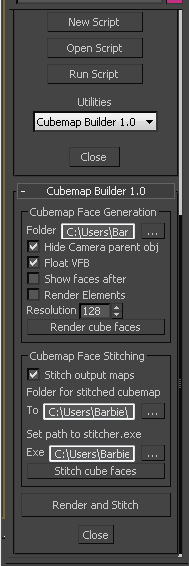
A maxscript Utility for the batch generation of cubemap faces across multiple cameras, and optional assembling of a "complete" cubemap in DDS format. The completed DDS texture is ready to use in the DirectX shader material - the original inspiration and motivation for this script.

Hoha_SuperiorTurntable_Camera

2 votes

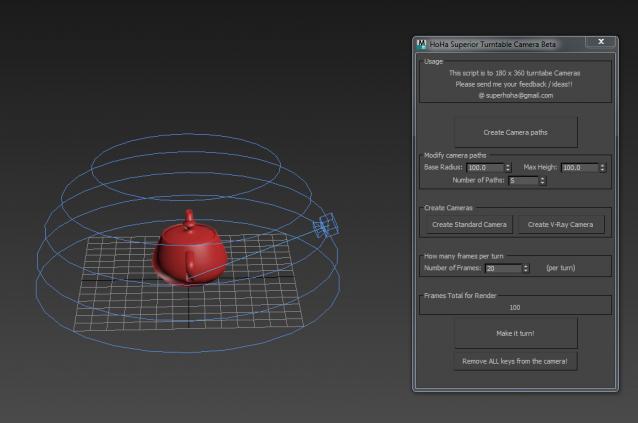
I would like to share with you today Superior Turn table script.

Superior Cam Pic

This script will make a turn table camera around the 0 0 0 coordinate. However, it can do more than that. It can take 360 x 90 angles of your model. Very useful for those who wants to render as hemishpere presentation.

It is a straight forward script. Just click from the top to botton, and you will have your camera.

Any questions, feedbacks please post below or email me.

Thank you.

Batch Camera Previews

2 votes

This script will render out via "Preview - Grab Viewport" for multiple cameras at once. Useful if you create preview cameras a lot, or need to make multiples at once.

Installation:

1. Run script

2. In Max goto "Customize->Customize User Interface...->Toolbars tab->Category: ColinScripts->OpenGL Previews" and drag "OpenGL Previews" to a toolbar, click to run.

Render Still Cameras

1 vote

VERY QUICK & SIMPLE BATCH RENDERER for STILL IMAGES. Just 2 clicks and ready to go!

This script is very useful to render many views from a single model or scene when you have already placed still cameras.

It combines many still cameras into one single animated camera that shows all those views sequentially, one per frame.

Then you just need to render the new camera to a sequence of images.


HOW IT WORKS:

The script lets you first select the still cameras to combine into one.

ImagePlane

31 votes

"Scripted object plugin that will generate a parametric imageplane for a given camera; useful for matchmoving - previewing set extensions - combining live footage with CG etc.
New: plane non-renderable by default - buttons for quickly changing render/display state"

New in v1.45: Richard Annema from Splutterfish added support for Brazil v2 cameras


Syndicate content