Tagged 'select'

Select Similar

17 votes

Allows you to select objects that are similar to the currently selected object. It will compare the bounding box size, mesh (vert, face, edge counts) and material either within the currently visible objects or all objects in the scene.

Demonstration video here

Unhide by Select

3 votes

This script allows you to unhide hidden objects by selecting them via mouse click or via Select From Scene dialog(H hotkey).

How to use it:

CamLister

4 votes

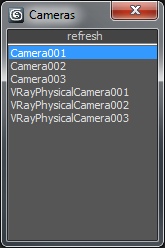
A very simple Camera Lister which allows to select and assign cameras by clicking it in the list.

Leftclick: Select the camera
Rightclick: Assign to current active Viewport

Very simple one but still my most used Script for daily work ;)

ClaverTech-KeyStones

10 votes

This tool just holds a list of key objects u want to quickly select or view. helpful when in a scene with a crapload of nodes when ur really only animating a few of them. Additionally if u right click an item in the list u will zoom extents of it (if geometry), or look from its perspective (camera or light). It also keeps the list variables as persistant... so u can open and close it without changin the list.. even closing and loading the scene.


SplineTools

2 votes

Simple tools for working with splines in 3dsMax.

These tools includes:

  • -Selection filtering *Select only closed *Select only open 
  • -Clean up *Convert to spline and perform overlapping points weld.
  • -Close all *Close all splines
  • -Set points to corner/smooth/bezier/bezierCorner *Sub-object level sensitive
  • -Select by length *Select and sort splines by input length
  • -Sort *Detach open splines
  • -Explode *Explode shape object to splines (not segments)
  • -VArranger *Arrange selected splines by input z values and optionaly create a surface. Used to create terrain from drawing.

SplineTools_ScriptSpot_V.2.0

Memento

1 vote

New MaxScript. Simple and handy as aways. Free.
It's very useful for my use. You can quickly save and recall up to 5 groups of selections. You can increment memories adding objects to them (Which is SO useful in some situations (to help in the process of organizing big and messy scenes)...
Hide and Un-Hide from Memory buttons. Isolate groups, etc.

BTW, the video says QuickSelect, but i changed the script name to Memento.;)

Select opened spline

10 votes

It selects opened splines in selected spline.

Control Hidden and Frozen Objects

1 vote

what this script does:
1- unfreeze objects by name
2- select freeze objects and move, rotate or scale them without unfreezing them.
--this is useful when you have several frozen objects and you do not want unfreeze all of them to select one of them.

3- select hidden objects, delete, more or...without unhide them

if you have some heavy hidden objects and you need delete them, first you should unhide them, then delete them but with this script you can select hidden objects and just delete them without unhide them.

--how it work,

MultiSelectFilter

19 votes

Filter what you want to select. If you hold CTRL you will be able to mark multiple options.
Video preview:
www.coldfolio.info/scripts/MultiSelectFilterPreview.mp4

Rig Ready Script

0 votes

Hello, my first MAXscript is complete.
Script for 3D modelers and 3D animators.
It is recommended that you use the Y up coordinate system to perform operations on character assets such as unity3D.

Use after 3D modeling mesh editing and size checking.

[Option]
Rotation XYZ : Pivot coordinate Change.

Option_Move : Moving the Selected Model is Location is all 0.0
Option_Rotate: When released, it is not affected by the coordinate system.

Final Apply : Button is apply all of the above.

Created using 3ds max official manual and internet.