3ds Max | All

IFL Playback Manager

1 vote

Description

IFL Playback Manager is a really handy script for 3ds Max that helps you manage and control the timing of animated textures in your scene. It automatically lists all textures with assigned .ifl (Image File List) files and allows you to adjust their playback parameters directly.

3DS Max - Plugin - ZoomExtSelFix

1 vote

In this update, the script will work on sub-object selections. Also, a bug in the first version is fixed, when you switch to another mode other than the Modify Panel, the first version gives an error, this is fixed now in this 1.5 version.
To recap on why this plugin:
The default Zoom Extents Selected tool in Max has an issue when you're in a sub-object level but no sub-object element is selected, pressing Z(the default shortcut) causes Max to Zoom Extents on the whole scene instead of the selected object.

Instantly Auto Edges

27 votes

Performs auto edge on all selected Editable Meshes,
making imported Revit or AutoCAD meshes more readable.

3DS Max - Simple Chair Modeling

0 votes

In this tutorial, we'll model a simple chair, as requested by a viewer, we'll see one approach to model chairs like this. We'll also learn how to assign different material IDs to the polygons, allowing us to create a Multi/Sub-Object material with three distinct materials for the chair(without configuring the materials' properties, just colors). Additionally, as always, I'll include useful tips and information.

Stich Polys

0 votes

The script moves vertices from one object (object1) to other (object2). If the vertice is outside of Snap Distance creates vertices in other object, when needed (MAX cut operation)

Object 1 and Object 2:
- The Objects must be a Editabled Poly with no EditPoly modifier.
- The Objects must have edges or vertices selected.
Can select edges inside of object the script will take only border edges.

Move to Surface (New tool)

1 vote

This tool can move Points and objects to a surface very fast, It is ideal for massive jobs with large
amounts of points or objects.

New Tool

Join Discord server

Sweep Tool Pro

1 vote

This tool create a Sweep modifier to extrude a cross-section along a spline.
Can Allows you to apply the current sweep to selected splines great for massive jobs.

Join Discord server

Quick tangents

10 votes

This will set the tangents of your selected keys
in the trackbar.  It's pretty easy
to use,
select your
keys in the trackbar or trackview
(however the whole point of it is to change your keys without opening
your trackview) and click on the tangent you want. That's it.
It also has options to choose whether you want to change only
the
incoming or outgoing tangents.

miauu's Draw Circle

0 votes

The main purpose of this script is to allow you to draw a circle with an exact amount of knots, something you can't do with the built-in Circle shape.

Also, you can set the radius of the circle. The circle will be created at world's center.

How to install: drag and drop the miauuDrawCircle_01.ms onto any 3ds max viewport. Go to Customize -> Customize User Interface -> miauu category and find the "Draw Circle" item.

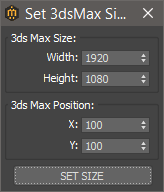
Set 3ds Max window Size & Position

0 votes

With this script you can set the position and size(in pixels) of 3ds Max window.


How to install:

drag and drop the miauuSet3dsMaxSizeAndPos.ms onto any 3ds max viewport.

Go to Customize -> Customize User Interface -> miauu category and you will find the "Set 3ds Max Size and Pos" script.

Syndicate content