Tagged 'render'

Mosaic Render Effect

6 votes

Creates a Mosaic effect in a rendered image.

NiezRender

18 votes

still learning ...
im to lazy to go to render setup (F10) and scroll down to assign renderer so i make this script to change renderer for just click. for this time it just for scanline, mentalray and vray, for vray you have to install the vray plugin first.

cheers

Dennis WK

noMissingUV

1 vote

Do you ever get the "Missing Map Coordinates" window popping up while you're trying to render?

We all do.

This script will add simple UV's to all Editable Poly and Editable Mesh objects that either lack UV's or have corrupted UV's.

Please, use caution when using this script. It may screw everything up. So, save a copy of your scene before use.

Not Anonther Bitmap Path Checker

13 votes

You know when you leave an animation test rendering at night so that you can see what the camera work looks like, and then the next morning you find that the scene had a bitmap with a bad path and nothing happened?

Rise your hand if that has ever happened to you!! How many times have you wished there was a way to avoid this?? WELL NOW THERE IS!!!

Object ID's

7 votes

This script changes the GBuffer channel of objects in the scene. A must if your compositing with effect* using RLA images.

Octane CamTools

3 votes

Red&Cyan Octane Tools

What do they do?

- Create free Octane cam:

Obviously creates a free octane cam. You can decide wether you want to use a focus plane or not.
the focus plane affects the focal depth and vice versa.

- Create octane cam from view:

Works exactly as the usual "create camera from view".
You can also add a focus plane, wich is linked to the focalDepth.

- Replace with octane cam:

Select the camera/s that you want to replace and run the script. for each selected camera an octane cam will be created.

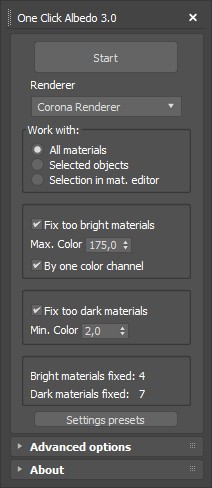
One Click Albedo for Corona render and V-ray

6 votes

Script Description:

This script is made to automatically adjust the albedo of materials in the scene. Too high albedo may slow rendering process down and make the materials look unrealistic. Especially when an object with a high albedo occupies the most part of frame area. Corona Render developers recommend to keep albedo of your materials under RGB 180 (For diffuse color or texture).

outrender

2 votes

Outrender lets you work in 3ds max during rendering.
It uses the standard command-line utility 3dsmaxcmd.exe to render current scene.
Just press outrender macroscript button and continue working - last saving of your scene will be automatically loaded and rendered in another special 3ds max window.

Overnight Batch Render

3 votes

SubSpline 3dsmax script - banner

Full rendering job while you sleep!


Description

Overnight Batch Render is a simple yet powerful batch rendering tool for 3dsMax, capable to process multiple scene files sequentially on a single computer.

Oversize Render

0 votes

OversizeRender

OversizeRender is a MAXScript tool for 3ds Max designed to help users easily set up and manage "oversize" or "over-scan" rendering. This technique involves rendering an image larger than the final intended dimensions, providing extra pixels around the edges. This is commonly used for:

Syndicate content