Tagged 'General Scripting'

Changing the Area to render via a script.

Hi all i have the following code


<code>

try(DestroyDialog SB_Tools_Region_Render)catch()

Rollout SB_Tools_Region_Render "Render Region"

(

   dropdownlist render_dd "Please select a render type" items:#("View", "Selected", "Region", "Crop", "Blowup")

on render_dd selected i do

setRenderType render_dd.items[i]


)

CreateDialog SB_Tools_Region_Render

<code\>

checking snap options

HI

I want to write a simple script instead of the 3DS to set snap options (snap to grid lines, snap a vertex, etc.). I want to: right click on my checkbox - setting on only the snap I need and disable the rest. What command stands for checking snap (for example, snap to grid)? Unfortunately commands like

actionMan.executeAction 1259304063 "50073"

operate on the principle of switching on/off without switching state = true / false

Error: unknown property

Hello
I worked on the camera parameters interface and ran into a problem.
The interface does not start if the camera is not selected. (Unknown property)
Tell me how to fix this?
Can I see changes in camera settings in my interface?
Thanks :-)

Automatic rotation of moving objects to match their direction

Hi there. I'm a noob to 3DS Max, and have hit a wall with this. I'm using external position data (csv) to animate objects in 3D space. I've managed to get objects moving ok, but I cannot figure out how to rotate them to face in the direction of travel. I've seen some other problem pages about this, but couldn't get their scripts working.

Very grateful for any assistance. I include my code below for an idea of where I stand.

Robin

------------------

resetMaxFile #noPrompt
(
--Read in the movement data
local theFile = openFile "p:\\data.csv"
global data = #()

Create parts of an Object but keep normals

Hello everyone,

I'm trying to create a little Maxscript for splitting a character into parts for a game but have some trouble with the resulting normal borders and hope anyone here can help me. I've already searched the forum but couldn't find what I'm looking for.

What I'm doing right now:
- I create 3 copys of my character and delete all unwanted faces by material id. This way I get 3 new Objects (in the end this will be more but I'm just testing on a smaller object) This works and I'm doing it this way because I want to keep the skinning of the original object

Net rendering a post render script help.

I am trying to write a script that runs on completion of a network rendered job. When the job is finished it will run and compile all the rendered frames into an .mov and save it in a watch folder for adobe media encoder. Then adobe media encoder will then encode the .mov into a .flv ready to be put into flash.

Edit Poly vertex Collapse with Scale (Scale vertices). Thanx Miauu

How to make as well as in this video for script?

http://youtu.be/YTGKr-CvNyQ

scale $.selectedVerts [0,0,0] does not work :(

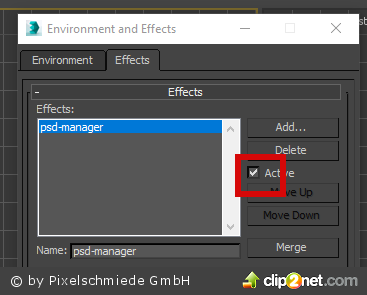
button for checking if effect is on or off

hi all coders

I have found this script to check if DR in Vray is on or off, and now I need this for checking another checkbox...
is it possible to check if psd manager is on or off, too? see: https://c2n.me/3WIDjWd.png

thanks for reply.

best regards
themaxxer

macroScript Leo_Distributed_render_On 
category:"Leo_DR" 
internalCategory:"Distributed_Render" 
tooltip:"Distributed_Render_ON" 
buttontext:"DR ON"
 
(
	on isChecked return (renderers.current.system_distributedRender)
	on execute do
	(

How to output a dynamic variable?

This is a mechanical system i simulated on 3ds max. I had made a maxscript to output the angle of rotation of the cylinder shown in picture to external files. But the problem is that i need to output the angle of rotation in real time, meaning that when i rotate the cylinder, the outputted data updated the data in real time, just like what happen at the status bar(the coordinate input section which is marked red in the picture). Can anyone tell me how to output a dynamic variable (in this case is angle of rotation)? Or read the dynamic variable at the coordinate input section?

controlling a propeller's rotation speed?

hi. this have been asked many times, but i just don't seem to get the right answer.
here's the deal:
I have a circle spline that works as my control object. it has an attribute holder with custom attributes on it, a spinner, that will control my propeller's rotation speed.
then i have a point helper, positioned in the rotation axis, wich is this point helper's zero euler Z axis. then my rotor blade objects attached to the point helper, wich doesnt matter right now.