Tagged 'General Scripting'

Image Button without border and without animation to open web adress

border:false -- doesn't help. It's showing black border and is animating when mouse over - I want it to work like usual images but to open link when pressed

dotNetControl logobtn "Button" pos:[0,0] width:400 height:286 border:false
on testRoll open do (logobtn.image = (StringToImage img_logo))
 
 
on logobtn click do
	(
        	HyperLink Hypl_homepage "homepage" pos:[50,320] width:65 height:15 address:"www.google.com"
	)
 
<code>

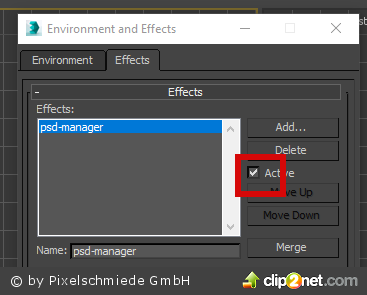
button for checking if effect is on or off

hi all coders

I have found this script to check if DR in Vray is on or off, and now I need this for checking another checkbox...
is it possible to check if psd manager is on or off, too? see: https://c2n.me/3WIDjWd.png

thanks for reply.

best regards
themaxxer

macroScript Leo_Distributed_render_On 
category:"Leo_DR" 
internalCategory:"Distributed_Render" 
tooltip:"Distributed_Render_ON" 
buttontext:"DR ON"
 
(
	on isChecked return (renderers.current.system_distributedRender)
	on execute do
	(

How to output a dynamic variable?

This is a mechanical system i simulated on 3ds max. I had made a maxscript to output the angle of rotation of the cylinder shown in picture to external files. But the problem is that i need to output the angle of rotation in real time, meaning that when i rotate the cylinder, the outputted data updated the data in real time, just like what happen at the status bar(the coordinate input section which is marked red in the picture). Can anyone tell me how to output a dynamic variable (in this case is angle of rotation)? Or read the dynamic variable at the coordinate input section?

controlling a propeller's rotation speed?

hi. this have been asked many times, but i just don't seem to get the right answer.
here's the deal:
I have a circle spline that works as my control object. it has an attribute holder with custom attributes on it, a spinner, that will control my propeller's rotation speed.
then i have a point helper, positioned in the rotation axis, wich is this point helper's zero euler Z axis. then my rotor blade objects attached to the point helper, wich doesnt matter right now.

How to differenciate bump map / normal map in the bump slot

Hello everyone,

I am trying to convert a vray material into a standard material, and I have a problem to write this algorithm in MAXScript :

if (the bump map slot is not empty) do
(if (the slot contains a normal map) do (normal map goes to bump slot of the standard material)
else (bump map goes to bump slot of the standard material))

Probably I'm wrong, but the problem is that i don't know how to differentiate the 3 possible choices.

This is my actual code which is wrong :

for o in geometry do 
(
if classof o.material == VRayMtl do 
	(

How to apply a .Net method to 3dsMax

IList propertyNames = TheJObject.Properties().Select(p => p.Name).ToList();

this is the code in .net i'm trying to use JSON library. Everything is fine but i can not handle "p => p.Name" part, what is it, how does it work and how can i change it to maxscript? I need it to be able to create a loop.

Thanks in advance.

Select (highlight) editable poly in modify list?

How do i do this. I need my editable poly to be selected in able to use soft selection in a script...

max modify mode --go to modify panel
modPanel.setCurrentObject $.modifiers [#Editable_poly_Here_Would_be_To_Simple_...] --**HELP HERE**
subObjectLevel = 1 --go to vertex selection lev
$.useSoftSelection = true --use softsel
polyop.setVertSelection $ #{5000} --select vert
polyop.moveVert $ #all [0,0,10] useSoftSel:true --move vert influence all verts in obj

Vray Properties in maxscript

Hello to everyone,

 i'm trying to find all the names of the Vray Properties in vray. By now ik know:

     "VRay_Matte_Enable" (bool)

     "VRay_Matte_Alpha" (bool)

Loading renderpresets via Maxscript

Hi! This may be an easy one, but I'm stuck.

I try to load a renderpreset via maxscript. So I checked the reference and cam up with this:

renderPresets.LoadAll 0 "X:\\projects\presets\turntable_preset.rps"

Unfortunatly it doesn't do nothing, it is only replying "false". It is a preset for Vray settings, working on max 2014. Somebody has an idea why it doesn't work?

Thanks!

Sticky Attributes

Hi

I have scripted a camera rig interface using custom attributes. Now when I select a lens from a dropdown list it sets the focal length and disables some spinners. Howether when I deselect and then reselect the object the values have changed but the dropdown list reverts to position 1 and the spinners re-enable themselfs. How do I get them to remember there settings?

Thanks

My Code:-
rollout ro_lensControls "Lens Controls" width:162 height:77
(

label lab_fp "Focus:" pos:[20,8] width:99 height:16