Tagged 'align'

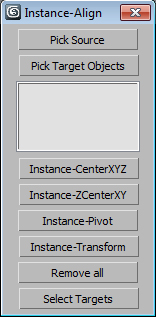
Instance-Align

4 votes

Very useful script for interior visualisation (cafe, bars, restaurants): add lights, change chairs/ tables, put tableware on many tables, e.t.c.

1. Pick object to clone

2. Select targets, click pick targets -> ok

3. Choose align method:

- CenterXYZ

- ZCenterXY (Align minZ of source to maxZ targets)

- Pivot align

- match all transform

After execute new objects will be selected. U can select target objects (to hide or delete).

Align to Faces

0 votes

A 3ds Max Script for Aligning Selected Objects to Picked Object's Faces .
for more details check the download link .

Working Pivot Placer

0 votes

Simple 3dsMax Script for Placing the Working Pivot on Surface or By 1 , 2 or 3 Points .

"Coordinates Shortcuts.ms" this file Contains 3 Macro Scripts , for Fast Coordinate Switching .

  • Coordinate Center Cycle : Cycling the 3 Types of Coordinate Center .

  • Coordinate System Cycle : Cycling the Coordinate System Between [View/Local/Working Pivot]

  • Coordinate System-Pick : Pick Object to be used as Coordinate System .

Wheel Align

16 votes

Hi,

This script animates a parented wheel, it's rotation along travelling path, and a steering rotation.

Greets,
TAS

Edges To Curve / Rectification

4 votes


Custom Align

4 votes

This script is intended to align objects with a given spacing. You can randomnize position and scale and choose between object center or object base, you can also align to min and max, this is especially useful for randomizing books on shelves or any similar task like populating supermarket shelves or if you have to evenly space any objects.

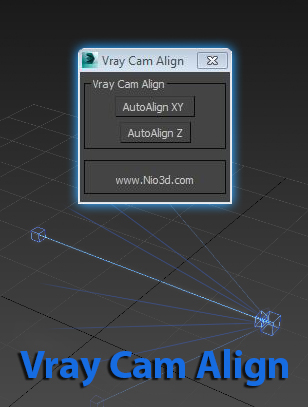
Vray Cam Align

1 vote

GuideLines
Description:
Vray Cam Align will align your VrayCam target height with the selected camera height.
The "AutoAlign XY" button will do the above and also find the general direction of
the cam,and align the target to the appropriate axis.

enjoy:)

AttachmentAlign

0 votes

AttachmentAlign is a script to get automaticaly postioned your Helper with an Attachment Constraint.

- So you got your mesh (Editable Poly) ...
- You place your target (Point Helper), where you want the helper to be on your mesh (If you want to, use AutoGrid) ...
- Run the script and pick the mesh & helper

-> A new helper will be created and attachment constraint to the surface of the mesh at nearly the point were your target is.

Highest accuracy does take rly long and is not effective enough, i think, so use the default...

MoveToView

6 votes

Moves the selected object in front of the current view.

Vertex Aligner

1 vote

A 3dsMax Script for Aligning Vertices by 2 or 4 Points

it Works with [Poly/Mesh/Shapes].

Install: Drag and drop the downloaded mzp file to 3dsmax viewport or from Scripting Menu/Run Script. after that you can find it in _My Sceripts_ Category, you can add it to quad menu or toolbar or assign shortcut to it.

How It Works:

Syndicate content