Tagged 'pivot'

miauu's Script Pack vol.1

14 votes

miauu's Script Pack is a set of scripts that will help you to make faster and easier some of the tedious task when you use 3ds Max.

miauu's Script Pack include:

Milyan's object cleaner

1 vote

Modifier Manager

4 votes

With this maxscript tool, you can manage your modifiers
1: you can align gizmo and change gizmo properties on multiple objects
2: you can attach gizmo to an object, so one object can control multiple gizmo on multiple objects with move, scale and rotate
3: you can control all the modifiers options on your object selection.

Pivot & Align Tools

10 votes

Pivot & Align Tools (PAT) are a set of macros bundled into a quad menu that allow you to perform various object alignment, pivot alignment and object snapping functions... among others. Most of the functions can operate on a selection of multiple objects at once, including grouped objects as part of the selection (open or closed).


NOTE: This script now handles quad setup for both 3dsmax 2025 and above, as well as previous versions of Max.


See online guide in links section. 

Pivot placer

10 votes

With this script you can replace pivot where you want.
on the selected vertex, at the center of the selected edge or face, or at the center of the object.
You also can create a point as pivot.

Pivot to center min

1 vote

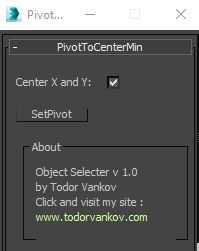
With this script you can easily move the pivot point to center and minimum of selected objects in 3ds max. This scrip is written and tested at 3ds max 2016. If you have some problem with your max version please text me.

Script category: “#todorScripts”

You can see an example here, how to install my script per Drag and Drop:

Pivot to spline selection

0 votes

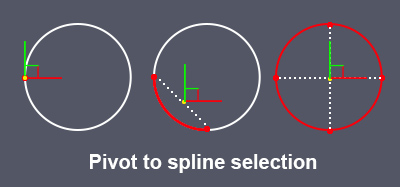
Sets the pivot in the center of the spline selection.
Works with vertices, segments and splines.

pivot to spline selection

Prepare object for UE4

1 vote

This simple macroscript prepare selected objects to export to unreal engine.

Select objects and execute the macro script will do the nexts steps for all of them:

- Center pivot on Z base
- World align pivot
- Reset Xform
- Convert to Edit Poly
- Callapse to Editable Poly

Rig Ready Script

0 votes

Hello, my first MAXscript is complete.
Script for 3D modelers and 3D animators.
It is recommended that you use the Y up coordinate system to perform operations on character assets such as unity3D.

Use after 3D modeling mesh editing and size checking.

[Option]
Rotation XYZ : Pivot coordinate Change.

Option_Move : Moving the Selected Model is Location is all 0.0
Option_Rotate: When released, it is not affected by the coordinate system.

Final Apply : Button is apply all of the above.

Created using 3ds max official manual and internet.

SmartGroup

1 vote

Group selected objects without popup for naming and set group pivot to Z minimum.

Syndicate content