Tagged 'scale'

Scale Refs

1 vote

Select By Mass

11 votes

Simple script, if people find it useful I'll make a gui and add a bit more to it. But the whole premise was to just quickly build a tool I could differentiate big objects from small objects in my scene based on VolSize variable in the script.

What I used it for was to fracture objects for a big landslide for a film, and then I wanted to use this script to tell me which objects were big so I would then work on making them procedurally break more, whereas I didn't want the small pieces to sub-fracture because that would be overkill.

Simply Cool Uv Tool

22 votes

This is my first script.Made for fun. Actually i needed to move selected uv clusters exactly 1 uv tile in witch direction i choose so i made a script. And added a few things...

Uploaded with ImageShack.us

TransformbyStep

4 votes


Universal Arrange

4 votes


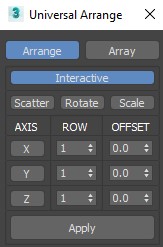
This Script for Arranging Selected Objects in 1 or 2 or 3 Axis . You Can Control the Offset on each Axis and the Number of Rows (When Using 2 or 3 Axis). Notes: Press Right Click on any Axis to Arrange the Objects on this Axis Only.

Version 1.2

Universal Transform

4 votes

Universal Transform has Alot of Featuers for Moving Rotating Scaling Randomizing Scattering Objects and Working with Pivot and Working Pivot and More .

The Script has 5 Modes (Move, Rotate, Scale, Pivot, Random) . and 3 Type of Auto Switching to Switch Between Them (to not Get Confussed) .

The 3 Auto Modes is (Auto T, Auto D, and The MacroScript (Universal Transform - Auto Switch)) .

- it has 3 Options :

1- By Spinners or (Type-in) .

UV Tools

35 votes

[Admin update - this is a commercial script]

UV Tools is a 3d studios max plugin designed for making the process of
UVW mapping easier. Designed mainly for use directly while in Editable
Polygon mode, you can use it directly alongside while you are modeling
or editing your geometry.

UVSetscale

3 votes

"Preview"

UVW Transform

11 votes

This tool allows you to precisely move rotate and scale UVWs. I have found it useful for putting multiple UVs on one layout, Using non-square textures and when working with uvs that overlap.

Update 1.1 added Undo

World Scale UV Tiling

4 votes

I have a material library in Unreal that uses real-world values to calculate how much they should tile.

I needed the ability to apply any material to any mesh in Unreal, including custom unwrapped ones, and have the materials be at the same scale. This script solves that issue.

If I wanted to solve this manually:

Syndicate content