Tagged 'scale'

Quick Link Lock Tool

1 vote


Tronotools Quick Link Lock Info

A small tool I created to more quickly handle link locks. You can globally lock or unlock everything with one button. Same with just movement, rotate or scale separately. Supports multiple objects and behaves just like the normal 3dsMax Hierarchy->Link Info System.


v1.1 - Fixed a bug when no objects were selected.

Copy and Acquire

0 votes

This is a simple maxScript to make a copy from a base object and Acquire Position Rotation Scale and Material from the targets.

copy and acquire v1.0

FumeFX System Scale

0 votes

I made this to easily manipulate, and keep track of the systemScale of my Fume grids

It's great if you're scared of Maxscript or just want a more straightforward way to manipulate your grid scale

Select By Mass

11 votes

Simple script, if people find it useful I'll make a gui and add a bit more to it. But the whole premise was to just quickly build a tool I could differentiate big objects from small objects in my scene based on VolSize variable in the script.

What I used it for was to fracture objects for a big landslide for a film, and then I wanted to use this script to tell me which objects were big so I would then work on making them procedurally break more, whereas I didn't want the small pieces to sub-fracture because that would be overkill.

Radius Scale

1 vote

Radius Scale sets the working pivot to the intersection of 2 coplanar lines, then selects the loop between the initial selection and switches to the scale tool. Useful for changing the radius of rounded corners. Right now the script references the Smart Loop feature of Miauu's Script Pack 2. I'm using it to loop between the 2 selected edges, but if you don't have his script you can delete the following lines and select manually instead,or come up with something else that does the job, or buy his script :)

macros.run "miauusScriptPack_vol2" "macroSP_vol2_SmartLoopDotSelection_UI"

Coordinate Center Macros

21 votes

These are 3 simple macros I use to add shortcuts for the transform coordinate center options.

zsResize Modifier Plugin

6 votes

zsResize-screenshot

Scripted Modifier Plug-In, extends the XForm modifier. Just enter the desired dimensions.

Scale on Value

3 votes

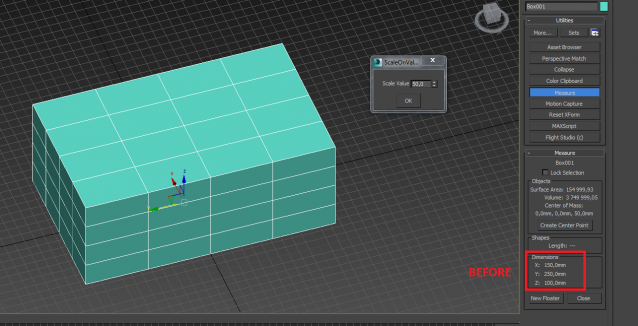
Scale on the custom value (+ or -) for X, Y, Z axises (for planes on second axises)

World Scale UV Tiling

4 votes

I have a material library in Unreal that uses real-world values to calculate how much they should tile.

I needed the ability to apply any material to any mesh in Unreal, including custom unwrapped ones, and have the materials be at the same scale. This script solves that issue.

If I wanted to solve this manually:

ResizeAfterZBrush

0 votes

Hi,
this is a little Script I made 10 month ago ...
And from then to now it was indispensable for my 3ds-Max <-> Zbrush Workflow.

It's a rough version so use it carefully -> save your scene before you use it until you get how to use it ... maybe I'll upload an easier understandable version ... but it should be selfexplainable enough.

What it does? I scales you Mesh to the correct size (in cm's!) like my character is 1,65 cm tall ...
well even a few more features are there too
like the *10 scale and the /10 scale button and so on

Syndicate content