Tagged 'Tools'

Layer Manager

7 votes

Layer Manager is a utility that creates layer controls for 3D-Studio MAX. When Using Layer Manager - every object that is created within Max is placed on a Layer -
each object defaults to the World Layer. Each layer has it's own properties - and each object assumes the properties of the layer it exists on. Layers can easily be hidden - frozen or given an alternate material.

Layer Manager 3.0

4 votes

Layer Manager is a utility that creates layer controls for 3D-Studio MAX.
When Using Layer Manager - every object that is created within Max is placed on a Layer - each object defaults to the World Layer. Each layer has it's own properties - and each object assumes the properties of the layer it exists on. Layers can easily be hidden - frozen or given an alternate material.

Layer[x] Interface

0 votes

This script creates an easy to use visual interface that allows the user to assign objects to selection set driven layers. The interface allows the user to quickly hide - freeze - or select all objects contained in the layer - as well as rename or delete a given layer. The functionality of the script is designed to mirror that of the layer system used in Maya.

LightRigger

43 votes

LightRigger is a free Maxscript-based, draft-quality Global Illumination lighting system for the 3ds max Default Scanline Renderer.  It is based on the well known "old-school" principle of a light dome, but LightRigger takes the concept much further.

Little Batch Render

33 votes

Vray - LittleBatchRender
Version 0.84

Description:
with the "LittleBatchRender"-script you can easily render multiple cameras in your scene with one Click
Features:


• correct autonaming for Render Elements
• NetRenderSupport
• Spawning can be disabled when rednering with NetRender
• consistent Naming for local and NetRender - no relinking in Compositing necessary
• Turning of and on individual Xrefs for individual Cameras

MakeUnique

4 votes

Takes a selected object and makes it unique (ie - if it's an instance of another object - it will no longer be an instance). Originally found as part of Blur's Object utilities - now here it is in script form.

Map Path Editor

5 votes

Changes all the map path´s of an object or scene to the path you specify.

Mat Renamer

4 votes

Automatically renames all or a selection of materials to match the name of the object it´s applied to. Useful when merging to avoid duplicate mat replacement.

MatchMover Scrubbing

3 votes

Lets you scrub a background movie sequence in realtime to match-move to a MAX scene. It works around the limitation of MAX which does not update while the time slider is dragged.

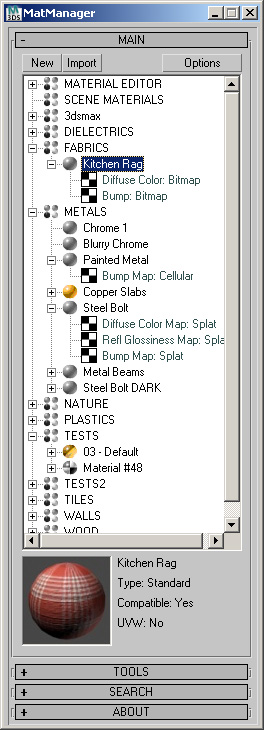
MatManager

47 votes


MatManager is a collection of tools created to help
you, the artist, control your materials and allow you to make the most of
them. It was designed to complement 3D Studio, keeping a clean and
streamlined interface where every action takes as few clicks as
possible.

Syndicate content