Tagged 'spline'

splineManager

6 votes

Lets you modify various controls for all selected splines.

Orb Tool

0 votes

This plugin creates a new Spline primitive called "Orb". It can be used to quickly create orb controls for use in rigging, for example.

To use, either evaluate the script or place it in the startup folder to make it load on start.

#CAUTION# - 12/01/2015

I just noticed that when you create the Orb, the script creates a 0-size rectangle on the origin, which gives you dead vertices when it collapses the object. Will update ASAP.

RenderableSplineFaceCount

6 votes

Takes any renderable splines that are selected and gives you back the number of faces they'll create when rendered. Also included are two utility buttons that makes all selected splines either renderable or non renderable.

Poly2Spline

7 votes

This script convert poly objects to spline and back.

Shape Trimmer

2 votes

3ds Max Script for Making Trimming and Cutting Shapes Very Sample and Easy Thing to do .

The Script Required Max 2019+ to Work

Refine by 2 Vertices

1 vote

This Script will Add 2 vertices for each vertex in the Selected Spline by Specified Percent
(its useful for fixing the UV for Sweep modifier)
Hope you find it useful.

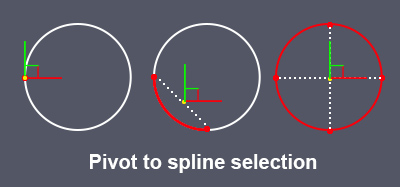
Pivot to spline selection

0 votes

Sets the pivot in the center of the spline selection.
Works with vertices, segments and splines.

pivot to spline selection

FreehandSpline15-AsMCR

2 votes

Bobo's 'freehandspline15.ms' as a MacroScript for MAX r3.x. Contains brief explanation of how to convert UtilityScript to MacroScript.

Here's the original description: "FreehandSpline (FHS) lets you draw freeform splines with the mouse or tablet similar to drawing with a pencil. It lets you quickly create complex shapes with control over form and quality."

ShapeShifter

6 votes

The script is 'sort of' a spline normalizer with a little different twist. It also has limited functionality when used on nurbs curves. All actions are based on a calculation between total spline length and 'travel' length. So basically we 'travel' down a splineshape while creating a new spline - adding knots at 'travel' length increments until we reach the end of the subject splineshape.

Spline Align

5 votes

If you want to align objects to a spline created in AutoCAD. Choose an object/group - select two vertices on a spline and the object will be aligned to the spline...Use in top view...

Syndicate content