Tagged 'Rendering'

CompareAA

4 votes

Render a frame with any two AntiAliasing FIlters side by side. Lets you define any AA settings and render alternate strips. Strips can be color-marked.

Contact sheet

8 votes

Generate a HTML contact sheet of all objects in the scene.
For each object (or group) an image is created, and some information is displayed.
This script was originally created for a CGTalk challenge.

Copy Render to Clipboard

2 votes

Simply copies your last render to the clipboard. I've separated it into two macroscripts - one 'CopyRenderToClipboard' copies the RGB data to the clipboard and the other one 'CopyRenderAlphaToClipboard' copies the Alpha data to the clipboard.

Copy To Clipboard

11 votes

CopyToClipboard - 3DS MAX Render Effect allows you to copy the rendered image to the Windows clipboard.

- v1.0.1 (20.10.2007) added support for MAX 2008.

Create Plate

3 votes

Create a reference plate on a plane with width and heightconstrained to the image proportions.

Cubemap Builder

0 votes

Description:
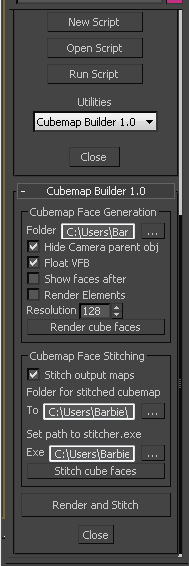
A maxscript Utility for the batch generation of cubemap faces across multiple cameras, and optional assembling of a "complete" cubemap in DDS format. The completed DDS texture is ready to use in the DirectX shader material - the original inspiration and motivation for this script.

cubicVR

15 votes

cubicVR is everything you need to create cubic QTVR files - as seen below - from 3ds max.


Delete Bad Frames on Backburner

12 votes

This script allows you to delete bad frames that were rendered by a given
node on backburner. This happens if the render farm is heterogeneous
(= different software or hardware configuration on the render nodes). Instead
of manually deleting the frames, it will delete all frames that were rendered
by a certain machine for a certain job. To find out which frames need to be
deleted it connects to the manager and fetches information about every
rendered frame. If the frame was rendered by the machine that has the name

DeMultiplyAlpha

6 votes

Demultiply the color of an image by its alpha.

DepthMatte

7 votes

Saves an image that represents the current environment ranges in the scene by changing all objects in the scene to a black matte color and rendering the scene with white fog. Good for doing postprocess fog and postprocess depth of field.

Syndicate content