Tagged 'select'

Quick Isolate Object

66 votes

With this useful and funny script, you can isolate in a ListBox, the category object in Geometry, Shape, Light, Helper, Camera and Space Warp in the viewport.  We can select, rename and count the items in the scene.  Useful in many work situation.

qio

CamLister

4 votes

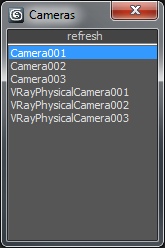
A very simple Camera Lister which allows to select and assign cameras by clicking it in the list.

Leftclick: Select the camera
Rightclick: Assign to current active Viewport

Very simple one but still my most used Script for daily work ;)

Control Hidden and Frozen Objects

1 vote

what this script does:
1- unfreeze objects by name
2- select freeze objects and move, rotate or scale them without unfreezing them.
--this is useful when you have several frozen objects and you do not want unfreeze all of them to select one of them.

3- select hidden objects, delete, more or...without unhide them

if you have some heavy hidden objects and you need delete them, first you should unhide them, then delete them but with this script you can select hidden objects and just delete them without unhide them.

--how it work,

Select By Measuring

5 votes

This tool will allow you to select objects by the size of the bounding box, surface area or volume.

Rig Ready Script

0 votes

Hello, my first MAXscript is complete.
Script for 3D modelers and 3D animators.
It is recommended that you use the Y up coordinate system to perform operations on character assets such as unity3D.

Use after 3D modeling mesh editing and size checking.

[Option]
Rotation XYZ : Pivot coordinate Change.

Option_Move : Moving the Selected Model is Location is all 0.0
Option_Rotate: When released, it is not affected by the coordinate system.

Final Apply : Button is apply all of the above.

Created using 3ds max official manual and internet.

Select Faces By 2 Edges

2 votes

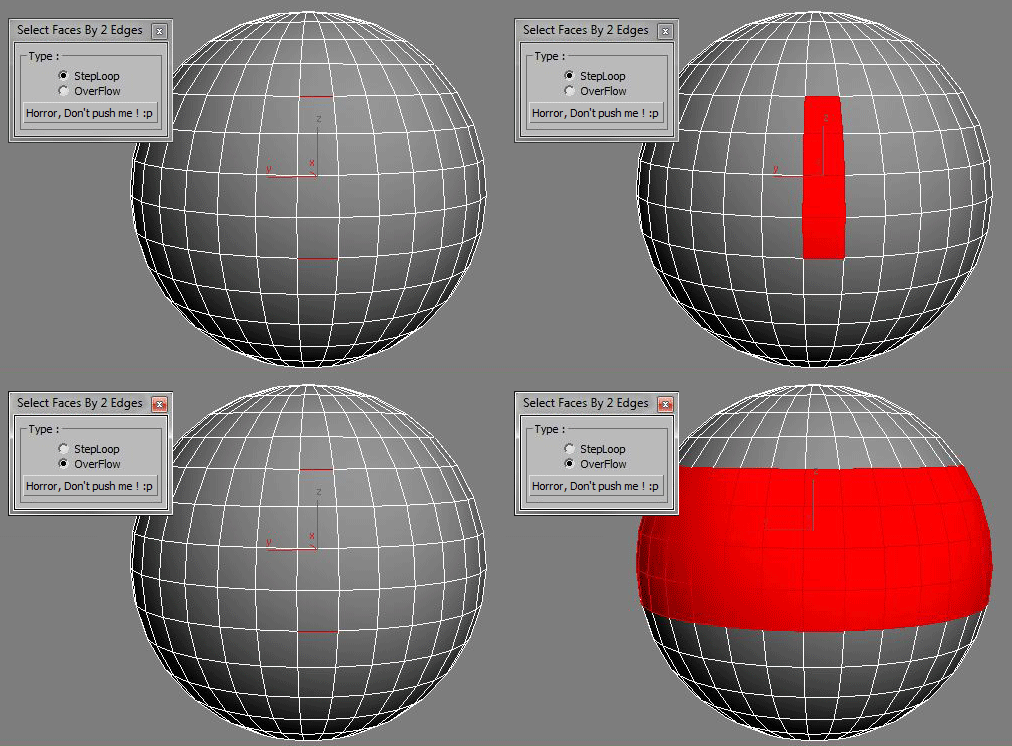
Select a Loop Faces between two selected Edges.

miauu's Select Edges by lenght

52 votes

With this script you can select edges which is less, equal or grater than the value that you want. Also, you can measure the lenght of single or multiple edges.

Instalation: Drag-n-drop mzp files in 3ds max. Go to Customize-Custumize User Interface, under "miauu" category you will find the script.

ClaverTech-KeyStones

10 votes

This tool just holds a list of key objects u want to quickly select or view. helpful when in a scene with a crapload of nodes when ur really only animating a few of them. Additionally if u right click an item in the list u will zoom extents of it (if geometry), or look from its perspective (camera or light). It also keeps the list variables as persistant... so u can open and close it without changin the list.. even closing and loading the scene.


SelectionSet Tools

3 votes

This script allows you to export and import of Selection Sets as XML file. By selecting name in list, you can select the Selection Sets in scene.

How to use:

・Save SelSets / Load SelSets Button:
Export and Import selection sets in 3dsmax. In Load Selection Set Window, you can select any sets to import.

・update list Button:
synchronize selection sets list in scene and Selection Set List below.

・Selection Set List:
select set name in list, then the objects are selected in scene.

Grab Hierarchy

27 votes

Selecting whole heirarchy by picking one belonging object.
Similar to Sergo's "Pick Hierarchy" script but simplified code.

Syndicate content