ScriptSpot

MCG

MCG SymmetryRadial

By vusta · 2015-05-04

Version
1.00.00
Version requirement
2016
Other software required
MCG Sample Pack
Date updated
2015-05-04
Votes
7
Downloads

Tags: MCG Symmetry Radial modelling for Max

Description


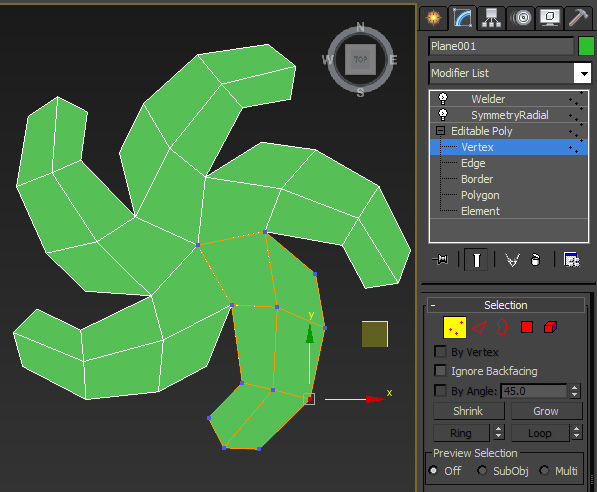
This modifier is to enable you to model with Radial Sym on like in Zbrush.

You can do it with the default ARingClone MCG but I found it unweildy, try it yourself and see. I've taken away the Radius param because I think that is the root of the problem. I've also combined the AWeld MCG into this but as it turns the mesh into tris, I've left it as default OFF and recommend that you put a Welder (Verts!) mod above it instead. I've named this MCG SymmetryRadial so that it conveniently sits just below the normal Symmetry mod. So with the Radius gone, after you've added the the SymmetryRadial, in subobj mode, move all your verts/polys away from centre and you'll be able to see what you're doing. If you can 'ask' Autodesk to change their Weld operator to retain quads rather than turn them into tris that would be great !!!Otherwise, happy ZBrushing..err..I mean Radial modelling.

Don't know if I should incorporate X/Y/Z axis since you just turn your object (not subobj) to ANY angle you want so let's just stick to the KISS principle for now shall we ? Now go do your hubcaps...

Might have to do a video for this one...but tooooooo lazy !!!

Vu

Any small donations to vusta@hotmail.com would be greatly appreciated. I intend to then fully donate onto the following:

http://www.worldanimalprotection.org/

https://www.worldwildlife.org/

http://www.redcross.org.au/

http://www.savethechildren.org.au/

Thankyou.


Videos
Comments (5)

Thanks

obaida · 2018-04-03

can you add slice option?
thanks in advanced .

slice modifier ?

vusta · 2018-04-03

not sure I'm following you. If you add a slice modifier (below the radial modifier)...then the effect would be repeated radially ?

Like radial symetry the plugins

obaida · 2018-04-09

The mcg dosnt slice the object by itself only makeing radial array,if i have to add slice modifier i need to rotate the gizmo of it accourding to the number of copies in the mcg (hard to get the angle).

Gizmo centre

vusta · 2015-05-05

Hi luxxeon, yeah Radius was the gizmo centre but if you try to model radially with the orig ARingClone that has the Radius, you'll see it is 'unwieldy' as you go down to your bottom editable poly level...put Show End result on, and say your Radius was not zero...your verts don't quite line up (offset by the Radius). You can work with it but it's not nice. So that's why I decide to ditch the Radius. The centre is ALWAYS the the pivot point of your OBJECT, and the 'radial' revolves around this. Hence if you want some offset, you go to your subobj mode and move all your verts away from the pivot point, this is just the 'inverse' of moving your 'centre'. Honestly had the ARingClone worked nicely then there wouldn't have been a need for my little tweak. This should be used for MODELLING something starting from some basic polys, for cloning objects radially there are more powerful tools than this, eg.

http://www.scriptspot.com/3ds-max/mcg/mcg-r-clone-jc-0
(lots of controls)

Vu.