Tagged 'bitmap'

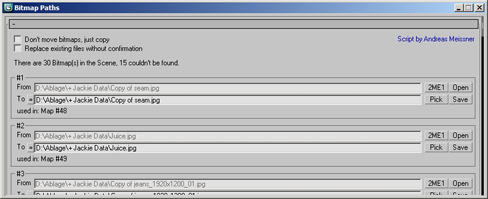
Bitmap Paths

24 votes


Adjust your bitmap paths ... hope it helps :D

FilePathFinder Pro & Light versions

410 votes

Using the FilePathFinder you can be sure that you have complete control over external links into your scenes.

Asset tracking features include support for XREF files and easy linking with external files.

Using the FilePathFinder (and Batch Render&Relink), you can search for missing assets and relink external files.

In addition, files that are linked to selected objects are displayed in Interactive Mode, and bitmap textures can be toggled and placed within the Material Editor.

Also with this tool, you can easily make an archive a 3ds Max scene.

Note that FilePathFinder supports the highest number of asset types of any plug-in.
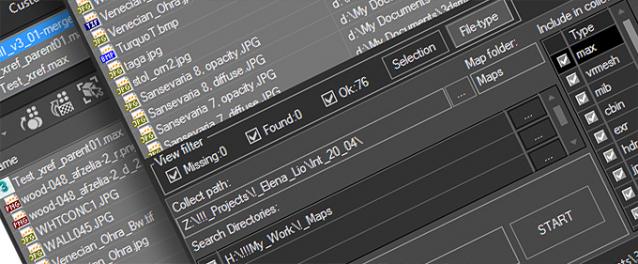
 

The Batch Render&Relink tool helps manage your asset files into the 3D model and material libraries in Batch Mode.

BR&R is capable of rendering thumbnails for 3D models, materials, and IES photometric files.

Batch Mode makes for an easy way to gather and compile many assets at once.


The new version of FilePathFinder is released with support to 3ds Max 2026

and many new features that improve managing scene assets

FilePathFinder Pro version 4.17.01

  • Adds support to 3Ds Max 2026
  • Play IFL, and animated GIFs directly in the list view
  • Play IFL and animated GIFs in the external Asset Viewer
  • Ability to change selected assets directly from the Asset Viewer using keyboard shortcuts
  • Adds an ability to include/exclude search directories by filename
  • More accurate material/texture placement in SME
  • Drops support to light theme
  • Fixes an issue with including/excluding search directories by filename
  • Fixes an issue with searching, relinking, collecting, and archiving the content of IFL files
  • Fixes an issue with relink assets in batch mode for Demo version [Batch Render&Relink]
  • Fixes an issue with renaming external scene links with status #Found
  • Fixes some issues with relink assets using exclude directories
  • Fixes a bug with relinking assets in huge scenes
  • Fixes a bug when using the tool together with Materials Manager and Models Manager
  • Some other optimizations, fixes and speed improvements

Photoshop tool. Open image maps in photoshop

30 votes

Hello,

This is an update for an oldie but a goodie,


This is an oldie but a goody. Put simply, it is a script that will open 3ds Max material maps in photoshop. I use it in my quad menu. If photoshop isn’t open, then it will open it for you. The previous version used a hard old school search for image maps used
in your materials, before opening them in photoshop. This version uses
the max class dependencies to get all bitmaps used in a material.

Check_Bitmap_N-th_power_2

12 votes

Created by: feilang

This can check all of the bitmaps in your scene if their sizes can be divided end by 2.

Usually, game developers may like this.

bitmapCollector

18 votes

Collects all the scene bitmaps and places them into a single directory, updating your scene to point to their new home.

Tutorial:
Open a scene that contains a lot of bitmaps. Run the UI version of the script. Choose a Directory. Hit Do. All the bitmaps you choosed will be copied to the directory you specified, and now all the scene materials point to that directory.

Open All Bitmaps

15 votes

The script is used to open all bitmaps on any selected objects in Photoshop. When first run the script will ask you for the location of Photoshop; which it then stores in 3dmax.ini. If Photoshop is moved the script will ask you to reconfirm the location. When pressed Photoshop is launched and bitmaps on selected object are opened.

Inspired by the script LoadBitmapInPhotoshop

Maps_fixer

22 votes

Relocate, replace or search missing maps.
See on which materials they are placed,
Double click to relink bitmaps
Globally change paths
Search and replace maps in subdirectories
...

RH Check ATS Maps

22 votes

This script goes through all the .max files in a given folder and checks if all the assets in the Asset Tracking System have their status set to "Ok". Once its done it pops an info box thats shows how many files where checked, and then gives you the name of the .max files that were wrong.

Relink Bitmaps

501 votes

Relink Bitmaps is a script to easily relink all missing files (Bitmaps, VRayMeshes, Mental Ray Proxies, VRayHDRI, IES, etc) when they change directories or when you move computers, check out the short video tutorial below for more detailed information.

Unlike some other scripts of its kind, this is free!  There is a small donation link within the script if you choose to donate, I will remove the nag.  It is a simple licensing system, that does not force you to transfer network cards or be connected to the internet and will work with all versions of Max that are supported by the script.  If you choose to donate I'll be more than happy to license multiple computers as well.

Features:

[*] All 3dsmax supported Bitmap Texture types
[*] (new) Relinks Mental Ray Proxy files
[*] (new) Relinks VRay Proxies (.vrmesh)
[*] (new) Relinks VRayHDRI files
[*] (new) Relinks IES files (including VRayIES files)
[*] (new) Automatically checks for script updates and new versions
[*] 250% speed increase from previous versions
[*] Command-line mode available for automating repetative tasks (see documentation on the website)
[*] Configurable default user options saving button clicks and wasted time

Relink Bitmaps webpage:

https://colinsenner.com/relink-bitmaps/

Supported Max versions: Max 2018+
(Older versions should work, but are not supported moving forward)

RDG PSD2Mat - a pipeline tool

23 votes

Hello,

I would like to invite you to take a look at our new pipeline tool:
PSD2Mat - a pipeline tool

PSD2Mat is a production proven connection between Adobe PhotoShop® and
Autodesk 3D Studio MAX®. This maxscript converts layered PSD Files into
a Scanline or VRay, Brazil and Mental Ray Material. Named layers are converted to bitmapfiles
and assigned to their respective material slots.