Tagged 'max'

3DS Max Hot Box

201 votes

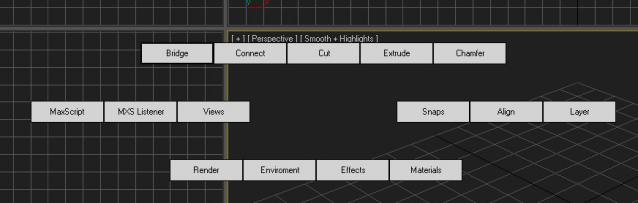
After being inspired by the video I saw of a Max hot box here on Script Spot I decided to work on my own. So here is the first version, its only a beta so some bugs or problems are to be expected. I am giving it out early as I want to get as much feedback as possible  I am currently debating whether to follow the Maya route or do something a bit different. 

ScriptSpotter

201 votes


This is a little tool to get the scripspot rss feed directly in max, displayed on the viewport. It of course only shows max related stuff, updates every 7 minutes and thats about it for descriptions.
have phun

Skip Every N-th

61 votes

Skip every vert/edge/face. In Loop mode, you can skip edges and polygons. In Ring mode you can skip vertices,edges and polygons. To make poly loop select 3 faces(the middle one is starting face), check PolyLoop checkbox, set "Skip V-E-P" spinner to value greater then 2 and start skiping. You can't skip one face, only 2 or more. Ring mode does not have this limitation. "For Steps" spinner works only with edges. If you want to skip every 2 edges five times, set "Skip" spinner to 2 and "For Steps" spinner to 5. Instalation: Drag-n-drop SkipEveryNthVEPRingLoop.mzp to 3ds max.

Maxscript basics #3 - building a scripted GUI

19 votes

Quick tutorial demonstrating how to build a GUI in maxscript

Maxscript basics #2 - loops, strings etc.

20 votes

Another introductory basic maxscript tutorial

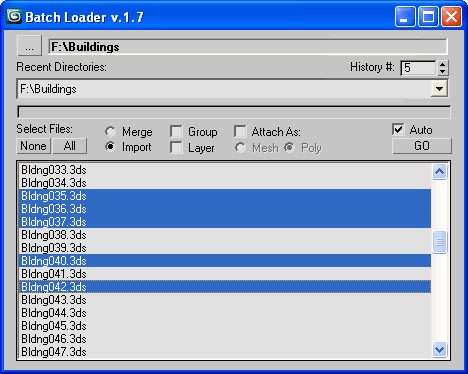
Batch Loader

75 votes

Quick Merge/Import multiple files.

UI v.1.7

Features:

  • Merge multiple .MAX files
  • Import multiple .* files (ie all that can be imported)!
  • Log all files where failed to load to Listener (if any)
  • Multiple history for recent used paths available
  • Limit count of recent paths to keep in history added
  • Group option available
  • Layer option available
  • Attach option available
  • "Auto" option (if is checked no prompt for Merge/Import) *

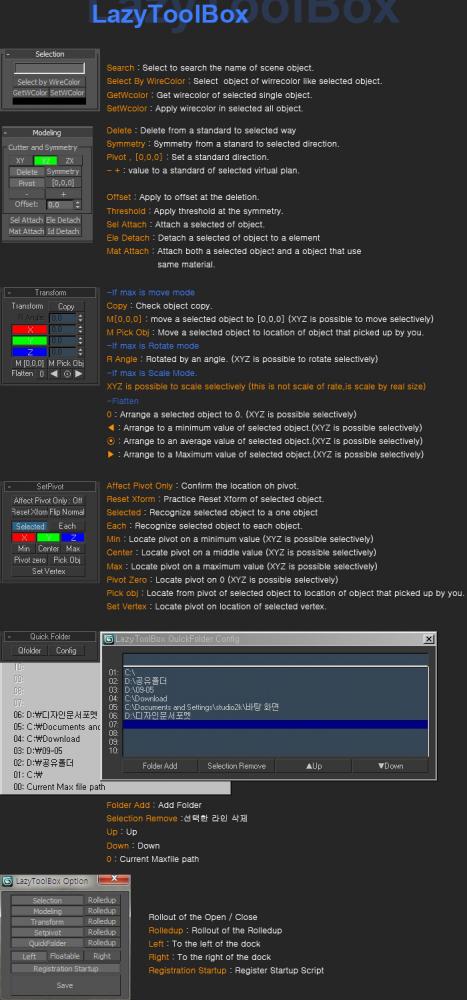
Lazytoolbox

15 votes

 Choose Install Location window, select the folder to use version of the Max!

Tentacles

97 votes

Create procedural tentacle animation with one click. Select the parent bone, generate the script and have fun.


video demonstration***not updated

--
***Loop function added (thanks Zoran for the idea) 21.04.09
***Bug fix for 64bitVersions
reverse animation option 17.02.09
***Installer update

JJTools

30 votes

I have used 3DS Max on a daily basis for almost 10 years now and I took an interest in MAXScript almost immediately. The learning process was slow but I was able to pick the brains of my very talented colleagues. I began by studying 3ds Max’s ‘Listener’ and with time and confidence I tentatively created short scripts of my own. Many years later, and with a lot of help from my friends, I am in the fortunate position of being able to create my very own 3ds Max tools.


http://www.jimjagger.com/Pages/Tools/index.htm

Most of my scripts are workflow improvements in an effort to avoid repetitive tasks. With any luck, they may save you some time too.

Material Editor Manager, MEM

26 votes

This script was developed due to a better usability of 3dsmax's material editor.