Tagged '3dsmax'

Screenshot Manager for 3ds Max

0 votes

Screenshot Manager for 3ds Max

Screenshot Manager is a powerful, lightweight utility designed to streamline the process of capturing viewports in 3ds Max. Whether you need a quick progress shot or a batch of high-resolution frame sequences for a client review, this script automates the tedious steps of manual saving and configuration.

MaxBatch - Advanced Batch Render Manager for 3ds Max

0 votes

ForestPack Manager Cover

MaxBatch is a comprehensive batch rendering utility for 3ds Max. It provides a structured interface to queue and manage multiple rendering tasks, whether you are rendering multiple cameras within your active scene or processing a list of external .max files sequentially. It is specifically optimized for V-Ray 7 and Corona 14.

ForestPack Manager

0 votes

ForestPack Manager Cover

FPManager is a powerful MaxScript utility, specifically designed to optimize workflow when using iToosoft Forest Pack in 3ds Max.

Key Features:

Global Scene Management: Instantly select all Forest Pack objects in the scene (visible or hidden) and force a global refresh/rebuild to update distributions.

3DS Max - Plugin Update - CopyPasteDWG V1.5

1 vote

*Description:
This plugin allows the user to copy paste geometries from AutoCAD into 3DS Max.
The plugin works with multiple opened AutoCAD files. It recognizes the last copied objects.
The script offers many filtering options for the imported objects like:
1-Removing the prefix "Layer:" and this will make it easier to select objects by name.
2-Removing any material applied to the imported objects.
3-Removing the Block/Style Parent hierarchies. (You might encounter name LinkComposite, it's the same thing.)
4-Selecting the imported objects when importing is done.

miauu's LayerColorizer – color-coded layers for 3ds Max

1 vote


miauu's Layer Colorizer allows you to assign custom background and text colors to any layer in the Layer or Scene Explorer.

You can also apply the same color to all child objects of a colorized layer for better visual organization.

You can save your preferred colors in a Color Palettes and reuse them anytime.

3DS Max [Plugin Update] Multiple Sections v1.5

0 votes

In this version, I added the ability to clean the sections of unnecessary vertices. This feature works with the sections created by this plugin, and you can also use it with splines in the scene. Please watch this video to the end to learn about this new addition.

To learn about all the plugin's features, you can refer to the demo video for the first version:
https://youtu.be/4HX5wssIqSw

But download and install the updated version from here.

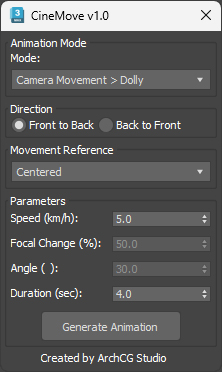
CineMove

0 votes

Local Pivot Align

2 votes

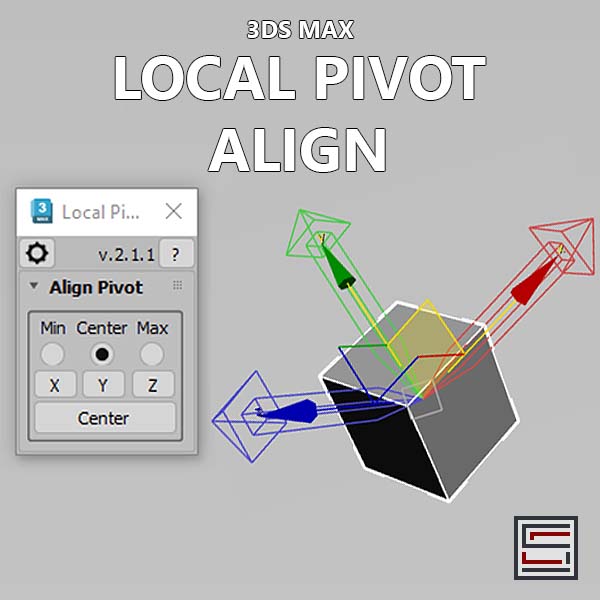
Description: This script aligns the local pivot using an object's bounding box min/max extremes. 

3DS Max - Plugin - [UPDATE] - CopyPaste V1.5

1 vote

This is an update for the CopyPaste plugin. This plugin allows you to copy and paste geometry between opened 3DS Max files, of course, in the same file too. This version includes a few additional features. The most important one is the ability to copy and paste using a base point. Also, there is a button that allows you to clear the cache file to save space on the hard drive. And, lastly, a Status section that gives you feedback whenever you perform an action. Please check the demo video for an in-depth explanation.

3DS Max - Plugin - ZoomExtSelFix

1 vote

In this update, the script will work on sub-object selections. Also, a bug in the first version is fixed, when you switch to another mode other than the Modify Panel, the first version gives an error, this is fixed now in this 1.5 version.
To recap on why this plugin:
The default Zoom Extents Selected tool in Max has an issue when you're in a sub-object level but no sub-object element is selected, pressing Z(the default shortcut) causes Max to Zoom Extents on the whole scene instead of the selected object.