Tagged 'batch'

Names Fixer

0 votes

A Script for Replacing Chinese and illegal Characters from (Objects-Materials-Maps-Modifiers-layers) Names .

PS: Undo Disabled , So its Better to Save your Work Before Running the Script .

For Replacing Texture Names you can use Pop Chinese Script

UPDATE 1.1 :

  • Change the script name to "Names Fixer"  .
  • Add Fix for Names Sequences , ("Group464134564" will be fixed to normal sequence "Group023")

Multimaterial from Files

0 votes

The script lets you pick multiple image files from your drive and creates one material per file, with the image assigned as diffuse texture, and builds a multimaterial with all of them. Then assigns the multimaterial to the selected objects.

Corona Copy Material Slot

1 vote

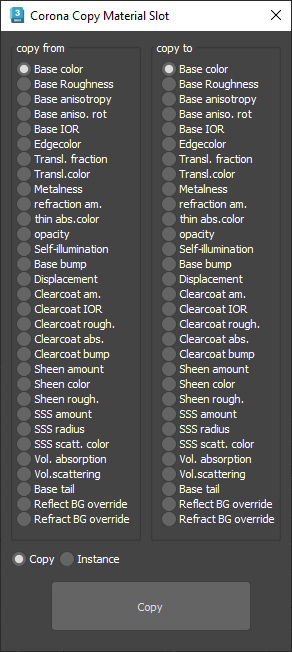
This is only for Corona Physical Materials, i might do a legacy version later..

This script is intended to batch copy from slot to slot within the same material,

For example, you can copy a bump map to a displacement map or the diffuse map to selfillumination on multiple material at once.

you can use my other script to add some color correction with a saturation set to -1, to create bump or roughness maps from your diffuse map.

SceneShutter

0 votes

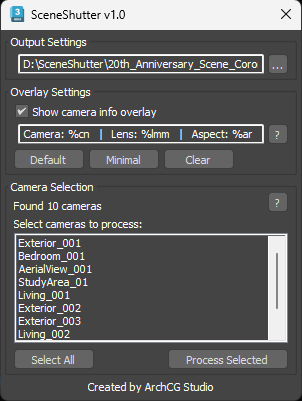
SceneShutter — Camera Viewport Export Tool for 3ds Max
Batch export clean, safe-frame camera previews with overlays and flexible aspect ratios — in seconds.

What is SceneShutter?
SceneShutter is a powerful yet lightweight tool for Autodesk 3ds Max that allows you to quickly export clean, safe-frame viewport previews from multiple cameras — without rendering.

ECamera2Batch

1 vote

ECamera2Batch – Professional Camera Batch Render Manager for 3ds Max

Streamline Your 3ds Max Rendering Workflow with Intelligent Camera Processing

ECamera2Batch is a powerful MaxScript tool designed to revolutionize how you handle multiple camera renders in Autodesk 3ds Max. This professional-grade solution automatically creates batch render views from selected cameras while intelligently parsing camera names for custom render parameters.

MaxBatch - Advanced Batch Render Manager for 3ds Max

0 votes

ForestPack Manager Cover

MaxBatch is a comprehensive batch rendering utility for 3ds Max. It provides a structured interface to queue and manage multiple rendering tasks, whether you are rendering multiple cameras within your active scene or processing a list of external .max files sequentially. It is specifically optimized for V-Ray 7 and Corona 14.

One-Step Copy & Relink (Bitmap Path Manager)

0 votes

One-Step Copy & Relink is a workflow utility that consolidates two tedious texture-management tasks into a single operation. It scans your scene for all bitmap-based maps — standard BitmapTexture, VRayBitmap, and VRayHDRI — then copies the source files to a destination folder of your choice while simultaneously relinking the materials to a different target folder using a new file extension.

V-Ray to Standard Converter (Materials & HDRI Maps)

0 votes

V-Ray to Standard Converter is a lightweight scene-migration script that strips V-Ray dependencies out of a 3ds Max file in a single pass. It scans the scene for every VRayHDRI map and VRayMtl material, then replaces them with their native 3ds Max equivalents — BitmapTexture and Standard material — while preserving names, file paths, and the most common texture slot assignments.

Syndicate content