Tagged 'Biped'

Rigging_Paste_Biped_or_Envelope_or_Mirror_Paste.ms

3 votes

This script will either (based on the object selected and its' subobject mode) paste a biped posture opposite or paste a skin envelope or mirror paste a skin envelope.

Select_All_Animatable_Biped_Objects.ms

3 votes

Using a selected biped body part this script will select the rest of the biped. If any of the parts are hidden or frozen they will be unfrozen or unhidden.

Select_All_Animatable_Biped_Objects.ms

6 votes

Using a selected biped body part this script will select the rest of the biped. If any of the parts are hidden or frozen they will be unfrozen or unhidden.

Select_All_Animatable_Biped_Objects_And_Keys.ms

3 votes

Using a selected biped body part this script will select the rest of the biped body parts and all of their keys.

Stepped Playback

16 votes

This script allows you to playback any animations in stepped mode. It simply goes through your trackbar keys one by one in real time. I use it to play my Biped animations in stepped mode since you can't change f-curves with the Biped. Enjoy!

stretchy biped

17 votes

Notes:The Script helps you to setup stretchy biped
bones (arms,legs,spine,etc) quickly with 1 mouse click. It simply adds
a parameter “stretchy” to first selected bone(modifier stack) from
selection. ( you can copy paste modifier where ever you want after
wards).

Installation: Just drag-drop or put in your “usermacros” folder

Usage: 3dsmax>>customize>>lm_Rigging(Catagory)>>SquashyBiped (assign a key,quadmenu,etc)


ThePuppetTool

39 votes

Macroscript ThePuppetTool 1.1 for 3dsmax 2010 (also works in 3dsmax 2008, 2009)
Should work in versions 2011, 2012, 2013
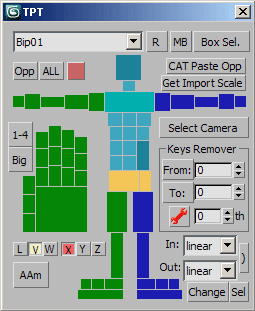
Cat/Biped selector with many powerful features, such as:

1. Automatically make Biped matched current human CAT-rig
2. Paste opposite for human CAT-rig
3. Select All, select Opposite, easy select any bones of human characters by clicking on ImgTags (also with dbl-click, alt and ctrl of course)
4. Keys remover
5. Keys type changer

New in version 1.1
1. Added some tags and buttons to select more limbs

Worker of Biped

35 votes

Based on Blur's Biped Worker, this script creates a floater interface allowing easier selection of a biped's different body parts. It will simultaneously support several Bipeds with different bone setups. Multi-bone (Control-Click), hierarchical (Shift-Click), symmetry and opposite selections are also supported, as are the setting of commonly use pivot points all within the GUI.

Syndicate content