Tagged 'select'

Select Every N-th-no UI

37 votes

If you want to select every 2nd or 3rd or 4th, etc edges, just select the first edge, skip the desired number of edges and select the second edge, then execute the script.

If you want to see the time that script needs to make a selection, just start MAXScript Listener.

Instalation: Drag 'n drop two mzp files in 3ds max, then go to Customize - Customize User Interface. Under "miauu" category you can find "Gap Loop" and "Gap Ring" scripts.

On the video below the script works 3 times slower, because of Camtasia and my old, single core PC.

Outliner

756 votes

 The Outliner 2.0 is a fast and easy to use scene management tool. It has a wide range of features, including selecting, hiding, freezing, linking and grouping objects in the "Hierarchy Mode". In the "Layer Mode" you can organize your scene by dragging&dropping objects from one layer to the other. What's more, the Outliner offers support for nested layers, to manage scenes more efficiently. The interface is nimble enough to keep it open constantly.

Skip Every N-th

61 votes

Skip every vert/edge/face. In Loop mode, you can skip edges and polygons. In Ring mode you can skip vertices,edges and polygons. To make poly loop select 3 faces(the middle one is starting face), check PolyLoop checkbox, set "Skip V-E-P" spinner to value greater then 2 and start skiping. You can't skip one face, only 2 or more. Ring mode does not have this limitation. "For Steps" spinner works only with edges. If you want to skip every 2 edges five times, set "Skip" spinner to 2 and "For Steps" spinner to 5. Instalation: Drag-n-drop SkipEveryNthVEPRingLoop.mzp to 3ds max.

Modifier Auto-Select

51 votes

This is a tool I put together because sometimes you have to work with modifiers on multiple nodes and the modifiers aren't at the very top of the stack. You’re constantly having to select the node and then selecting the proper modifier. Prime example of this is when you have a turbosmooths on top of all of your geometry while you are either skinning or modelling. It would be much easier, and save quite a bit of time, if every time you selected a node you just automatically were on the skin modifier or edit poly modifier.

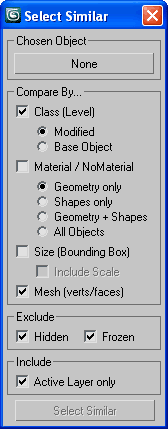
Select Similar Objects

50 votes

Select similar (to chosen) nodes by assembly of similarities.

SSObj

ClaverTech-KeyStones

10 votes

This tool just holds a list of key objects u want to quickly select or view. helpful when in a scene with a crapload of nodes when ur really only animating a few of them. Additionally if u right click an item in the list u will zoom extents of it (if geometry), or look from its perspective (camera or light). It also keeps the list variables as persistant... so u can open and close it without changin the list.. even closing and loading the scene.


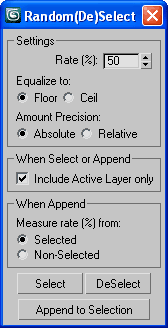
Random(De)Select

51 votes

Random(De)Select

Random Select/DeSelect objects by percentage with a few precise options

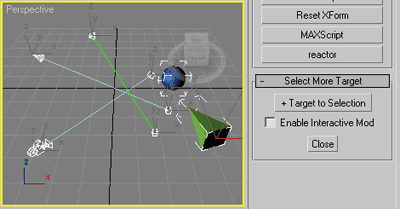
Select More Target

11 votes

Slim (self explained) selection assistant.

SMT

Commonly useful when select target lights, cameras or tape helpers,
or any objects with (older) Look_At transform controller applied
and you wish to select their targets as well.

Grab Hierarchy

27 votes

Selecting whole heirarchy by picking one belonging object.
Similar to Sergo's "Pick Hierarchy" script but simplified code.

MultiSelectFilter

19 votes

Filter what you want to select. If you hold CTRL you will be able to mark multiple options.
Video preview:
www.coldfolio.info/scripts/MultiSelectFilterPreview.mp4