Tagged 'texture'

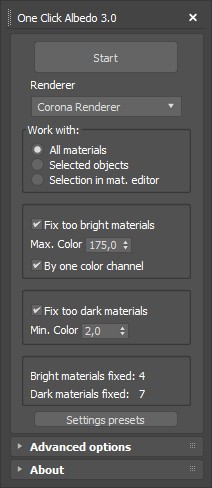
One Click Albedo for Corona render and V-ray

6 votes

Script Description:

This script is made to automatically adjust the albedo of materials in the scene. Too high albedo may slow rendering process down and make the materials look unrealistic. Especially when an object with a high albedo occupies the most part of frame area. Corona Render developers recommend to keep albedo of your materials under RGB 180 (For diffuse color or texture).

One-Step Copy & Relink (Bitmap Path Manager)

0 votes

One-Step Copy & Relink is a workflow utility that consolidates two tedious texture-management tasks into a single operation. It scans your scene for all bitmap-based maps — standard BitmapTexture, VRayBitmap, and VRayHDRI — then copies the source files to a destination folder of your choice while simultaneously relinking the materials to a different target folder using a new file extension.

Polygon Tools

4 votes

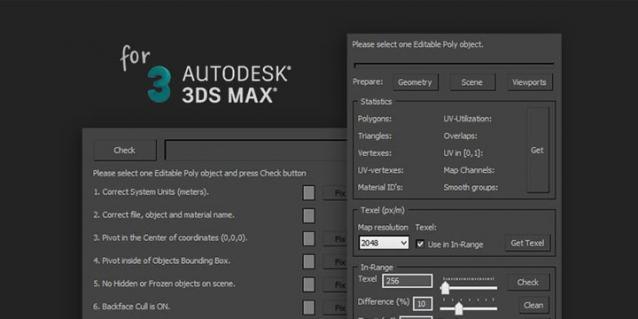
Polygon Tools are scripts pack for checking 3D-model during modeling and UV-mapping process in 3ds max.

Target audience: enthusiasts, beginning 3D-modelers, outsource managers, Art QA, art-managers and etc.

Polygon Tools was created to facilitate common problems search in 3D-models and speed up the work by reducing the amount of routine work.


Short Features List:

PolyUnwrapper

41 votes

PolyUnwrapper is a complete set of professional tools designed for the texture artists, especially for the architectural and game industries.

It contains plenty of features that will greatly help you improve your unwrapping workflow.

PolyUnwrapper


Main Features Features

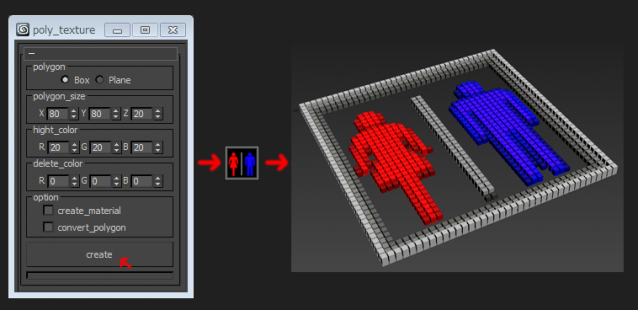
poly_texture

4 votes

Project Manager

597 votes

After a long stretch of development, Project Manager 4 is officially out — the biggest release in the product's history, and now with full 3ds Max 2027 support.
The headline is AI Asset Classification.
Your library gets sorted automatically — by object type, material, and style — no manual tagging.

Project Manager 4 — What's New Since v3

Changelog · 3ds Max 2016–2027

AI-Powered Asset Classification

  • Automatic categorisation of 3D models by object type, material, form, and style — no manual tagging required
  • Runs entirely on your machine — no cloud, no subscription, your assets never leave your computer
  • GPU-accelerated background processing at low priority — won't interfere with rendering or active work
  • Reclassify specific folders or categories on demand — no need to reprocess the entire library
  • Scale across a team: multiple workstations share the same database and classify in parallel

Colour Tools

  • Find assets by colour — pick from a palette and instantly see matching models or textures
  • Perceptual colour similarity search — finds visually related assets, not just exact hex matches
  • Find Similar by Colour in the right-click menu for models and textures

Find Similar

  • Find similar by content — AI matches 3D models by style, shape, and visual look
  • Find similar by colour palette — matches assets to a reference image or mood board by dominant colour proportions

Smarter Search & Filtering

  • Multi-keyword search: "Chair, Glass" finds a file named Chair.max described as "glass"
  • Category filter correctly includes all subcategories — filtering Furniture also returns Furniture → Chairs → Dining
  • Combine category and material filters: find glass-and-metal tables, or wooden ones, in one click
  • Categorised / Uncategorised quick filters — see which assets still need attention

Gallery & 3D File Browsing

  • Three gallery tabs for .max files: Models, Materials, and External Links
  • Drag materials directly from the gallery into your open 3ds Max scene
  • 3D viewport preview for FBX, 3DS, OBJ, and other formats — inspect geometry before importing
  • Edit external links inline — fix or replace missing textures without opening the .max file
  • Zoom & Pan for images — inspect textures at full resolution inside Project Manager

Migration & Compatibility

  • v3 and v4 share the same database format — point v4 at your existing library and go; no rebuild required
  • Run v3 and v4 side by side on the same team; supported from 3ds Max 2016 through 2027

Performance & Other Fixes

  • Significantly improved overall performance — faster navigation, filtering, search, and file/folder operations
  • Live sync in shared database mode — changes by colleagues appear automatically without reloading
More about new features   Project Manager version 4
 

Proxy Textures

1 vote

Proxy Textures 3dsMax plugin - banner

Quickly optimize your textures for viewport performance and fast rendering!


Description

Proxy Textures is a 3dsMax plugin to automatically create low resolution versions of your textures, to speed up your work on heavily loaded scenes.

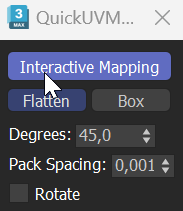
Quick UV Mapper - Interactive Unwrap

1 vote


RayFire Asperity Material

3 votes

This scripted plugin is intended for inner RayFire faces of debris fragments.
While the wellknown Asperity Modifier adds detalization by adding geometry modifying the existing topology, this parametric material works in a different way, as a procedural texture adding strong details with a variety of basic materials, including wood splinters, without adding any extra polygon to the scene.
In many cases, the Asperity modifier causes the system to crash specially when using a huge amount of debris objects in the scene.

rdg::graphPaper

14 votes

A procedural graph paper texture. The essential part of this material
are both Gradient Ramps (horizontal and vertical) that define tiling
and line management. Colors are defined by the top mix or output map
(depending on material version).

Syndicate content