ScriptSpot

MCG

MCG FFS

By vusta · 2016-07-07

Version
1.02
Version requirement
2016
Other software required
2016 + SP3 + EXT1/2, 2017
Date updated
2016-08-04
Votes
14
Downloads

Tags: MCG FFS Floor Flux Sake Generator Tile Pattern

Description

 Installation: Scripting, Install Max Creation Graph...

Max2017 should work straightaway, for max2016 ensure you have SP3 properly applied then Extension2 (maybe 1 would work too...can't be sure)

FFS...Floor Flux Sake !!! I empower you to take the Red pill or Blue pill....go into the graph and choose your destiny on the far right...Fastest compile time could be a second (Blue pills) or slowest (Red pills), with all functionalities, up to 15 secs !!! But once you've compiled the graph, it should be pretty quick.
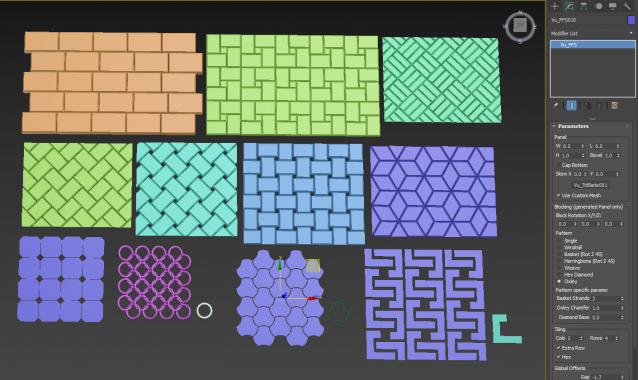
No, you're not getting the TriBlade !!!

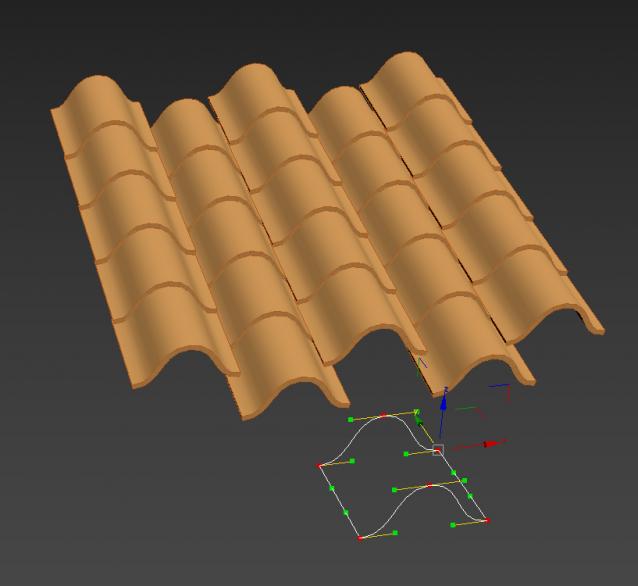
For those who don't follow the FB MCG usergroup, this will use any custom geometry as a tile/panel, plus also any closed spline..ie. an NGon. Of course, you'll have to do your own, thickness, bevel...etc for a custom mesh. The Oxley pattern is flat...too hard for me to do a built-in bevel for that... Here's a very quick example of using a closed spline...go nuts...
ver 1.01: fixed gap bug for Windmill and Basket

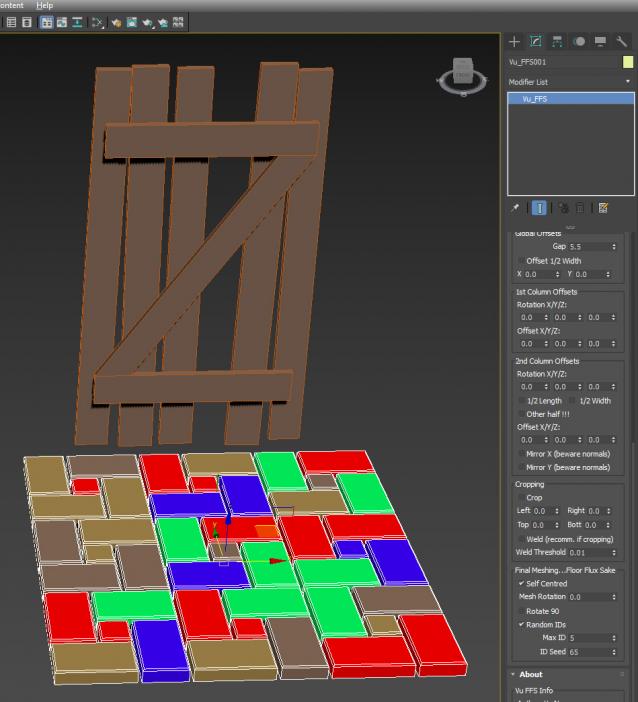
ver 1.02: fixed ID bug for Multi IDs....thanks to Cletus Bucktooth for discovering the bug...(while fixing the Sh**house Door)
Videos
Comments (32)

HOW DO I UNINSTALL THIS SCRIPT?

foxcat · 2021-03-28

After the failed installation of your script, my program started loading 5.5 GB of RAM. The program took a very long time to load.

Max freezes

foxcat · 2021-03-16

Doesn't work in 3ds max 2020
Max freezes

PROBLEM

Ger · 2020-03-27

HOW DO I UNINSTALL THIS SCRIPT?...I DONT FIND IT ....THANKS

Mayconvs · 2020-04-02

by any chance, did u manage to get rid of it?

rachka · 2018-07-11

Doesn't work in 3ds max 2018. Max freezes.

Aki4i · 2018-02-17

not working in 3ds max 2018

I'm not touching 2018 with a 10ft pole

vusta · 2018-02-19

because MCG custom UI in 2018 is bonkers...

-

ttus · 2018-02-16

nice tile explorer, probably that could be make a better floor generator.rich preset

On a cutom area & curved objects

ratatouille · 2017-06-12

Hi, im trying to use it like floorgenerator. i think it can be alternative but its need to work on a custom area or plane also on curved plane. then it will be an all in one tool.

Thanks

Yusuf_ES · 2017-01-01

Vu, your MCG tool is great!

Question

yahya1984 · 2016-11-17

Hello Mr
After installing the script correctly script does not appear to me within Modvair What is the reason
Thank you

not a modifier...

vusta · 2016-11-17

find it in Create Geometry tab>Vu

ver 1.02:

vusta · 2016-08-04

- fixed ID bug...it was random...but they were all the same ONE...now they're random....AND different

Great Script.

jaekabs · 2016-07-18

Hey, awesome script!
I have a question though, and it might be a no-brainer, but can I divide the floor tiles into single objects?

can be done...

vusta · 2016-07-19

but it's quite clunky and also the graph is complicated enough already... I simply use this script:

http://www.scriptspot.com/3ds-max/scripts/elements-to-objects

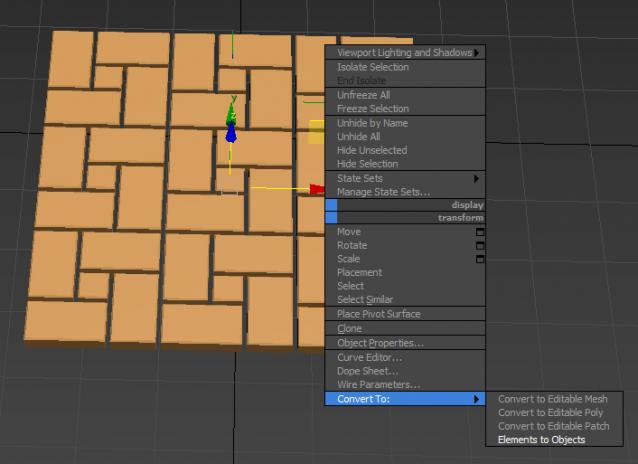
I assign the script (Category Toolbox) to my quad menu under convert to mesh/editable poly blah blah....just add it to the end of this list, so once you've done your tiling, rclick to convert to objects...done..easy...great script

Please note, it will delete the original FFS MCG so if you want to keep your settings...make a copy before converting to objects.

no update...

vusta · 2016-07-12

but there's been a few ppl saying can't install...please see instructions at the top.

ver 1.01:

vusta · 2016-07-10

fixed gap bug for Windmill and Basket.

tsausaky · 2016-07-10

thanks for help!
I've installed Max 2016 SP3 with Ext1\2 and then installation of FFS completed succesfully.

good to hear...

vusta · 2016-07-10

enjoy...

tsausaky · 2016-07-10

Dear scripter!
I'm sorry, I didn't want to make you so angry.
I really appreciate for the work you do.
I'm not a profi in 3D max and i didn't find the answer on my question in google.

I tried to install this script the way you recommend it:
Installation: Scripting, Install Max Creation Graph...
Then I take the file I've downloaded "Vu_FFS.mcg" and press install/
Then appears an error message:

"Install Max Creation Graph Tool

Validation failed for C:\Users\Саша\Autodesk\3ds Max 2016\Max Creation Graph\Tools\Downloads\Vu_FFS.maxtool : error occurred deserializing node: can't find operator MeshElements"

And can't find any Floor Flux Sake in my 3dMax then.
here are screen shots by the link below
https://drive.google.com/open?id=0B9F5UDBl5imOWXVlaWpDT1BEemc

Requirements...

vusta · 2016-07-10

you need to have EXT1 or 2 (I think 2), the MeshElements operator comes from that.

If there's no chance of you getting the Extension, then you can't have the MultiIDs functionality. Go in to the graph, on the far right, you'll see MeshElements, delete it cos you don't have access to it. Then connect node 313 to 7 (the Fast option). Build>Evaluate, it should compile OK.

You will still see MultiIDs in your rollout...but they will have no effect.

If you do have Extension 2, then everything should work.

tsausaky · 2016-07-09

the same thing on my another computer((( what could be wrong?

tsausaky · 2016-07-09

Thanks!
But it writes to me:

Install Max Creation Graph Tool

Validation failed for C:\Users\Саша\Autodesk\3ds Max 2016\Max Creation Graph\Tools\Downloads\Vu_FFS.maxtool : error occurred deserializing node: can't find operator MeshElements

Can't instal

tsausaky · 2016-07-09

Hello!
Help me please with instruction of installation.
Thanks a lot!

type a few words to search....hit enter ?

vusta · 2016-07-09

Installation: Scripting, Install Max Creation Graph...

tsausaky · 2016-07-09

doesn't work..

I despise these comments..

vusta · 2016-07-09

doesn't work....

The scripters..not just ME, put in hours/days of effort...and all you could give back is one line...."doesn't work"...any danger of including more descriptive messages, screenprints ? or does that take up too much of your time compared to the time the scripters have put into the scripts to give you for free ?

I could simply reply....well it bloody works here !!!!!

or try reading the Requirements ?

Does work !!!

Anyone else reading this, next time you give me one liners: "Doesn't work" will get absolutely NO response from me....

briliant stuff.

3dline · 2016-07-07

+1 cool and really useful.
thanks for sharing.

need random!

mishalobanov · 2016-07-07

needed randomly adding objects and random matID!
cool stuff!

random IDs is in there

vusta · 2016-07-07

...probably not seen in video as it was done a bit earlier...

mishalobanov · 2016-07-08

brilliant! many thanks!