ScriptSpot is a diverse online community of artists and developers who come together to find and share scripts that empower their creativity with 3ds Max. Our users come from all parts of the world and work in everything from visual effects to gaming, architecture, students or hobbyists.
This script is intended to ease the workflow with G-Buffer ID's.
Exposing ID's ranging from 0-300 on a switchboard that gives you a visual feedback of which ID's are active in the scene. Also you can select objects by ID just by right clicking on the ID button. Enjoy :)
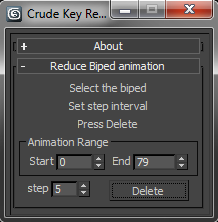
This will dismantle that wall of motion captured key frames into something more manageable. It’s not the most sophisticated of algorithms. But, it gets the job done and leaves you with nicely lined up key-poses. To use simply:
Hi Everybody
Recently I've Done a Simple 3dsmax Script For Making Number Of Feathers Which Every Single Feathers Can Control By Animator Plus Wind Simulation on Feathers and its Kind of Auto rigger For Feathers Stuff.
i am sure there will be some bugs , so please let me Know and Leave a comment if you find one . Thankyou :)
and i can make a howtouse Tutorial for that if i find out you are interested.
As you know the Vray Physical Camera is no longer available
In the recent releases of 3DS Max.
So I created a small script that will allow you to create it as you used to do. After installing the script you can create a toolbar for it and place in your main UI.
it is a modified version based on Rotation Axis Snap ,the view change mode is more like viewcube rather than zoom to selection that will minimize view jumps