ScriptSpot is a diverse online community of artists and developers who come together to find and share scripts that empower their creativity with 3ds Max. Our users come from all parts of the world and work in everything from visual effects to gaming, architecture, students or hobbyists.
Submitted by Marco Brunetta on Fri, 2009-07-31 12:42
34
votes
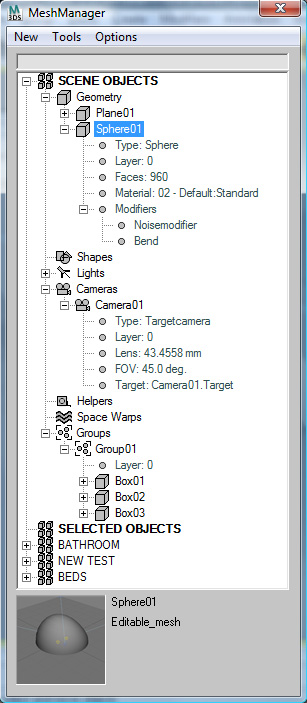
MeshManager combines a powerful scene explorer with a mesh asset manager in order to simplify and speed up the process of creating and modifying a scene in 3D Studio MAX. This is a commercial script that is't still in the beta stage. For a similar script oriented towards materials, check out MatManager .
MeshSmooth Controls is a script for 3DS Max that allows you control over the meshsmooth modifier similar to XSI and other packages. With it you can control the iterations of the meshsmooth modifier on one or multiple objects at once - without leaving your current place in the stack.
UV Tools is a 3d studios max plugin designed for making the process of
UVW mapping easier. Designed mainly for use directly while in Editable
Polygon mode, you can use it directly alongside while you are modeling
or editing your geometry.
This is one of my favorites. A tiny floater for dealing with an object that has a Link Constraint as its transforms. Instead of being stuck to the little motion panel window this will free you from that.
Makes it a lot easier for animating with the Link Constraint. Watch the video to see how easy it works.