Tagged 'render'

RIBit

13 votes

This is a free Renderman exporter for 3DSMax. It enables you to render your scenes using any Renderman complient renderer. For now - it doesn't do very much. It is after all a first alpha version - but it is usable to some extent. It exports you camera - lights and geometry (currenty - all geometry is exported using either polygons or subdivision meshes.) It does not export particles - though I would like to add them at some point. A lot of max attributes are not supported yet.

MailRenderCam

1 vote

Script MailRenderCam v2.2.2 for 3dsmax 2011 (also works in 3dsmax 8, 9, 2008, 2009, 2010). Should work in 2012 and 2013 too.
Opens max-files one-by-one and render every camera (if no cameras in scene then render perspective view).
It is possible to archive the results by WinRAR and send to e-mail by The Bat!,
after working script may turn PC off or to standby mode.
Script shows detailed info about all actions in the MAXScript Listener.

Render Holder Zorb

3 votes

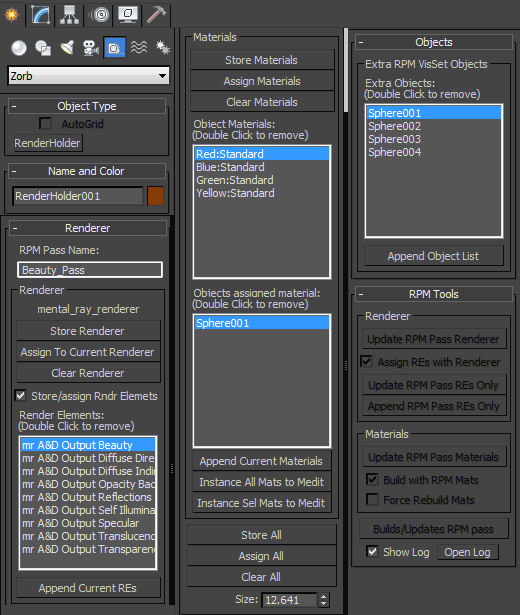
Render Holder Zorb is a max helper that is designed to help you manage, share and build render setting, render elements, material assignments and RPM passes. The main use for this is to us one or mutiple Render Holder with an asset file to store per pass render settings and materials.

You can store and restore the current Renderer, Render Elemants and object materials. Also there is a suit of RPM tools to help build and manage passes based on the settings stored on the Render Holder.  Including an object list to create the visability set with.

to install just extract to the 3dsmax root, or put the .ms file in scripts/startup or the plugins folder

For more help, hover your mouse over a button or checkbox in 3dsMax
jEasyrenderer

1 vote

- Change renderer
- Change size render
- Change mode render
- Run fast render o production render

Renderitis

3 votes

Renderitis is an open system to store render-presets for 3dsMax. Within the script you can view and edit presets before applying them. Presets are stored in xml which is an open file-format as opposed to the native 3dsMax presets. I’ve been developing this script for a long time and have stripped all the bells and whistles. The current version supports scanline for 3dsMax 2010 and scanline and vray for 3dsMax 2012. I'll be working on more features in the future. Also check my blog for more info.

jEasyRender

0 votes

Render Tools

4 votes

Este pequeño script permite generar elementos de render automaticamente con solo presionar un boton. Algunos pases requieren de cierto conocimiento previo para su uso o inclusive de activar alguinas funciones ocultas de la aplicacion dependiendo de que version estemos usando. Point Position: para generar este pase van a necesitar activar una funcion que se encuentra oculta, que mas abajo explicare, este pase es recomndable guardarlo en 32 Bits al igual que el Zdepth.

Quick Mask

72 votes

Quick black and white mask from the selected objects

Quick Mask

Now support XRef Scenes

Change Renderer

34 votes

This is the updated version of my First Script which u can use to change Render Engines. Am planning to add more render engines if i get their RenderClass.names. I would like to add other renderers too but i need their rendererclass names. You can see how to get that at the end of the video. Hope you enjoy this simple script.

UPDATE:

Version 4 Available HERE

OLD VERSIONS:

v3.00b screenshot:

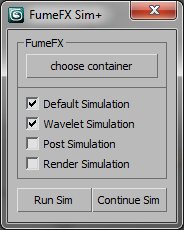
FumeFX Sim + 4/7/2011

23 votes

Updates
- Can automate the simulation for all selected states (default,wavelet,post,render)
- Can continue simulation from any state (default,wavelet,post)
- Prints simulation time in the listener for most accurate simulation times

Syndicate content