Tagged '3dsmax'

Screenshot Manager for 3ds Max

0 votes

Screenshot Manager for 3ds Max

Screenshot Manager is a powerful, lightweight utility designed to streamline the process of capturing viewports in 3ds Max. Whether you need a quick progress shot or a batch of high-resolution frame sequences for a client review, this script automates the tedious steps of manual saving and configuration.

Shader Utilties Pro

18 votes

Shader Utilities Pro (SU Pro) is a tool to create all kinds of shadings within a scene. Part of the tool is a converter, which converts foreign shadings to A&D material. SU offers the possibility of using parameters like AO and Round Corners globally on all shadings. There are 3 selection criteria for doing this: The latest addition is the Sample Curve Technology used to optimize the Sample-Types, AO, Reflection and Refraction globally for an entire scene or all materials. This has major advantages

Shape Trimmer

2 votes

3ds Max Script for Making Trimming and Cutting Shapes Very Sample and Easy Thing to do .

The Script Required Max 2019+ to Work

Showcaser

0 votes

Showcaser

0 votes

Showcaser

0 votes

Simple XML Library for 3dsMax

27 votes

Hi Everyone,

This is a library that simplifies working with XML files and XML Trees. It wraps the DotNet library's to provide a simpler way to work with XML. It has been kicking around the web on CgTalk and Tech Artists forum for quote a while so I thought I would post here.

It is implemented as to structs XMLDocument for working with XML files and XMLNode which represents a node in XML. It is very easy to use.

In the script at the bottom there is a complete example script documenting how to use it etc.

If you have any feedback or suggestions please let me know.

Cheers,

Slate - View Selected

21 votes

This free MaxScript instantly displays the material of the selected object (or objects) in a new view in the Slate Material Editor. Currently, Slate does not have a quick and easy way to do this. Slate View Selected allows you to create multiple views as well. You can close the script dialog box and the script will continue to run until you re-run the script where you can stop it. In the dialog box you can also set a "display max" so that if you select a large number of objects, Slate won't waste time collecting and displaying all the materials used by objects in the selection.

Slice and Dice

2 votes

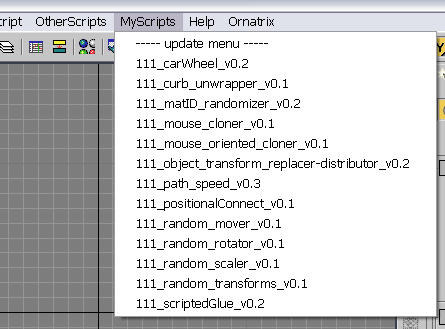
smart menu

42 votes

another script for today :)
this script scans a folder on your PC and creates a menu in 3dsmax's interface with all scripts it finds there (you must specify the path to scan in the script by yourself). all you need to do with your new script is to place it in that folder, and you will be able to access it in 3dsmax interface. no macroscripts support.

Syndicate content