Tagged 'Tools'

Randomizer

9 votes

Randomizes position. rotation and scale for selected objects.

Layer Manager

7 votes

Layer Manager is a utility that creates layer controls for 3D-Studio MAX. When Using Layer Manager - every object that is created within Max is placed on a Layer -
each object defaults to the World Layer. Each layer has it's own properties - and each object assumes the properties of the layer it exists on. Layers can easily be hidden - frozen or given an alternate material.

NukeOps

39 votes

A set of functions wrapped into a minimalist single-click button to help 3ds Max and Nuke artists to bring the 3ds Max 3d scene assets into Nuke's powerful 3d compositing scene.

This tool allows:

1) Copy cameras and any other objects (as points) and their animation into clipboard for an easy Copy+Paste action inside Nuke.

2) Generate .chan files from selected cameras and any other objects (as points) and save them either many at once or one at a time to selected destination.

Check Total Lengths SplineShape

74 votes

This simple and funny script, you can measure the total length, check the number of segments and the Knot of SplineShape. Very useful :)

ctlss

Hunter

13 votes

Search the scene for items (objects - modifiers - etc] with specified properties (instance of - same type as - etc.) - and do something to them (select - delete - disable - etc.)

Arch & Design Overwrite

7 votes

This little script allows the user to Overwrite most of the Arch & Design shader properties.

Little Batch Render

33 votes

Vray - LittleBatchRender
Version 0.84

Description:
with the "LittleBatchRender"-script you can easily render multiple cameras in your scene with one Click
Features:


• correct autonaming for Render Elements
• NetRenderSupport
• Spawning can be disabled when rednering with NetRender
• consistent Naming for local and NetRender - no relinking in Compositing necessary
• Turning of and on individual Xrefs for individual Cameras

SpeedoMeter

7 votes

Shows the Local or Average Speed of an animated object in a multitude of formats. FIXED BUG that prevented the script from running. Added Selection Monitoring.

Motion Graphics Tools

29 votes

A Max Script with a bunch of commonly used tools for working with motion
graphics and standard materials in Max.


Shred

2 votes

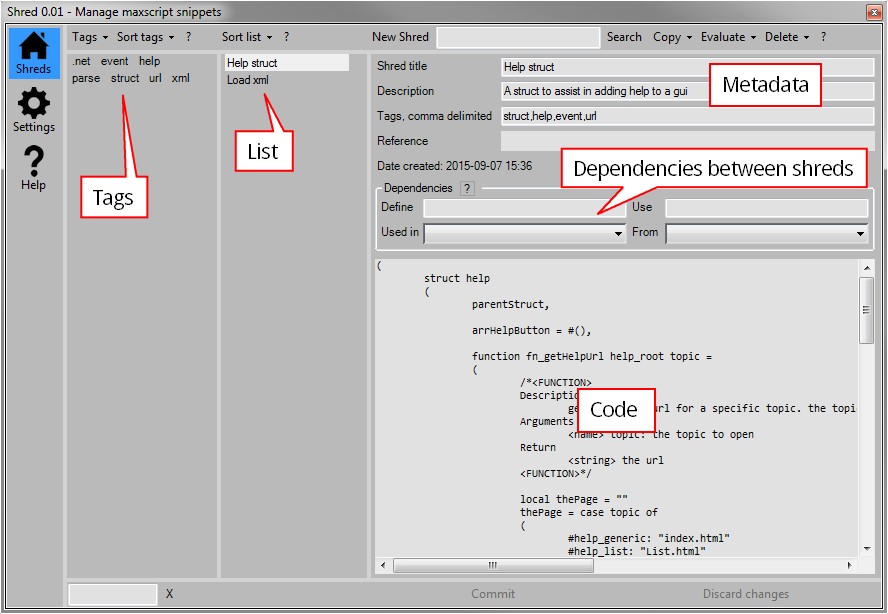
Shred helps you manage your clever snippets of maxscript code in 3dsMax. If you’re anything like me and forget what code you put where this script might be something for you.

Reuse, rinse, repeat

Use shred to store and tag functions or algorithms. This makes it easy to retrieve them later on when you need them. Shred also allows you to gradually improve your snippets. It’s a great way to gradually improve common pieces of code.

Syndicate content