Tagged 'copy'

Materials to Editor

65 votes

Max CP

0 votes

This tool copy and paste objects between many 3ds max windows. You can add a shortcut like ctr+c ctrl+v.

MaxCopyPaste

4 votes

MaxCopyPaste Poster

"Copy-paste on steroids" with some extra features such as clipboard history, drawing and placing objects on top of your geometry, and copying objects between 3Ds Max instances. You can choose whether to duplicate materials when you paste an object. Instancing is supported now. Return the missing functionality that makes your workflow intuitive and fast. Watch the video for more details.

miauu's Extended Clone Tool

2 votes


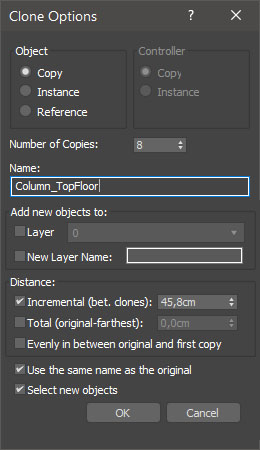
miauu's Extended Clone Tool adds new options to the standard Clone Options dialog.

The main goal - save time using these features:

- move the created objects to a new layer,

- move the created objects into existing layer

miauu's Slate Material Cloner

1 vote


Model: Same Named Copies

0 votes

Title: "Model: Same Named Copies"

Description:
-- This script creates multiple copies with same object name
-- This script works on all geometry types but it may also work on other types like lights, helpers, etc.

How to use this script:
-- First select a single object
-- Set the relative position with respect to this object in "Enter relative positions" options
-- In "No. of copies" option set the number of copies required
-- Then, press "Create copies" button

Here's the screenshot of the script -

Move/Clone to cursor

3 votes

Hi, this is simple script which move or clone selected objects to surface under cursor. You can bind it to any hotkey (I usualy use Alt+S and Alt+C).

1.0.1

- initial releas

1.0.2

- settings can be binded to hotkey

- possibility to turn on random rotation in Z axis

1.0.3

- multiple object selection can be treated as object list, so in clone mode random object will be selected

- cloned objects can be automaticly moved to active layer


Move/Clone to cursor

0 votes

Hi, this is simple script which move or clone selected objects to surface under cursor. You can bind it to any hotkey (I usualy use Alt+S and Alt+C). In this current version additional settings are avaiable only by hidden function call ObjToCursorSettings() which can be called via MaxScript Listener.

NukeOps

39 votes

A set of functions wrapped into a minimalist single-click button to help 3ds Max and Nuke artists to bring the 3ds Max 3d scene assets into Nuke's powerful 3d compositing scene.

This tool allows:

1) Copy cameras and any other objects (as points) and their animation into clipboard for an easy Copy+Paste action inside Nuke.

2) Generate .chan files from selected cameras and any other objects (as points) and save them either many at once or one at a time to selected destination.

One-Step Copy & Relink (Bitmap Path Manager)

0 votes

One-Step Copy & Relink is a workflow utility that consolidates two tedious texture-management tasks into a single operation. It scans your scene for all bitmap-based maps — standard BitmapTexture, VRayBitmap, and VRayHDRI — then copies the source files to a destination folder of your choice while simultaneously relinking the materials to a different target folder using a new file extension.

Syndicate content